This tutorial uses the Background Removal API. See the docs, live demo, and pricing.
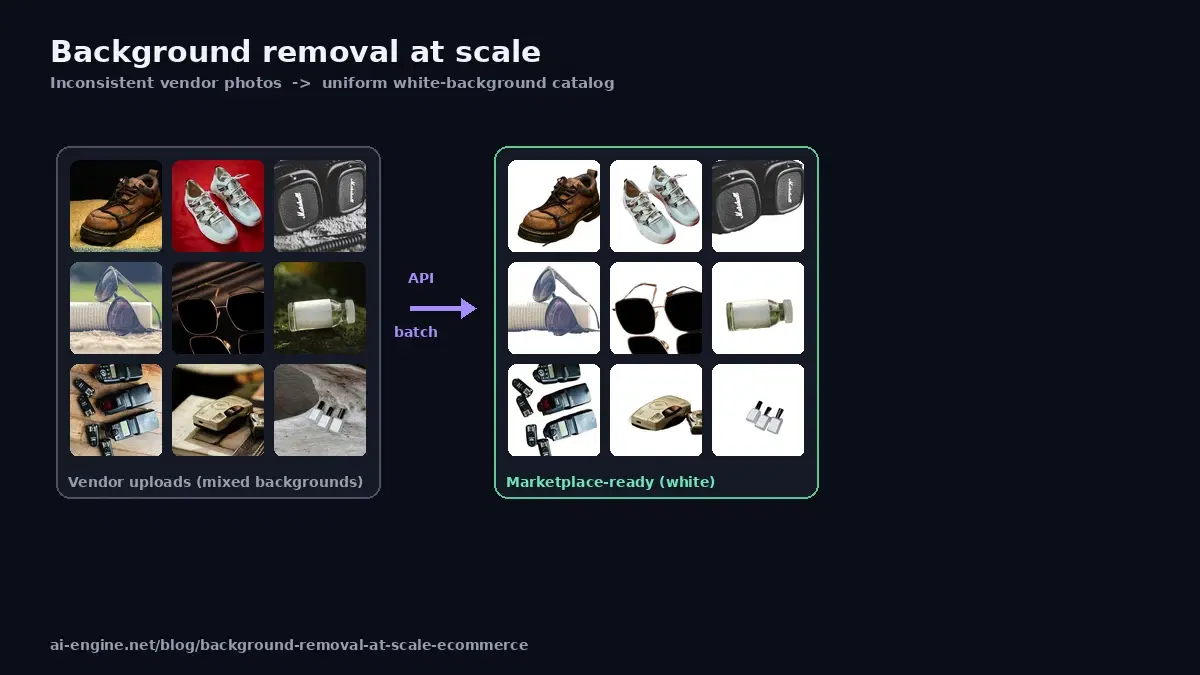
You run an online store, a marketplace integration, or a product-data pipeline, and you have thousands of product photos shot against inconsistent backgrounds: vendor warehouses, kitchen tables, studio sweeps, phone snaps. Marketplaces want clean, uniform images. Doing this by hand in Photoshop does not scale past a few dozen SKUs. A background removal API turns it into a batch job you run once and forget.
This guide covers the scaling patterns that matter when you are processing a whole catalog: single calls, concurrent batches, white-background output for marketplace listings, and a retry-safe pipeline. All code is Python and runs against a live API.
Why Backgrounds Matter for Ecommerce Conversion
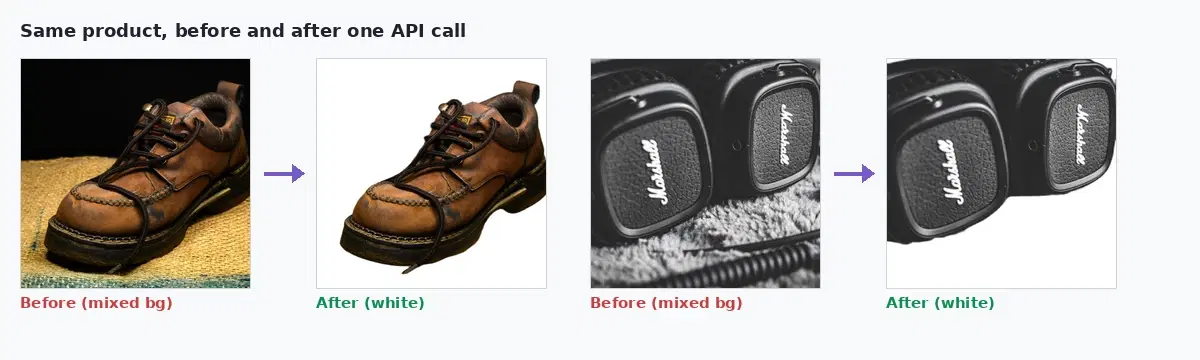
Product image quality is not cosmetic. Amazon requires a pure white background (RGB 255, 255, 255) for main listing images. Shopify themes look broken when one product floats on white and the next sits on a gray kitchen counter. Consistent backgrounds make a catalog look professional, and consistency is part of how shoppers judge whether a store is trustworthy. The problem is that your source images almost never arrive consistent, especially when vendors or drop-shippers supply them.
So the real job is not "remove one background." It is "normalize thousands of inconsistent images into one clean look, repeatably, as new products arrive."
Prerequisites
Everything here runs on Python 3.8 or newer with two packages. The batch script adds tqdm for a progress bar over long runs:
pip install requests tqdmThe Single Call
Start with one image to confirm the shape. The Background Removal API accepts either a file upload or a public image URL and returns a URL to the processed PNG:
import requests

HEADERS = {
    "x-rapidapi-key": "YOUR_API_KEY",
    "x-rapidapi-host": "background-removal-ai.p.rapidapi.com",
}

resp = requests.post(
    "https://background-removal-ai.p.rapidapi.com/remove-background",
    headers={**HEADERS, "Content-Type": "application/json"},
    json={"image_url": "https://example.com/product.jpg"},
)

result = resp.json()
print(result["image_url"])     # URL to the transparent PNG
print(result["width"], result["height"], result["size_bytes"])
The response includes the output image_url plus width, height, and size_bytes, which you can store alongside your product records.
White Background for Marketplace Listings
Transparency is great for your own site, but marketplaces usually want a solid white backdrop. Instead of removing the background and then compositing onto white in a second step, use the /color-background endpoint to do both at once:
def on_white(image_url):
    """Remove background and composite the product onto solid white."""
    resp = requests.post(
        "https://background-removal-ai.p.rapidapi.com/color-background",
        headers={**HEADERS, "Content-Type": "application/json"},
        json={"image_url": image_url, "bg_color": "255,255,255,255"},
    )
    return resp.json()["image_url"]

print(on_white("https://example.com/product.jpg"))
One call, one marketplace-ready image. The bg_color value is R,G,B,A (each 0 to 255), so 255,255,255,255 is opaque white. Swap it if a channel needs a different brand color behind the product.
Batch a Whole Catalog Concurrently
A catalog migration is the moment scaling matters. Processing sequentially, 10,000 images at 1.5 seconds each is over 4 hours of wall-clock time. With a concurrency pool, the same job finishes in a fraction of that. Here is a retry-safe batch processor using a thread pool:
import csv
import requests
from concurrent.futures import ThreadPoolExecutor, as_completed
from tqdm import tqdm

HEADERS = {
    "x-rapidapi-key": "YOUR_API_KEY",
    "x-rapidapi-host": "background-removal-ai.p.rapidapi.com",
}
URL = "https://background-removal-ai.p.rapidapi.com/color-background"

def process(sku, image_url, retries=3):
    """Process one product image, retrying on transient errors."""
    for attempt in range(retries):
        try:
            r = requests.post(
                URL,
                headers={**HEADERS, "Content-Type": "application/json"},
                json={"image_url": image_url, "bg_color": "255,255,255,255"},
                timeout=30,
            )
            r.raise_for_status()
            return sku, r.json()["image_url"], None
        except Exception as e:
            if attempt == retries - 1:
                return sku, None, str(e)


# products.csv has columns: sku, image_url
with open("products.csv") as f:
    products = list(csv.DictReader(f))

results, failures = [], []
with ThreadPoolExecutor(max_workers=10) as pool:
    futures = [pool.submit(process, p["sku"], p["image_url"]) for p in products]
    # tqdm shows a live progress bar as futures complete
    for fut in tqdm(as_completed(futures), total=len(futures), desc="Removing backgrounds"):
        sku, out_url, err = fut.result()
        if err:
            failures.append((sku, err))
        else:
            results.append((sku, out_url))

print(f"Processed {len(results)} images, {len(failures)} failed")

# Write the mapping back so you can update your catalog
with open("processed.csv", "w", newline="") as f:
    w = csv.writer(f)
    w.writerow(["sku", "processed_url"])
    w.writerows(results)
The max_workers=10 setting controls concurrency. Tune it to your plan's rate limit: higher means faster but risks throttling, lower is gentler. The retry loop absorbs transient network blips so a single failure does not abort a 10,000-image run, and failed SKUs land in a list you can re-run.
Keep a Pipeline Running for New Products
A catalog is not static. New SKUs arrive from vendors every week, so the durable pattern is a small worker that watches for new images and processes them on the way in:
def ingest_new_product(sku, raw_image_url):
    """Called when a new product image lands (webhook, queue, cron)."""
    try:
        clean_url = process(sku, raw_image_url)[1]
        if clean_url:
            save_to_catalog(sku, clean_url)   # your DB write
            return True
    except Exception as e:
        enqueue_for_retry(sku, raw_image_url)  # dead-letter queue
    return False
Wire ingest_new_product to a webhook from your PIM, a message queue, or a nightly cron over a staging bucket. The point is that background removal becomes an automatic step in the product lifecycle, not a manual chore someone forgets.
Quality Control at Scale
Most product photos cut out cleanly, but a catalog always has a tail of hard cases: reflective bottles, transparent or glossy packaging, white products on near-white surfaces, and busy lifestyle shots where the subject is ambiguous. Publishing a bad cutout to a marketplace looks worse than the original photo, so a high-volume pipeline needs a QA step, not just a process step.
You cannot eyeball 10,000 images, so flag the suspicious ones automatically and send only those to a human. Two cheap signals catch most failures: an output whose dimensions or file size are far from the batch norm, and products in categories you already know are tricky.
import statistics

def flag_for_review(results_with_meta):
    """Return SKUs whose output looks off and deserves a human check.

    results_with_meta: list of (sku, width, height, size_bytes, category)
    """
    sizes = [m[3] for m in results_with_meta]
    median = statistics.median(sizes)
    tricky = {"glassware", "jewelry", "transparent-packaging"}

    review = []
    for sku, w, h, size_bytes, category in results_with_meta:
        # An unusually tiny output often means the subject was over-cropped
        too_small = size_bytes < median * 0.3
        if too_small or category in tricky:
            review.append(sku)
    return review
Route the flagged SKUs to a review queue and auto-publish the rest. In practice that keeps human effort on the few percent of images that actually need it, while the bulk of the catalog flows through untouched. Re-run the failures from the batch script's failure list the same way.
Beyond White: Blur and Gradient
Marketplaces want white, but your own storefront, ads, and social posts can use richer treatments. The same API offers /blur-background (keep the subject sharp, blur the original scene) and /gradient-background for lifestyle and campaign visuals. For a single-image walkthrough of all four modes, see how to remove image backgrounds with an API, and for the transparent-PNG workflow specifically, the transparent background PNG guide.
When a Cloud API Beats Self-Hosting at Scale
Open-source models like rembg are free and fine for low volume. At catalog scale the calculus changes:
- Consistent quality on messy input. Vendor photos vary wildly. A managed API holds quality across hair, fur, transparent packaging, and busy backgrounds where lighter models struggle.
- No GPU fleet to operate. High throughput from a self-hosted model means GPUs, autoscaling, and on-call. The API absorbs that.
- One pipeline to monitor. Retries, rate limits, and a single output format, instead of a model deployment you maintain.
For a measured comparison of the open-source route versus a managed API, read rembg vs Cloud API, and for a head-to-head of the commercial providers, the best background removal APIs comparison.
Getting Started
Grab a key from the Background Removal API page, drop it into the batch script above, point it at a CSV of your SKUs and image URLs, and run it against a sample of 20 products first to check quality. Once you are happy, scale the worker count and process the full catalog. A free tier is available to test on real product photos before committing.
Frequently Asked Questions
- How many product images can a background removal API process per day?
- There is no fixed daily ceiling on the technology itself; throughput is bounded by your plan's request volume and how many calls you run in parallel. Each call returns in roughly 1 to 2 seconds including network time. Running 10 concurrent workers, you can process on the order of tens of thousands of images per day. For a full catalog migration, batch overnight with a concurrency pool and a retry queue, which is the pattern shown in this guide.
- Can I get a white background instead of a transparent one for marketplace listings?
- Yes. Marketplaces like Amazon and many Shopify themes expect a solid white background rather than transparency. The API's color-background endpoint removes the original background and composites the subject onto a solid color in one call, so you do not need a separate compositing step. Pass the bg_color as R,G,B,A values (255,255,255,255 for opaque white, which is what most marketplaces require).
- Should I remove backgrounds client-side or with a server API at scale?
- For a handful of images, a browser library can work. At catalog scale (thousands of SKUs, recurring uploads from vendors), a server-side API is the practical choice: consistent quality across messy vendor photos, no per-device performance variance, and a single pipeline you can monitor and retry. The trade-off is a per-call cost and a network dependency, which is usually worth it when image quality directly affects conversion.