This tutorial uses the Background Removal API. See the docs, live demo, and pricing.
You need to remove backgrounds from images in your application. The open-source route is tempting — rembg has 17,000+ GitHub stars and works with a single pip install. But once you test it on real-world photos with complex backgrounds, hair, or transparent objects, the limitations become clear. This guide compares the two main open-source tools (rembg and transparent-background) against a cloud background removal API, with real test results, benchmarks, and code examples.
Quick Comparison
| Criteria | rembg | transparent-background | AI Engine Cloud API |
|---|---|---|---|
| Setup | pip install rembg[cpu] | pip install transparent-background | Get API key (2 min) |
| Dependencies | ONNX Runtime, NumPy, Pillow | PyTorch, Kornia, Albumentations | Any HTTP client |
| Speed (CPU) | ~10s per image | ~16s per image + 28s model load | ~3.5s (incl. network) |
| Hair detail | White halos, lost strands | Better edges but residual background | Clean edges, strands preserved |
| Custom background | Manual compositing | Manual compositing | Built-in (single API call) |
| Offline support | Yes | Yes | No |
| Cost | Free + your compute | Free + your compute | Free tier (100/mo), then $12.99/mo |
The Open-Source Landscape
rembg
rembg is the most popular open-source background removal tool with 17,000+ GitHub stars. It uses U2-Net and IS-Net models under the hood, runs via ONNX Runtime, and supports both CPU and GPU inference. Installation is simple:
pip install rembg[cpu]

# Or with GPU support
pip install rembg[gpu]from rembg import remove
from PIL import Image
img = Image.open("photo.jpg")
result = remove(img)
result.save("no_bg.png")Clean and simple. But the first run downloads a ~170 MB model, ONNX Runtime adds ~200 MB of dependencies, and inference on CPU takes about 10 seconds per image.
transparent-background
transparent-background uses InSPyReNet, a more recent architecture. It requires PyTorch (1.5+ GB), Kornia, and Albumentations as dependencies — a significantly heavier stack than rembg.
from transparent_background import Remover
from PIL import Image

remover = Remover()  # 28s model load on CPU
img = Image.open("photo.jpg").convert("RGB")
result = remover.process(img, type="rgba")
result.save("no_bg.png")
Model loading alone takes ~28 seconds on CPU. Inference adds another ~16 seconds per image. Total time for a single image: over 44 seconds. In a server context, you can amortize the model load, but inference remains slow without a GPU.
Real Test Results
We tested all three tools on the same portrait photo — a woman with detailed hair, a white flower with green leaves, and a complex foliage background. This is exactly the kind of image that exposes segmentation weaknesses.
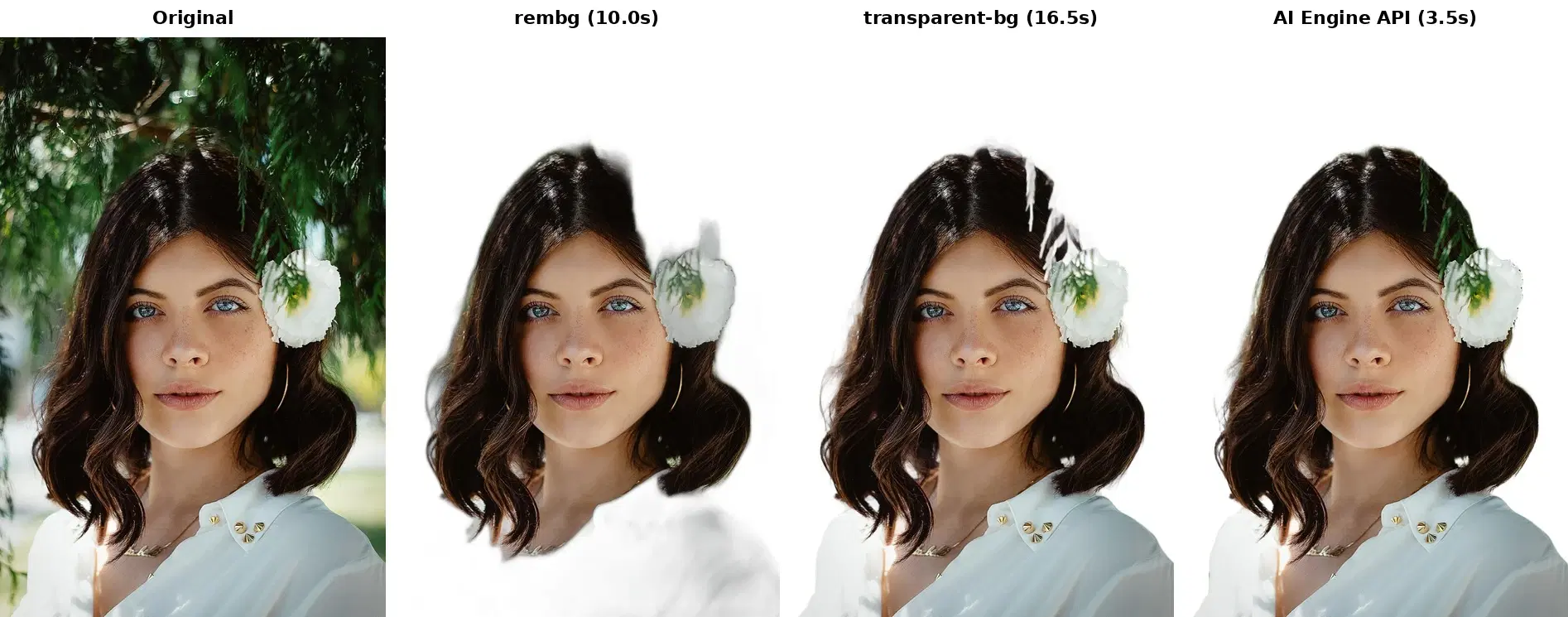
rembg
- Visible white halos around hair strands where the background bleeds through
- Top of the head is partially cut off — the model loses fine hair detail against the foliage
- The flower and leaves are roughly segmented with noticeable artifacts
- Processing time: 10.0 seconds on CPU
transparent-background
- Better edge detection than rembg on the hair outline
- But residual background is still visible around the hair and flower
- The mask is not clean enough for production use on complex backgrounds
- Processing time: 16.5 seconds on CPU (+ 28s model load)
AI Engine API
- Cleanest result — hair strands are well preserved without halos
- The flower with its green leaves is accurately segmented
- Smooth, production-ready edges throughout
- Processing time: 3.5 seconds (including network round-trip)
Performance Benchmark
| Tool | Model Load | Inference (CPU) | Total (first image) | Dependencies Size |
|---|---|---|---|---|
| rembg | Included in inference | ~10s | ~10s | ~400 MB |
| transparent-background | ~28s | ~16.5s | ~44.5s | ~1.8 GB (PyTorch) |
| AI Engine API | N/A | ~3.5s (cloud GPU) | ~3.5s | 0 (HTTP client only) |
When Open-Source Is Enough
To be fair, rembg and transparent-background have their place:
- Offline or air-gapped environments — No internet means no API calls. rembg runs entirely locally.
- Simple backgrounds — Studio photos with solid or gradient backgrounds are handled well by rembg. The quality gap only shows on complex scenes.
- Custom pipeline control — If you need to modify the segmentation mask, apply custom post-processing, or integrate into an ML pipeline, having the model locally gives you full flexibility.
- Very high volume with existing GPU — If you already have GPU infrastructure and process millions of images, the marginal cost per image is near zero.
When a Cloud API Wins
- Production quality requirements — E-commerce product photos, profile pictures, marketing assets — anywhere users see the output, quality matters.
- No GPU available — On CPU, open-source tools are 3–12x slower than a cloud API that runs on optimized GPU infrastructure.
- Serverless or lightweight deployments — Adding PyTorch (1.8 GB) to a Lambda function or container is impractical. An HTTP call is a few KB.
- Custom background replacement — The API supports replacing the background with a custom image in a single call. With open-source tools, you need to composite the transparent output yourself.
- Zero maintenance — No model updates, no dependency conflicts, no ONNX/PyTorch version management.
Code: Test Both on Your Images
The best way to decide is to compare on your actual data. Here is a script that runs both rembg and the API on the same image:
Python
import requests, time
from rembg import remove
from PIL import Image
from io import BytesIO

image_path = "test_photo.jpg"
img = Image.open(image_path)

# --- rembg ---
t0 = time.time()
rembg_result = remove(img)
t_rembg = time.time() - t0
rembg_result.save("rembg_output.png")
print(f"rembg: {t_rembg:.1f}s")

# --- Cloud API ---
t0 = time.time()
with open(image_path, "rb") as f:
    resp = requests.post(
        "https://background-removal-ai.p.rapidapi.com/remove-background",
        headers={
            "x-rapidapi-host": "background-removal-ai.p.rapidapi.com",
            "x-rapidapi-key": "YOUR_API_KEY",
        },
        files={"image": f},
    )
data = resp.json()
t_api = time.time() - t0

# Download the result
png = requests.get(data["image_url"]).content
with open("api_output.png", "wb") as f:
    f.write(png)
print(f"API: {t_api:.1f}s")
print(f"Result: {data['image_url']}")
cURL
# Cloud API — single HTTP call
curl -X POST \
  'https://background-removal-ai.p.rapidapi.com/remove-background' \
  -H 'x-rapidapi-host: background-removal-ai.p.rapidapi.com' \
  -H 'x-rapidapi-key: YOUR_API_KEY' \
  -F 'image=@photo.jpg'
JavaScript
const form = new FormData();
form.append("image", fileInput.files[0]);

const response = await fetch(
  "https://background-removal-ai.p.rapidapi.com/remove-background",
  {
    method: "POST",
    headers: {
      "x-rapidapi-host": "background-removal-ai.p.rapidapi.com",
      "x-rapidapi-key": "YOUR_API_KEY",
    },
    body: form,
  }
);

const data = await response.json();
console.log(data.image_url); // CDN URL to transparent PNG
Pricing: What Does the API Cost?
| Plan | Price | Requests/month | Cost per image |
|---|---|---|---|
| Basic | Free | 100 | $0 |
| Pro | $12.99/mo | 10,000 | ~$0.0013 |
| Ultra | $49.99/mo | 50,000 | ~$0.001 |
| Mega | $159.99/mo | 200,000 | ~$0.0008 |
rembg is "free" but your compute is not. Running a GPU instance for background removal costs $50–365/month depending on your cloud provider. On CPU, the 10-second inference time limits throughput to ~360 images per hour — and with much lower quality on complex images.
Both approaches are valid tools for background removal. rembg is a solid choice for offline use, simple backgrounds, or custom ML pipelines. But for production applications where quality, speed, and simplicity matter, a cloud API is the pragmatic choice. Test both on your images and let the results speak for themselves.
The Background Removal API offers 100 free requests per month to get started. New to the API? The how to remove image backgrounds with an API tutorial walks through the call in Python, cURL, and JavaScript. For a comparison of the top 5 commercial APIs, see our best background removal APIs guide.
Frequently Asked Questions
- Is rembg good enough for production use?
- rembg works well on simple portraits with clean backgrounds, but struggles with fine hair details, transparent objects, and complex scenes. For production apps where quality consistency matters, a cloud API delivers more reliable results.
- How much faster is a cloud API than rembg?
- On CPU, rembg takes about 10 seconds per image. A cloud API processes the same image in about 3.5 seconds including network round-trip, because it runs on optimized GPU infrastructure server-side.
- When should I use rembg instead of a cloud API?
- Use rembg when you work offline or in air-gapped environments, need to process millions of simple images with existing GPU hardware, or want full control over the model pipeline for custom fine-tuning.