This tutorial uses the NSFW Detect API. See the docs, live demo, and pricing.
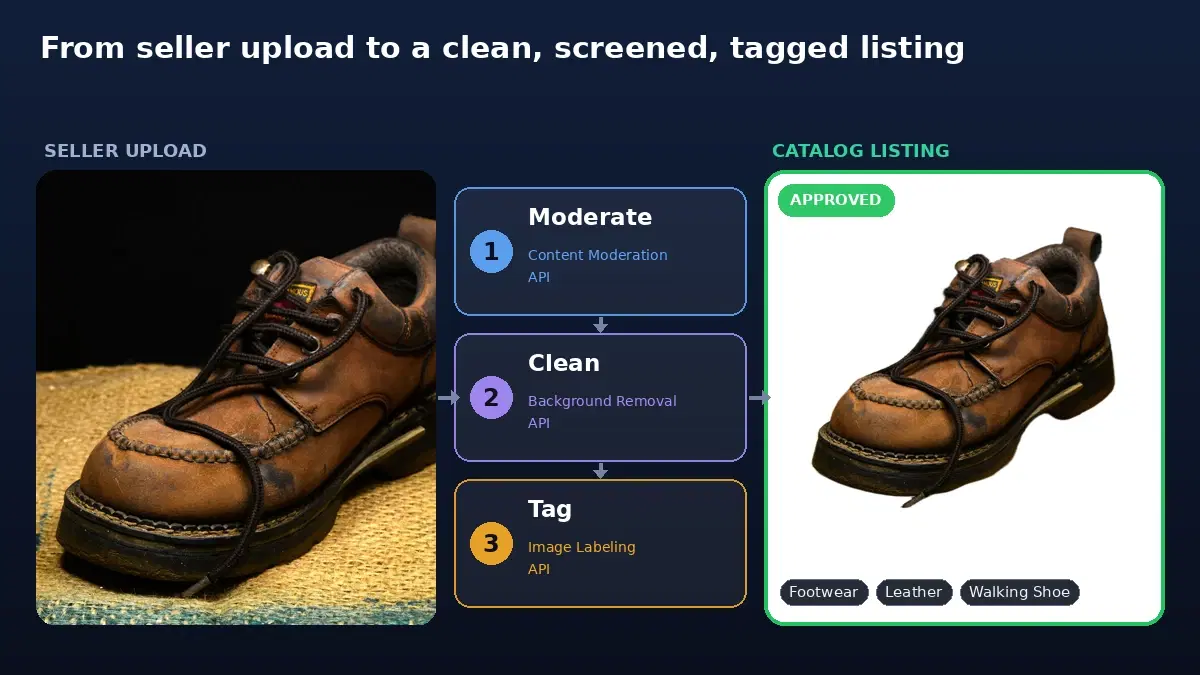
On a marketplace, your catalog is built from images other people upload, whether from third-party sellers on a structured e-commerce site or from individuals posting ads on a classifieds platform (Craigslist, Facebook Marketplace, Leboncoin). At any real volume, you cannot review them by hand, so product listing moderation has to be automated.
And you cannot afford not to. Prohibited or offensive images do show up: weapons, drugs, explicit material, a hate symbol printed on a t-shirt. One of them reaching the storefront is a brand problem, a payment-processor problem, and sometimes a legal one. The risk runs higher on classifieds, where uploads come from individuals rather than vetted sellers. A content moderation API screens every upload automatically and sends only the ambiguous ones to a human.
This guide builds that for an e-commerce catalog: scoring a listing image, a marketplace policy that passes legitimate product categories while blocking prohibited ones, a gate at listing creation, and a bulk backfill over an existing catalog. All code is Python and runs against a live API.

Why Generic Nudity Filters Hurt a Marketplace
The instinct is to bolt on a nudity detector and block anything it flags. On a marketplace that backfires. An apparel seller listing a bikini, a lingerie brand, a swimwear store: a blanket nudity filter rejects all of them and you lose real sellers and real sales. The same photo that is a violation on a social feed is a legitimate product on a fashion marketplace.
So marketplace moderation is not "block flagged images." It is "apply a policy that knows your catalog": reject genuinely prohibited content, let category-relevant product imagery through, and send the in-between to a fast human review. That requires a moderation API that returns which category fired and how confidently, not a single score.
Step 1: Score a Listing Image
Send the seller's image to the content moderation API and get back the labels it is confident about. A clean product photo returns an empty list:
import requests

HEADERS = {
    "x-rapidapi-key": "YOUR_API_KEY",
    "x-rapidapi-host": "nsfw-detect3.p.rapidapi.com",
}

def moderate(image_path):
    """Return the moderation labels for an image (empty list means clean)."""
    with open(image_path, "rb") as f:
        r = requests.post(
            "https://nsfw-detect3.p.rapidapi.com/nsfw-detect",
            headers=HEADERS,
            files={"image": f},
        )
    return r.json()["body"]["ModerationLabels"]
Each label has a Name, a Confidence (0 to 100), and a ParentName. Labels are hierarchical, so the top-level categories are the ones with an empty ParentName. Print them on a sample of your real listings to see the exact names you need to write a policy against:
labels = moderate("seller_photo.jpg")
categories = [l["Name"] for l in labels if l["ParentName"] == ""]
print(categories)
# ['Swimwear or Underwear']   on a bikini listing (legit for apparel)
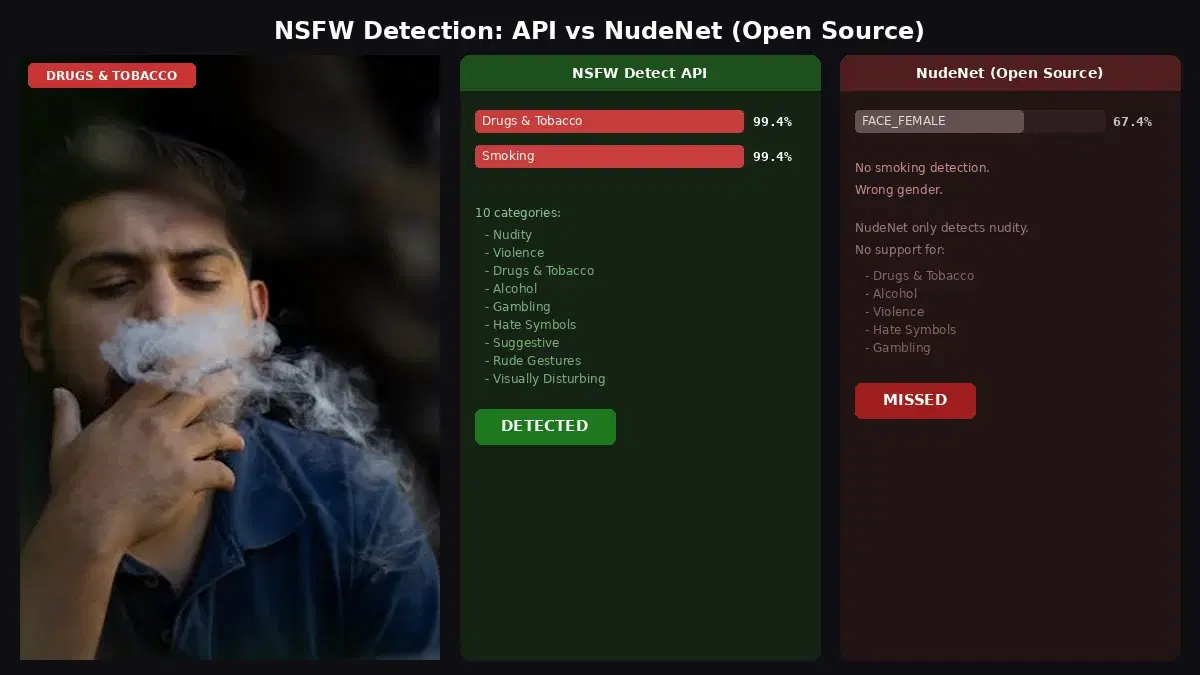
# ['Drugs & Tobacco']         on a prohibited listing
# []                          on a clean product photo
Step 2: A Marketplace Policy That Knows Your Catalog
Here is the part a generic filter gets wrong. Map each category to a listing action, and make the category-relevant ones review or approve instead of a hard reject. An apparel marketplace reviews swimwear rather than blocking it; a wine marketplace allows alcohol:
# Tune per marketplace. A category absent from the table is approved.
# Use the exact Names the API returns for your catalog (see Step 1).
LISTING_POLICY = {
    "Explicit":                                          {"action": "reject", "threshold": 50},
    "Non-Explicit Nudity of Intimate parts and Kissing": {"action": "reject", "threshold": 60},
    "Violence":                                          {"action": "reject", "threshold": 60},
    "Hate Symbols":                                      {"action": "reject", "threshold": 40},
    "Drugs & Tobacco":                                   {"action": "reject", "threshold": 60},
    # Category-relevant for an apparel marketplace -> review, do not auto-reject
    "Swimwear or Underwear":                             {"action": "review", "threshold": 60},
    "Gambling":                                          {"action": "review", "threshold": 70},
    # Alcohol absent -> approved (wine and spirits sellers)
}

def screen_listing(labels):
    """Map moderation labels to a listing verdict: approve, review, or reject."""
    verdict, reasons = "approve", []
    for label in labels:
        if label["ParentName"]:          # top-level categories only
            continue
        rule = LISTING_POLICY.get(label["Name"])
        if not rule or label["Confidence"] < rule["threshold"]:
            continue
        reasons.append(f"{label['Name']} ({label['Confidence']:.0f}%)")
        if rule["action"] == "reject":
            verdict = "reject"
        elif verdict != "reject":
            verdict = "review"
    return verdict, reasons


print(screen_listing(moderate("leather_shoe.jpg")))   # ('approve', [])
print(screen_listing(moderate("bikini.jpg")))         # ('review', ['Swimwear or Underwear (97%)'])
print(screen_listing(moderate("prohibited.jpg")))     # ('reject', ['Drugs & Tobacco (100%)'])
The bikini listing lands in review, not the bin, so a human confirms it is a legitimate apparel product in seconds rather than the system silently killing the sale. The prohibited product is rejected outright. Clean products go straight through. One table, edited per marketplace, and the same code serves a fashion store, a wine merchant, or a general bazaar.
Step 3: Gate at Listing Creation
A listing usually has several images, and the listing should be gated by its worst one. Screen them all when the seller submits, and let the strictest verdict decide:
RANK = {"approve": 0, "review": 1, "reject": 2}

def on_new_listing(listing_id, image_paths):
    """Screen every image on a new listing; the strictest verdict wins."""
    verdict, reasons = "approve", []
    for path in image_paths:
        v, r = screen_listing(moderate(path))
        reasons += r
        if RANK[v] > RANK[verdict]:
            verdict = v

    if verdict == "approve":
        publish_listing(listing_id)                 # goes live
    elif verdict == "review":
        queue_for_review(listing_id, reasons)       # human checks
    else:
        reject_listing(listing_id, reasons)         # seller is notified why
    return verdict
Wire on_new_listing to your listing-creation flow or the webhook your seller portal already fires. Returning a clear reason on a reject matters: the seller sees why and can fix the photo instead of opening a support ticket.
Step 4: Backfill the Existing Catalog
Listings created before you added the check still need screening. Run a one-time batch over the catalog concurrently, and act on each result as it lands:
from concurrent.futures import ThreadPoolExecutor, as_completed

def screen_one(listing):
    """listing: dict with id and primary image path."""
    try:
        verdict, reasons = screen_listing(moderate(listing["image"]))
    except Exception as e:
        verdict, reasons = "review", [f"moderation error: {e}"]
    return {"id": listing["id"], "verdict": verdict, "reasons": reasons}

def backfill(catalog, max_workers=10):
    flagged = []
    with ThreadPoolExecutor(max_workers=max_workers) as pool:
        futures = [pool.submit(screen_one, l) for l in catalog]
        for fut in as_completed(futures):
            res = fut.result()
            if res["verdict"] != "approve":
                flagged.append(res)         # pull or review these listings
    return flagged

flagged = backfill(all_listings)
print(f"{len(flagged)} listings need attention")
The fail-safe to review on error keeps a failed call from quietly approving a listing. Pull or hold the flagged listings and let your team work the much shorter list.
Honest Limits
Image moderation is the visual-safety layer of catalog quality, not the whole compliance stack:
- It does not catch counterfeits or IP misuse. A fake handbag looks like a real one. Brand rights and authenticity need seller verification and brand registries, not a pixel score.
- Restricted does not equal unsafe. Whether a legal product can be sold in a given country is a category-and-jurisdiction rule, separate from whether the image is offensive.
- Thresholds are yours to tune. Too strict and you bury your reviewers in legitimate apparel; too loose and prohibited items slip through. Tune against your own catalog.
For moderating non-commerce user uploads (profile photos, chat images, review photos) rather than seller listings, see the content moderation API guide for user uploads, and for a provider comparison, the best content moderation APIs comparison.
Getting Started
Grab a key from the content moderation API page, run moderate over a sample of your real listings to see which categories fire, and set LISTING_POLICY so your legitimate product categories review or pass while prohibited ones reject. Wire it into listing creation, backfill the catalog once, and prohibited products stop reaching your storefront. A free tier is available to test on your own catalog first.
Frequently Asked Questions
- How is moderating marketplace listings different from moderating social uploads?
- The categories overlap but the policy is different. On a social platform almost any flagged category is a problem. On an apparel marketplace, swimwear and underwear are legitimate products, so blocking them outright would reject real sellers and lose sales. The same goes for alcohol on a wine marketplace. Marketplace moderation needs a per-category policy that separates genuinely prohibited content (weapons, drugs, explicit material, hate symbols) from category-relevant product imagery that should pass or go to a quick human review.
- When should a marketplace screen a seller's images?
- At two points. First, at listing creation: screen every image the moment a seller submits a listing, and gate the listing on the result so prohibited products never go live. Second, as a one-time backfill over the existing catalog, since older listings predate the check. Both use the same API call; the difference is one is event-driven and the other is a batch job.
- Does image moderation catch counterfeit or restricted products?
- Not on its own. An image moderation API scores visual content (nudity, violence, drugs, weapons, hate symbols, and so on). It does not verify authenticity, brand rights, or whether a specific product is restricted in a given country. Those need separate signals: seller verification, brand registries, and category rules. Use image moderation as the visual-safety layer of catalog quality, not the whole compliance stack.