Face Swap API — Swap & Enhance Faces with AI
AI face swap API — Swap faces in images with deepfake precision. Face detection, face enhancement, and face restoration. Multiple face swapper for group photos — target specific faces by index. Enhance face quality, restore and upscale old photos. Single synchronous request, result in seconds.
See It in Action
Real examples generated by the API. See the quality for yourself.

Face Swap and Face Targeting — swap a single face or target a specific face by index in group photos
Features
Multi-Face Support
Swap or enhance up to 5 faces in group photos with the many_faces option in a single request.
Face Targeting
Detect faces first, then swap or enhance a specific face by index — perfect for group photos.
Face Enhancement
Standalone AI face restoration and 2x upscaling. Fix artifacts and improve face quality without swapping.
Face Detection
Detect all faces in an image and get their bounding box positions for precise targeting.
Flexible Input
Upload files via multipart, pass URLs via JSON, or use form-encoded data. Three content types supported.
Fast Processing
Single synchronous request — result in seconds. JSON response with CDN image URL, no polling required.
API Reference
5 endpoints, simple integration. Here's everything you need.
Supported Content Types
https://deepfake-face-swap-ai.p.rapidapi.com/swap-faceSwap the face from a source image onto a target image. Returns JSON with a CDN URL to the result image.
source_image / source_urlfile / stringrequiredSource face image. Upload file via multipart or pass a public URL via JSON/form-encoded.
target_image / target_urlfile / stringrequiredTarget image where the face will be placed. Upload file via multipart or pass a public URL via JSON/form-encoded.
many_facesbooleanSwap up to 5 faces in one request. Default: false
{
  "image_url": "https://images.ai-engine.net/face-swap-ai/abc12345.jpg",
  "width": 1024,
  "height": 768,
  "size_bytes": 245000
}https://deepfake-face-swap-ai.p.rapidapi.com/target-faceSwap a specific face in a group photo by index. Use /detect-faces first to get face indices. Only the targeted face is swapped. Returns JSON with a CDN URL to the result image.
source_image / source_urlfile / stringrequiredSource face image. Upload file via multipart or pass a public URL via JSON/form-encoded.
target_image / target_urlfile / stringrequiredTarget group photo. Upload file via multipart or pass a public URL via JSON/form-encoded.
face_indexintegerIndex of the face to swap (from /detect-faces). Default: 0
{
  "image_url": "https://images.ai-engine.net/face-swap-ai/abc12345.jpg",
  "width": 1024,
  "height": 768,
  "size_bytes": 245000
}https://deepfake-face-swap-ai.p.rapidapi.com/detect-facesDetect all faces in an image and return their positions. Use the returned face indices with /target-face or /target-enhance to target specific faces.
image / image_urlfile / stringrequiredImage to analyze. Upload file via multipart or pass a public URL via JSON/form-encoded.
{
  "total_faces": 3,
  "faces": [
    {"index": 0, "bbox": {"x": 120, "y": 50, "width": 160, "height": 160}},
    {"index": 1, "bbox": {"x": 400, "y": 80, "width": 120, "height": 120}},
    {"index": 2, "bbox": {"x": 650, "y": 90, "width": 100, "height": 100}}
  ]
}https://deepfake-face-swap-ai.p.rapidapi.com/enhance-faceEnhance and restore faces in an image using AI upscaling. No face swap — just improve face quality, fix artifacts, and upscale details. Returns JSON with a CDN URL to the result image.
image / image_urlfile / stringrequiredImage containing faces to enhance. Upload file via multipart or pass a public URL via JSON/form-encoded.
many_facesbooleanEnhance up to 5 faces in one request. Default: false
{
  "image_url": "https://images.ai-engine.net/face-swap-ai/abc12345.jpg",
  "width": 2048,
  "height": 1536,
  "size_bytes": 520000
}https://deepfake-face-swap-ai.p.rapidapi.com/target-enhanceEnhance a specific face in a group photo by index. Use /detect-faces first to get face indices. Only the targeted face is enhanced. Returns JSON with a CDN URL to the result image.
image / image_urlfile / stringrequiredImage containing faces to enhance. Upload file via multipart or pass a public URL via JSON/form-encoded.
face_indexintegerIndex of the face to enhance (from /detect-faces). Default: 0
{
  "image_url": "https://images.ai-engine.net/face-swap-ai/abc12345.jpg",
  "width": 2048,
  "height": 1536,
  "size_bytes": 520000
}
Response
All endpoints return JSON. Swap and enhance endpoints return a JSON object with image_url (CDN URL), width, height, and size_bytes. The detect-faces endpoint returns JSON with face positions and indices.
Limits
- Maximum image size: 10 MB per image
- Supported input formats: JPEG, PNG, WebP
- Output format: JPEG (quality 95), delivered via CDN URL in JSON response
- Swap output dimensions: same as target image (original resolution preserved)
- Enhance output dimensions: 2x upscaled from input
- URL download timeout: 10 seconds
- Face enhancement applied automatically to swap results
Quick Start
Copy-paste code to get started in seconds. Replace YOUR_API_KEY with your RapidAPI key.
# Swap face (file upload)
curl -X POST "https://deepfake-face-swap-ai.p.rapidapi.com/swap-face" \
  -H "x-rapidapi-key: YOUR_API_KEY" \
  -H "x-rapidapi-host: deepfake-face-swap-ai.p.rapidapi.com" \
  -F "source_image=@source.jpg" \
  -F "target_image=@target.jpg"

# Swap face (JSON with URLs)
curl -X POST "https://deepfake-face-swap-ai.p.rapidapi.com/swap-face" \
  -H "x-rapidapi-key: YOUR_API_KEY" \
  -H "x-rapidapi-host: deepfake-face-swap-ai.p.rapidapi.com" \
  -H "Content-Type: application/json" \
  -d '{"source_url": "https://example.com/source.jpg", "target_url": "https://example.com/target.jpg"}'

# Detect faces
curl -X POST "https://deepfake-face-swap-ai.p.rapidapi.com/detect-faces" \
  -H "x-rapidapi-key: YOUR_API_KEY" \
  -H "x-rapidapi-host: deepfake-face-swap-ai.p.rapidapi.com" \
  -F "image=@group_photo.jpg"

# Enhance face
curl -X POST "https://deepfake-face-swap-ai.p.rapidapi.com/enhance-face" \
  -H "x-rapidapi-key: YOUR_API_KEY" \
  -H "x-rapidapi-host: deepfake-face-swap-ai.p.rapidapi.com" \
  -F "image=@photo.jpg"
Pricing
Start free, scale as you grow. All plans include full API access with no credit card required for the free tier.
Basic
100 requests/mo
- Full API access
- All endpoints
- Standard support
Pro
10,000 requests/mo
- Full API access
- All endpoints
- Standard support
Ultra
50,000 requests/mo
- Full API access
- All endpoints
- Standard support
Mega
200,000 requests/mo
- Full API access
- All endpoints
- Standard support
Frequently Asked Questions
- How does the face swap API work?
- The face swap API takes a source image (the face to use) and a target image (where the face will be placed), then seamlessly replaces the target face using AI. It returns a JSON response with a CDN URL to the result image, and face enhancement is applied automatically for natural-looking results.
- Can I swap a specific face in a group photo?
- Yes. Use the /detect-faces endpoint first to get the index of each face in the group photo, then call the /target-face endpoint with the desired face_index. This lets you target and swap only the specific face you want while leaving the others unchanged.
- Does the API support face enhancement without swapping?
- Yes. The /enhance-face endpoint provides standalone AI face restoration and 2x upscaling without any face swapping. It fixes artifacts and improves face quality in photos, and you can target a specific face by index using the /target-enhance endpoint.
Tutorials & Guides
Learn how to integrate this API with step-by-step tutorials and real-world use cases.

Face Swap a Video with Python and an API — Tutorial
Python tutorial for face swapping in videos. Extract frames with ffmpeg, swap faces with an AI API, and reassemble the video with optimization tips.
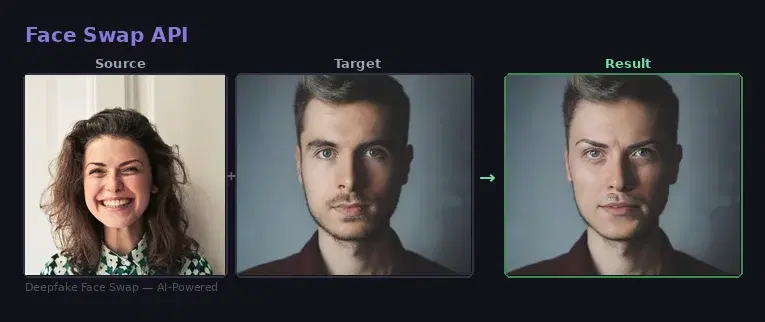
Face Swap & Replacement API: Examples and Code (Python)
Working examples of a face swap API in Python and JavaScript. How the endpoint works, request parameters, image format, and complete code you can copy-paste.
How to Swap Faces in Images with an AI API
Step-by-step guide to using a Face Swap API for realistic face swapping, face detection, and face enhancement. Includes cURL, Python, and JavaScript examples.
Start Using Face Swap Today
Sign up on RapidAPI to get your API key. The free tier includes generous monthly requests — no credit card required.