This tutorial uses the NSFW Detect API. See the docs, live demo, and pricing.
If your app accepts video or GIF uploads (short clips in a social feed, reaction GIFs in chat, product videos on a marketplace), checking only the thumbnail is not moderation. The problem frame can sit at second 12 of a 30 second clip. NSFW video moderation with an image API works by sampling frames, scoring each one, and deciding on the whole clip, and that is what this guide builds in Python with ffmpeg and the NSFW Detect API.
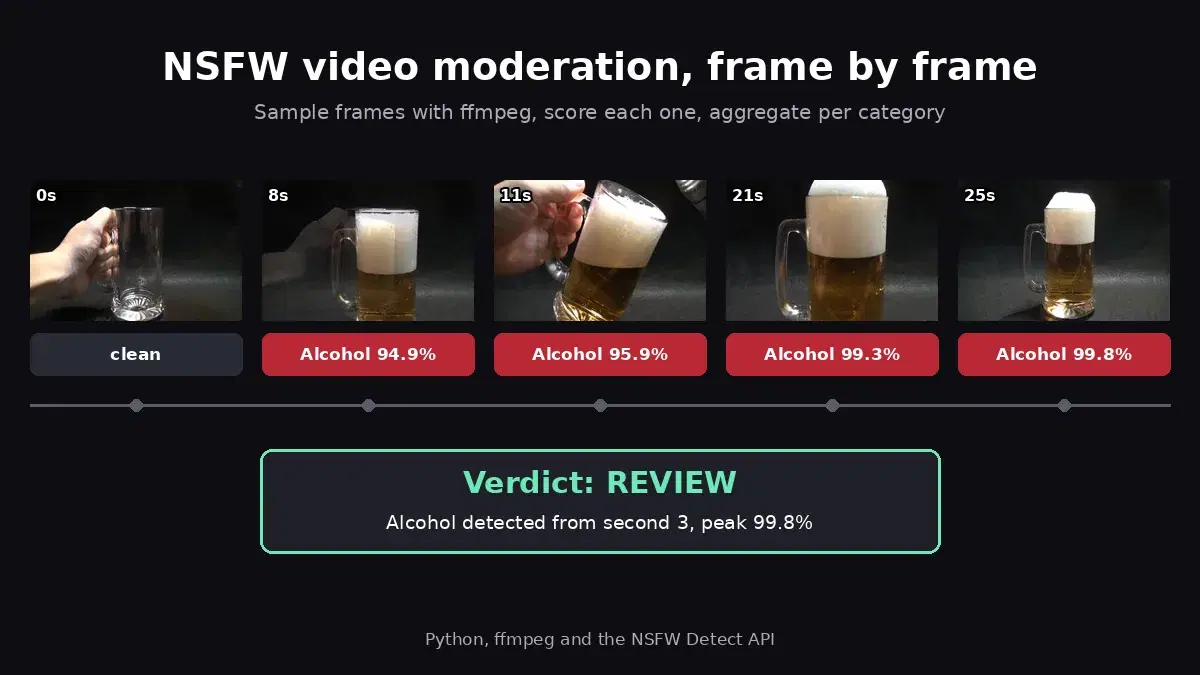
Every number below comes from a real run on a public domain 25 second clip of a beer being poured: it starts with an empty glass and ends with a full one, which makes it a good test for how detections change over time.
How Video Moderation Works with an Image API
A moderation API looks at images, so a video becomes a list of frames. The pipeline has four steps:
- Sample frames with ffmpeg, either at a fixed interval or on scene changes.
- Score each frame with the API, in parallel.
- Aggregate per top-level category: highest confidence, number of flagged frames, timestamps.
- Decide allow, review, or block for the clip, and stop early when a frame already settles it.
The sampling rate drives both cost and recall, so it gets its own section further down. If you have built the per-image moderation policy already, steps 3 and 4 extend it from one image to a timeline.
Step 1: Sample Frames with ffmpeg
The fps filter keeps one frame every N seconds. Capping the width at 1280 pixels keeps each upload small without hurting detection:
import os
import subprocess

def extract_frames(video_path, out_dir, every_seconds=1.0):
    """Grab one frame every N seconds. Returns [(timestamp, path), ...]."""
    subprocess.run(
        ["ffmpeg", "-v", "error", "-i", video_path,
         "-vf", f"fps=1/{every_seconds},scale='min(1280,iw)':-2",
         "-q:v", "3", f"{out_dir}/frame_%05d.jpg"],
        check=True,
    )
    files = sorted(os.listdir(out_dir))
    return [(i * every_seconds, os.path.join(out_dir, f)) for i, f in enumerate(files)]
On the 25 second test clip, every_seconds=1.0 returns 26 frames and every_seconds=2.0 returns 13.
Step 2: Score Frames in Parallel
Each frame is a normal image moderation call. The API returns hierarchical labels; keep only the top-level categories (the ones with an empty ParentName) so every sub-label maps to one policy rule. A thread pool scores several frames at once:
import tempfile
from concurrent.futures import ThreadPoolExecutor

import requests

API_URL = "https://nsfw-detect3.p.rapidapi.com/nsfw-detect"
HEADERS = {
    "x-rapidapi-key": "YOUR_API_KEY",
    "x-rapidapi-host": "nsfw-detect3.p.rapidapi.com",
}

def moderate_frame(path):
    """Return the top-level categories found in one frame: {name: confidence}."""
    with open(path, "rb") as f:
        r = requests.post(API_URL, headers=HEADERS, files={"image": f}, timeout=30)
    r.raise_for_status()
    labels = r.json()["body"]["ModerationLabels"]
    return {l["Name"]: l["Confidence"] for l in labels if l["ParentName"] == ""}

def moderate_video(video_path, every_seconds=1.0, workers=4):
    """Moderate sampled frames in parallel. Returns [(timestamp, categories), ...]."""
    with tempfile.TemporaryDirectory() as tmp:
        frames = extract_frames(video_path, tmp, every_seconds)
        with ThreadPoolExecutor(max_workers=workers) as pool:
            results = list(pool.map(lambda fr: moderate_frame(fr[1]), frames))
    return [(t, cats) for (t, _), cats in zip(frames, results)]

for t, cats in moderate_video("beer_pour.mp4"):
    print(f"{t:>3.0f}s", {k: round(v, 1) for k, v in cats.items()})
#   0s {}                    empty glass
#   8s {'Alcohol': 94.9}
#  11s {'Alcohol': 95.9}
#  21s {'Alcohol': 99.3}
#  25s {'Alcohol': 99.8}
#  (26 frames in total)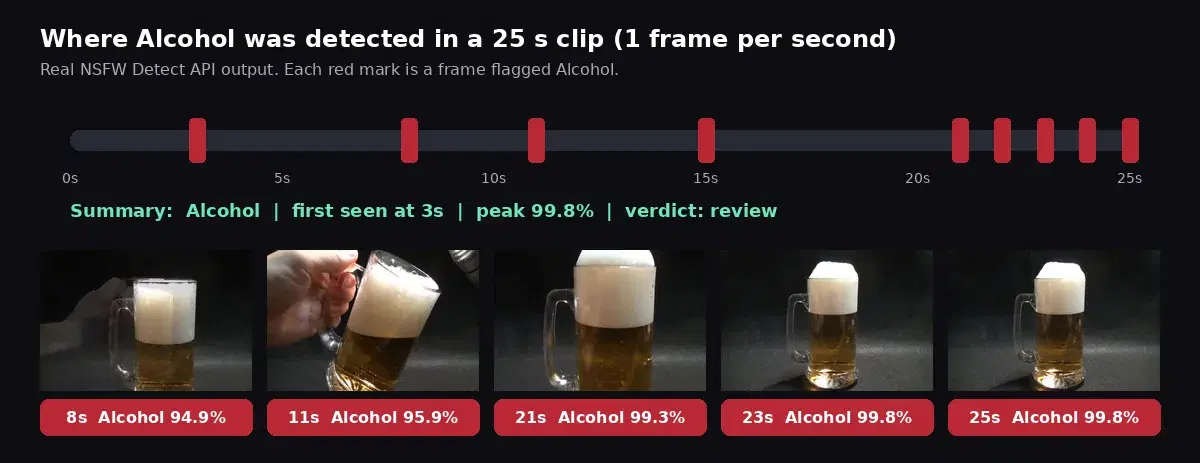
The empty glass at second 0 comes back clean, and Alcohol is flagged from second 3, as soon as beer is in the glass, up to 99.8% on the full glass. A timeline like this is what turns frame scores into a decision: when the category first appears, how often, and how confident the API is at its peak.
Step 3: Aggregate per Category and Decide
Summarize each category across the clip, then apply a policy. Compared with a single image policy, each rule gets one extra field, min_frames: how many frames must cross the threshold before the rule fires. It makes the clip verdict rest on content that stays on screen rather than on a single frame:
# Top-level category -> action, minimum confidence, minimum number of flagged frames.
# Use the exact names the API returns. A category absent from the table is allowed.
POLICY = {
    "Explicit":                                          {"action": "block",  "threshold": 60, "min_frames": 1},
    "Non-Explicit Nudity of Intimate parts and Kissing": {"action": "review", "threshold": 70, "min_frames": 2},
    "Violence":                                          {"action": "block",  "threshold": 70, "min_frames": 2},
    "Hate Symbols":                                      {"action": "block",  "threshold": 50, "min_frames": 1},
    "Drugs & Tobacco":                                   {"action": "review", "threshold": 80, "min_frames": 2},
    "Alcohol":                                           {"action": "review", "threshold": 90, "min_frames": 2},
}

def summarize(results):
    """Per category: max confidence, number of flagged frames, timestamps."""
    summary = {}
    for t, cats in results:
        for name, conf in cats.items():
            s = summary.setdefault(name, {"max": 0.0, "frames": 0, "times": []})
            s["max"] = max(s["max"], conf)
            s["frames"] += 1
            s["times"].append(t)
    return summary

def decide(summary):
    """Turn the per-category summary into allow / review / block."""
    verdict, reasons = "allow", []
    for name, s in summary.items():
        rule = POLICY.get(name)
        if not rule or s["max"] < rule["threshold"] or s["frames"] < rule["min_frames"]:
            continue
        reasons.append(f"{name}: {s['frames']} frames, max {s['max']:.1f}%, first at {s['times'][0]:.0f}s")
        if rule["action"] == "block":
            verdict = "block"
        elif verdict != "block":
            verdict = "review"
    return verdict, reasons

print(decide(summarize(moderate_video("beer_pour.mp4"))))
# ('review', ['Alcohol: 9 frames, max 99.8%, first at 3s'])
The reasons string is what your reviewers need: the category, how much of the clip it covers, and where to jump in the video. Store it with the upload so a human can check second 3 instead of watching the whole clip. The names in POLICY are the exact top-level names the API returns; print the categories on a sample of your own uploads to confirm them before you go live.
Step 4: Stop Early on a Clear Block
Once a block rule has fired, the remaining frames cannot change the verdict. Scoring frames in time order, one batch at a time, lets you stop there:
def moderate_with_early_stop(frames, workers=4):
    """Moderate frames in time order, batch by batch; stop at the first block."""
    results, calls = [], 0
    with ThreadPoolExecutor(max_workers=workers) as pool:
        for i in range(0, len(frames), workers):
            batch = frames[i:i + workers]
            cats = list(pool.map(lambda fr: moderate_frame(fr[1]), batch))
            results += [(t, c) for (t, _), c in zip(batch, cats)]
            calls += len(batch)
            verdict, reasons = decide(summarize(results))
            if verdict == "block":
                break
    return verdict, reasons, calls

# A kids platform where alcohol is not allowed
POLICY["Alcohol"] = {"action": "block", "threshold": 90, "min_frames": 2}

with tempfile.TemporaryDirectory() as tmp:
    frames = extract_frames("beer_pour.mp4", tmp, every_seconds=1.0)
    print(moderate_with_early_stop(frames))
# ('block', ['Alcohol: 3 frames, max 95.9%, first at 3s'], 12)
With a kids platform policy, the clip is blocked after 12 calls instead of 26. Early stopping only saves calls on rejected videos; clean videos still need every sampled frame, because absence of a label is only proven by looking.
Choosing a Sampling Rate
Denser sampling catches shorter scenes, sparser sampling saves calls. These are the real results on the same clip:
| Sampling | API calls | Frames with Alcohol | Verdict (review policy) |
|---|---|---|---|
| Every 1 second | 26 | 9 | review |
| Every 2 seconds | 13 | 5 | review |
For long edited videos, scene-change sampling cuts calls further by picking one frame per cut. Cap the gap between frames so long continuous shots are still sampled at a steady rate:
import re

def extract_scene_frames(video_path, out_dir, threshold=0.3, max_gap=5):
    """One frame per scene change, and never more than max_gap seconds apart."""
    select = (f"isnan(prev_selected_t)+gt(scene,{threshold})"
              f"+gte(t-prev_selected_t,{max_gap})")
    proc = subprocess.run(
        ["ffmpeg", "-i", video_path,
         "-vf", f"select='{select}',showinfo",
         "-fps_mode", "vfr", "-q:v", "3", f"{out_dir}/scene_%05d.jpg"],
        capture_output=True, text=True, check=True,
    )
    times = [float(t) for t in re.findall(r"pts_time:([\d.]+)", proc.stderr)]
    files = sorted(os.listdir(out_dir))
    return [(t, os.path.join(out_dir, f)) for t, f in zip(times, files)]
For short user uploads, a fixed interval of one to two seconds is the safer default. Keep scene sampling (with a small max_gap) for long, heavily edited videos where calling the API every second would be wasteful.
Moderating GIF Uploads
A GIF is a short video, and ffmpeg reads it directly: extract_frames("reaction.gif", tmp, 2.0) works unchanged. If your upload worker has no ffmpeg (a slim serverless image, for example), Pillow can sample the frames using each frame's own duration:
from PIL import Image, ImageSequence

def extract_gif_frames(gif_path, out_dir, every_seconds=1.0):
    """Sample a GIF every N seconds using each frame's own duration."""
    gif = Image.open(gif_path)
    frames, t, next_t = [], 0.0, 0.0
    for i, frame in enumerate(ImageSequence.Iterator(gif)):
        if t >= next_t:
            path = os.path.join(out_dir, f"gif_{i:05d}.jpg")
            frame.convert("RGB").save(path, quality=90)
            frames.append((t, path))
            next_t += every_seconds
        t += frame.info.get("duration", 100) / 1000
    return frames
The output has the same (timestamp, path) shape, so moderate_frame, summarize and decide work as is. On a 360 pixel GIF made from the same clip, sampling every 2 seconds gave 13 frames, Alcohol on 7 of them (max 99.9%) and a review verdict. Converting each frame to RGB matters: GIF frames are palette images, and a JPEG needs RGB.
How Many API Calls Does Video Moderation Use?
The count is easy to predict: one call per sampled frame. A 30 second clip sampled every 2 seconds costs 15 calls; every second, 30 calls. Multiply by your upload volume: 1,000 clips of 30 seconds at one frame every 2 seconds is about 15,000 calls over the month, before early stops.
- Early stop cuts the cost of rejected videos, which matters most on platforms with a lot of abuse.
- Duration limits on uploads keep the worst case bounded: a 3 minute cap at one frame every 2 seconds is at most 90 calls per video.
- Skip re-moderation of the same file: hash the upload and cache the verdict, since reposted GIFs are common.
Video multiplies call volume compared to still images, so size your plan on frames, not on uploads. The plans are listed on the NSFW Detect API page.
Production Tips
- Moderate after upload, publish after the verdict. Keep new videos in a pending state and run the pipeline in a background worker. A 26 frame clip with 4 workers finishes in seconds.
- Fail safe to review. If a frame call errors out, send the clip to human review instead of allowing it.
- Moderate the poster frame too. The thumbnail users see in the feed may be chosen separately; score it like any image.
- Tune per category. One confident Explicit frame is enough to block, while Alcohol on a wine marketplace may need several frames, or no rule at all. That is what
thresholdandmin_framesare for.
Related Moderation Guides
- Content moderation for user uploads: the per-image policy engine this pipeline builds on.
- Blur NSFW content in Python: hide flagged regions instead of rejecting the upload.
- Discord NSFW moderation bot: the same checks applied to chat attachments.
- Best NSFW detection APIs compared: if you are still choosing a provider.
Sources
- One example of how to pour beer (Wikimedia Commons): the public domain test clip used for every result above.
- ffmpeg select filter documentation: the
sceneandprev_selected_tvariables used for scene sampling.
Video moderation is image moderation plus three decisions: how often to sample, how to aggregate, and when to stop. Grab a key on the NSFW Detect API page, paste it into the script above, and run it on a few clips your users actually upload before you settle the thresholds.
Frequently Asked Questions
- Can an image moderation API moderate videos?
- Yes. You extract frames from the video at a fixed interval (for example one frame every one or two seconds), send each frame to the image moderation API, and aggregate the results per category across the whole clip. The verdict is based on how many frames were flagged and how confident the API was, not on a single frame.
- How many frames should I check per second of video?
- For short user uploads, one frame every one to two seconds is a safe default. On a 25 second test clip, sampling every second found alcohol in 9 of 26 frames and every two seconds found it in 5 of 13: both flagged the clip for review. For long edited videos, scene-change sampling with a gap cap cuts the number of calls further.
- How do I moderate animated GIFs for NSFW content?
- Treat a GIF like a short video. ffmpeg reads GIF files directly, so the same frame sampling code works. Without ffmpeg, Pillow can iterate the GIF frames and use each frame's duration to sample one frame every N seconds, then each sampled frame goes to the moderation API like a still image.