This tutorial uses the Background Removal API. See the docs, live demo, and pricing.
If your app calls the remove.bg API, you have a hard deadline: the self-service API stops accepting requests on 1 December 2026 at 9:00 CET, and unused pay-as-you-go credits expire the same day. This guide shows what changes, how each remove.bg parameter maps to a replacement API, and a drop-in Python and JavaScript function you can swap in so the rest of your code keeps working. Every snippet below was run against the live API before publishing.
What Exactly Is Shutting Down
- Self-service API: stops on 1 December 2026, 9:00 CET. Calls to
api.remove.bg/v1.0/removebgwill fail after that. - Website and accounts: become inaccessible. Export usage reports and invoices before the deadline.
- Credits: unused pay-as-you-go credits expire. Annual subscriptions end with a pro-rata refund; monthly subscriptions end automatically.
- Plugins: the Photoshop plugin and other integrations are discontinued.
- Enterprise contracts: not affected, they continue as normal.
remove.bg points self-service API users to Leonardo.ai (both belong to Canva). You can migrate there, or to any other background removal API. Either way, your integration code has to change.
Your Options: Leonardo.ai or Another API
Leonardo's migration guide recommends its synchronous endpoint and keeps most remove.bg option names (size, type, bg_color, crop, channels...). It is the closest match if you rely on those options. The differences you will still have to code around:
- Requests are JSON only. No multipart upload: send a file as base64, or upload it first to a presigned URL.
- The response is a URL or base64 string, not raw image bytes.
- Errors can come back with HTTP 200 and an
errorsarray, so status checks alone are not enough. bg_image_fileis not supported, andbg_image_urlis renamed.- The migration guide lists $0.1047 per image, billed from a prepaid balance.
If you mostly send an image and get a transparent PNG back, sometimes with a background color or image, a simpler REST API does the job for far less. The rest of this guide migrates to the AI Engine Background Removal API, which accepts multipart uploads like remove.bg did and costs about $0.0013 per image at 10,000 images a month. For a full price comparison of the alternatives, see our background removal API comparison.
remove.bg Parameter Mapping
Here is how each remove.bg input maps to AI Engine. The endpoint changes with the background you want, instead of a parameter on one endpoint.
| remove.bg | AI Engine | Notes |
|---|---|---|
X-Api-Key header | x-rapidapi-key + x-rapidapi-host | Key from your RapidAPI dashboard |
image_file | image (multipart) | Same multipart upload, new field name |
image_url | image_url | Form, multipart or JSON body |
image_file_b64 | Not supported | Decode and send as a file |
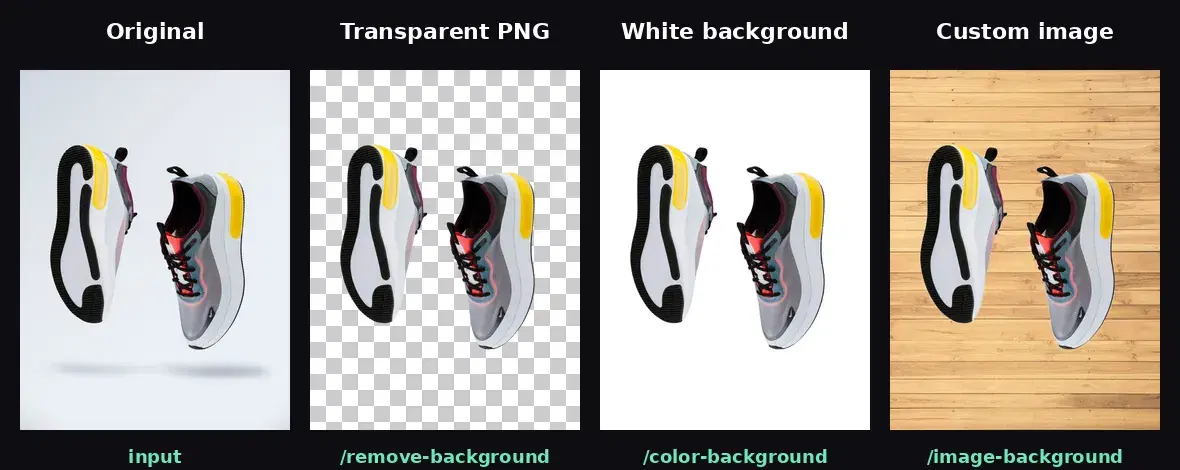
no bg_* parameter | POST /remove-background | Transparent PNG |
bg_color (hex) | POST /color-background, bg_color | Format is R,G,B,A, e.g. 255,255,255,255. Hex returns a 422 |
bg_image_url | POST /image-background, bg_image_url | Same name |
bg_image_file | POST /image-background, bg_image | Multipart file |
format | Always PNG | Convert to JPG or WebP with Pillow if needed |
size, scale, crop, roi, position | Not supported | Output keeps the input resolution; resize or crop afterwards |
type, channels, shadow_type | Not supported | Subject is detected automatically; no mask-only or shadow output |
| - | /blur-background, /gradient-background | Extra effects remove.bg did not have |
The other change is the response. remove.bg returned the image bytes directly (or base64 with Accept: application/json). AI Engine returns JSON with a CDN link:
{
  "image_url": "https://images.ai-engine.net/background-removal-ai/2b6c7a0b-....png",
  "width": 1200,
  "height": 1500,
  "size_bytes": 692010
}
Before: A Typical remove.bg Call
This is the pattern most integrations use, straight from the remove.bg docs:
import requests

response = requests.post(
    "https://api.remove.bg/v1.0/removebg",
    files={"image_file": open("product.jpg", "rb")},
    data={"size": "auto", "bg_color": "ffffff"},
    headers={"X-Api-Key": "YOUR_REMOVE_BG_KEY"},
)
if response.status_code == requests.codes.ok:
    with open("product-white.png", "wb") as out:
        out.write(response.content)
After: A Drop-In remove_bg() Function in Python
Wrap the new API in a function that takes the same inputs and returns PNG bytes, like remove.bg did. Call sites that wrote response.content to disk only need to write the return value instead.
import os
import requests

API = "https://background-removal-ai.p.rapidapi.com"
HEADERS = {
    "x-rapidapi-host": "background-removal-ai.p.rapidapi.com",
    "x-rapidapi-key": os.environ["RAPIDAPI_KEY"],
}


def hex_to_rgba(value):
    """remove.bg takes 'ffffff' or '#81d4fa'; AI Engine takes 'R,G,B,A'."""
    value = value.lstrip("#")
    r, g, b = (int(value[i:i + 2], 16) for i in (0, 2, 4))
    return f"{r},{g},{b},255"


def remove_bg(image_file=None, image_url=None, bg_color=None, bg_image_url=None):
    """Same inputs as the remove.bg call, returns PNG bytes like remove.bg did."""
    data, files = {}, {}
    if image_file:
        files["image"] = open(image_file, "rb")
    else:
        data["image_url"] = image_url

    if bg_image_url:
        endpoint = "/image-background"
        data["bg_image_url"] = bg_image_url
    elif bg_color:
        endpoint = "/color-background"
        data["bg_color"] = hex_to_rgba(bg_color)
    else:
        endpoint = "/remove-background"

    resp = requests.post(API + endpoint, headers=HEADERS, data=data,
                         files=files or None, timeout=60)
    resp.raise_for_status()
    result = resp.json()  # {"image_url": ..., "width": ..., "height": ..., "size_bytes": ...}
    return requests.get(result["image_url"], timeout=60).content
The call site from the "before" example becomes:
png = remove_bg(image_file="product.jpg", bg_color="ffffff")
with open("product-white.png", "wb") as out:
    out.write(png)
We ran this function on four inputs: a local file, a public URL, a hex color and a background image URL. All four returned a 1200x1500 PNG, the same size as the input. Here is what the three endpoints produce on the same product photo:
The Same Function in JavaScript (Node 18+)
Node 18 and later ship fetch, FormData and Blob, so no extra package is needed:
import { readFile, writeFile } from "node:fs/promises";

const API = "https://background-removal-ai.p.rapidapi.com";
const HEADERS = {
  "x-rapidapi-host": "background-removal-ai.p.rapidapi.com",
  "x-rapidapi-key": process.env.RAPIDAPI_KEY,
};

// remove.bg takes "ffffff" or "#81d4fa"; AI Engine takes "R,G,B,A"
function hexToRgba(hex) {
  const v = hex.replace("#", "");
  const [r, g, b] = [0, 2, 4].map((i) => parseInt(v.slice(i, i + 2), 16));
  return `${r},${g},${b},255`;
}

export async function removeBg({ imageFile, imageUrl, bgColor, bgImageUrl }) {
  const form = new FormData();
  if (imageFile) {
    form.append("image", new Blob([await readFile(imageFile)]), "input.jpg");
  } else {
    form.append("image_url", imageUrl);
  }

  let endpoint = "/remove-background";
  if (bgImageUrl) {
    endpoint = "/image-background";
    form.append("bg_image_url", bgImageUrl);
  } else if (bgColor) {
    endpoint = "/color-background";
    form.append("bg_color", hexToRgba(bgColor));
  }

  const res = await fetch(API + endpoint, { method: "POST", headers: HEADERS, body: form });
  if (!res.ok) throw new Error(`${res.status}: ${await res.text()}`);
  const { image_url } = await res.json();
  return Buffer.from(await (await fetch(image_url)).arrayBuffer()); // PNG bytes
}

// Usage
const png = await removeBg({ imageFile: "product.jpg", bgColor: "#ffffff" });
await writeFile("product-white.png", png);
Testing With cURL
Before touching your code, check your key and an image from the terminal:
curl -X POST 'https://background-removal-ai.p.rapidapi.com/remove-background' \
  -H 'x-rapidapi-host: background-removal-ai.p.rapidapi.com' \
  -H 'x-rapidapi-key: YOUR_API_KEY' \
  -F 'image=@product.jpg'
Update Your Error Handling
remove.bg returned {"errors": [{"title": ...}]} with 400 (bad input), 402 (no credits), 403 (bad key) and 429 (rate limit). If your code branches on those, map them to what we observed on the new API:
- 422 with
{"detail": "..."}: bad input, such as an unreachableimage_urlor a hexbg_color. This replaces most 400s. - 403: invalid key, or a key not subscribed to the API.
- 429: too many requests. Retry with backoff, as you did with remove.bg.
- 415: missing or unsupported content type. Send multipart, form or JSON.
Migration Checklist
- Search your codebase for
api.remove.bgandX-Api-Keyto find every call site. - List the remove.bg parameters you actually send. If you depend on
size,crop,channelsor shadows, plan a Pillow post-processing step or pick an API that supports them. - Swap the call for
remove_bg()and run it on 20 to 50 of your real images, including your hardest ones (hair, glass, low contrast). - Update error handling for the new status codes.
- Export your remove.bg invoices and usage reports before 1 December 2026.
- Switch production before the deadline, not on it: anything still pointing at remove.bg after 9:00 CET on 1 December will fail.
If you process images in bulk, our guide to background removal at scale covers concurrency and retries for product catalogs.
Sources
- remove.bg FAQ - shutdown date, credits, subscriptions and plugins
- remove.bg API documentation - parameters, responses and error codes
- Leonardo.ai: migrate from the remove.bg API - request format, supported options and price per image
The remove.bg shutdown forces a code change either way. If your integration sends an image and expects a cutout back, the swap above takes a few minutes and keeps the one-call model. Test it on your own images with the free tier of the AI Engine Background Removal API.
Frequently Asked Questions
- When does the remove.bg API stop working?
- The self-service remove.bg API stops accepting requests on 1 December 2026 at 9:00 CET, when the standalone website closes. Unused pay-as-you-go credits expire the same day. Enterprise API contracts continue as normal.
- Is Leonardo.ai a drop-in replacement for the remove.bg API?
- No. Leonardo keeps most remove.bg option names, but the request is a JSON body with the image in a guidances block, file uploads go through a presigned URL or base64, the response is a URL or base64 instead of raw image bytes, and errors can arrive with HTTP 200. Its migration guide lists $0.1047 per image.
- Which remove.bg features have no direct equivalent in AI Engine?
- size, type, roi, crop, scale, position, channels=alpha and shadows have no AI Engine parameter. The output is always a full-resolution PNG, so crop, resize or convert it with Pillow if you need to. Background color, background image and transparent output map directly.