This tutorial uses the Background Removal API. See the docs, live demo, and pricing.
To remove a video background in Python, split the video into frames, send each frame to a background removal API, and rebuild the video from the cutouts. There is no green screen and no model to host. The script below does all of it with ffmpeg and about 70 lines of Python, and we ran it exactly as shown on a real stock clip.
How It Works
- ffmpeg extracts the frames as JPG files.
- The Background Removal API returns a transparent PNG for each frame.
- ffmpeg rebuilds the PNG sequence into a transparent WebM and an MP4 on a solid color.
You need Python with requests, ffmpeg, and a RapidAPI key saved in the RAPIDAPI_KEY environment variable.
The Complete Script
import os
import subprocess
from concurrent.futures import ThreadPoolExecutor
from pathlib import Path

import requests

API_URL = "https://background-removal-ai.p.rapidapi.com/remove-background"
HEADERS = {
    "x-rapidapi-host": "background-removal-ai.p.rapidapi.com",
    "x-rapidapi-key": os.environ["RAPIDAPI_KEY"],
}
INPUT_VIDEO = "input.mp4"
FPS = 8
SECONDS = 5
FRAMES = Path("frames")
CUTOUTS = Path("cutouts")


def extract_frames():
    FRAMES.mkdir(exist_ok=True)
    subprocess.run(
        ["ffmpeg", "-y", "-v", "error", "-i", INPUT_VIDEO, "-t", str(SECONDS),
         "-vf", f"fps={FPS}", str(FRAMES / "%04d.jpg")],
        check=True,
    )


def remove_background(frame):
    with open(frame, "rb") as f:
        response = requests.post(API_URL, headers=HEADERS, files={"image": f}, timeout=120)
    response.raise_for_status()
    png = requests.get(response.json()["image_url"], timeout=120)
    png.raise_for_status()
    (CUTOUTS / f"{frame.stem}.png").write_bytes(png.content)


def process_frames():
    CUTOUTS.mkdir(exist_ok=True)
    frames = sorted(FRAMES.glob("*.jpg"))
    with ThreadPoolExecutor(max_workers=4) as pool:
        list(pool.map(remove_background, frames))
    return len(frames)


def build_transparent_webm():
    subprocess.run(
        ["ffmpeg", "-y", "-v", "error", "-framerate", str(FPS),
         "-i", str(CUTOUTS / "%04d.png"),
         "-c:v", "libvpx-vp9", "-pix_fmt", "yuva420p", "output_transparent.webm"],
        check=True,
    )


def build_mp4_on_color(color="0x1E3A8A"):
    subprocess.run(
        ["ffmpeg", "-y", "-v", "error", "-framerate", str(FPS),
         "-i", str(CUTOUTS / "%04d.png"),
         "-filter_complex",
         f"color=c={color}:s=960x540:r={FPS}[bg];[bg][0:v]overlay=shortest=1,format=yuv420p",
         "output_on_color.mp4"],
        check=True,
    )


extract_frames()
print(f"Frames processed: {process_frames()}")
build_transparent_webm()
build_mp4_on_color()
print("Saved output_transparent.webm and output_on_color.mp4")
Output on our test clip, in about 70 seconds with four parallel workers:
Frames processed: 39
Saved output_transparent.webm and output_on_color.mp4
The Result
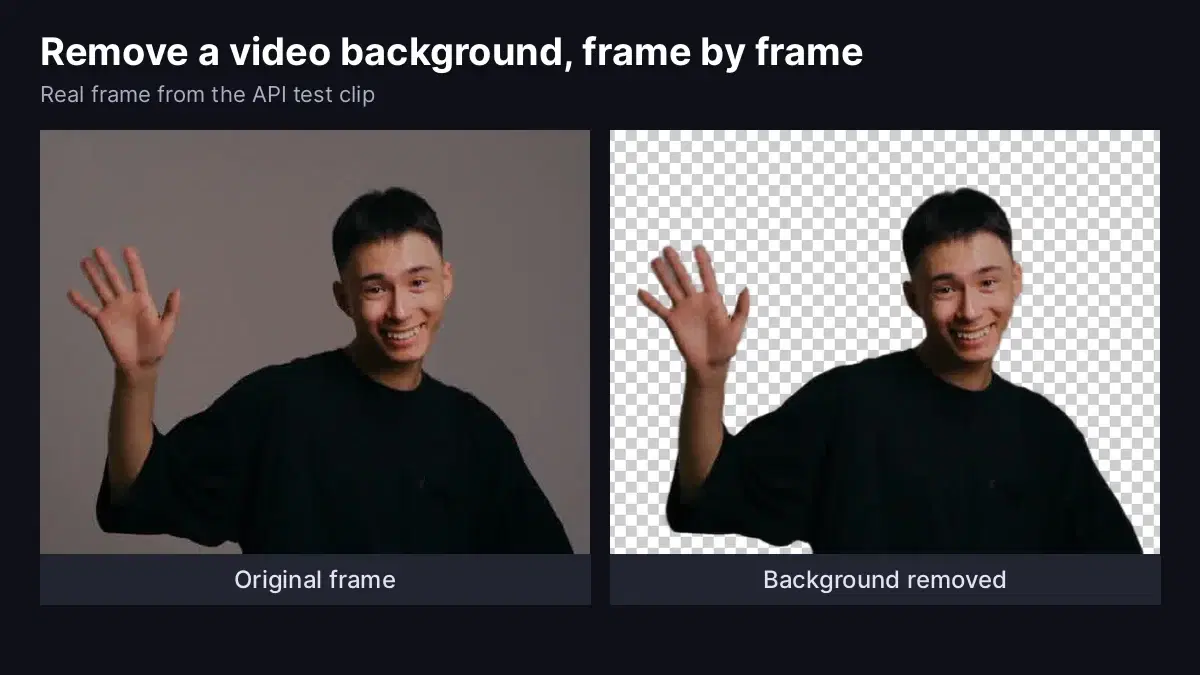
These are real output frames from the test clip, shown here on a checkerboard so you can see the transparency. The raised hand, the fingers, the hair, and the sleeves stay clean as the person moves.

The API is also repeatable: we sent the same frame twice and got identical transparency masks.
Choosing the Right Settings
Frame Rate and Duration
Each frame is one request, so requests equal FPS multiplied by SECONDS. Our clip lasts 4.84 seconds, so 8 frames per second gave 39 frames. Start with a low frame rate while you test, then raise it for the final render.
Output Format
- Transparent WebM: use it for web overlays and for editors that read VP9 alpha.
- MP4 on a color: use it when you know the final background. Change the
colorargument, and the960x540size if your video has another resolution.
Production Tips
- Best for: one clear subject in front of a simple backdrop, such as talking-head clips, presenters, and studio footage. Run a few seconds of your own footage first to confirm the result.
- Run it in a background job: video processing takes longer than a web request, so use a queue and notify the user when the file is ready.
- Reuse the pattern: the same frame-by-frame approach powers our NSFW video moderation guide. For still images, see transparent PNGs with an API and background removal at scale.
Sources
Frequently Asked Questions
- How many API requests does a video use?
- One request per extracted frame, so requests equal frames per second multiplied by seconds. Our 4.84-second test clip at 8 frames per second used 39 requests. Lower the FPS value to use fewer requests.
- Which video format keeps the transparency?
- A WebM file encoded with VP9 and the yuva420p pixel format keeps the alpha channel, and that is what the script builds. It also builds an MP4 with the person placed on a solid color, for players and editors that expect MP4.
- Which videos work best for frame-by-frame background removal?
- Clips with one clear subject in front of a simple backdrop, such as a person speaking or waving in front of a wall. That covers talking-head videos, product presenters, and studio footage. Test a few seconds of your own footage before processing a full video.