This tutorial uses the Background Removal API. See the docs, live demo, and pricing.
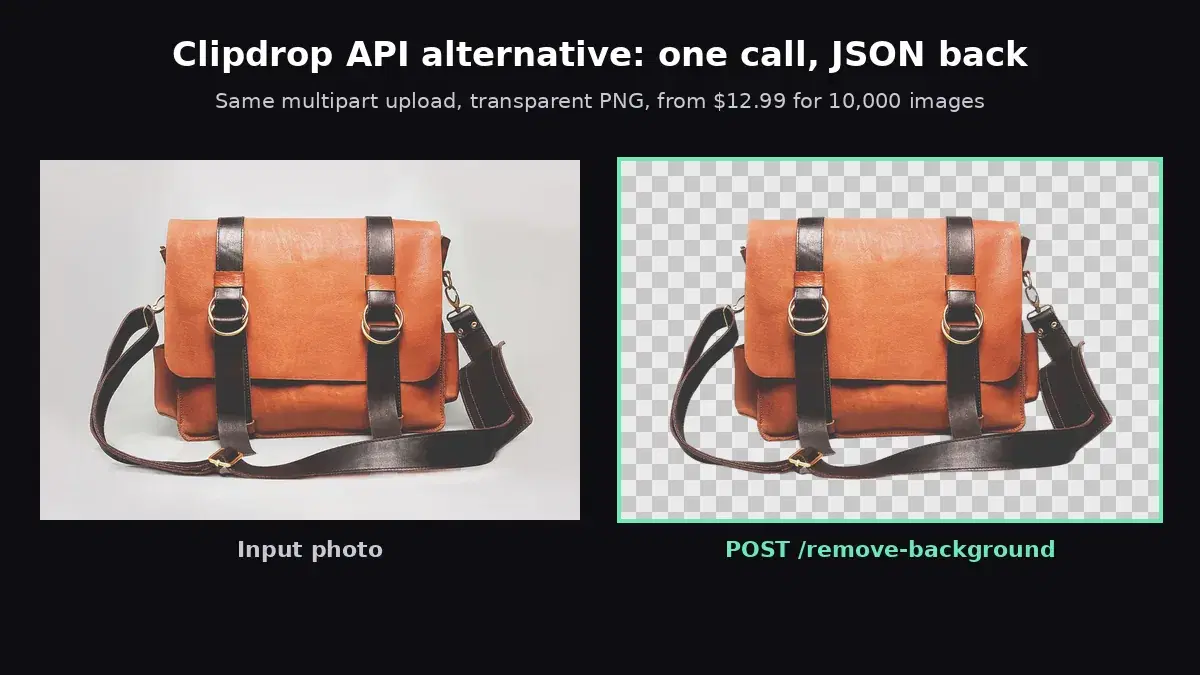
If you are looking at Clipdrop API pricing, you are probably deciding whether to keep using its remove background endpoint or switch. This guide covers what the Clipdrop API looks like today (endpoint, limits, credit packs), what it costs at 10,000 images a month, and a drop-in Python and JavaScript function that moves your integration to a cheaper API without touching the rest of your code. Every snippet below was run against the live API before publishing.
The Clipdrop Remove Background API Today
Clipdrop started at Stability AI and has been part of Jasper since 2024. The API still runs on its own domain, and the documentation describes it like this:
- Endpoint:
POST https://clipdrop-api.co/remove-background/v1with amultipart/form-databody. - Auth: an
x-api-keyheader. - Input:
image_file(PNG, JPG or WebP, up to 25 megapixels and 30 MB), plus an optionaltransparency_handlingflag. - Output: the image bytes, PNG by default, or WebP or JPG through the
acceptheader. Same dimensions as the input. - Credit headers:
x-remaining-creditsandx-credits-consumedon every response. - Rate limit: 60 requests per minute per key by default.
- Errors: JSON with an
errorfield and status 400 (bad input), 401 (no key), 402 (no credits left), 403 (invalid key), 406 (bad accept header) or 429 (rate limited).
Clipdrop API Pricing: Credit Packs
One successful background removal call costs 1 credit. Credits are prepaid in packs and stay valid for 2 years. These are the prices on the Clipdrop API pricing page, checked in October 2026 (USD, VAT included where applicable):
| Clipdrop pack | Price | Per image |
|---|---|---|
| 100 free credits | $0 | For development only, one time |
| 100 credits | $50 | $0.50 |
| 1,000 credits | $320 | $0.32 |
| 5,000 credits | $800 | $0.16 |
| 25,000 credits | $3,600 | $0.144 |
Above 25,000 credits the page sends you to Jasper to "discuss bigger plans", and the docs point there for more credits and newer models. There is no published monthly plan.
Why Teams Look for a Clipdrop Alternative
- Cost at volume. Even the largest pack is $0.144 per image. Background removal is now priced well under a cent elsewhere.
- Prepaid budgeting. You buy credits up front and track
x-remaining-credits. A 402 in production means someone forgot to top up. - Growth goes through sales. Past the 25,000 pack, pricing is a conversation with Jasper, which is a marketing platform rather than an API vendor.
- Cutout only. The remove background endpoint returns the subject on a transparent background. Putting it on a white, colored or branded background is extra code on your side.
Cost at 10,000 Images a Month
| Option | Monthly cost | Per image |
|---|---|---|
| Clipdrop, two 5,000 packs | $1,600 | $0.16 |
| Clipdrop, 25,000 pack (lasts 2.5 months) | about $1,440 | $0.144 |
| AI Engine Pro plan (10,000 requests) | $12.99 | $0.0013 |
At 1,000 images a month the gap is similar: $320 for a Clipdrop pack against $12.99 for the same plan. For the full market, including Pixian, Poof and PhotoRoom, see our background removal API comparison. The rest of this guide migrates to the AI Engine Background Removal API, which keeps the one-call, multipart model Clipdrop uses.
Clipdrop to AI Engine: Request Mapping
| Clipdrop | AI Engine | Notes |
|---|---|---|
clipdrop-api.co/remove-background/v1 | background-removal-ai.p.rapidapi.com/remove-background | POST, multipart |
x-api-key header | x-rapidapi-key + x-rapidapi-host | Key from your RapidAPI dashboard |
image_file | image | Same file upload, new field name. Or send image_url |
accept: image/webp or image/jpg | Always PNG | Convert with Pillow, see the function below |
transparency_handling | No equivalent | Flatten transparent inputs yourself if you relied on it |
| Response: image bytes | Response: JSON with image_url | Download the PNG from the CDN link |
x-remaining-credits | x-ratelimit-requests-remaining | Requests left in your plan period |
| - | /color-background, /gradient-background, /image-background, /blur-background | New backgrounds in the same call |
The AI Engine response looks like this:
{
  "image_url": "https://images.ai-engine.net/background-removal-ai/57912bc9-....png",
  "width": 1200,
  "height": 801,
  "size_bytes": 859858
}
The output keeps the input resolution. We sent a 6000x4005 photo (24 megapixels, close to Clipdrop's 25 MP cap) and got a 6000x4005 PNG back in about 8 seconds.
Before: A Typical Clipdrop Call
This is the pattern from the Clipdrop docs:
import requests

with open("bag.jpg", "rb") as image_file:
    r = requests.post(
        "https://clipdrop-api.co/remove-background/v1",
        files={"image_file": ("bag.jpg", image_file, "image/jpeg")},
        headers={"x-api-key": "YOUR_CLIPDROP_KEY"},
    )
if r.ok:
    with open("bag-cutout.png", "wb") as out:
        out.write(r.content)  # raw PNG bytes
else:
    r.raise_for_status()
After: A Drop-In remove_background() Function in Python
The function below takes the same image and returns image bytes, like Clipdrop did, so the code that writes r.content to disk or uploads it to storage stays the same. It also keeps Clipdrop's accept option for WebP and JPG output.
import io
import os
import requests
from PIL import Image

API = "https://background-removal-ai.p.rapidapi.com"
HEADERS = {
    "x-rapidapi-host": "background-removal-ai.p.rapidapi.com",
    "x-rapidapi-key": os.environ["RAPIDAPI_KEY"],
}


def remove_background(image_file, accept="image/png"):
    """Same input as Clipdrop's remove-background call, returns image bytes like Clipdrop."""
    with open(image_file, "rb") as f:
        resp = requests.post(API + "/remove-background", headers=HEADERS,
                             files={"image": f}, timeout=60)
    resp.raise_for_status()
    result = resp.json()  # {"image_url": ..., "width": ..., "height": ..., "size_bytes": ...}
    png = requests.get(result["image_url"], timeout=60).content
    if accept == "image/png":
        return png
    # Clipdrop could also return WebP or JPG through the accept header
    img = Image.open(io.BytesIO(png))
    out = io.BytesIO()
    if accept == "image/webp":
        img.save(out, "WEBP")
    else:  # image/jpg: no alpha channel, flatten on white
        flat = Image.new("RGB", img.size, (255, 255, 255))
        flat.paste(img, mask=img.getchannel("A"))
        flat.save(out, "JPEG", quality=92)
    return out.getvalue()
The call site from the "before" example becomes:
png = remove_background("bag.jpg")
with open("bag-cutout.png", "wb") as out:
    out.write(png)
We ran it with all three accept values on the bag photo from the cover: PNG and WebP came back with an alpha channel, JPG came back flattened on white, all at the input size of 1200x801.
The Same Function in JavaScript (Node 18+)
import { readFile, writeFile } from "node:fs/promises";

const API = "https://background-removal-ai.p.rapidapi.com";
const HEADERS = {
  "x-rapidapi-host": "background-removal-ai.p.rapidapi.com",
  "x-rapidapi-key": process.env.RAPIDAPI_KEY,
};

// Same input as Clipdrop's remove-background call, returns PNG bytes
export async function removeBackground(imageFile) {
  const form = new FormData();
  form.append("image", new Blob([await readFile(imageFile)]), "input.jpg");

  const res = await fetch(API + "/remove-background", {
    method: "POST",
    headers: HEADERS,
    body: form,
  });
  if (!res.ok) throw new Error(`${res.status}: ${await res.text()}`);
  const { image_url } = await res.json();
  return Buffer.from(await (await fetch(image_url)).arrayBuffer());
}

const png = await removeBackground("bag.jpg");
await writeFile("bag-cutout.png", png);
Test Your Key With cURL
curl -X POST 'https://background-removal-ai.p.rapidapi.com/remove-background' \
  -H 'x-rapidapi-host: background-removal-ai.p.rapidapi.com' \
  -H 'x-rapidapi-key: YOUR_API_KEY' \
  -F 'image=@bag.jpg'
Beyond Transparency: New Backgrounds in One Call
With Clipdrop, a white or branded background meant compositing the cutout yourself. Here the background is an endpoint choice. Colors use the R,G,B,A format; a hex value such as ffffff returns a 422.
import os
import requests

API = "https://background-removal-ai.p.rapidapi.com"
HEADERS = {
    "x-rapidapi-host": "background-removal-ai.p.rapidapi.com",
    "x-rapidapi-key": os.environ["RAPIDAPI_KEY"],
}


def replace_background(image_file, endpoint, data=None, bg_image=None):
    files = {"image": open(image_file, "rb")}
    if bg_image:
        files["bg_image"] = open(bg_image, "rb")
    resp = requests.post(API + endpoint, headers=HEADERS, data=data or {},
                         files=files, timeout=60)
    resp.raise_for_status()
    return resp.json()["image_url"]


# White catalog background (R,G,B,A, not hex)
print(replace_background("bag.jpg", "/color-background",
                         {"bg_color": "255,255,255,255"}))
# Soft vertical gradient
print(replace_background("bag.jpg", "/gradient-background",
                         {"top_color": "245,236,224,255", "bottom_color": "196,164,132,255"}))
# Your own background photo, composited server-side
print(replace_background("bag.jpg", "/image-background", bg_image="marble.jpg"))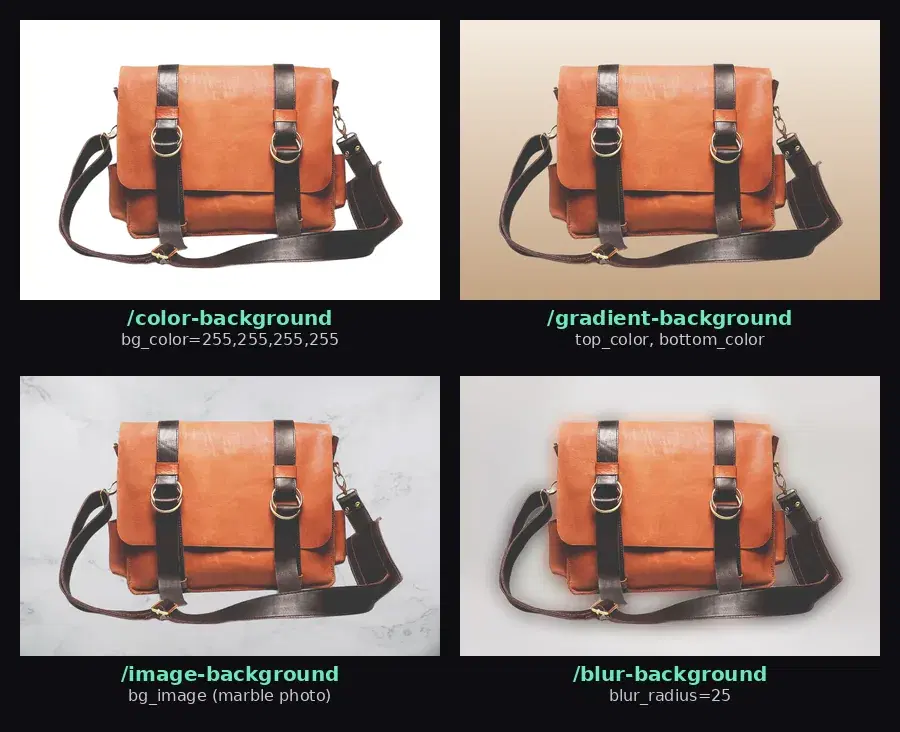
Update Your Error Handling
If your code branches on Clipdrop status codes, map them to what we observed:
- 402 (no credits) has no direct equivalent: a monthly plan has no prepaid balance to drain. Watch
x-ratelimit-requests-remaininginstead. - 401 and 403 (key problems) stay 401 and 403: a missing or malformed key returns 401 ("Invalid API key"), a key not subscribed to the API returns 403 ("You are not subscribed to this API.").
- 400 (bad input) becomes a 422 with a
detailfield, such as an unreachableimage_urlor a hex color. - 429 (rate limited) stays a 429. Keep your retry with backoff.
Migration Checklist
- Search your codebase for
clipdrop-api.coandx-api-keyto find every call site. - Note which
acceptformats you request and whether you usetransparency_handling. - Swap the call for
remove_background()and run it on 20 to 50 of your real images, including hard ones: hair, glass, white product on white table. - Replace any client-side compositing with
/color-backgroundor/image-backgroundif you put cutouts on a fixed background. - Update error handling and swap credit monitoring for the RapidAPI rate limit headers.
- Keep your remaining Clipdrop credits as a fallback: they stay valid for 2 years from purchase.
Moving off remove.bg too? The remove.bg API migration guide maps its parameters the same way. For large catalogs, see background removal at scale for concurrency and retries.
Sources
- Clipdrop remove background API documentation - endpoint, input limits, response headers, error codes, rate limit and free credits
- Clipdrop API pricing - credit packs, credit cost per tool and 2-year validity (checked October 2026)
Clipdrop's API still works, but at $0.144 to $0.50 per image it is built for low volumes. If your integration sends an image and expects a cutout back, the swap above takes a few minutes. Try it on your own product photos with the free tier of the AI Engine Background Removal API.
Frequently Asked Questions
- How much does the Clipdrop remove background API cost?
- Each successful call costs 1 credit. Credits are sold in prepaid packs: 100 for $50, 1,000 for $320, 5,000 for $800 and 25,000 for $3,600 (checked October 2026), which is $0.144 to $0.50 per image. Credits are valid for 2 years, and larger plans go through Jasper's sales team.
- Is there a free tier for the Clipdrop API?
- You can claim 100 free credits after signing in, intended for development and debugging. Once they are used, further calls are rejected until you buy a credit pack.
- What is the cheapest Clipdrop API alternative for background removal?
- AI Engine's Background Removal API costs $12.99 a month for 10,000 images, about $0.0013 per image, with 100 free requests a month. It takes the same multipart upload as Clipdrop and returns a link to a transparent PNG, plus endpoints for color, gradient, blur and custom image backgrounds.