This tutorial uses the Face Analyzer API. See the docs, live demo, and pricing.
Kairos and Betaface were two of the go-to face recognition APIs of the 2010s: enroll a face under a name, then recognize it in any photo. In 2026, Kairos sells identity verification and the public Betaface API is offline, which leaves attendance apps, visitor kiosks and photo tools that were built on them looking for a replacement.
This guide replaces both with the Face Analyzer API, using a small Python module that keeps the Kairos function names (enroll, recognize, verify, galleries) and the Kairos response shape, so the rest of your code barely changes. Every output below comes from a live run on real photos of an office team.
Where Kairos and Betaface Stand in 2026
We checked both services on 28 October 2026:
- Kairos: kairos.com now presents "Instant Identity Verification" (documents, selfies, liveness). The classic face recognition docs still live on face.kairos.com, but sign-up asks for a business email and how you plan to use Kairos, and the pricing page is a contact-sales form.
- Betaface: the products page on betaface.com reads "Public betafaceapi.com is temporarily down", its latest news post (17 March 2026) says the website is being restored, and the betafaceapi.com domain no longer resolves. On-premise licences are still offered.
If you want a hosted API with self-serve keys, the calls map one to one.
Kairos Endpoints Mapped to Face Analyzer
| Kairos | Face Analyzer API |
|---|---|
/enroll (subject_id, gallery_name) | /save-face-in-repository (external_id, repository_id) |
/recognize | /faceanalysis, then /search-face-in-repository per face |
/verify | /search-face-in-repository filtered on the subject |
/detect | /faceanalysis (box, landmarks, age range, gender, emotions) |
/gallery/list_all | /list-facial-repositories |
/gallery/view | /list-repository-faces |
/gallery/remove_subject | /delete-face-from-repository |
/gallery/remove | /delete-facial-repository |
| confidence 0 to 1, default threshold 0.60 | Similarity 0 to 100, we use 90 |
Betaface Concepts Mapped to Face Analyzer
- Image upload with face tags (age, gender, glasses, smile) becomes
/faceanalysis, which returnsAgeRange,Gender,Eyeglasses,SmileandEmotionsper face. - Namespaces become face repositories (
repository_id). - Persons such as
john@mynamespacebecome theexternal_idof the saved faces. - Verification (compare two faces) becomes
/compare-faces, and identification (search a namespace) becomes/search-face-in-repository.
The module below uses the same repository calls, so it works as the base for a Betaface migration too: a namespace is a gallery, a person is a subject_id.
Step 1: A Kairos-Compatible Module
Save this as kairos_compat.py. It needs requests and Pillow. Kairos /recognize matches every face in a photo, while the repository search looks at the main face of the image it receives, so recognize detects the faces first and searches a crop of each one:
import io
import requests
from PIL import Image, ImageOps

BASE = "https://faceanalyzer-ai.p.rapidapi.com"
HEADERS = {
    "x-rapidapi-host": "faceanalyzer-ai.p.rapidapi.com",
    "x-rapidapi-key": "YOUR_API_KEY",
}
MIN_SIMILARITY = 90  # 0 to 100 scale


def _post(endpoint, files=None, data=None):
    r = requests.post(f"{BASE}{endpoint}", headers=HEADERS, files=files, data=data)
    return r.json()["body"]


def _get(endpoint, params=None):
    r = requests.get(f"{BASE}{endpoint}", headers=HEADERS, params=params)
    return r.json()["body"]


def _search(face_jpg, gallery_name):
    """Return the matches of one face in a gallery, best first."""
    body = _post(
        "/search-face-in-repository",
        files={"image": ("face.jpg", face_jpg, "image/jpeg")},
        data={"repository_id": gallery_name},
    )
    matches = [m for m in body.get("FaceMatches", []) if m["Similarity"] >= MIN_SIMILARITY]
    return sorted(matches, key=lambda m: m["Similarity"], reverse=True)


def enroll(image_path, subject_id, gallery_name):
    """Kairos /enroll: store the face under subject_id, creating the gallery if needed."""
    if gallery_name not in _get("/list-facial-repositories")["FacialRepositoriesId"]:
        _post("/create-facial-repository", data={"repository_id": gallery_name})
    with open(image_path, "rb") as f:
        body = _post(
            "/save-face-in-repository",
            files={"image": f},
            data={"repository_id": gallery_name, "external_id": subject_id, "max_faces": "1"},
        )
    return {"face_id": body["FacesId"][0], "subject_id": subject_id}


def recognize(image_path, gallery_name):
    """Kairos /recognize: match every face in the photo against the gallery."""
    with open(image_path, "rb") as f:
        faces = _post("/faceanalysis", files={"image": f})["faces"]
    im = ImageOps.exif_transpose(Image.open(image_path)).convert("RGB")
    w, h = im.size
    images = []
    for face in faces:
        b = face["boundingBox"]
        x1, y1 = int(b["topLeft"]["x"] * w), int(b["topLeft"]["y"] * h)
        x2, y2 = int(b["bottomRight"]["x"] * w), int(b["bottomRight"]["y"] * h)
        m = int((x2 - x1) * 0.4)
        buf = io.BytesIO()
        im.crop((max(0, x1 - m), max(0, y1 - m), min(w, x2 + m), min(h, y2 + m))).save(buf, "JPEG")
        matches = _search(buf.getvalue(), gallery_name)
        transaction = {"topLeftX": x1, "topLeftY": y1, "width": x2 - x1, "height": y2 - y1}
        if matches:
            transaction.update(
                status="success",
                subject_id=matches[0]["ExternalImageId"],
                confidence=round(matches[0]["Similarity"] / 100, 5),
            )
        else:
            transaction.update(status="failure", message="no match found")
        candidates = [
            {"subject_id": m["ExternalImageId"], "confidence": round(m["Similarity"] / 100, 5)}
            for m in matches
        ]
        images.append({"transaction": transaction, "candidates": candidates})
    return {"images": images}


def verify(image_path, subject_id, gallery_name):
    """Kairos /verify: is the main face in the photo this subject?"""
    with open(image_path, "rb") as f:
        matches = _search(f.read(), gallery_name)
    scores = [m["Similarity"] for m in matches if m["ExternalImageId"] == subject_id]
    confidence = round(max(scores, default=0) / 100, 5)
    return {"status": "success" if scores else "failure", "subject_id": subject_id, "confidence": confidence}


def gallery_view(gallery_name):
    """Kairos /gallery/view: the subject_ids enrolled in a gallery."""
    faces = _get("/list-repository-faces", {"repository_id": gallery_name})["Faces"]
    return {"subject_ids": sorted({f["ExternalImageId"] for f in faces})}


def gallery_remove_subject(gallery_name, subject_id):
    """Kairos /gallery/remove_subject: delete every face enrolled for subject_id."""
    faces = _get("/list-repository-faces", {"repository_id": gallery_name})["Faces"]
    face_ids = [f["FaceId"] for f in faces if f["ExternalImageId"] == subject_id]
    _post("/delete-face-from-repository", data={"repository_id": gallery_name, "face_ids": face_ids})
    return {"status": "Complete", "removed": len(face_ids)}


def gallery_remove(gallery_name):
    """Kairos /gallery/remove: delete the gallery and all its faces."""
    return _post("/delete-facial-repository", data={"repository_id": gallery_name})
Similarity comes back from 0 to 100, so the module divides it by 100 to keep Kairos-style confidences. Code that reads transaction.subject_id, transaction.confidence or candidates keeps working.
Step 2: Enroll Your People
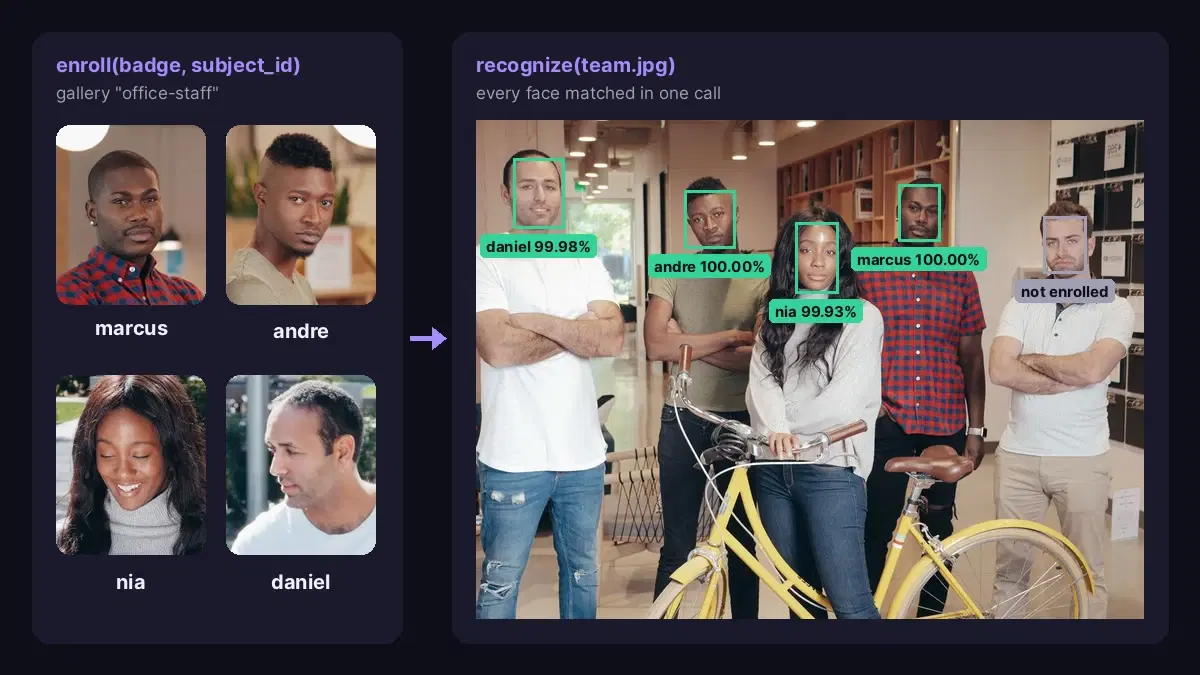
One photo per person is enough to start. Here, four staff badges, with the same enroll(image, subject_id, gallery_name) call as Kairos. The gallery is created on first use:
from kairos_compat import enroll, recognize, verify, gallery_view, gallery_remove_subject

GALLERY = "office-staff"
for name in ["marcus", "andre", "nia", "daniel"]:
print(enroll(f"badges/{name}.jpg", name, GALLERY)){'face_id': 'b2ab7035-b60a-42dd-8c8b-8d92131f386a', 'subject_id': 'marcus'}
{'face_id': 'e9491251-586b-4b81-b053-186182c01b59', 'subject_id': 'andre'}
{'face_id': '69d85fe0-9e02-40db-a591-cb8fc054add8', 'subject_id': 'nia'}
{'face_id': '4094744a-9a0d-4107-9373-9df1524303f9', 'subject_id': 'daniel'}Step 3: Recognize Every Face in a Group Photo
result = recognize("team.jpg", GALLERY)
for image in result["images"]:
    t = image["transaction"]
print(t["status"], t.get("subject_id", "-"), t.get("confidence", ""))success daniel 0.9998
success nia 0.99934
failure -
success andre 0.99999
success marcus 0.99999Five faces in the team photo, five correct answers in under 3 seconds: the four enrolled people are named with a confidence above 0.999, and the fifth man, who was never enrolled, comes back as failure with no candidate and the same "no match found" message Kairos uses. The cover image of this article shows that run.
Step 4: Verify One Person
verify answers "is this Daniel?". We tested it on a photo from another day of the shoot, in a suit and tie instead of the white t-shirt of his badge:
print(verify("daniel_suit.jpg", "daniel", GALLERY))
print(verify("daniel_suit.jpg", "marcus", GALLERY)){'status': 'success', 'subject_id': 'daniel', 'confidence': 0.99975}
{'status': 'failure', 'subject_id': 'marcus', 'confidence': 0.0}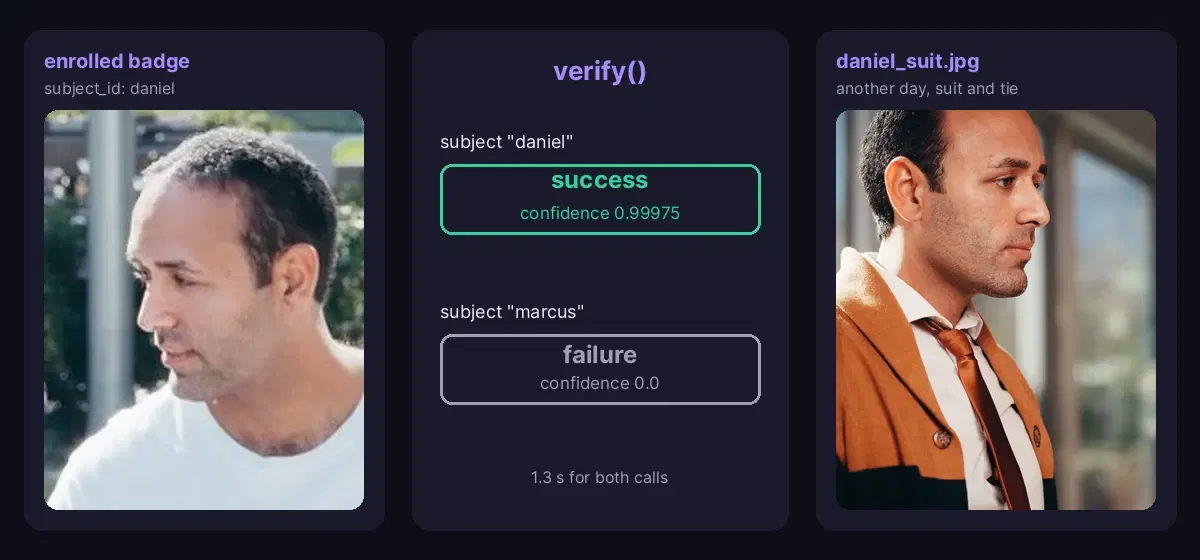
To compare two photos without a gallery at all, for example an ID portrait and a selfie, call /compare-faces directly; the face-api.js alternative guide shows it in Node.js.
Step 5: Manage the Gallery
print(gallery_view(GALLERY))
print(gallery_remove_subject(GALLERY, "andre"))
print(gallery_view(GALLERY)){'subject_ids': ['andre', 'daniel', 'marcus', 'nia']}
{'status': 'Complete', 'removed': 1}
{'subject_ids': ['daniel', 'marcus', 'nia']}When someone leaves the company or withdraws consent, one call removes every face stored under their subject_id.
Migration Tips
- Re-enroll from the original photos. Face templates are specific to each engine, so keep the source images of your subjects and run them through
enrollonce, with the same subject_ids you used before. - Set the threshold on the new scale. Kairos used a 0.60 confidence by default; on the 0 to 100 Similarity scale, 90 is a strict starting point for access control. Raise it rather than lower it.
- Enroll more than one photo per person. Call
enrollagain with another photo and the same subject_id: a profile shot or a photo with glasses helps in real conditions. - Switch behind a flag. Because the module returns Kairos-shaped JSON, you can route a share of traffic to it, compare the answers, then switch over.
- One gallery per customer. In a SaaS, never mix the faces of two customers, and delete a gallery with
gallery_removewhen the customer leaves.
For a wider look at the market, the face recognition API comparison covers Face++, Luxand, Google Vision and CompreFace. The same gallery logic also powers a face recognition attendance system and lets you group photos by face.
Move Off Kairos or Betaface Today
One module, the same function names and the same JSON shape: enroll, recognize, verify and gallery management all ran live on the Face Analyzer API in a few seconds. Grab a key from the Face Analyzer API page, re-enroll your subjects and point your app at kairos_compat.py. A free tier is available to test it on your own photos.
Sources
- Kairos API reference - /enroll, /recognize, /verify, /detect and gallery endpoints, default 0.60 threshold.
- kairos.com - identity verification positioning and contact-sales pricing, checked 28 October 2026.
- Betaface products page - "Public betafaceapi.com is temporarily down" and on-premise licensing.
- Test photos on Pexels by Kindel Media.
Frequently Asked Questions
- Is the Kairos face recognition API still available?
- Kairos now markets identity verification on kairos.com. The older face recognition docs (enroll, recognize, verify, galleries) are still online at face.kairos.com, but sign-up asks for a business email and a description of your use case, and pricing goes through a contact-sales form. If you need self-serve face recognition with a public price, the Face Analyzer API covers the same calls.
- Is the Betaface API down?
- Yes. Betaface's own products page says the public betafaceapi.com service is temporarily down, and when we checked on 28 October 2026 the betafaceapi.com domain did not resolve at all. Betaface still offers on-premise licences. Apps that called the public API need another face recognition API.
- How do I migrate from Kairos to another face recognition API?
- Map each call: /enroll to saving a face in a repository with your subject_id as the external ID, /recognize to a face search per detected face, /verify to a search filtered on one subject, and the gallery calls to the repository list and delete endpoints. Then re-enroll your people from their original photos, since face templates are specific to each engine. The drop-in Python module in this guide keeps the Kairos function names and response shape.