This tutorial uses the Face Analyzer API. See the docs, live demo, and pricing.
After a wedding, a conference or a race, the photographer delivers 2,000 photos and every guest asks the same question: which ones am I in? Scrolling a whole gallery is how most people give up. A face search fixes it: the guest takes one selfie, and the gallery shows only the photos that contain them. This guide shows how to find event photos by selfie with a face search API in Python, from indexing the gallery to returning each guest's photos with their face highlighted.
Everything runs on the Face Analyzer API and its face repository endpoints. The numbers below come from live calls on a real 18-photo birthday gallery with five guests.
How Selfie Photo Search Works
Two phases, with the face repository in the middle:
- Index the gallery once. Send each event photo to the API. It finds every face in the photo and stores it in a repository, labeled with the photo's file name.
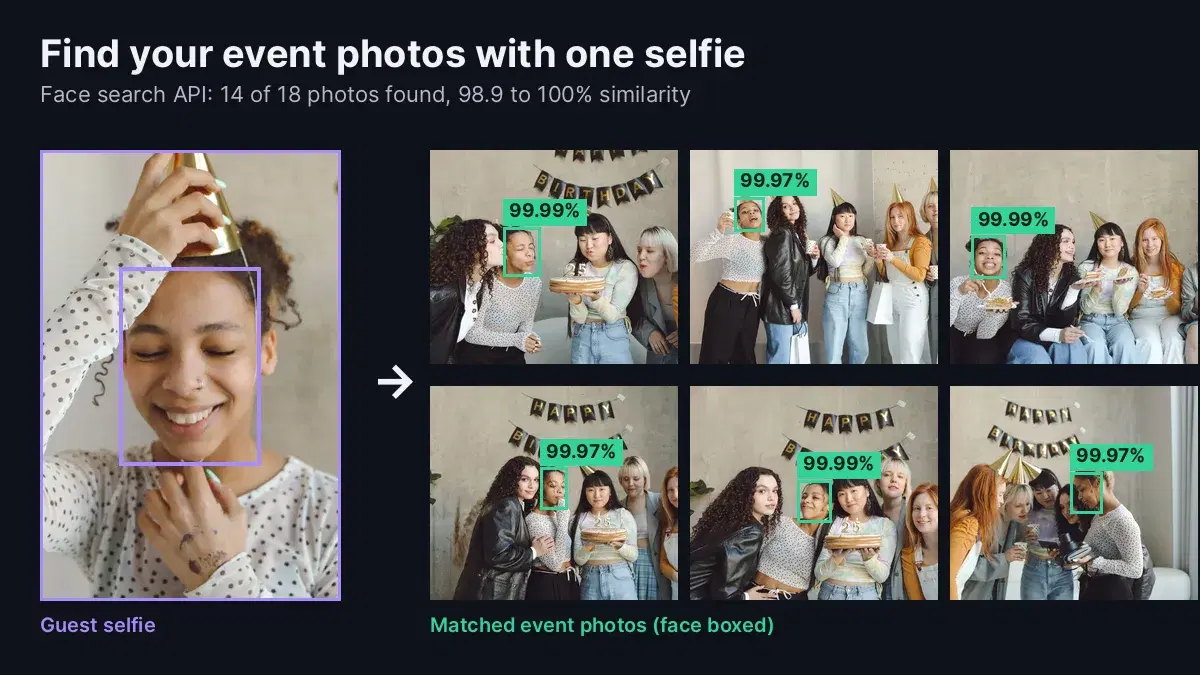
- Search with a selfie. When a guest uploads a selfie, search it in the same repository. Each match carries the label of the photo it came from, a similarity score and the face's position in that photo.
A group photo with five people produces five stored faces, all labeled with the same file name. That is the whole trick: the label turns a face match into a photo match.
Step 1: Create a Repository per Event
One repository per event keeps searches fast and makes cleanup a single call when the gallery closes:
import os
import requests
from concurrent.futures import ThreadPoolExecutor

BASE = "https://faceanalyzer-ai.p.rapidapi.com"
HEADERS = {
    "x-rapidapi-host": "faceanalyzer-ai.p.rapidapi.com",
    "x-rapidapi-key": "YOUR_API_KEY",
}
EVENT = "birthday-2026-10-17"

r = requests.post(
    f"{BASE}/create-facial-repository",
    headers=HEADERS,
    data={"repository_id": EVENT},
)
print(r.json())
# {'statusCode': 200, 'body': {'message': 'OK'}}
Step 2: Index Every Event Photo
Send each photo to /save-face-in-repository with the file name as external_id. Set max_faces high enough for your biggest group shot, so nobody in the back row is skipped. Photos are independent, so index them in parallel:
def index_photo(path):
    """Save every face in one event photo, labeled with the photo's file name."""
    with open(path, "rb") as f:
        r = requests.post(
            f"{BASE}/save-face-in-repository",
            headers=HEADERS,
            files={"image": f},
            data={
                "repository_id": EVENT,
                "external_id": os.path.basename(path),
                "max_faces": "20",
            },
        )
    return os.path.basename(path), len(r.json()["body"].get("FacesId", []))

photos = sorted(os.path.join("event_photos", n) for n in os.listdir("event_photos"))
with ThreadPoolExecutor(max_workers=4) as pool:
    for name, faces in pool.map(index_photo, photos):
        print(name, faces, "faces indexed")
On our birthday gallery:
IMG_7336925.jpg 3 faces indexed
IMG_7336934.jpg 3 faces indexed
IMG_7336946.jpg 5 faces indexed
IMG_7336950.jpg 1 faces indexed
IMG_7336957.jpg 5 faces indexed
...
IMG_7337110.jpg 5 faces indexed
18 photos, 76 faces, one call per photo. Index the gallery as soon as the photographer uploads it, before you send guests the link.
Step 3: Find a Guest's Photos from One Selfie
Search the selfie in the event repository. A person can only appear once per photo, but keeping the best match per file name makes the result safe to display either way:
MIN_SIMILARITY = 95

def find_my_photos(selfie_path):
    """Return the event photos that contain the person in the selfie."""
    with open(selfie_path, "rb") as f:
        r = requests.post(
            f"{BASE}/search-face-in-repository",
            headers=HEADERS,
            files={"image": f},
            data={"repository_id": EVENT},
        )
    body = r.json()["body"]
    if "error" in body:
        return None  # no face found in the selfie: ask for a new one
    best = {}
    for m in body["FaceMatches"]:
        photo = m["ExternalImageId"]
        if m["Similarity"] >= MIN_SIMILARITY and (
            photo not in best or m["Similarity"] > best[photo]["Similarity"]
        ):
            best[photo] = m
    return sorted(best.values(), key=lambda m: m["Similarity"], reverse=True)

matches = find_my_photos("selfie.jpg")
print(len(matches), "photos found")
for m in matches:
    print(m["ExternalImageId"], round(m["Similarity"], 2))
The live output for one guest:
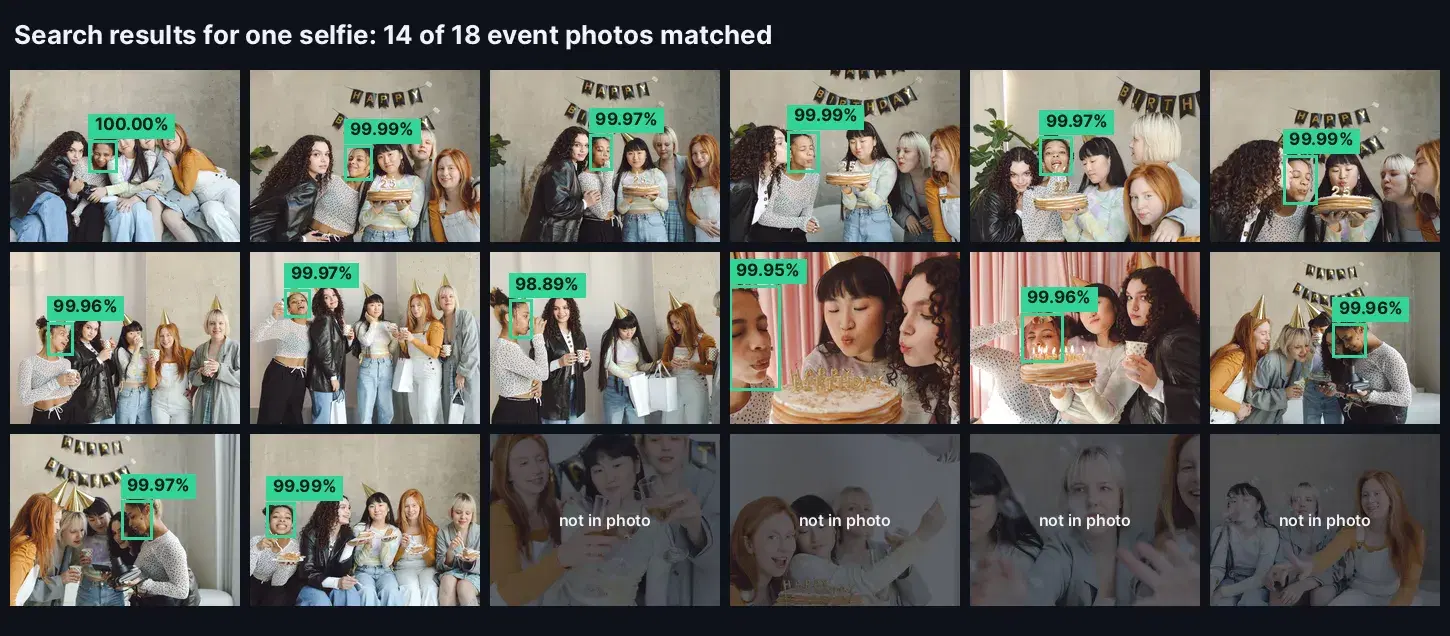
14 photos found
IMG_7336946.jpg 100.0
IMG_7337110.jpg 99.99
IMG_7336957.jpg 99.99
IMG_7336976.jpg 99.99
IMG_7336980.jpg 99.99
IMG_7336977.jpg 99.97
IMG_7337085.jpg 99.97
IMG_7336963.jpg 99.97
IMG_7336990.jpg 99.97
IMG_7336988.jpg 99.96
IMG_7337066.jpg 99.96
IMG_7337028.jpg 99.96
IMG_7337022.jpg 99.95
IMG_7336992.jpg 98.89
We checked every photo by eye: she appears in exactly those 14, and the 4 photos left out are the ones she is not in. The match held on group shots with five people, a side view, a face cut by the edge of the frame and a party hat in every frame. The search itself took about half a second.
Two cases to handle in your upload screen. A selfie with no visible face returns {"error": "There are no faces in the image. Should be at least 1"} in the body, which find_my_photos turns into None so you can ask for a new picture. A person who was not at the event gets an empty FaceMatches list: show a friendly "no photos yet" message, since the photographer may still be uploading.
Step 4: Highlight the Guest in Each Photo
Each match includes the BoundingBox of the face in the original photo, as fractions of its width and height. Drawing it helps the guest spot themselves in a crowded shot, and the same box can drive a face crop for a profile picture:
from PIL import Image, ImageDraw

def highlight(photo_path, match, out_path):
    """Draw a box around the guest's face in one matched photo."""
    im = Image.open(photo_path).convert("RGB")
    w, h = im.size
    box = match["BoundingBox"]
    rect = [
        box["topLeft"]["x"] * w, box["topLeft"]["y"] * h,
        box["bottomRight"]["x"] * w, box["bottomRight"]["y"] * h,
    ]
    ImageDraw.Draw(im).rectangle(rect, outline=(52, 211, 153), width=6)
    im.save(out_path)

os.makedirs("my_photos", exist_ok=True)
for m in matches:
    name = m["ExternalImageId"]
    highlight(os.path.join("event_photos", name), m, os.path.join("my_photos", name))
The full script (create, index 18 photos, search, highlight 14 photos) ran end to end in under 8 seconds.
Where Selfie Photo Search Fits
- Event photographers: a "find my photos" button on the gallery page sells more prints and downloads than a 2,000-photo scroll.
- Races and sports events: runners find their finish line shots even when the bib number is hidden.
- Weddings and private parties: each guest gets a personal album link instead of the full gallery.
- Conferences and corporate events: speakers and attendees pull their own photos for social posts the same day.
- Schools and camps: parents see photos of their own child only, which is also the privacy-friendly default.
Production Tips
- Ask for a clear selfie. Front-facing, good light, no sunglasses. The search tolerates a lot, but the selfie is the one input you control.
- Show guests only their own matches. The repository holds every guest's face. Never expose search results for another person's selfie, and do not let one guest browse the faces index.
- Get consent, then clean up. Ask guests to opt in before they upload a selfie, do not store the selfie after the search, and call
/delete-facial-repositorywhen the gallery closes. One repository per event makes that a single call. - Index new uploads as they arrive. Photographers often deliver in batches. Index each batch on upload and let guests search again later.
- Keep the threshold simple. Genuine matches in our test scored 98.89 and above, and the search returns nothing for people who are not in the gallery, so a 95 cutoff keeps a wide margin.
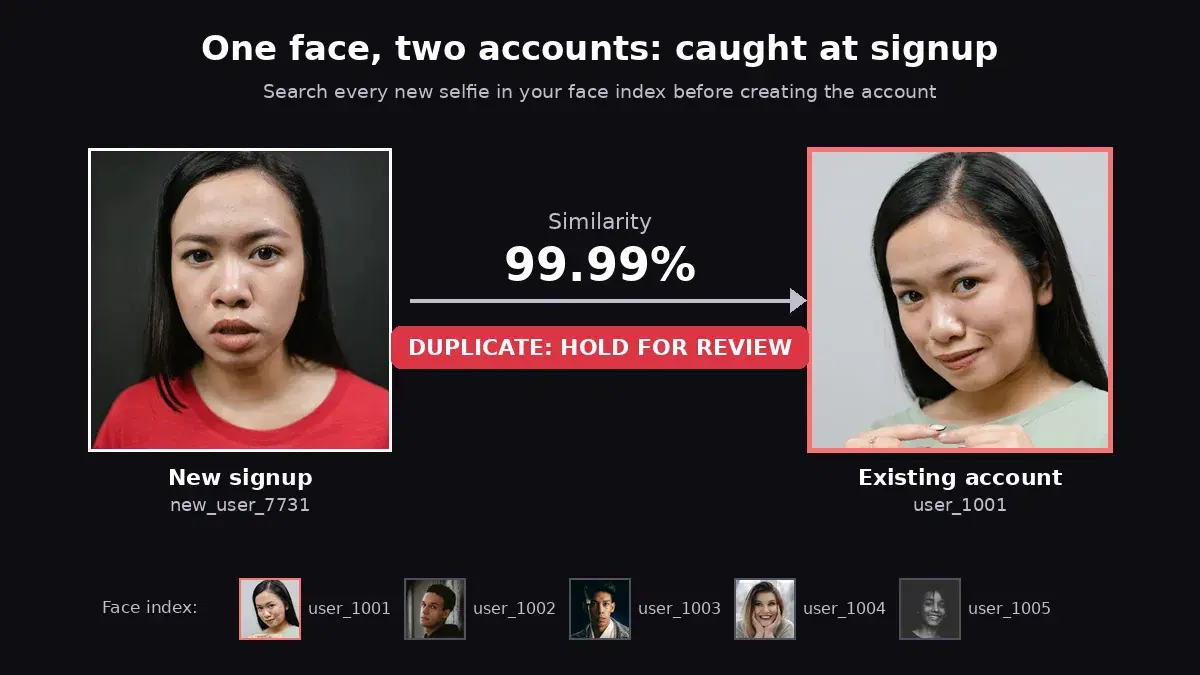
The same repository pattern powers other face search workflows on this blog: blocking repeat signups in duplicate account detection, identifying staff in a face recognition attendance system, and one-to-one checks in the face comparison tutorial.
Add Selfie Search to Your Gallery
Finding event photos by selfie takes three API calls in your code: create a repository, index each photo, search each selfie. Grab a key from the Face Analyzer API page, point the script at a folder of your own event photos and run a search with your selfie. A free tier is available to test it on a real gallery.
Sources
- GDPR Article 9 - processing of special categories of personal data, including biometric data used to identify a person.
- Polina Tankilevitch on Pexels - photographer of the birthday party photos used in the test gallery.
Frequently Asked Questions
- How do guests find their photos with a selfie?
- Every event photo is indexed once in a face repository, with the photo's file name as the label of each face it contains. A guest uploads a selfie, the face search returns every indexed face that belongs to the same person, and the labels tell you which photos to show. It costs one API call per event photo and one per guest search.
- How accurate is selfie-based photo search?
- On a real 18-photo birthday gallery with five guests, one selfie found all 14 photos that person appears in, at 98.89 to 100% similarity, and none of the 4 photos she is not in. Group shots, side angles and party hats did not stop the match.
- Is face search for event photos allowed under GDPR?
- Face data used to identify a person is biometric data under GDPR Article 9, so ask guests for explicit consent before they upload a selfie, use it only to find their photos, and delete the event's face repository when the gallery closes. This is not legal advice: check the rules for your market.