This tutorial uses the Face Analyzer API. See the docs, live demo, and pricing.
Your referral bonus is being farmed. One person opens ten accounts with ten email addresses, ten prepaid SIMs and a VPN, collects the signup credit on each, and your fraud rules see ten different users. Email, phone and device checks all fail for the same reason: those signals are cheap to rotate. A face is not. This guide shows how to detect duplicate accounts at signup with a face search: index every verified user's selfie once, then search each new selfie against that index before the account is created.
The whole check runs on the Face Analyzer API and its face repository endpoints, with about 50 lines of Python. The results below come from live calls on real photos, including the similarity scores we used to pick a threshold.
Where Multi-Accounting Costs You Money
Duplicate accounts are not a niche problem. Any product that gives something away per account, or that bans bad actors per account, pays for them:
- Referral and signup bonuses: fintech apps, wallets and delivery platforms paying credit for each new user.
- Free-trial abuse: SaaS and AI tools where a new account resets the free quota.
- Banned users coming back: marketplaces, dating apps and gig platforms where a removed seller, scammer or driver simply registers again.
- Betting and gaming: bonus hunting across accounts, and self-excluded players who must not be allowed to reopen one.
- Marketplace reviews and voting: one person running several buyer accounts to boost their own listings.
If your onboarding already asks for a selfie (for eKYC or a profile photo), you already have the input. The missing piece is a one-to-many search across everyone who signed up before.
Face Search vs Face Comparison: 1:N, Not 1:1
A face comparison answers "are these two photos the same person?". That is the right tool when you already know who the user claims to be, like matching a selfie to an ID photo. Duplicate detection asks a different question: "is this person anywhere among my existing users?". Comparing the new selfie against every user one pair at a time does not scale past a few hundred accounts.
A face repository solves this. You save each verified face once, with your own user ID as the label (external_id). A search then returns the matching labels and a Similarity score from 0 to 100 in a single call, without any loop over users in your code.
The Signup Check, Step by Step
- Create one face repository for your user base (once).
- On signup, search the new selfie in the repository.
- If a face matches above your threshold, do not create the account yet: hold it for review and show the reviewer which existing account matched.
- If nothing matches, create the account and save the face with the new user ID as its label. Store the returned face ID with the user record.
- If no face is found in the photo, ask the user to retake the selfie.
Duplicates are never indexed, so a repeat offender cannot pollute the index with a second entry. If a reviewer clears a flagged signup (a returning user with a legitimate reason, for example), index it then.
Create the repository
curl -X POST "https://faceanalyzer-ai.p.rapidapi.com/create-facial-repository" \
  -H "x-rapidapi-key: YOUR_API_KEY" \
  -H "x-rapidapi-host: faceanalyzer-ai.p.rapidapi.com" \
  -d "repository_id=signup-faces"
The response is {"statusCode": 200, "body": {"message": "OK"}}. Calling it again with the same ID returns an error in body.error ("already exist"), so run it as a one-time setup step, not on every deploy.
Search a new selfie and index a new user (cURL)
# 1. Search the new selfie against existing users
curl -X POST "https://faceanalyzer-ai.p.rapidapi.com/search-face-in-repository" \
  -H "x-rapidapi-key: YOUR_API_KEY" \
  -H "x-rapidapi-host: faceanalyzer-ai.p.rapidapi.com" \
  -F "image=@selfie.jpg" \
  -F "repository_id=signup-faces"

# 2. No match: save the face with your user ID as the label
curl -X POST "https://faceanalyzer-ai.p.rapidapi.com/save-face-in-repository" \
  -H "x-rapidapi-key: YOUR_API_KEY" \
  -H "x-rapidapi-host: faceanalyzer-ai.p.rapidapi.com" \
  -F "image=@selfie.jpg" \
  -F "repository_id=signup-faces" \
  -F "external_id=user_1001" \
  -F "max_faces=1"
Two details the code below handles. Pass max_faces on the save call (1 for a signup selfie). And read the result from body: errors are reported there under an error key.
A search that finds a duplicate returns this (real response):
{
  "statusCode": 200,
  "body": {
    "FaceMatches": [
      {
        "FaceId": "61dbcaca-71ab-4883-9d6a-9a00563cdc1e",
        "ExternalImageId": "user_1001",
        "Similarity": 99.9853744506836,
        "BoundingBox": {"topLeft": {"x": 0.33, "y": 0.23}, "bottomRight": {"x": 0.65, "y": 0.48}}
      }
    ],
    "SearchedFaceBoundingBox": {"topLeft": {"x": 0.36, "y": 0.06}, "bottomRight": {"x": 0.67, "y": 0.76}}
  }
}
ExternalImageId and Similarity sit directly on each match. When nobody matches, FaceMatches is an empty list.
The full signup check in Python
import requests

API = "https://faceanalyzer-ai.p.rapidapi.com"
HEADERS = {
    "x-rapidapi-host": "faceanalyzer-ai.p.rapidapi.com",
    "x-rapidapi-key": "YOUR_API_KEY",
}
REPO = "signup-faces"
DUPLICATE_THRESHOLD = 95.0


def search_face(selfie_path):
    with open(selfie_path, "rb") as f:
        r = requests.post(
            f"{API}/search-face-in-repository",
            headers=HEADERS,
            files={"image": f},
            data={"repository_id": REPO},
        )
    body = r.json()["body"]
    if "error" in body:
        raise ValueError(body["error"])  # e.g. no face in the photo
    return body["FaceMatches"]


def index_face(user_id, selfie_path):
    with open(selfie_path, "rb") as f:
        r = requests.post(
            f"{API}/save-face-in-repository",
            headers=HEADERS,
            files={"image": f},
            data={"repository_id": REPO, "external_id": user_id, "max_faces": 1},
        )
    return r.json()["body"]["FacesId"][0]


def check_signup(user_id, selfie_path):
    try:
        matches = search_face(selfie_path)
    except ValueError:
        return {"decision": "retake_selfie"}

    duplicates = [m for m in matches if m["Similarity"] >= DUPLICATE_THRESHOLD]
    if duplicates:
        return {
            "decision": "review",
            "matched_accounts": [
                (m["ExternalImageId"], round(m["Similarity"], 2)) for m in duplicates
            ],
        }

    face_id = index_face(user_id, selfie_path)
    return {"decision": "approve", "face_id": face_id}


print(check_signup("user_7731", "selfie.jpg"))
Store the returned face_id with the user record. You will need it to delete the face later, and it saves you from listing the whole repository to find one user.
Real Results: 5 Users, 3 New Signups
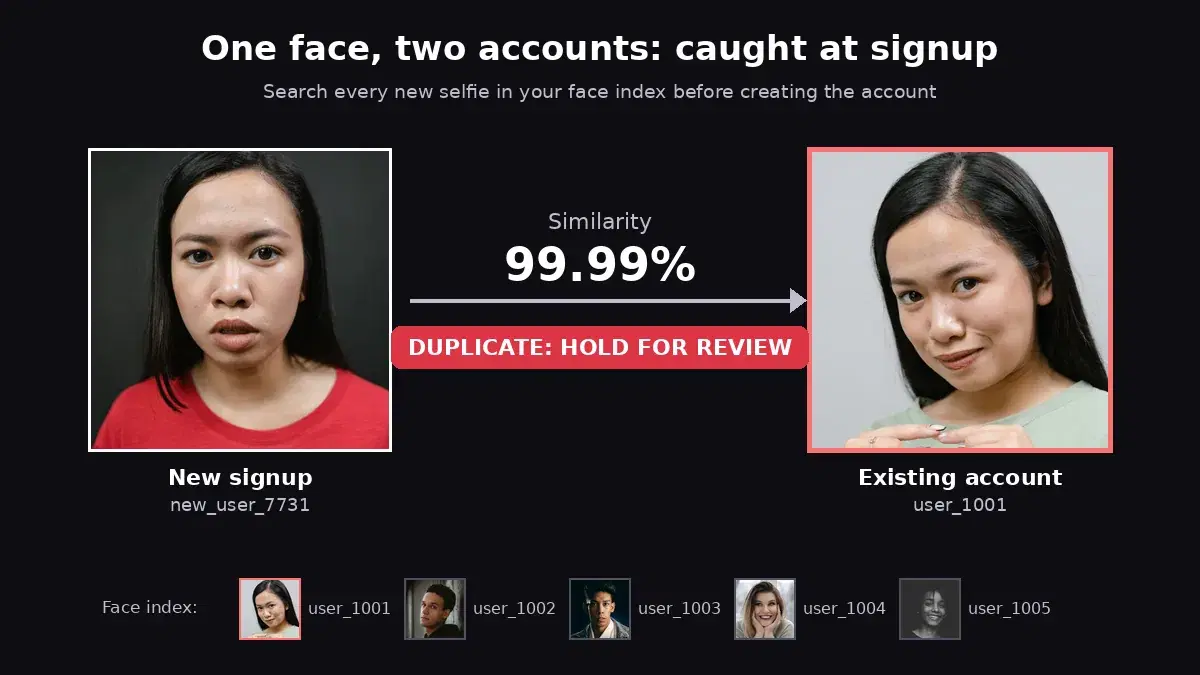
We indexed five existing users (anonymous stock models, one photo each), then ran check_signup on three new signups: a different photo of user_1001 with another outfit, background and expression, a different photo of user_1003, and a person who was never indexed.
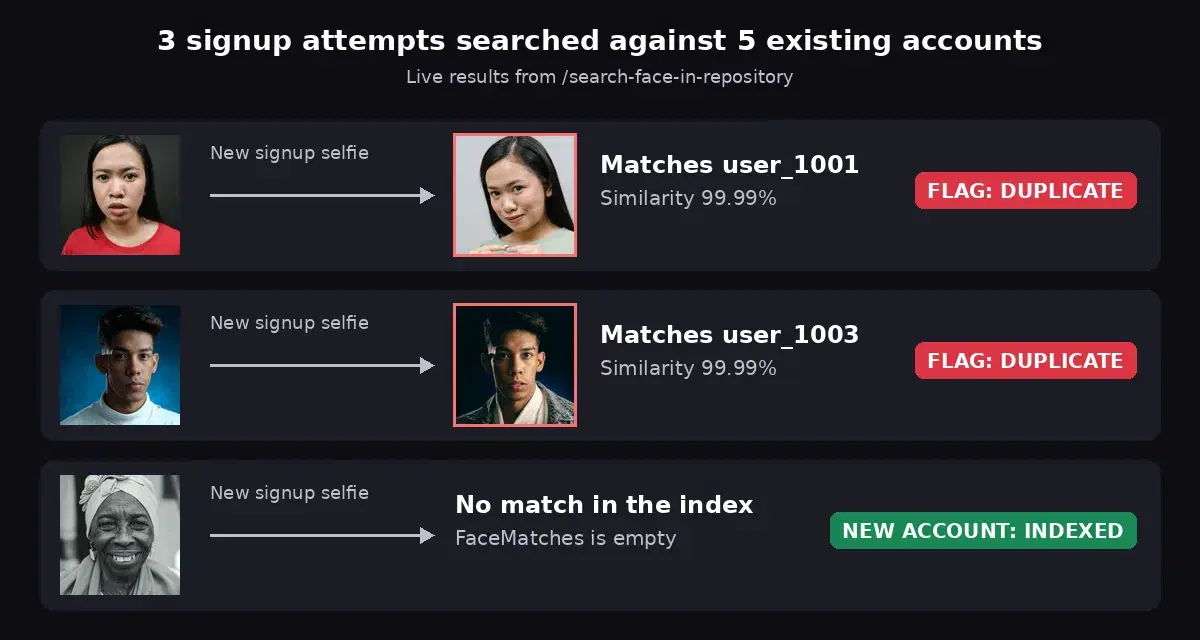
| New signup | Best match | Similarity | Decision |
|---|---|---|---|
| user_7731 (second photo of user_1001) | user_1001 | 99.99 | review |
| user_7732 (second photo of user_1003) | user_1003 | 100.0 | review |
| user_7733 (never indexed) | none | - | approve, indexed |
| user_7734 (photo with no face) | - | - | retake_selfie |
One more case worth knowing: when we indexed the same woman under a second ID (as if a duplicate had slipped in before you added the check), the next search returned both accounts, at 99.99 and 99.97. Every match is a lead: a face that maps to three accounts is a fraud ring, not a coincidence.
Choosing a Similarity Threshold
The threshold is the main tuning decision, so we measured how scores behave on harder inputs. Each row searches a degraded copy of a photo whose owner was already indexed from a different picture:
| Search input | Similarity to the right user |
|---|---|
| Different photo, full resolution | 99.62 to 99.9998 |
| Downscaled 8x | 99.96 |
| Downscaled 14x (face about 30 px wide) | 99.49 |
| Heavy Gaussian blur | 99.98 |
| Grayscale | 99.98 |
| Rotated 90 degrees | 99.99 |
| 11 different people, not indexed | no match returned |
Two takeaways. True duplicates land very close to 100, even on poor photos. And different people do not come back with a low score: the search only returns candidates above an internal floor, so an unrelated face simply produces an empty FaceMatches list, including for people of the same age and gender as an indexed user in our set of 11.
That is why we use 95. It sits far below every genuine duplicate we measured, while still filtering out a weak candidate if one ever comes back. Adjust it to your own risk policy: raise it for a stricter queue, lower it to cast a wider net. Either way:
- Review, do not auto-ban. Some returning users have a legitimate reason (a forgotten login, a new email address). A human looks at both photos and the account history and decides in seconds.
- Show the reviewer the matched account, its creation date and its status (active, banned, self-excluded). A match to a banned account is a much stronger signal than a match to an active one.
- Combine with your other signals. Same face plus same device or payment card is a near-certain duplicate; same face alone is still worth a look.
Privacy, Consent and Deletion
A face used to recognize a person is biometric data. Under GDPR it is a special category (Article 9), and in the US, laws such as Illinois' Biometric Information Privacy Act require informed written consent before collection. Build the check with that in mind from day one:
- Ask for explicit consent at the selfie step and say what it is for: preventing duplicate accounts.
- Keep the index, not the photos. The repository stores face features linked to your
external_id. Once the face is saved you do not need to keep the selfie file for this check. - Use an opaque user ID as the label, never a name or email address.
- Delete on request and on account closure. This is where the stored face ID pays off:
def erase_user(face_id):
    r = requests.post(
        f"{API}/delete-face-from-repository",
        headers=HEADERS,
        data={"repository_id": REPO, "face_ids": [face_id]},
    )
    return r.json()["body"]  # {"message": "OK"}
We ran this on an indexed user, then searched a photo of the same person again: FaceMatches came back empty. The deleted face no longer exists anywhere in the index. For a full audit, GET /list-repository-faces?repository_id=signup-faces returns every stored FaceId with its ExternalImageId, so you can reconcile the index with your user table.
Scaling and Cost per Signup
- Two calls per genuine new user (one search, one save) and one call per flagged duplicate (search only). Logins never touch the API, only signups do, so the cost tracks your growth, not your traffic.
- One search, any repository size. You do not loop over users in your code, so the check stays a single request as the user base grows.
- One repository per product or region if your data must stay separated, for example one per brand or per legal entity.
- Backfill existing users who already gave a selfie, with consent, so the first duplicate you catch is not limited to accounts created after launch.
- Keep a liveness check in front for high-risk flows. The search tells you a face is already known; it does not tell you the selfie is a live person rather than a photo of one.
If you also need to confirm that the selfie matches an ID document, add the selfie-to-ID eKYC step before the duplicate search. The two checks answer different questions and share the same selfie.
Add the Duplicate Check to Your Signup
Duplicate account detection with a face search comes down to one rule: search before you create, index after you approve. Grab a key from the Face Analyzer API page, create a repository, paste the check_signup function above into your signup handler, and run it on a few photos of the same person tonight. The free tier is enough to measure the scores on your own users before you set the threshold.
Sources
- GDPR Article 4 - definition of biometric data (point 14), which explicitly includes facial images used for unique identification.
- GDPR Article 9 - processing of special categories of personal data, including biometric data for uniquely identifying a person.
- GDPR Article 17 - right to erasure, the reason to keep a face ID per user.
- Illinois Biometric Information Privacy Act (740 ILCS 14) - written consent and retention rules for biometric identifiers in Illinois.
Frequently Asked Questions
- How do you detect duplicate accounts with face recognition?
- Keep a face index of your verified users. When someone signs up, search their selfie in that index before creating the account. If an existing face matches above your similarity threshold, hold the signup for review; if nothing matches, create the account and add the new face to the index with the user ID as its label. It costs two API calls per new user: one search, one save.
- What similarity threshold should I use to flag duplicate faces?
- In our tests, every second photo of an already indexed person scored between 99.49 and 100, even after downscaling the photo 14 times, blurring it, converting it to grayscale or rotating it. Eleven people who were not indexed never appeared in the results at all, because the search only returns candidates above an internal floor. A threshold of 95 leaves a wide safety margin; route matches to a review queue instead of banning automatically.
- Is storing face data to prevent fraud allowed under GDPR?
- Face data used to uniquely identify someone is biometric data, a special category under GDPR Article 9, so you need an explicit legal basis (usually explicit consent), a clear purpose and a retention limit. Store the face index rather than the photos, link each entry to a user ID, and delete it when the user asks or closes the account. This is not legal advice: check with your privacy counsel for your markets.