This tutorial uses the Landmark Detection API. See the docs, live demo, and pricing.
Travelers snap millions of photos every day at iconic locations around the world, yet most of those images end up in camera rolls with no context about what they actually depict. A landmark detection API solves this by analyzing a photograph and identifying famous structures, monuments, and natural wonders it contains — along with precise GPS coordinates. Whether you are building a travel app, a photo management tool, or a geographic analysis platform, landmark detection turns unstructured images into location-aware, searchable data. In this tutorial you will learn how to integrate the Landmark Detection API into your projects using cURL, Python, and JavaScript.
Why Landmark Detection Matters
Recognizing landmarks in images unlocks capabilities that go far beyond simple photo tagging. Here are the key areas where landmark detection delivers real value.
Automatic Geo-Tagging
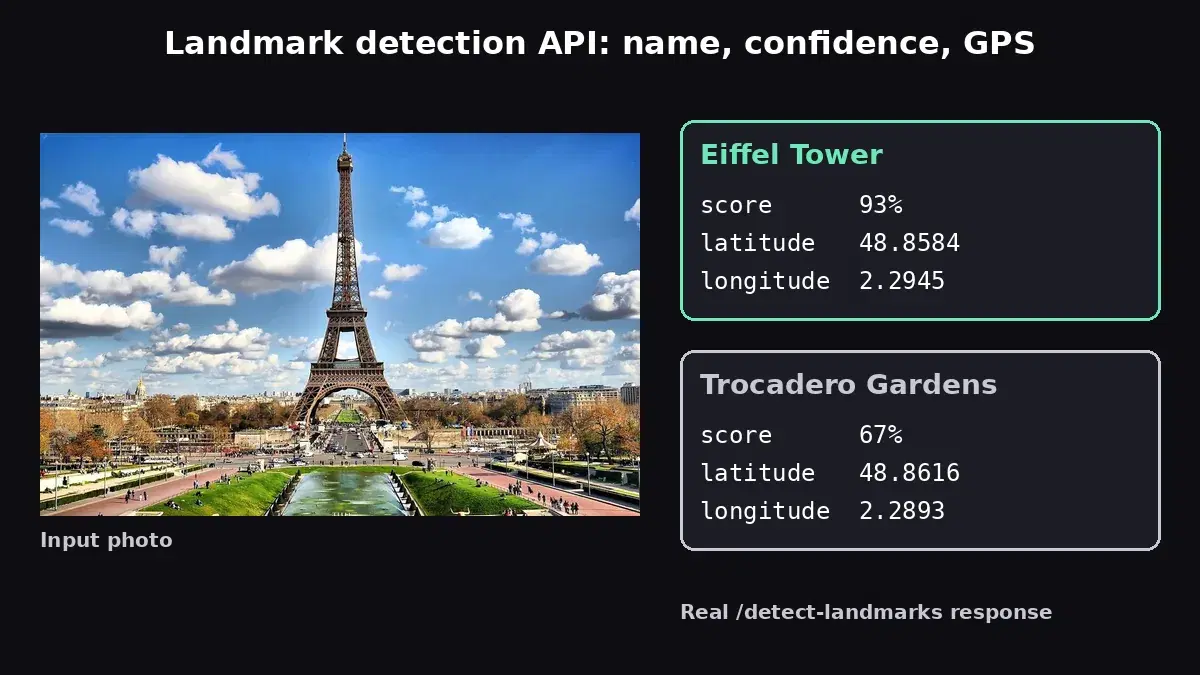
Many photos lack GPS metadata — images shared on social media, downloaded from the web, or taken with devices that had location services disabled. Landmark detection fills this gap by inferring the geographic location directly from the visual content. When the API identifies the Eiffel Tower in a photo, you instantly know the image was taken in Paris, France, complete with latitude and longitude coordinates. This enables retroactive geo-tagging of entire photo libraries without any manual effort.
Tourism and Travel Applications
Travel apps can use landmark detection to enhance the user experience in powerful ways. Point-and-identify features let users snap a photo of a building or monument and instantly receive its name, history, and visitor information. Travel journals can auto-populate location data for each photo. Trip planning tools can analyze inspiration boards to suggest destinations based on the landmarks that appear in saved images.
Cultural Heritage and Documentation
Museums, archives, and cultural organizations manage vast collections of historical photographs that often lack proper metadata. Landmark detection can automatically identify and catalog the locations depicted in these images, making collections searchable by place and enabling researchers to cross-reference images across different archives. This is particularly valuable for digitization projects where thousands of photos need to be processed efficiently.
Content Moderation and Verification
News organizations and content platforms can use landmark detection to verify the claimed location of user-submitted photos. If a photo is captioned as being from New York but the API detects landmarks from London, that discrepancy can be flagged for review. This adds a layer of geographic fact-checking that complements other verification methods.
Getting Started with the Landmark Detection API
The Landmark Detection API accepts either an image URL (sent as form-encoded data) or a direct image file upload (sent as multipart form data). It returns a JSON response containing every detected landmark along with its name, a confidence score, and GPS coordinates (latitude and longitude). Below are working examples in three languages.
cURL
Send an image URL using form-encoded data:
curl -X POST \
  'https://landmarks-detection.p.rapidapi.com/detect-landmarks' \
  -H 'Content-Type: application/x-www-form-urlencoded' \
  -H 'x-rapidapi-host: landmarks-detection.p.rapidapi.com' \
  -H 'x-rapidapi-key: YOUR_API_KEY' \
  -d 'url=https://example.com/photo.jpg'
Or upload a local file directly:
curl -X POST \
  'https://landmarks-detection.p.rapidapi.com/detect-landmarks' \
  -H 'Content-Type: multipart/form-data' \
  -H 'x-rapidapi-host: landmarks-detection.p.rapidapi.com' \
  -H 'x-rapidapi-key: YOUR_API_KEY' \
  -F 'image=@/path/to/local-photo.jpg'
Python
The Python example below demonstrates the URL-based approach and iterates through detected landmarks to print names, confidence scores, and GPS coordinates:
import requests

api_url = "https://landmarks-detection.p.rapidapi.com/detect-landmarks"
headers = {
    "x-rapidapi-host": "landmarks-detection.p.rapidapi.com",
    "x-rapidapi-key": "YOUR_API_KEY",
}

# Send an image URL
response = requests.post(
    api_url,
    headers={**headers, "Content-Type": "application/x-www-form-urlencoded"},
    data={"url": "https://example.com/photo.jpg"},
)

data = response.json()

for lm in data["body"]["landmarks"]:
    name = lm["description"]
    score = lm["score"]
    for loc in lm["locations"]:
        lat, lng = loc["latitude"], loc["longitude"]
        print(f"{name} (confidence: {score:.0%}) at {lat:.4f}, {lng:.4f}")
JavaScript (fetch)
This example uploads a local file using the Fetch API with FormData:
const formData = new FormData();
formData.append("image", fileInput.files[0]);

const response = await fetch(
  "https://landmarks-detection.p.rapidapi.com/detect-landmarks",
  {
    method: "POST",
    headers: {
      "x-rapidapi-host": "landmarks-detection.p.rapidapi.com",
      "x-rapidapi-key": "YOUR_API_KEY",
    },
    body: formData,
  }
);

const data = await response.json();

data.body.landmarks.forEach((lm) => {
  const { description, score, locations } = lm;
  locations.forEach((loc) => {
    console.log(
      `${description} (${(score * 100).toFixed(1)}%) at ${loc.latitude.toFixed(4)}, ${loc.longitude.toFixed(4)}`
    );
  });
});
Understanding the Response
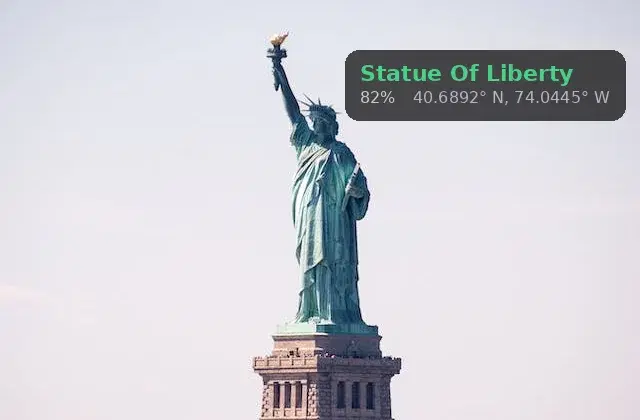
The API returns a JSON object with a statusCode and a body containing a landmarks array. Here is a typical response:
{
  "statusCode": 200,
  "body": {
    "landmarks": [
      {
        "description": "Statue Of Liberty",
        "score": 0.82,
        "locations": [
          {
            "latitude": 40.6892,
            "longitude": -74.0445
          }
        ]
      }
    ]
  }
}
Let's break down each field:
- description — The name of the detected landmark. This is a human-readable string such as "Statue Of Liberty", "Eiffel Tower", or "Colosseum".
- score — A floating-point confidence value between 0 and 1. A score of 0.82 means the model is 82% confident in its identification. For production use, filtering results above 0.6 is recommended to avoid false positives while still catching less obvious landmarks.
- locations — An array of geographic coordinates for the landmark. Each location contains a
latitudeandlongitudein decimal degrees. These coordinates pinpoint the real-world position of the landmark and can be used directly with mapping services like Google Maps, Mapbox, or Leaflet.
When an image contains multiple landmarks, the landmarks array will include a separate object for each detection. If no landmarks are found, the array will be empty.
Real-World Use Cases
Travel Photo Organizer
Photo management apps can automatically sort vacation photos by location using landmark detection. Instead of relying solely on GPS metadata (which may be missing or inaccurate), the API identifies the actual landmark in each photo. A trip to Rome gets automatically tagged with "Colosseum", "Trevi Fountain", and "St. Peter's Basilica", creating a structured travel journal without any manual input from the user. This is especially valuable for photos received via messaging apps, which typically strip GPS metadata for privacy.
Real Estate and Location Intelligence
Real estate platforms can enhance property listings by identifying nearby landmarks from neighborhood photos. A listing near the Brooklyn Bridge or Central Park gains context that matters to buyers. Location intelligence platforms can analyze large image datasets to map which landmarks appear most frequently in user-generated content, providing insights into tourist hotspots and foot traffic patterns.
Augmented Reality and Navigation
AR applications can use landmark detection as a trigger for contextual overlays. When a user points their camera at a landmark, the app identifies it and displays historical information, visitor tips, or navigation directions. The GPS coordinates from the API response enable precise positioning of AR content relative to the real-world landmark. Combined with object detection, the app can identify both the landmark and the objects surrounding it for a richer experience.
Educational Platforms
E-learning platforms focused on geography, history, or architecture can use landmark detection to create interactive quizzes and study tools. Students upload a photo and the system identifies the landmark, then presents relevant educational content. Geography courses can use the GPS coordinates to plot detected landmarks on an interactive map, connecting visual recognition with spatial understanding.
Tips and Best Practices
Use Clear, Well-Framed Photos
Landmark detection works best when the landmark is clearly visible and occupies a significant portion of the image. Distant shots where the landmark is a small element in the background produce lower confidence scores. Close-up details (such as a single column or window) may not be recognized as part of the larger landmark. Encourage users to capture the full structure when possible.
Leverage GPS Coordinates for Enrichment
The latitude and longitude in the response are a goldmine for downstream processing. Use them to reverse-geocode the location into a full address, link to a map pin, fetch weather data for the location, or pull nearby points of interest from a places API. The coordinates are precise enough for mapping applications and can serve as the foundation for a full location profile associated with each image.
Combine with Image Labeling
Landmark detection tells you which specific monument or structure appears in an image, while image labeling provides broader context like "Beach", "Mountain", or "Cityscape". Running both APIs on the same image gives you a complete picture: the specific landmark plus the general scene and environment. This combination is powerful for building rich photo metadata that supports both specific searches ("Statue of Liberty") and broad category browsing ("Coastal landmarks").
Handle Multiple Landmarks Gracefully
Panoramic shots and cityscape images may contain several landmarks at once. Design your processing pipeline to handle multiple results and present them in a way that makes sense for your application. A map view that plots all detected landmarks is more useful than a text list for most travel and navigation use cases.
Landmark detection transforms ordinary travel photos into location-aware, searchable data with a single API call. Whether you are building a travel journal, a geographic intelligence platform, or an AR navigation tool, the Landmark Detection API gives you landmark names, confidence scores, and GPS coordinates for every famous structure in an image. Grab your API key and start identifying landmarks today.
Frequently Asked Questions
- What is a landmark detection API?
- A landmark detection API identifies famous buildings, monuments, and natural landmarks in photos. It returns the landmark name, GPS coordinates, and a confidence score. This enables automatic geo-tagging, travel app features, and cultural heritage documentation.
- Does landmark detection return GPS coordinates?
- Yes. When a landmark is recognized, the API returns its known latitude and longitude. This allows you to automatically geo-tag photos, plot locations on a map, or build location-aware features in travel and tourism applications.
- How many landmarks can the API recognize?
- The API recognizes thousands of landmarks worldwide, including major buildings (Eiffel Tower, Colosseum), natural sites (Grand Canyon, Mount Fuji), and cultural monuments. Recognition accuracy is highest for well-known landmarks with distinctive visual features.