This tutorial uses the Face Analyzer API. See the docs, live demo, and pricing.
Short-term rental hosts and property managers need to know who is coming before handing over the keys. A guest ID verification step does that remotely: the guest uploads a photo of their ID and a selfie, and your system checks that both show the same person, that the selfie is usable and that the guest meets the minimum age. At arrival, a second check can confirm that the person who booked is really there and that the group is not larger than the booking.
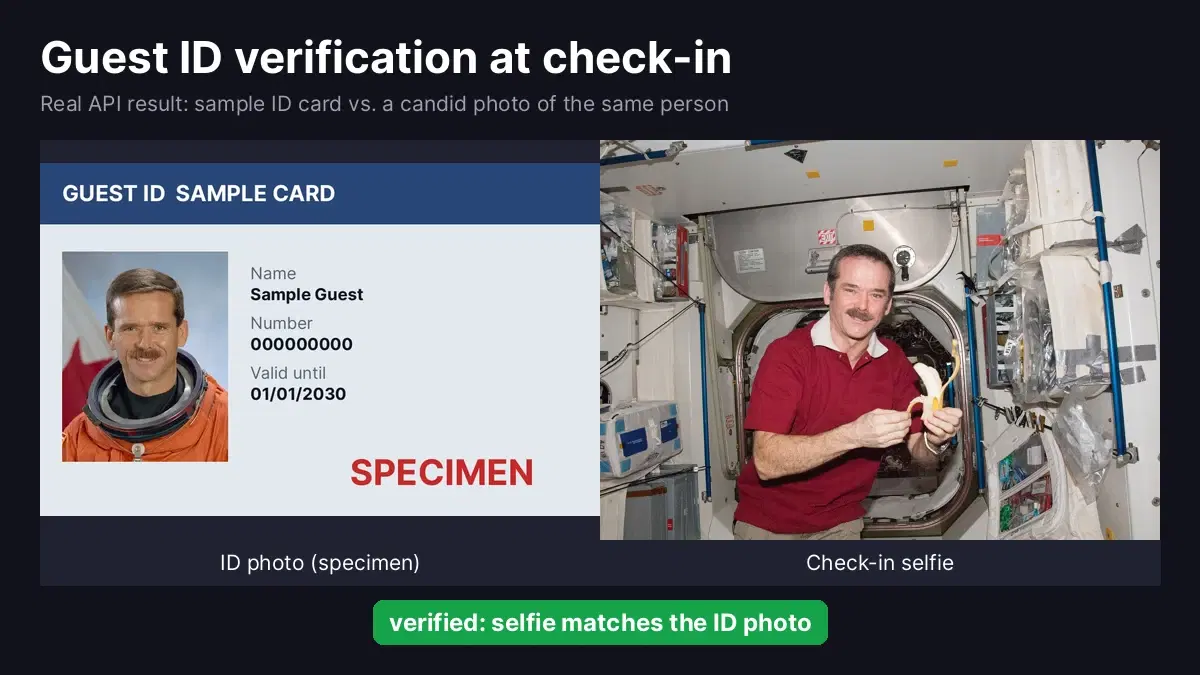
This tutorial builds both checks in Python with the Face Analyzer API. We ran every script on public domain NASA photos: official astronaut portraits play the role of the ID photo, placed on a sample card marked SPECIMEN, and candid photos taken on the International Space Station play the role of the selfie.
The Check-in Flow
- Booking confirmed: the guest receives a link to upload a photo of their ID and take a selfie.
- Selfie quality gate: exactly one face, no sunglasses, estimated age above your minimum. Otherwise the guest is asked to retake it right away.
- Face match: the selfie is compared with the face on the ID. A match marks the guest as verified; no match sends the booking to manual review.
- Arrival check (optional): a photo from the door camera or check-in tablet is compared with the booker's ID to confirm presence and count people.
Results on Six Check-in Attempts
We tested the verification function on six realistic situations: two genuine guests, one guest whose selfie belongs to someone else, a selfie with sunglasses, a group photo sent as a selfie, and a photo with no face at all. Every attempt received the right decision, and each API call took one to two seconds.
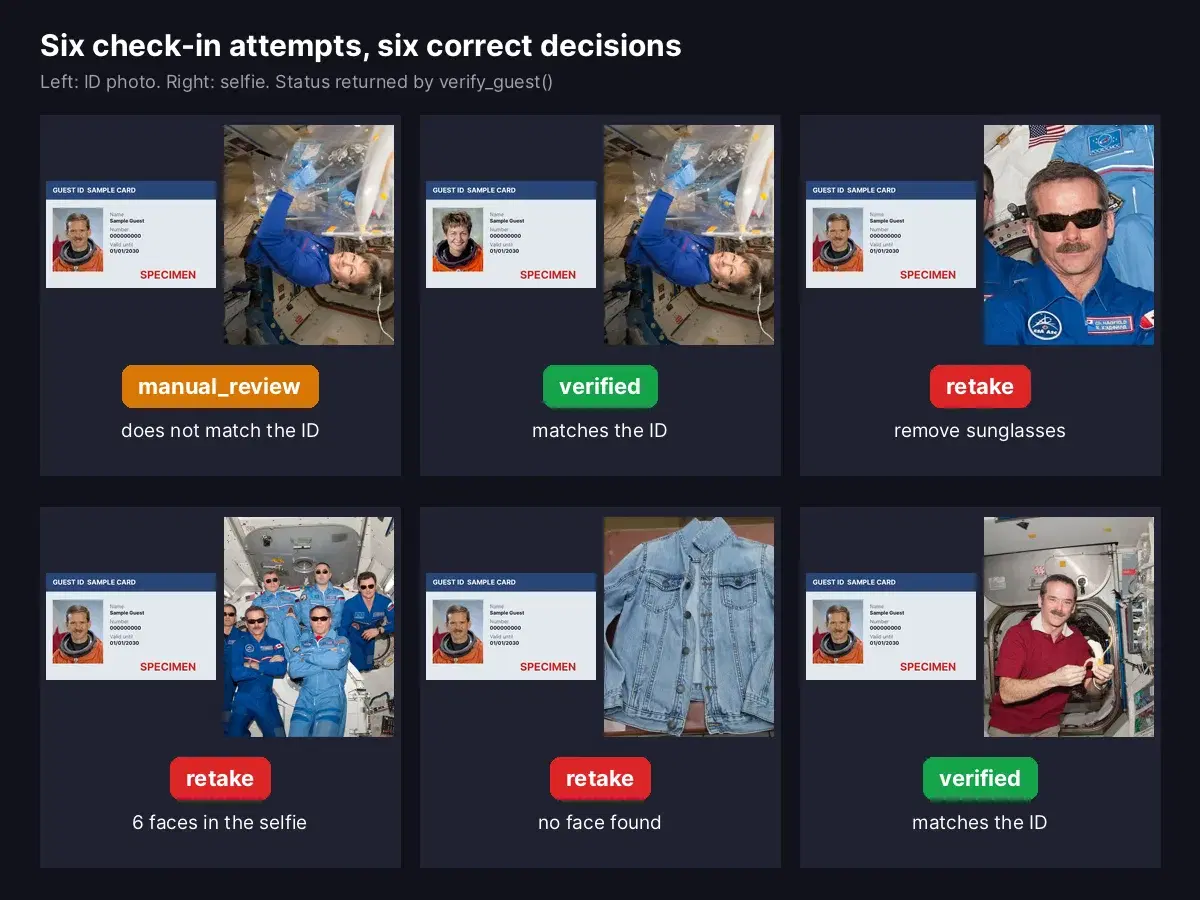
The two genuine matches are worth a look. The ID photos are studio portraits in pressurized suits, the selfies were taken on the space station, in different light and clothing, and in one case with the head tilted sideways and glasses on. Both were matched.
Verify a Guest in Python
You need Python 3 with requests and a RapidAPI key in the RAPIDAPI_KEY environment variable. The script uses two endpoints: /faceanalysis to inspect the selfie and /compare-faces to match it against the ID photo. Save it as guest_check.py:
import os
import requests

HOST = "faceanalyzer-ai.p.rapidapi.com"
HEADERS = {"x-rapidapi-host": HOST, "x-rapidapi-key": os.environ["RAPIDAPI_KEY"]}
MIN_AGE = 25  # many rentals require the main guest to be 25 or older


def call(endpoint, files):
    r = requests.post(f"https://{HOST}/{endpoint}", headers=HEADERS, files=files, timeout=30)
    r.raise_for_status()
    data = r.json()
    if data.get("statusCode") != 200:
        raise RuntimeError(data["body"].get("error", "unknown error"))
    return data["body"]


def check_selfie(selfie_path):
    """Return None if the selfie is usable, or the reason to ask for a new one."""
    with open(selfie_path, "rb") as f:
        faces = call("faceanalysis", {"image": f})["faces"]
    if not faces:
        return "no face found"
    if len(faces) > 1:
        return f"{len(faces)} faces, only the guest should be in the selfie"
    features = faces[0]["facialFeatures"]
    if features["Sunglasses"]:
        return "remove sunglasses"
    if features["AgeRange"]["Low"] < MIN_AGE:
        return "age needs a manual ID check"
    return None


def same_person(id_photo_path, selfie_path):
    with open(id_photo_path, "rb") as a, open(selfie_path, "rb") as b:
        body = call("compare-faces", {"source_image": a, "target_image": b})
    return len(body["matchedFaces"]) > 0


def verify_guest(id_photo_path, selfie_path):
    problem = check_selfie(selfie_path)
    if problem:
        return "retake", problem
    if same_person(id_photo_path, selfie_path):
        return "verified", "selfie matches the ID photo"
    return "manual_review", "selfie does not match the ID photo"


if __name__ == "__main__":
    tests = [
        ("hadfield_card.jpg", "hadfield_selfie.jpg"),
        ("whitson_card.jpg", "whitson_selfie.jpg"),
        ("hadfield_card.jpg", "whitson_selfie.jpg"),
        ("hadfield_card.jpg", "sunglasses_selfie.jpg"),
        ("hadfield_card.jpg", "crew34.jpg"),
        ("hadfield_card.jpg", "nobody.jpg"),
    ]
    for id_photo, selfie in tests:
        status, reason = verify_guest(id_photo, selfie)
        print(f"{id_photo:<18} {selfie:<22} {status:<14} {reason}")
Output:
hadfield_card.jpg  hadfield_selfie.jpg    verified       selfie matches the ID photo
whitson_card.jpg   whitson_selfie.jpg     verified       selfie matches the ID photo
hadfield_card.jpg  whitson_selfie.jpg     manual_review  selfie does not match the ID photo
hadfield_card.jpg  sunglasses_selfie.jpg  retake         remove sunglasses
hadfield_card.jpg  crew34.jpg             retake         6 faces, only the guest should be in the selfie
hadfield_card.jpg  nobody.jpg             retake         no face found
Notice that the whole ID card is sent as source_image, not a crop of the photo. The API finds the face on the card by itself, so the guest can simply photograph the document.
Why Three Statuses and Not Two
- retake is resolved by the guest in seconds, on the same screen. Most failed checks in practice are bad photos, not fraud, so this status keeps support tickets low.
- manual_review means a usable selfie that does not match the ID. Do not cancel the booking automatically: a guest may have uploaded a partner's ID by mistake. Ask for a new upload or a quick video call.
- verified unlocks the next step: door code, key box location or check-in instructions.
The age rule uses AgeRange.Low, the cautious side of the estimate. A guest who looks younger than MIN_AGE is not refused; their date of birth is simply checked on the ID by a person. For more on age thresholds, see our age detection API tutorial.
Check the Group at Arrival
Unannounced parties and extra guests are a common worry for hosts. If the property has a door camera or a self check-in tablet, one more call answers two questions: is the person who booked in the picture, and how many people are there? The compare-faces response lists matched faces and unmatched faces, so the total is simply the sum of both.
from guest_check import call


def check_group(booker_id_path, group_photo_path, booked_guests):
    """Is the booker in the arrival photo, and how many people are there?"""
    with open(booker_id_path, "rb") as a, open(group_photo_path, "rb") as b:
        body = call("compare-faces", {"source_image": a, "target_image": b})
    people = len(body["matchedFaces"]) + len(body["unmatchedFaces"])
    return {
        "booker_present": len(body["matchedFaces"]) > 0,
        "people_in_photo": people,
        "over_capacity": people > booked_guests,
        "booker_box": body["matchedFaces"][0]["boundingBox"] if body["matchedFaces"] else None,
    }


print(check_group("hadfield_card.jpg", "crew34.jpg", booked_guests=4))
print(check_group("whitson_card.jpg", "crew34.jpg", booked_guests=6)){'booker_present': True, 'people_in_photo': 6, 'over_capacity': True, 'booker_box': {'topLeft': {'x': 0.31, 'y': 0.42}, 'bottomRight': {'x': 0.37, 'y': 0.54}}}
{'booker_present': False, 'people_in_photo': 6, 'over_capacity': False, 'booker_box': None}We used the official Expedition 34 crew photo, where all six astronauts wear sunglasses. The API still picked out the booker from his ID card and counted six people against a booking for four. With the second ID, a person who is not in the photo, it correctly reported the booker as absent.
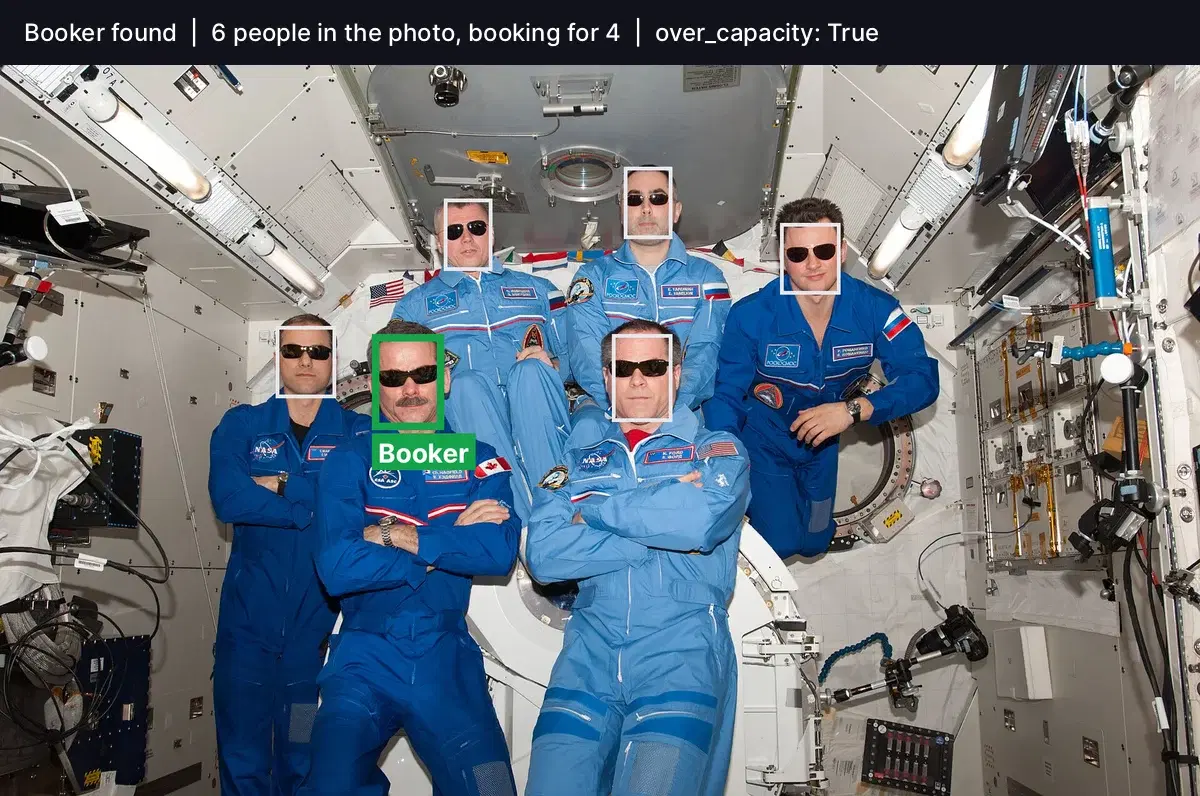
booker_box uses coordinates between 0 and 1, so you can draw it on the photo for the host, as above, whatever the image size.
Production Tips
- Run the selfie check in the browser flow. Call
check_selfieas soon as the photo is taken, so the guest can retake it before leaving the page. - Ask for the ID before the selfie. If the ID photo has no detectable face (glare, blur, a finger over the photo), ask for a new picture of the document first.
- Delete images after the decision. Keep the status, the date and the booking reference. Face images and ID documents are sensitive data, and a short retention period is easier to defend in your privacy notice.
- Be transparent about the arrival check. Tell guests when a camera at the entrance is used for check-in, and never place cameras inside the rental.
- Need document checks too? Reading names and dates from the ID is a separate step. Our eKYC selfie and ID verification guide combines OCR and face matching, and the KYC selfie verification tutorial includes a JavaScript version for the browser.
Next Step
Get a key on the Face Analyzer API page, save guest_check.py, and run it with a photo of your own ID and a selfie to see the statuses in action. For large property portfolios, custom plans are available.
Sources
- Individual portrait of astronaut Chris Hadfield, NASA (public domain)
- Chris Hadfield on the International Space Station, Expedition 34, NASA (public domain)
- Official portrait of astronaut Peggy Whitson, NASA (public domain)
- Peggy Whitson in the Destiny laboratory, Expedition 52, NASA (public domain)
- ISS Expedition 34 inflight crew portrait, NASA (public domain)
- Jean jacket, NikosLikomitros (Wikimedia Commons, CC0), used as the no-face test
Frequently Asked Questions
- How do vacation rentals verify guest identity?
- Most hosts and property managers ask the main guest for a photo of an ID document and a selfie before arrival. A face comparison API checks that the selfie and the ID photo show the same person, and a face analysis call checks that the selfie is usable: one face, no sunglasses, and an estimated age above the rental's minimum.
- Can I check that the person who booked actually arrives?
- Yes. Compare the booker's ID photo with a photo taken at arrival, for example by a smart lock camera or a self check-in tablet. The compare-faces endpoint returns matched and unmatched faces, so one call tells you whether the booker is present and how many people are in the picture.
- Does the API work when the guest wears glasses?
- Regular glasses are fine. In our group test, the API found the booker among six people who were all wearing sunglasses. For the verification selfie itself, it is still better to ask guests to remove sunglasses, and the check_selfie function in this article does that automatically using the Sunglasses flag.
- Should I store guest selfies and ID photos?
- Store as little as possible. Keep the verification result, the date and the booking reference, and delete the images once the check is done or after a short retention period stated in your privacy notice. ID documents and face images are sensitive personal data in most jurisdictions.