This tutorial uses the Face Swap API. See the docs, live demo, and pricing.
Face swapping in photos is straightforward: send two images to an API and get the result. But face swapping in video requires a different approach. A video is just a sequence of frames, so the strategy is to extract every frame, swap the face on each one, and reassemble the frames back into a video. This tutorial walks you through the entire pipeline in Python using ffmpeg for video processing and the Face Swap API for the actual face replacement.
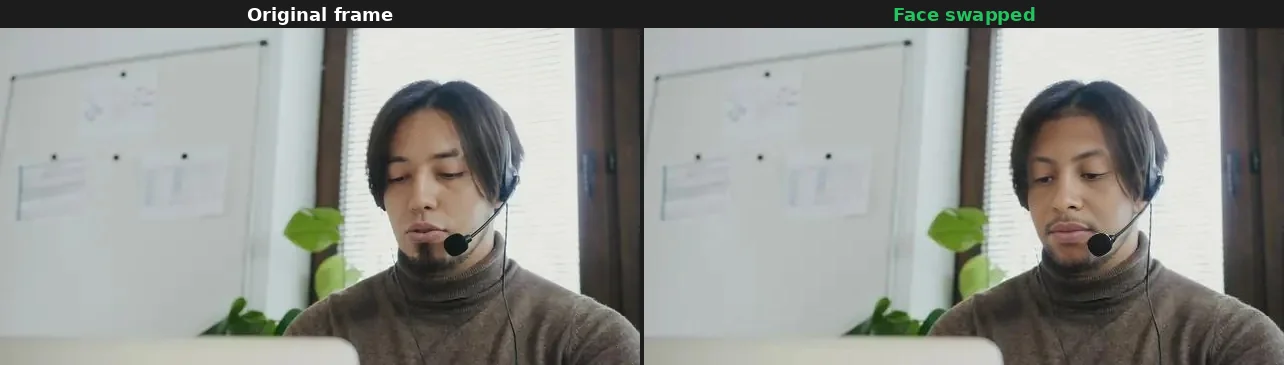
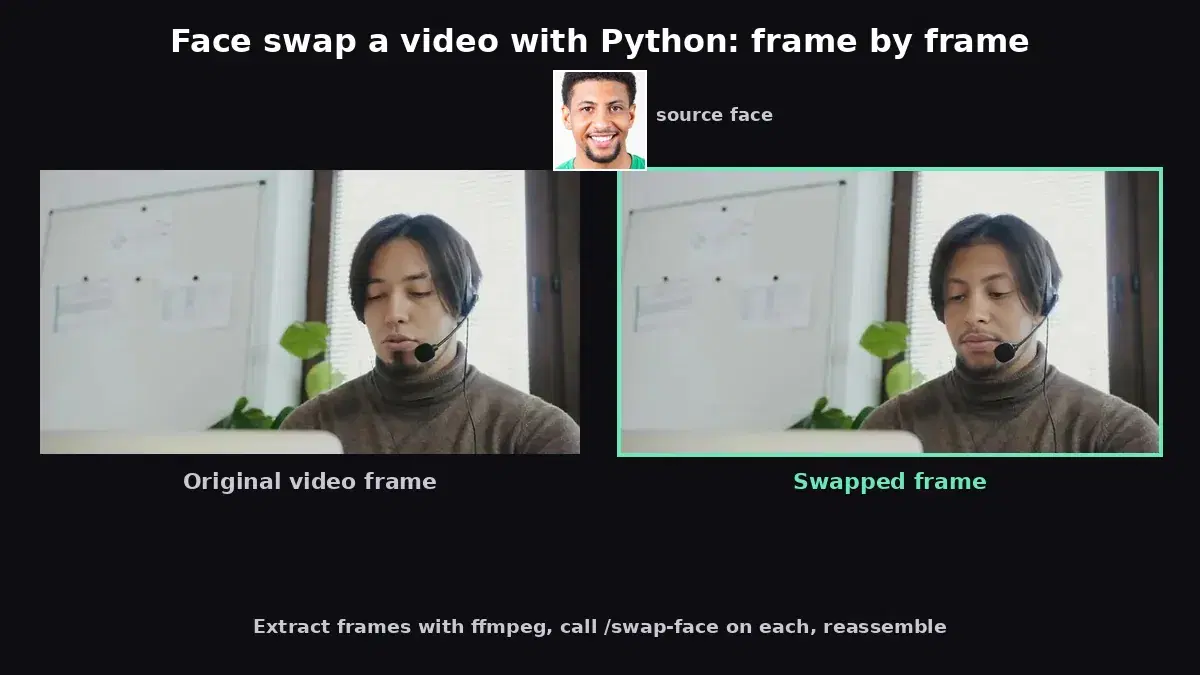
Live demo: original video frames (left) vs. face-swapped result (right), processed frame-by-frame with the Face Swap API.
How Video Face Swap Works
Unlike real-time face swap filters that run on-device, this approach processes a video file offline with high-quality results. The workflow has four stages:
- Extract: Split the video into individual JPEG frames using ffmpeg.
- Filter: Detect which frames contain a face. Skip the rest to save API calls.
- Swap: Send each face-containing frame to the API along with the source face.
- Reassemble: Stitch the processed frames back into a video with ffmpeg, preserving the original audio.
Prerequisites
You need Python 3.8+, ffmpeg installed on your system, and a RapidAPI key for the Face Swap API. Install the Python dependencies:
pip install requestsVerify ffmpeg is available:
ffmpeg -versionStep 1: Extract Frames from the Video
The first step is to split the video into individual frames. ffmpeg does this efficiently and preserves the exact frame rate. Each frame is saved as a numbered JPEG file.
import subprocess
import os
import json

def extract_frames(video_path: str, frames_dir: str) -> tuple[int, float]:
    """Extract all frames from a video and return (frame_count, fps)."""
    os.makedirs(frames_dir, exist_ok=True)

    # Get video FPS and frame count
    probe = subprocess.run(
        [
            "ffprobe", "-v", "quiet",
            "-print_format", "json",
            "-show_streams",
            video_path,
        ],
        capture_output=True, text=True,
    )
    streams = json.loads(probe.stdout)["streams"]
    video_stream = next(s for s in streams if s["codec_type"] == "video")

    fps_parts = video_stream["r_frame_rate"].split("/")
    fps = int(fps_parts[0]) / int(fps_parts[1])

    # Extract frames as JPEG
    subprocess.run(
        [
            "ffmpeg", "-i", video_path,
            "-qscale:v", "2",           # high quality JPEG
            f"{frames_dir}/frame_%05d.jpg",
        ],
        capture_output=True,
    )

    frame_count = len([f for f in os.listdir(frames_dir) if f.endswith(".jpg")])
    print(f"Extracted {frame_count} frames at {fps:.2f} FPS")
    return frame_count, fps

# Usage
total_frames, fps = extract_frames("input_video.mp4", "frames/")
For a 10-second clip at 30 FPS, this produces 300 frames. Each frame is a standalone JPEG that we can process independently.
Step 2: Detect Frames with Faces
Not every frame contains a visible face. Scenes might show a landscape, a close-up of hands, or the back of someone's head. Swapping these frames wastes API calls and money. The /detect-faces endpoint tells you which frames have faces and which to skip.
import requests

HOST = "deepfake-face-swap-ai.p.rapidapi.com"
HEADERS = {
    "x-rapidapi-host": HOST,
    "x-rapidapi-key": "YOUR_API_KEY",
}

def has_face(frame_path: str) -> bool:
    """Check if a frame contains at least one face."""
    with open(frame_path, "rb") as f:
        resp = requests.post(
            f"https://{HOST}/detect-faces",
            headers=HEADERS,
            files={"image": ("frame.jpg", f, "image/jpeg")},
        )
    if resp.status_code == 200:
        return resp.json().get("total_faces", 0) > 0
    return False
In practice, you can sample rather than check every single frame. If frame 10 has a face and frame 20 has a face, frames 11 through 19 very likely have a face too. This is covered in the optimization section below.
Step 3: Swap Faces on Each Frame
This is the core step. For each frame that contains a face, send it to the /swap-face endpoint along with the source face image. The API returns a JSON response with the result image URL, which you download and save as the processed frame.
from pathlib import Path

def swap_face_on_frame(source_path: str, frame_path: str, output_path: str) -> bool:
    """Swap the source face onto a single video frame."""
    with open(source_path, "rb") as src, open(frame_path, "rb") as tgt:
        resp = requests.post(
            f"https://{HOST}/swap-face",
            headers=HEADERS,
            files={
                "source_image": ("source.jpg", src, "image/jpeg"),
                "target_image": ("frame.jpg", tgt, "image/jpeg"),
            },
        )

    if resp.status_code == 200:
        result = resp.json()
        img = requests.get(result["image_url"])
        Path(output_path).write_bytes(img.content)
        return True

    print(f"Failed on {frame_path}: {resp.status_code}")
    return False
Step 4: Process All Frames
Now we tie it all together. Loop through every extracted frame, check if it contains a face, swap if it does, and copy the original if it does not. Using a thread pool processes multiple frames in parallel, staying within the API's rate limit of 60 requests per minute.
import shutil
from concurrent.futures import ThreadPoolExecutor, as_completed

def process_frame(source_face: str, frame_path: str, output_path: str):
    """Process a single frame: swap if face detected, copy otherwise."""
    if has_face(frame_path):
        success = swap_face_on_frame(source_face, frame_path, output_path)
        if not success:
            shutil.copy2(frame_path, output_path)  # fallback to original
        return True  # was swapped
    else:
        shutil.copy2(frame_path, output_path)
        return False  # no face, kept original

def process_all_frames(
    source_face: str,
    frames_dir: str,
    output_dir: str,
    max_workers: int = 4,
):
    """Process all video frames with parallel face swapping."""
    os.makedirs(output_dir, exist_ok=True)

    frame_files = sorted(
        f for f in os.listdir(frames_dir) if f.endswith(".jpg")
    )
    print(f"Processing {len(frame_files)} frames with {max_workers} workers...")

    swapped = 0
    skipped = 0

    with ThreadPoolExecutor(max_workers=max_workers) as pool:
        futures = {}
        for fname in frame_files:
            frame_path = os.path.join(frames_dir, fname)
            output_path = os.path.join(output_dir, fname)
            future = pool.submit(process_frame, source_face, frame_path, output_path)
            futures[future] = fname

        for future in as_completed(futures):
            was_swapped = future.result()
            if was_swapped:
                swapped += 1
            else:
                skipped += 1

    print(f"Done: {swapped} frames swapped, {skipped} frames skipped (no face)")

# Run the processing
process_all_frames(
    source_face="actor_face.jpg",
    frames_dir="frames/",
    output_dir="swapped_frames/",
    max_workers=4,
)
Step 5: Reassemble the Video
The final step combines the processed frames back into a video using ffmpeg. We use the original video's FPS to keep the timing correct and copy the audio track from the original file.
def reassemble_video(
    frames_dir: str,
    original_video: str,
    output_video: str,
    fps: float,
):
    """Reassemble frames into a video with the original audio."""
    subprocess.run(
        [
            "ffmpeg", "-y",
            "-framerate", str(fps),
            "-i", f"{frames_dir}/frame_%05d.jpg",
            "-i", original_video,             # source for audio
            "-map", "0:v",                     # video from frames
            "-map", "1:a?",                    # audio from original (if present)
            "-c:v", "libx264",
            "-preset", "medium",
            "-crf", "18",                      # high quality
            "-c:a", "aac",
            "-shortest",
            output_video,
        ],
        capture_output=True,
    )
    print(f"Output saved to {output_video}")

# Reassemble
reassemble_video("swapped_frames/", "input_video.mp4", "output_video.mp4", fps)
The -crf 18 flag produces high-quality output with reasonable file size. Lower values mean higher quality (and larger files). The -shortest flag ensures the output ends when the shorter stream (video or audio) finishes.
Complete Script
Here is the full pipeline in a single runnable script. Save it as video_face_swap.py and run it:
"""
Video Face Swap: Full Pipeline
Usage: python video_face_swap.py input.mp4 source_face.jpg output.mp4
"""
import subprocess
import os
import sys
import json
import shutil
import requests
from pathlib import Path
from concurrent.futures import ThreadPoolExecutor, as_completed

HOST = "deepfake-face-swap-ai.p.rapidapi.com"
HEADERS = {
    "x-rapidapi-host": HOST,
    "x-rapidapi-key": "YOUR_API_KEY",
}

def get_video_fps(video_path: str) -> float:
    probe = subprocess.run(
        ["ffprobe", "-v", "quiet", "-print_format", "json", "-show_streams", video_path],
        capture_output=True, text=True,
    )
    streams = json.loads(probe.stdout)["streams"]
    vs = next(s for s in streams if s["codec_type"] == "video")
    num, den = vs["r_frame_rate"].split("/")
    return int(num) / int(den)

def extract_frames(video_path: str, frames_dir: str) -> int:
    os.makedirs(frames_dir, exist_ok=True)
    subprocess.run(
        ["ffmpeg", "-i", video_path, "-qscale:v", "2", f"{frames_dir}/frame_%05d.jpg"],
        capture_output=True,
    )
    return len([f for f in os.listdir(frames_dir) if f.endswith(".jpg")])

def detect_face(frame_path: str) -> bool:
    with open(frame_path, "rb") as f:
        resp = requests.post(
            f"https://{HOST}/detect-faces",
            headers=HEADERS,
            files={"image": ("frame.jpg", f, "image/jpeg")},
        )
    return resp.status_code == 200 and resp.json().get("total_faces", 0) > 0

def swap_face(source: str, frame: str, output: str) -> bool:
    with open(source, "rb") as s, open(frame, "rb") as t:
        resp = requests.post(
            f"https://{HOST}/swap-face",
            headers=HEADERS,
            files={
                "source_image": ("src.jpg", s, "image/jpeg"),
                "target_image": ("tgt.jpg", t, "image/jpeg"),
            },
        )
    if resp.status_code == 200:
        img = requests.get(resp.json()["image_url"])
        Path(output).write_bytes(img.content)
        return True
    return False

def process_frame(source: str, frame: str, output: str) -> bool:
    if detect_face(frame):
        if swap_face(source, frame, output):
            return True
    shutil.copy2(frame, output)
    return False

def reassemble(frames_dir: str, original: str, output: str, fps: float):
    subprocess.run([
        "ffmpeg", "-y",
        "-framerate", str(fps),
        "-i", f"{frames_dir}/frame_%05d.jpg",
        "-i", original, "-map", "0:v", "-map", "1:a?",
        "-c:v", "libx264", "-preset", "medium", "-crf", "18",
        "-c:a", "aac", "-shortest", output,
    ], capture_output=True)

def main():
    video_in = sys.argv[1]
    source_face = sys.argv[2]
    video_out = sys.argv[3] if len(sys.argv) > 3 else "output.mp4"

    fps = get_video_fps(video_in)
    print(f"[1/4] Extracting frames...")
    count = extract_frames(video_in, "tmp_frames")
    print(f"       {count} frames at {fps:.1f} FPS")

    print(f"[2/4] Swapping faces...")
    os.makedirs("tmp_swapped", exist_ok=True)
    frames = sorted(f for f in os.listdir("tmp_frames") if f.endswith(".jpg"))
    swapped = 0

    with ThreadPoolExecutor(max_workers=4) as pool:
        futures = {
            pool.submit(
                process_frame,
                source_face,
                f"tmp_frames/{f}",
                f"tmp_swapped/{f}",
            ): f
            for f in frames
        }
        for fut in as_completed(futures):
            if fut.result():
                swapped += 1

    print(f"       {swapped}/{count} frames swapped")

    print(f"[3/4] Reassembling video...")
    reassemble("tmp_swapped", video_in, video_out, fps)

    print(f"[4/4] Cleaning up...")
    shutil.rmtree("tmp_frames")
    shutil.rmtree("tmp_swapped")

    print(f"Done! Output: {video_out}")

if __name__ == "__main__":
    main()
Optimization Tips
Processing every frame of a long video can be slow and expensive. Here are practical strategies to cut processing time and API costs.
1. Sample Frames for Face Detection
Instead of calling /detect-faces on every frame, check every 10th frame. If a face is detected at frame 100 and frame 110, it is safe to assume frames 101-109 also have a face. This reduces detection calls by 90%.
def build_face_map(frames_dir: str, sample_rate: int = 10) -> set[str]:
    """Detect faces on sampled frames and fill in the gaps."""
    frames = sorted(f for f in os.listdir(frames_dir) if f.endswith(".jpg"))
    face_ranges = []
    last_had_face = False

    for i in range(0, len(frames), sample_rate):
        path = os.path.join(frames_dir, frames[i])
        if detect_face(path):
            if not last_had_face:
                face_ranges.append([i, i])
            else:
                face_ranges[-1][1] = i
            last_had_face = True
        else:
            last_had_face = False

    # Expand ranges to include all frames between samples
    face_frames = set()
    for start, end in face_ranges:
        for j in range(max(0, start), min(len(frames), end + sample_rate)):
            face_frames.add(frames[j])

    print(f"Face detected in {len(face_frames)}/{len(frames)} frames")
    return face_frames
2. Process Only Key Frames
For scenes with slow head movement, you can swap every 3rd frame and copy the swapped result to the adjacent frames. This reduces API calls by 66% with minimal visual artifacts in slow-moving scenes.
3. Control Concurrency to Stay Under Rate Limits
The API allows up to 60 requests per minute. With 4 parallel workers and an average response time of 2-3 seconds, you stay well within the limit. For the Pro plan (8,000 requests/month), a 30-second video at 30 FPS (900 frames) costs roughly one-eighth of your monthly quota, economical enough for regular use.
4. Enhance After Swapping
If you notice subtle blending artifacts, run the /enhance-face endpoint on swapped frames as a post-processing step. This smooths edges and upscales the face region for a more polished result. Only apply this to frames that were actually swapped to avoid unnecessary API calls.
Cost Estimation
Knowing the cost upfront helps you choose the right plan and optimize your pipeline. Here is a breakdown for a typical 30-second clip at 30 FPS.
| Scenario | Frames | API calls | Cost (Pro plan) |
|---|---|---|---|
| Every frame, detect + swap | 900 | ~1,800 | $9.99 (uses 22% of monthly quota) |
| Sampled detection (every 10th) | 900 | ~990 | $9.99 (uses 12% of monthly quota) |
| Key frames only (every 3rd) + sampled detection | 900 | ~390 | $9.99 (uses 5% of monthly quota) |
| 50% face coverage + key frames | 900 | ~240 | $9.99 (uses 3% of monthly quota) |
With the optimizations described above, even the basic Pro plan at $9.99/month (8,000 requests) can handle multiple video projects per month.
Handling Audio
The reassembly step uses -map 1:a? to copy the audio track from the original video. The question mark makes audio optional: if the input has no audio, ffmpeg still produces the output without errors. The audio stays perfectly synchronized because we preserve the original frame rate.
Limitations and Workarounds
- Processing time: A 30-second clip takes several minutes to process due to the per-frame API calls. This is an offline workflow, not real-time. For production use, run processing jobs in the background and notify users when the result is ready.
- Temporal consistency: Each frame is processed independently, so slight variations in blending between adjacent frames can occur. Running
/enhance-faceon swapped frames helps smooth these inconsistencies. - Fast head movement: Frames with extreme motion blur or partial face visibility may produce lower-quality swaps. The detect-first approach helps skip these problematic frames.
- Multiple faces in video: If the video has multiple people and you want to swap only one, use
/detect-facesto identify the target face index, then use/target-faceinstead of/swap-face.
Next Steps
You now have a complete pipeline for face swapping in video. From here you can:
- Wrap the script in a web application that accepts video uploads and returns processed results.
- Add a queue system (like Celery or Bull) to handle multiple video processing jobs concurrently.
- Combine with the face swap getting started guide for the image-based fundamentals, or see our deepfake use cases guide for virtual try-on and entertainment applications.
The Face Swap API offers a free tier with 50 requests/month, enough to test the full pipeline on a short clip before scaling up.
Frequently Asked Questions
- Can I face swap in a video using Python?
- Yes. The approach is to extract video frames with ffmpeg, apply the face swap API to each frame individually, then reassemble the processed frames back into a video. Python handles the orchestration, while the API does the heavy lifting of face detection and swapping on each frame.
- How long does it take to face swap a video?
- Processing time depends on video length, resolution, and frame rate. A 10-second video at 30fps has 300 frames. At roughly 1-2 seconds per API call, expect 5-10 minutes for the full video. You can optimize by processing frames in parallel or reducing the frame rate.
- What video formats work with face swap APIs?
- Face swap APIs work on individual image frames, not video files directly. Use ffmpeg to extract frames as PNG or JPG from any video format (MP4, AVI, MOV, WebM). After processing, reassemble into your desired output format with ffmpeg.