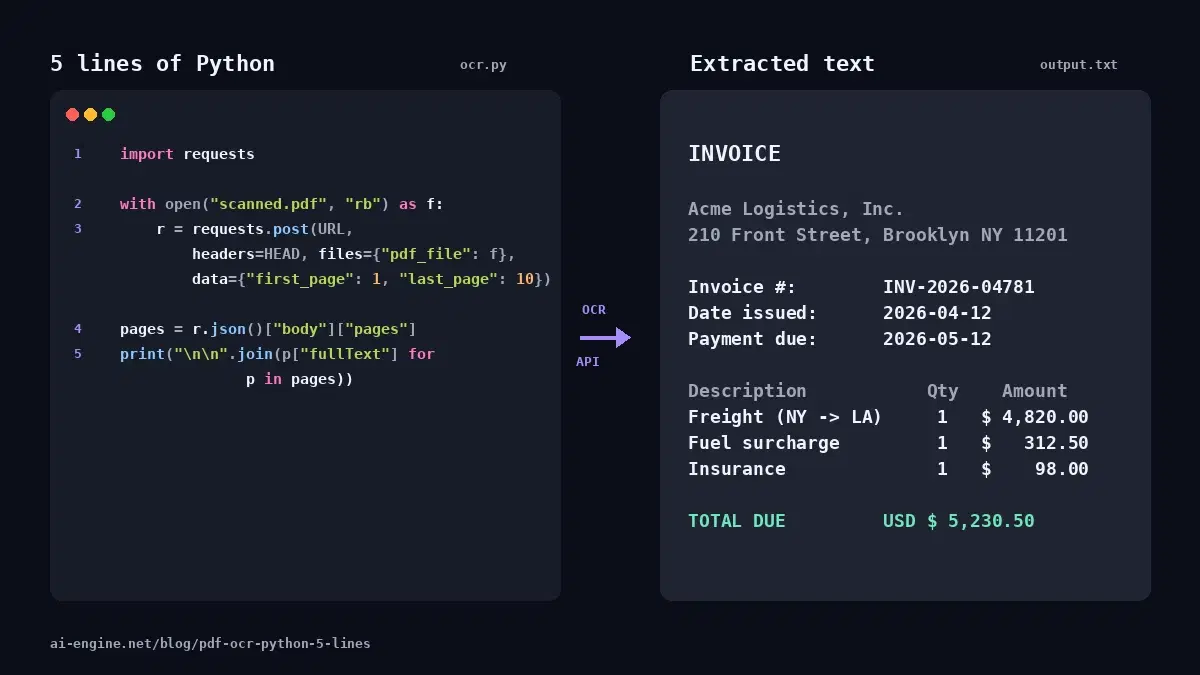
This tutorial uses the OCR Wizard API. See the docs, live demo, and pricing.
Your invoicing system needs to ingest scanned purchase orders. Your accounting platform handles contracts with cross-page tables. Your legal-tech tool parses financial reports with merged-header tables. The text inside these PDFs has to come out as structured data, not just a wall of text, or your downstream code has nothing to act on.
For most of 2024 and 2025, the answer was a specialized OCR API. In April 2026, LlamaIndex published their ParseBench benchmark showing vision LLMs with specific prompts outperform traditional OCR on layout-heavy documents. The buzz around it (a recent Medium post by Umair Ali Khan got 2,500 claps in three weeks) suggests we should all switch to Gemini 3 Flash or GPT-4o with HTML colspan/rowspan prompts.
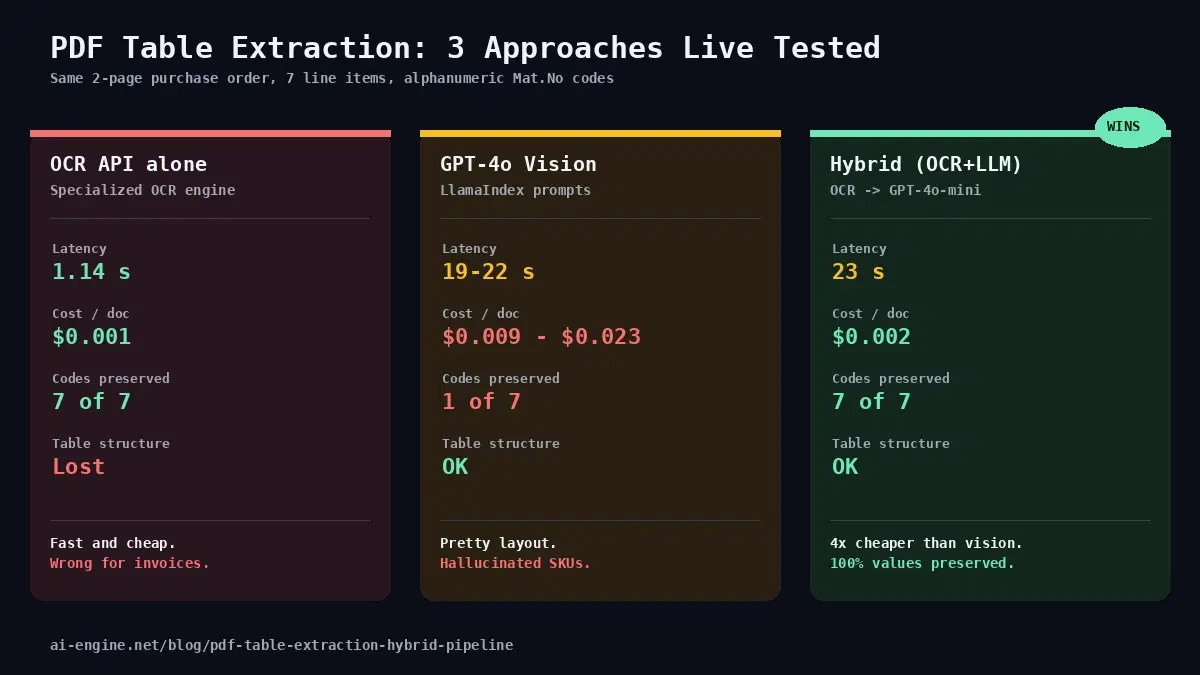
We ran the comparison live on a messy 2-page purchase order with merged headers, repeated shipping-address blocks, and a row that breaks across pages. Three approaches, same input. Results were not what the headlines suggest.
The Test Document
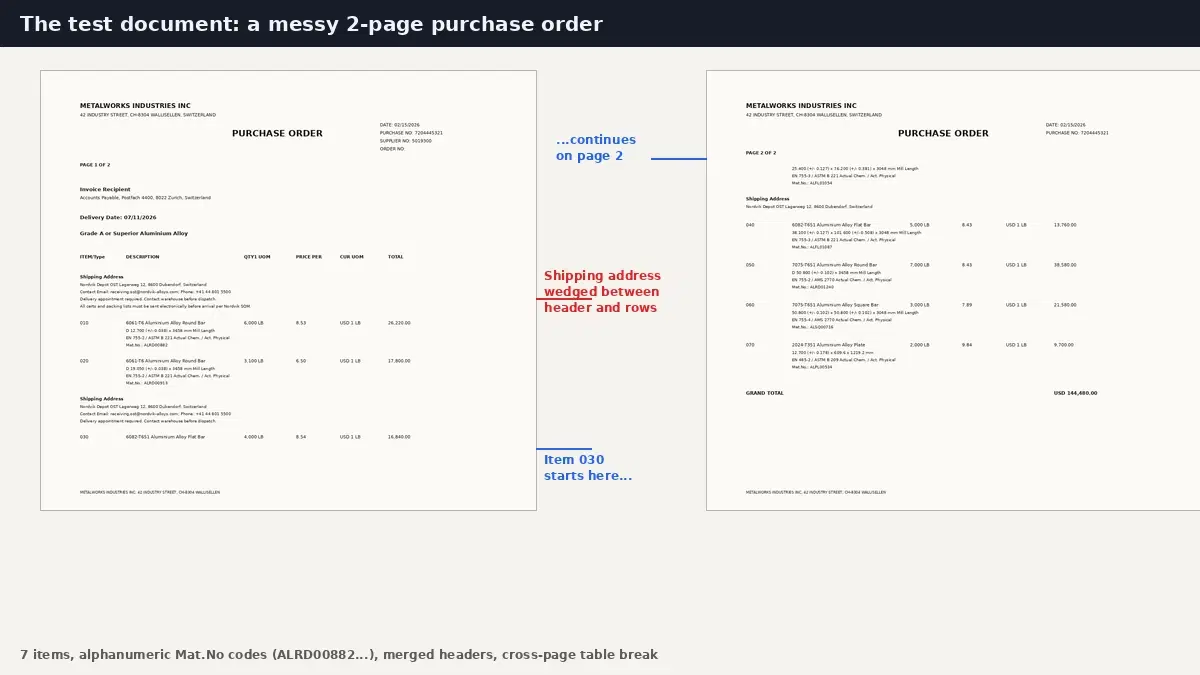
We built a synthetic purchase order that reproduces every layout problem real customer documents throw at a parser: a two-row merged header, shipping-address blocks wedged between the header and the data rows, the same header and title repeated on page 2, and item 030 split across the page break. The 7 line items each carry a Mat.No identifier (e.g. ALRD00882), the kind of alphanumeric code that matters in production: get one wrong and you ship the wrong product.
Quick Comparison
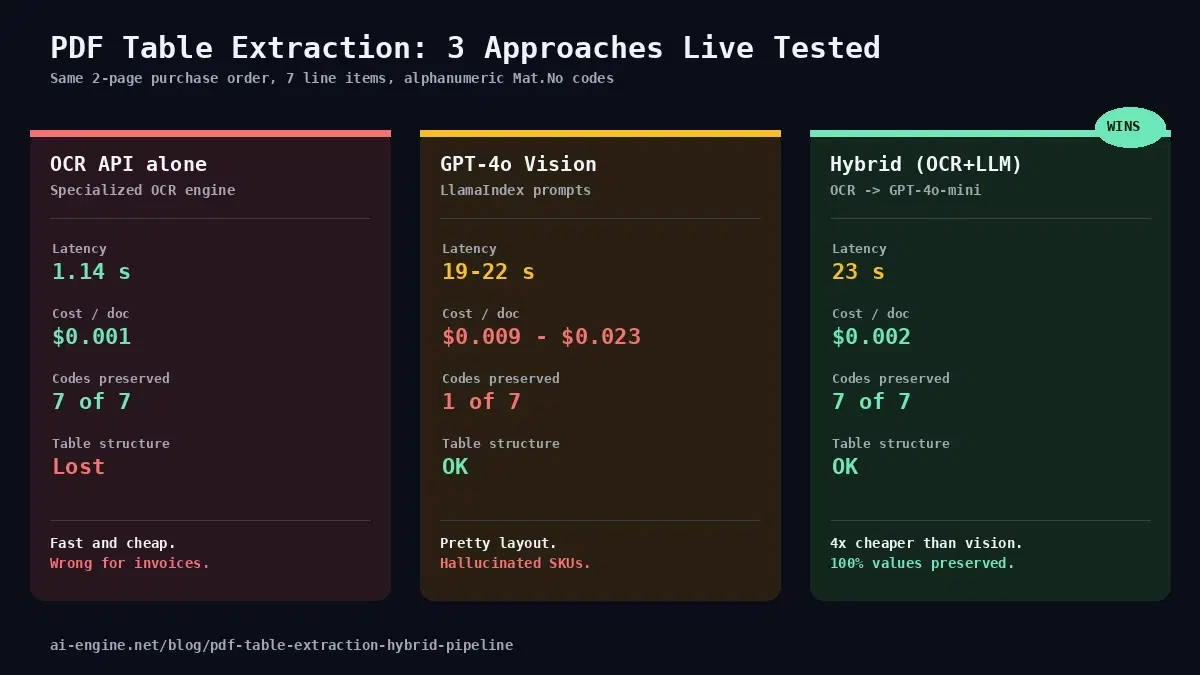
Same document through three pipelines. Mat.No accuracy is the column that separates a usable result from a liability.
| Approach | Latency | Cost | Codes accurate | Layout preserved |
|---|---|---|---|---|
| OCR API alone | 1.14 s | ~$0.001 | 7 of 7 | No |
| GPT-4o-mini + LlamaIndex prompts | 22.18 s | $0.0087 | 1 of 7 | Yes |
| GPT-4o full + LlamaIndex prompts | 19.72 s | $0.0228 | 1 of 7 | Yes (with colspan) |
| Hybrid (OCR + GPT-4o-mini) | 23.18 s | $0.0020 | 7 of 7 | Yes |
What ParseBench Got Right
LlamaIndex compared 14 parsing methods on the same documents and found that prompt design matters more than model size:
- LlamaParse Agentic scored 84.9 (highest).
- Gemini 3 Flash with the LlamaIndex prompts scored 71, beating dedicated parsers.
- Azure Document Intelligence scored 59.6, Google DocAI 50.4, AWS Textract 47.9.
The trick: ask the model to emit HTML tables with <table>, colspan, and rowspan attributes, plus wrap every layout element in a <div> with a normalized bounding box. The model preserves merged cells, multi-level headers, and reading order in a way Markdown tables cannot.
Here is the approach as runnable code. We send both page images to GPT-4o with the published LlamaIndex system prompt (trimmed for length):
import base64
from openai import OpenAI

client = OpenAI(api_key="YOUR_OPENAI_API_KEY")

SYSTEM_PROMPT = """You are a document parser. Convert document PDFs into clean, well-structured Markdown.
- Convert tables to HTML using <table>, <tr>, <th>, <td>.
- Use colspan and rowspan to preserve merged cells and hierarchical headers.
- For charts converted into tables, use flat combined column headers.
- Maintain reading order: left to right, top to bottom.
- Wrap each layout element in a <div data-bbox="[x1,y1,x2,y2]" data-label="Category"> tag.
Output only the parsed content, no commentary."""

def encode(path):
    with open(path, "rb") as f:
        return base64.b64encode(f.read()).decode()

resp = client.chat.completions.create(
    model="gpt-4o",  # or gpt-4o-mini for lower cost
    messages=[
        {"role": "system", "content": SYSTEM_PROMPT},
        {"role": "user", "content": [
            {"type": "text", "text": "Parse this document. Merge tables split across pages."},
            {"type": "image_url", "image_url": {"url": f"data:image/png;base64,{encode('page1.png')}"}},
            {"type": "image_url", "image_url": {"url": f"data:image/png;base64,{encode('page2.png')}"}},
        ]},
    ],
)
print(resp.choices[0].message.content)
On our test, both GPT-4o-mini and GPT-4o full produced a correctly structured HTML table for the purchase order. Shipping-address blocks were correctly separated from data rows. Items 040 through 070 came out aligned. Item 030, which OCR fragmented across the page break, was reconstructed cleanly. The layout claim holds up.
What ParseBench Did Not Stress-Test
The benchmark scores layout reconstruction quality, not per-character fidelity on identifiers. On our purchase order, both vision LLM runs invented Mat.No codes that look plausible but do not match the source:
| Source | GPT-4o-mini | GPT-4o full |
|---|---|---|
| ALRD00882 | ALU000892 | ALUM0088 |
| ALRD00913 | ALU000913 | ALUM00913 |
| ALSQ00716 | ALU050716 | (dropped) |
| ALPL00534 | ALPL005034 | ALPL05034 |
| ALRD01240 | ALR010240 | AL0108244 |
GPT-4o-mini also rewrote 12.700 (a tolerance in mm) as 12,700, three orders of magnitude off. It misread 3658 mm as 356 mm and EN 755-2 as EN 755.2. GPT-4o full fixed those numeric mistakes but still hallucinated the Mat.No identifiers.
This is not a flaw in the prompts. It is what happens when a language model generates text from pixels: alphanumeric codes have no linguistic regularity, so the model substitutes characters from codes it has seen in similar layouts. Bigger models hallucinate less, but they still hallucinate, and the substitutions look plausible enough that they can pass a manual review.
See It Yourself: Item 010 Three Ways
Here is the same source row, item 010, as each pipeline returned it. The source values are D 12.700 (+/-0.038) x 3658 mm, EN 755-2, and Mat.No ALRD00882.
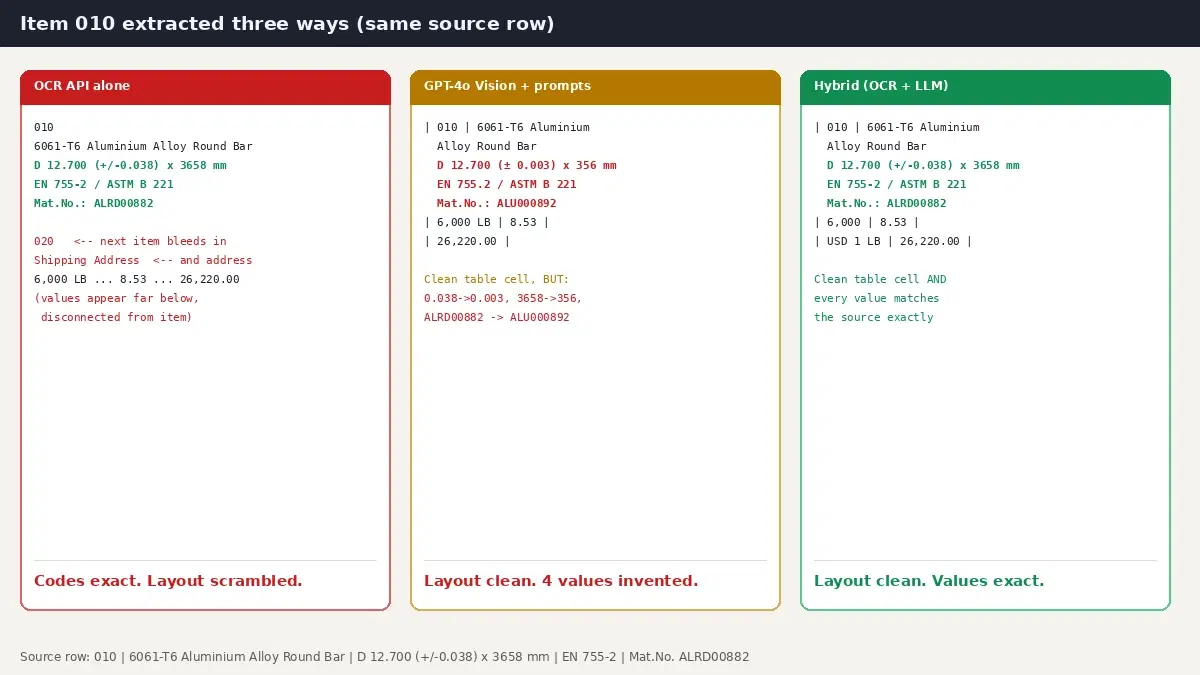
OCR API output (every value correct, but item 020 and a shipping-address block bleed in before the prices, which sit far below):
010
6061-T6 Aluminium Alloy Round Bar
D 12.700 (+/-0.038) x 3658 mm Mill Length
EN 755-2/ ASTM B 221 Actual Chem. / Act. Physical
Mat.No.: ALRD00882
020
Shipping Address
...
6,000 LB    8.53    USD 1 LB    26,220.00
GPT-4o-mini output (clean table cell, but four values are wrong):
<tr>
  <td>010</td>
  <td>6061-T6 Aluminium Alloy Round Bar
      D 12.700 (± 0.003) x 356 mm Mill Length      <!-- 0.038 -> 0.003, 3658 -> 356 -->
      EN 755.2 / ASTM B 221 ...                     <!-- 755-2 -> 755.2 -->
      Mat.No.: ALU000892</td>                       <!-- ALRD00882 -> ALU000892 -->
  <td>6,000 LB</td><td>8.53</td><td>USD 1 LB</td><td>26,220.00</td>
</tr>
Hybrid output (clean table cell, every value matches the source):
<tr>
  <td>010</td>
  <td>6061-T6 Aluminium Alloy Round Bar<br>
      D 12.700 (+/-0.038) x 3658 mm Mill Length<br>
      EN 755-2/ ASTM B 221 Actual Chem. / Act. Physical<br>
      Mat.No.: ALRD00882</td>
  <td>6,000</td><td>8.53</td><td>USD 1 LB</td><td>26,220.00</td>
</tr>
The Hybrid Pipeline
Pure OCR reads every character literally with no language prior, which is why it preserved all 7 Mat.No codes on our test. But it emits text in the reading order its layout analyzer produces, which on a messy purchase order means shipping-address text gets dropped between data rows and item 030 splits across the page break.
Hybrid splits the work where each approach is strong:
- OCR API reads the PDF and emits exact text per page, no inventions.
- LLM (GPT-4o-mini) receives the OCR text (not the image) and reconstructs the table structure as HTML, under a system prompt that forbids modifying any value.
Sending the OCR text instead of the image cuts the LLM input from about 51,000 tokens (base64-encoded page images) to about 1,300 tokens (the plain OCR text). That is the source of the 4x cost reduction. Accuracy goes up because the LLM is no longer doing character recognition; it is only doing layout reconstruction on text that is already correct.
Step 1: OCR Extraction
import requests

OCR_HEADERS = {
    "x-rapidapi-key": "YOUR_RAPIDAPI_KEY",
    "x-rapidapi-host": "ocr-wizard.p.rapidapi.com",
}

def ocr_pdf(pdf_path, first_page=1, last_page=10):
    """Extract raw text from a scanned PDF. Returns page-separated string."""
    with open(pdf_path, "rb") as f:
        r = requests.post(
            "https://ocr-wizard.p.rapidapi.com/ocr-pdf",
            headers=OCR_HEADERS,
            files={"pdf_file": f},
            data={"first_page": first_page, "last_page": last_page},
        )
    pages = r.json()["body"]["pages"]
    return "\n\n=== PAGE BREAK ===\n\n".join(p["fullText"] for p in pages)
Step 2: LLM Structure Reconstruction
The prompt is the load-bearing part. The model must understand that its job is reorganization, not transcription:
from openai import OpenAI  # pip install openai

client = OpenAI(api_key="YOUR_OPENAI_API_KEY")

HYBRID_SYSTEM_PROMPT = """You receive raw OCR text from a scanned document. The OCR is accurate at the character level but the reading order is broken: text from different parts of the page may be interleaved, especially in tables.

Your job is to reconstruct the document's logical structure as clean HTML.

CRITICAL RULES:
1. Every alphanumeric code, number, identifier, email, phone, date, and proper noun in your output MUST appear verbatim somewhere in the input OCR text. Do NOT invent, modify, or "correct" any value.
2. Convert tables to HTML using <table>, <tr>, <th>, <td>. Use colspan and rowspan for merged cells.
3. For tables that span pages, merge them into one table.
4. Text that appears between the table header and the first data row (e.g. a shipping address block) belongs in its own paragraph or in a row with colspan covering all columns, not inside a single data cell.
5. Do NOT add commentary or text not derived from the OCR.
6. If a value is missing from the OCR, leave the cell empty rather than guessing."""


def reconstruct_html(ocr_text):
    resp = client.chat.completions.create(
        model="gpt-4o-mini",
        messages=[
            {"role": "system", "content": HYBRID_SYSTEM_PROMPT},
            {"role": "user", "content": f"OCR TEXT:\n---\n{ocr_text}\n---\n\nOutput ONLY the HTML."},
        ],
        max_completion_tokens=4000,
    )
    return resp.choices[0].message.content
Step 3: Full Pipeline
def extract_pdf_tables(pdf_path):
    """Full hybrid pipeline: OCR for fidelity, LLM for structure."""
    text = ocr_pdf(pdf_path)
    html = reconstruct_html(text)
    return html


# Run it
html_output = extract_pdf_tables("purchase_order.pdf")
with open("output.html", "w") as f:
    f.write(html_output)
print("Done. Open output.html in a browser.")
On the same purchase order that broke pure OCR and vision LLM reconstruction, this pipeline preserved all 7 Mat.No codes, fixed the page-break fragmentation of item 030, separated the shipping-address blocks correctly, and produced a single well-formed HTML table.
Why Hybrid Costs Less Than Direct Vision LLM
Vision LLM input cost is dominated by image tokens. A single 1240x1100 page encoded as base64 consumes roughly 25,000 input tokens. Two pages plus the prompts: about 51,000 tokens. At GPT-4o-mini pricing ($0.15 per million input tokens), that is $0.0077 just for the input. Output adds another $0.001.
The hybrid pipeline sends only the OCR text, about 1,300 tokens total for the same document. Input cost drops to $0.0002. Output cost is similar. Total LLM cost: $0.001. OCR cost: $0.001. Grand total: $0.002.
At 10,000 documents per month: $20 with hybrid, $87 with GPT-4o-mini direct, $228 with GPT-4o full. The cost curve gets steeper as documents get longer because image tokens scale with page count while OCR text grows much more slowly.
When Pure OCR Is Enough
If your application only needs the text as a searchable string, skip the LLM step entirely. Use cases where pure OCR wins:
- Archive search and indexing. Full-text search across thousands of scanned PDFs. Reading order does not matter when the user is grepping for a name or invoice number.
- RAG embeddings. Vector databases tokenize the text anyway. Layout is discarded at the embedding step.
- High-volume real-time processing. 1 second per page versus 23 seconds is a 20x throughput multiplier. If you are processing live uploads from a mobile app, OCR alone is the only viable option.
- Document classification. Deciding "is this an invoice or a contract" needs keywords, not table structure.
For these workloads, see the focused PDF OCR in Python tutorial or the comprehensive OCR developer guide.
When Vision LLM Direct Still Wins
Hybrid handles tables, but it inherits a weakness from its OCR stage: it cannot see what is not text. Vision LLMs are the only approach that can do these things from a PDF:
- Convert charts and graphs into tables. A bar chart of "fastest-growing jobs 2025-2030" becomes a two-column table of job titles and growth percentages. OCR sees only the axis labels.
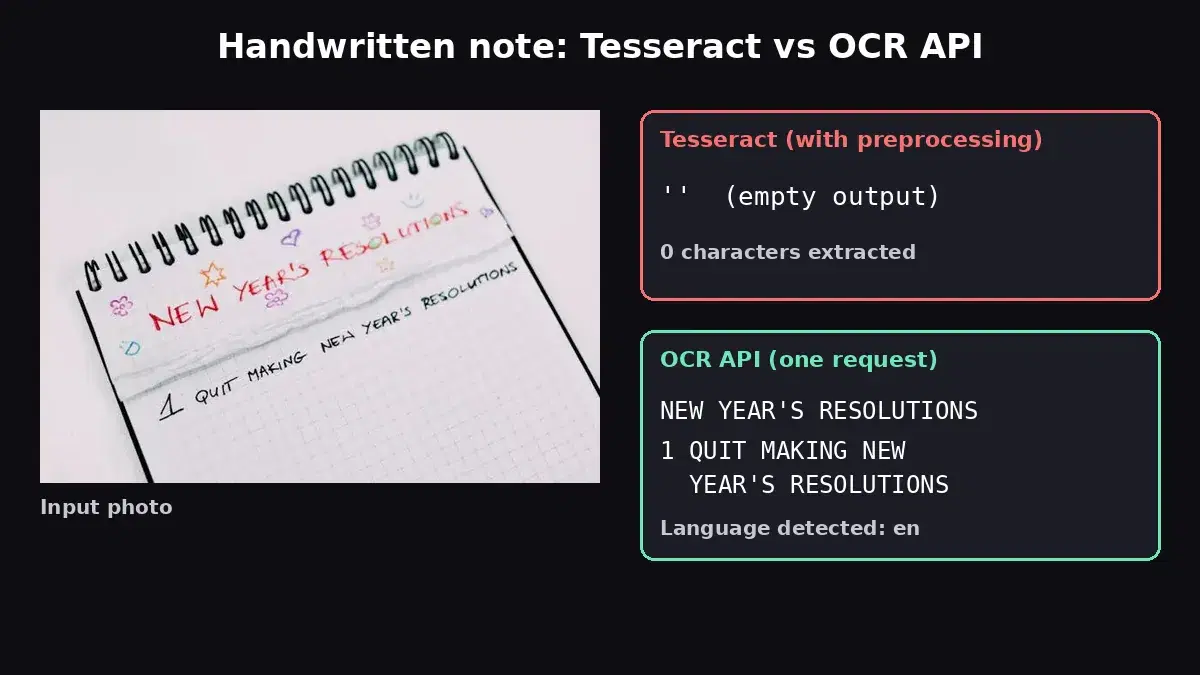
- Read signatures, stamps, and hand-drawn marks. Anything that did not start as digital text.
- Extract figure captions tied to non-text visuals. When the meaning depends on what the image shows, not just its caption.
For documents that mix tables (where hybrid wins) with charts (where only vision LLM can extract), the pragmatic answer is to run both: OCR + LLM reconstruction for the bulk text, and a vision LLM call targeted at the chart regions only.
Limitations and Honest Caveats
- The prompt is load-bearing. Drop the "do NOT invent" rules and the model will silently rewrite Mat.No codes into language-model-plausible substrings. The strict prompt above was the difference between 14 of 14 and 8 of 14 correct on our test.
- Two services, two failure modes. If your OCR provider has a quota or outage, the pipeline halts. The first version of this article was delayed by a quota cap that the LLM fallback could not work around.
- Latency dominated by the LLM. The 23-second per-document time is mostly the LLM step. For interactive use (chat-with-your-PDF), this is too slow. Batch processing (overnight invoice run) is fine.
- OCR errors propagate. If the OCR misreads a character, the LLM has no way to fix it (the image is gone by then). For low-quality scans where you suspect OCR errors, vision LLM direct may still be the right call.
Decision Framework
| Need | Choose |
|---|---|
| Searchable text only (RAG, archive) | OCR alone |
| Structured table data, value accuracy critical (invoices, contracts, financial reports) | Hybrid (OCR + LLM reconstruction) |
| Charts, graphs, signatures, hand-drawn marks | Vision LLM direct (or targeted at chart regions) |
| Sub-second latency at high volume | OCR alone |
| Lowest cost at scale with structure preservation | Hybrid |
Next Step
Grab a key from the OCR Wizard API page, plug it into the pipeline above, and run it against one of your messiest PDFs. If you also want to learn the simpler OCR-only patterns first, the 5-line Python tutorial covers the basics, and the ID Card to JSON tutorial shows the same hybrid pattern applied to structured field extraction.
Sources
- LlamaIndex ParseBench announcement and benchmark results: 14 parsing methods tested on the same documents, with the system and user prompts published in the appendix.
- Umair Ali Khan, "How to Accurately Extract Everything from Documents Using AI": the Medium article that popularized the LlamaIndex prompts. Includes the gaik multimodal_parser package for running the single-call vision LLM approach.
- Test methodology: 2-page synthetic purchase order with merged headers, repeated shipping blocks, page-break fragmentation, and 7 line items with alphanumeric Mat.No identifiers (the kind of codes that matter in real invoice processing).
Frequently Asked Questions
- Why does GPT-4o still hallucinate alphanumeric codes (SKUs, Mat.No, IBANs) even with the LlamaIndex prompts?
- Vision LLMs treat character recognition as a probabilistic generation task. For natural language they predict plausible next tokens, which works because real words follow distribution patterns. Alphanumeric identifiers (ALRD00882, INV-7421-X) have no language-model regularity, so the model substitutes nearby characters it has seen in similar contexts. GPT-4o full halved the hallucination rate compared to GPT-4o-mini on our test but did not eliminate it. For invoice processing or compliance work where one wrong SKU means a wrong product shipped, this is a dealbreaker. Specialized OCR engines read each character literally, with no language prior, which is why they preserve identifiers correctly.
- Is the hybrid pipeline faster than calling a vision LLM directly?
- Roughly the same: about 23 seconds for a 2-page document in our tests, versus 22 seconds for GPT-4o-mini direct. The OCR call adds about 1 second; the LLM call dominates both pipelines. The hybrid is much cheaper, not faster. If you need sub-second latency, use pure OCR and skip the LLM entirely.
- When should I use pure OCR versus hybrid versus vision LLM?
- Pure OCR for bulk text extraction where you only need searchable strings (archive indexing, full-text search, RAG embeddings). Hybrid (OCR + LLM reconstruction) for invoices, contracts, financial reports, and any document where you need both accurate values and a structured layout. Direct vision LLM for documents with visual elements that OCR misses entirely, like charts, graphs, signatures, or hand-drawn diagrams, which the LLM can convert to structured data from pixels.