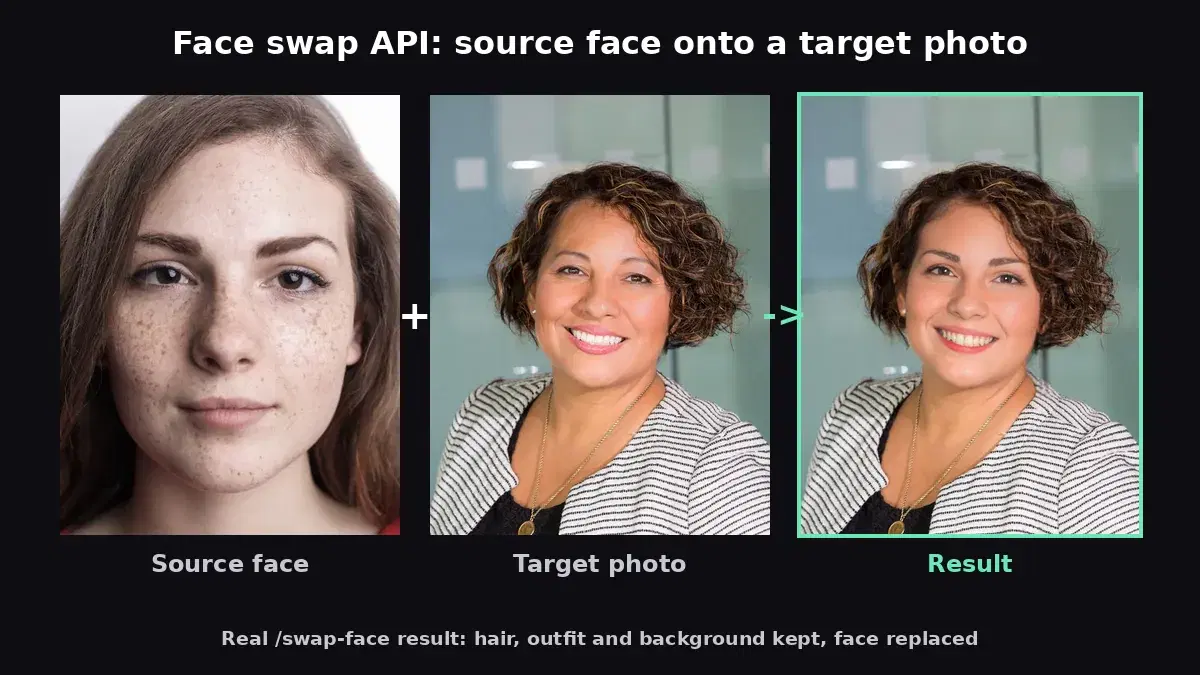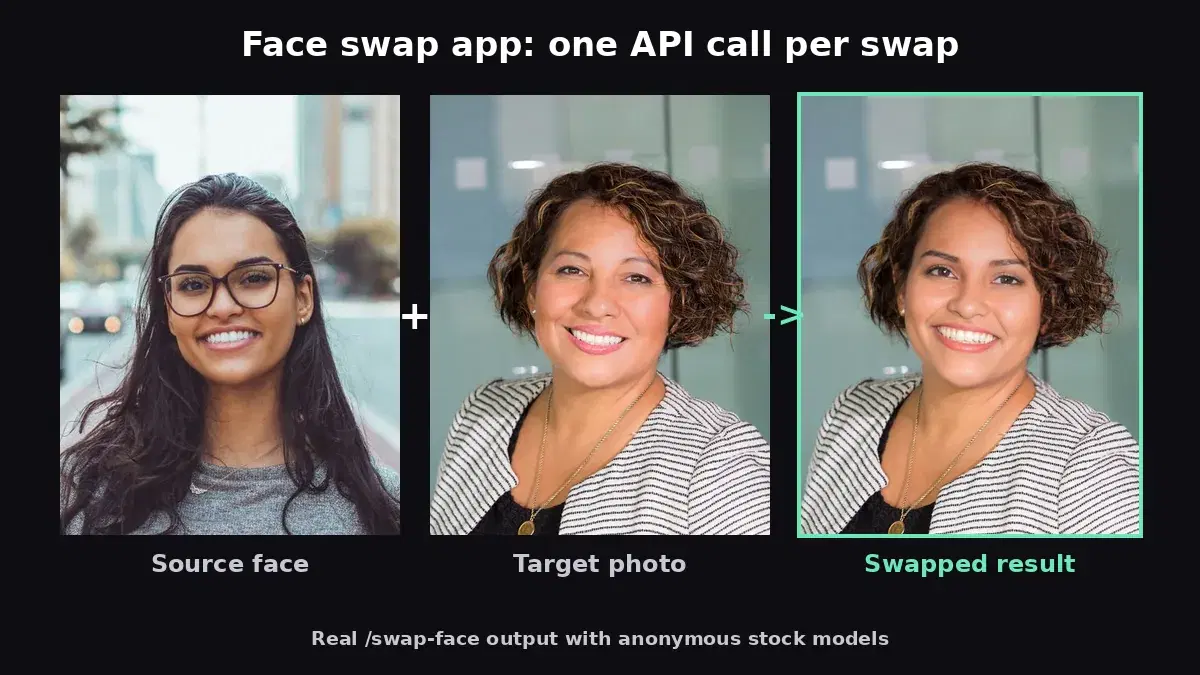
This tutorial uses the Face Swap API. See the docs, live demo, and pricing.
Deepfake technology has evolved from a research curiosity into a practical tool that powers real products. Entertainment apps use it for viral face swap features. E-commerce platforms use it for virtual try-on experiences. Video production studios use it for post-production face replacement. The common thread: all of these require swapping one face onto another image with seamless, realistic blending. Building this from scratch means solving face detection, landmark alignment, warping, color matching, and artifact removal — months of engineering work. The Face Swap API handles all of that in a single HTTP request. In this guide, you will learn how to build three real-world applications using the API: a virtual try-on system, an entertainment face swap app, and a video post-production pipeline.
What the Face Swap API Offers
Before diving into use cases, here is a quick overview of the API's five endpoints. Understanding what is available helps you design the right solution for each scenario.
- /swap-face — Replace the face in a target image with a face from a source image. Supports
many_facesfor group photos (up to 5 faces). - /target-face — Swap a specific face in a group photo by index. Useful when you only want to replace one person in a multi-person image.
- /detect-faces — Find all faces in an image with bounding box coordinates. Returns JSON with face indices for targeted operations.
- /enhance-face — AI-powered face restoration and 2x upscaling without swapping. Fixes artifacts and improves quality.
- /target-enhance — Enhance a specific face in a group photo by index.
All swap endpoints accept file uploads, JSON URLs, or form-encoded data and return a JPEG image directly. No polling, no webhooks — results come back in seconds. For a basic integration tutorial, see our face swap API getting started guide.
Use Case 1: Virtual Try-On for E-Commerce
Virtual try-on is one of the fastest-growing applications of face swap technology. Fashion brands, beauty companies, and eyewear retailers let customers "try on" products by swapping their face onto model photos wearing different items. This reduces return rates, increases purchase confidence, and creates an engaging shopping experience.
How It Works
The customer uploads a selfie (or takes one with their webcam). Your application takes model photos wearing different products and swaps the customer's face onto each model. The result shows the customer "wearing" the product — a hairstyle, a pair of glasses, a hat, or a makeup look.
Python Implementation
import requests
from pathlib import Path

HOST = "deepfake-face-swap-ai.p.rapidapi.com"
HEADERS = {
    "x-rapidapi-host": HOST,
    "x-rapidapi-key": "YOUR_API_KEY",
}

def virtual_try_on(customer_selfie: str, model_photo: str, output: str) -> str:
    """Swap the customer's face onto a model wearing a product."""
    with open(customer_selfie, "rb") as src, open(model_photo, "rb") as tgt:
        response = requests.post(
            f"https://{HOST}/swap-face",
            headers=HEADERS,
            files={
                "source_image": ("selfie.jpg", src, "image/jpeg"),
                "target_image": ("model.jpg", tgt, "image/jpeg"),
            },
        )

    if response.status_code == 200:
        result = response.json()
        # Download the result image
        img = requests.get(result["image_url"])
        Path(output).write_bytes(img.content)
        return output
    else:
        raise Exception(f"API error: {response.text}")

# Generate try-on images for multiple products
customer = "customer_selfie.jpg"
products = [
    ("models/hairstyle_a.jpg", "results/hairstyle_a.jpg"),
    ("models/hairstyle_b.jpg", "results/hairstyle_b.jpg"),
    ("models/glasses_round.jpg", "results/glasses_round.jpg"),
    ("models/glasses_square.jpg", "results/glasses_square.jpg"),
]

for model_path, output_path in products:
    result = virtual_try_on(customer, model_path, output_path)
    print(f"Generated: {result}")
JavaScript (Browser)
const HOST = "deepfake-face-swap-ai.p.rapidapi.com";
const HEADERS = {
  "x-rapidapi-host": HOST,
  "x-rapidapi-key": "YOUR_API_KEY",
};

async function virtualTryOn(selfieFile, modelUrl) {
  // Fetch model image as blob
  const modelBlob = await fetch(modelUrl).then((r) => r.blob());

  const formData = new FormData();
  formData.append("source_image", selfieFile);    // customer selfie from file input
  formData.append("target_image", modelBlob);      // model photo

  const response = await fetch(`https://${HOST}/swap-face`, {
    method: "POST",
    headers: HEADERS,
    body: formData,
  });

  const result = await response.json();
  return result.image_url; // URL of the swapped image
}

// Usage: customer uploads selfie, clicks a product to try on
const selfie = document.getElementById("selfie-input").files[0];
const modelUrl = "/models/hairstyle-curly.jpg";

const resultUrl = await virtualTryOn(selfie, modelUrl);
document.getElementById("try-on-preview").src = resultUrl;
Scaling Virtual Try-On
For production deployments, pre-generate try-on images asynchronously rather than making customers wait. When a customer uploads their selfie, queue try-on jobs for all available products in the background. By the time the customer browses to a product page, their personalized try-on image is already cached. The API's pricing at $9.99/month for 8,000 requests makes batch processing economical even for catalogs with hundreds of products.
Use Case 2: Entertainment and Meme Generator Apps
Face swap is one of the most viral features in mobile and web apps. Users love swapping faces with celebrities, historical figures, movie characters, or friends. Each swap is inherently shareable — driving organic growth through social media posts and messages. Apps like Reface and FaceApp built massive user bases on exactly this mechanic.
Basic Celebrity Face Swap
def celebrity_swap(user_photo: str, celebrity_photo: str) -> str:
    """Swap user's face onto a celebrity photo."""
    with open(user_photo, "rb") as src, open(celebrity_photo, "rb") as tgt:
        response = requests.post(
            f"https://{HOST}/swap-face",
            headers=HEADERS,
            files={
                "source_image": ("user.jpg", src, "image/jpeg"),
                "target_image": ("celeb.jpg", tgt, "image/jpeg"),
            },
        )

    result = response.json()
    return result["image_url"]

# User swaps their face onto a movie poster
result_url = celebrity_swap("user_selfie.jpg", "movie_poster.jpg")
print(f"Your movie poster: {result_url}")
Group Photo Fun: Swap a Specific Face
Group photos unlock a different kind of entertainment. Users can swap their face onto a specific person in a group — insert themselves into a band photo, a sports team, or a scene from a TV show. This requires the two-step detect-then-swap workflow.
def swap_into_group(user_photo: str, group_photo: str, face_index: int) -> str:
    """Swap user's face onto a specific person in a group photo."""
    # Step 1: Detect faces to show user which positions are available
    with open(group_photo, "rb") as f:
        detect_resp = requests.post(
            f"https://{HOST}/detect-faces",
            headers=HEADERS,
            files={"image": ("group.jpg", f, "image/jpeg")},
        )
    faces = detect_resp.json()
    print(f"Found {faces['total_faces']} faces in group photo")

    # Step 2: Swap user's face onto the chosen position
    with open(user_photo, "rb") as src, open(group_photo, "rb") as tgt:
        swap_resp = requests.post(
            f"https://{HOST}/target-face",
            headers=HEADERS,
            files={
                "source_image": ("user.jpg", src, "image/jpeg"),
                "target_image": ("group.jpg", tgt, "image/jpeg"),
            },
            data={"face_index": face_index},
        )

    result = swap_resp.json()
    return result["image_url"]

# User picks face at index 2 in a band photo
result_url = swap_into_group("selfie.jpg", "band_photo.jpg", face_index=2)
print(f"You in the band: {result_url}")
Meme Generator Flow
For a meme generator, curate a library of popular meme templates featuring faces. Let users upload a selfie, browse templates, and generate swaps instantly. Add text overlay on the client side for the full meme experience. The API handles the hard part (realistic face blending) while you control the creative layer.
Use Case 3: Video Post-Production
Video production studios use face replacement for practical reasons: replacing stunt doubles, fixing continuity errors, de-aging actors, or substituting faces when talent is unavailable for reshoots. While real-time video deepfake requires specialized infrastructure, frame-by-frame post-production face replacement is straightforward with the API.
Frame-by-Frame Processing
import cv2
import requests
from pathlib import Path
from concurrent.futures import ThreadPoolExecutor

HOST = "deepfake-face-swap-ai.p.rapidapi.com"
HEADERS = {
    "x-rapidapi-host": HOST,
    "x-rapidapi-key": "YOUR_API_KEY",
}

def swap_frame(source_path: str, frame_path: str, output_path: str):
    """Swap face in a single video frame."""
    with open(source_path, "rb") as src, open(frame_path, "rb") as tgt:
        response = requests.post(
            f"https://{HOST}/swap-face",
            headers=HEADERS,
            files={
                "source_image": ("source.jpg", src, "image/jpeg"),
                "target_image": ("frame.jpg", tgt, "image/jpeg"),
            },
        )

    if response.status_code == 200:
        result = response.json()
        img = requests.get(result["image_url"])
        Path(output_path).write_bytes(img.content)

def process_video(video_path: str, source_face: str, output_dir: str):
    """Extract frames, swap faces, and reassemble."""
    Path(output_dir).mkdir(exist_ok=True)
    cap = cv2.VideoCapture(video_path)
    fps = cap.get(cv2.CAP_PROP_FPS)
    frame_idx = 0
    frame_paths = []

    # Extract frames
    while cap.isOpened():
        ret, frame = cap.read()
        if not ret:
            break
        frame_path = f"{output_dir}/frame_{frame_idx:05d}.jpg"
        cv2.imwrite(frame_path, frame)
        frame_paths.append(frame_path)
        frame_idx += 1
    cap.release()
    print(f"Extracted {len(frame_paths)} frames at {fps} FPS")

    # Process frames in parallel (respect API rate limits)
    output_paths = []
    with ThreadPoolExecutor(max_workers=4) as pool:
        futures = []
        for i, fp in enumerate(frame_paths):
            out = f"{output_dir}/swapped_{i:05d}.jpg"
            output_paths.append(out)
            futures.append(pool.submit(swap_frame, source_face, fp, out))
        for f in futures:
            f.result()

    print(f"Processed {len(output_paths)} frames")
    return output_paths, fps

# Usage
frames, fps = process_video("scene.mp4", "actor_face.jpg", "output_frames/")
# Reassemble with ffmpeg:
# ffmpeg -r {fps} -i output_frames/swapped_%05d.jpg -c:v libx264 output.mp4
Optimizing for Video Workflows
Processing every frame of a 30 FPS video is expensive and often unnecessary. Here are practical optimizations:
- Skip frames without faces — Use the
/detect-facesendpoint first. If no face is detected in a frame, skip the swap and use the original frame. This avoids wasting API calls on frames showing only scenery or the back of someone's head. - Process key frames only — For scenes with minimal head movement, process every 3rd or 5th frame and interpolate the in-between frames. This reduces API calls by 60–80% with minimal quality loss.
- Batch with concurrent requests — The API supports concurrent requests. Use a thread pool (as shown above) to process multiple frames simultaneously. Stay within the API's rate limit of 60 requests per minute.
- Enhance after swapping — If the swap introduces subtle artifacts, run the
/enhance-faceendpoint on the swapped frames as a post-processing step. This adds polish without changing the face identity.
Handling the API Response
The swap endpoints return a JSON response with the result image URL, dimensions, and file size:
{
  "image_url": "https://images.ai-engine.net/face-swap-ai/abc123.jpg",
  "width": 500,
  "height": 750,
  "size_bytes": 64473
}
The /detect-faces endpoint returns face positions as JSON:
{
  "total_faces": 3,
  "faces": [
    { "index": 0, "bbox": { "x": 120, "y": 50, "width": 160, "height": 160 } },
    { "index": 1, "bbox": { "x": 400, "y": 80, "width": 120, "height": 120 } },
    { "index": 2, "bbox": { "x": 650, "y": 90, "width": 100, "height": 100 } }
  ]
}
Responsible Use of Deepfake Technology
Face swap technology is powerful, and with that comes responsibility. As a developer integrating this API, you should build safeguards into your application.
- Require consent — Only allow face swaps where the user has uploaded their own photo or has explicit permission from the person depicted. Never allow swaps using photos scraped from social media without consent.
- Label synthetic content — Clearly mark generated images as AI-generated or modified. Many jurisdictions now require disclosure of synthetic media. Adding a watermark or metadata tag protects both your users and your platform.
- Block harmful use cases — Implement content moderation to prevent your app from being used to create non-consensual intimate imagery, political disinformation, or harassment. Combine with NSFW detection to automatically flag inappropriate content.
- Log and audit — Keep records of generated content for compliance and abuse investigation. Set usage limits per user to prevent bulk generation of deepfake content.
Building responsibly does not limit your product — it makes it sustainable. Platforms that handle synthetic media carelessly face legal liability, app store removal, and user trust erosion. The small upfront investment in safety measures pays for itself.
Tips for Best Results
- Match face angles — Swaps look most natural when source and target faces are at similar angles. A front-facing selfie works best with front-facing targets. Profile-to-front swaps produce less convincing results.
- Use high-resolution inputs — Higher resolution source images produce better blending. The API accepts up to 10 MB per image and preserves the target image's resolution in the output.
- Good lighting matters — Evenly lit faces blend more naturally than faces with harsh shadows or extreme backlighting. Guide users to take selfies in good lighting conditions.
- Enhance after swapping — For maximum quality, run the result through
/enhance-faceafter the swap. This smooths any blending artifacts and upscales the face region to 2x resolution, giving a polished final result.
Deepfake face swapping is no longer a niche experiment — it is a production feature powering real products across e-commerce, entertainment, and media production. The Face Swap API gives you five endpoints covering swap, detect, and enhance workflows, all accessible through simple REST calls. Start with the free tier (50 requests/month), validate your use case, and scale from there.
Frequently Asked Questions
- What is a face swap API used for?
- A face swap API replaces one person's face with another in an image. Common use cases include virtual try-on for e-commerce, entertainment apps, social media filters, and video post-production.
- Is face swapping legal?
- Face swapping is legal when used with consent for legitimate purposes like virtual try-on, entertainment, and creative content. Always obtain consent from individuals whose faces are used and follow local regulations on biometric data.
- Can I face swap in videos with an API?
- Yes. Extract video frames with ffmpeg, apply the face swap API to each frame, then reassemble the frames into a video. This frame-by-frame approach works with any face swap API.