This tutorial uses the Face Swap API. See the docs, live demo, and pricing.
Personalized avatar packs, themed profile pictures and "see yourself in this outfit" features all need the same thing: one user's face placed on many template images. This tutorial builds that in Python. You give the script a selfie and a folder of templates, and it saves one swapped image per template.
The swap runs on the Face Swap API, so there is no GPU to set up and no model to install. All the code below was run against the live API, and the results shown are its real output.
What You Need
- Python 3 and the
requestslibrary (pip install requests) - A RapidAPI key for the Face Swap API
- A
selfie.jpgwith one clear face - A
templates/folder of JPG images
The Complete Batch Script
Save this as face_swap_batch.py next to your selfie and templates folder:
from concurrent.futures import ThreadPoolExecutor
from pathlib import Path

import requests

BASE = "https://deepfake-face-swap-ai.p.rapidapi.com"
HEADERS = {
    "x-rapidapi-host": "deepfake-face-swap-ai.p.rapidapi.com",
    "x-rapidapi-key": "YOUR_API_KEY",
}
WORKERS = 4


def swap_face(source_path, target_path):
    """Swap the face from source_path onto target_path, return the result URL."""
    with open(source_path, "rb") as source, open(target_path, "rb") as target:
        response = requests.post(
            f"{BASE}/swap-face",
            headers=HEADERS,
            files={
                "source_image": ("source.jpg", source, "image/jpeg"),
                "target_image": ("target.jpg", target, "image/jpeg"),
            },
            timeout=120,
        )
    response.raise_for_status()
    return response.json()["image_url"]


def has_face(image_path):
    """Return True if the image contains at least one face."""
    with open(image_path, "rb") as image:
        response = requests.post(
            f"{BASE}/detect-faces",
            headers=HEADERS,
            files={"image": ("image.jpg", image, "image/jpeg")},
            timeout=60,
        )
    return response.ok and response.json().get("total_faces", 0) > 0


def process_template(selfie, template, output_dir):
    if not has_face(template):
        return template.name, "skipped: no face"
    url = swap_face(selfie, template)
    output = output_dir / template.name
    output.write_bytes(requests.get(url, timeout=60).content)
    return template.name, f"saved {output}"


def swap_onto_templates(selfie, template_dir, output_dir):
    output_dir = Path(output_dir)
    output_dir.mkdir(exist_ok=True)
    templates = sorted(Path(template_dir).glob("*.jpg"))
    with ThreadPoolExecutor(max_workers=WORKERS) as pool:
        jobs = [
            pool.submit(process_template, selfie, template, output_dir)
            for template in templates
        ]
        return [job.result() for job in jobs]


if __name__ == "__main__":
    for name, status in swap_onto_templates("selfie.jpg", "templates", "output"):
        print(f"{name}: {status}")
How It Works
swap_faceuploads both images to/swap-faceand returns the URL of the result.has_facecalls/detect-facesso that a template with no face is skipped and the batch carries on.process_templatehandles one template from check to saved file.swap_onto_templatesruns those jobs on four worker threads and returns the results in filename order.
Real Results
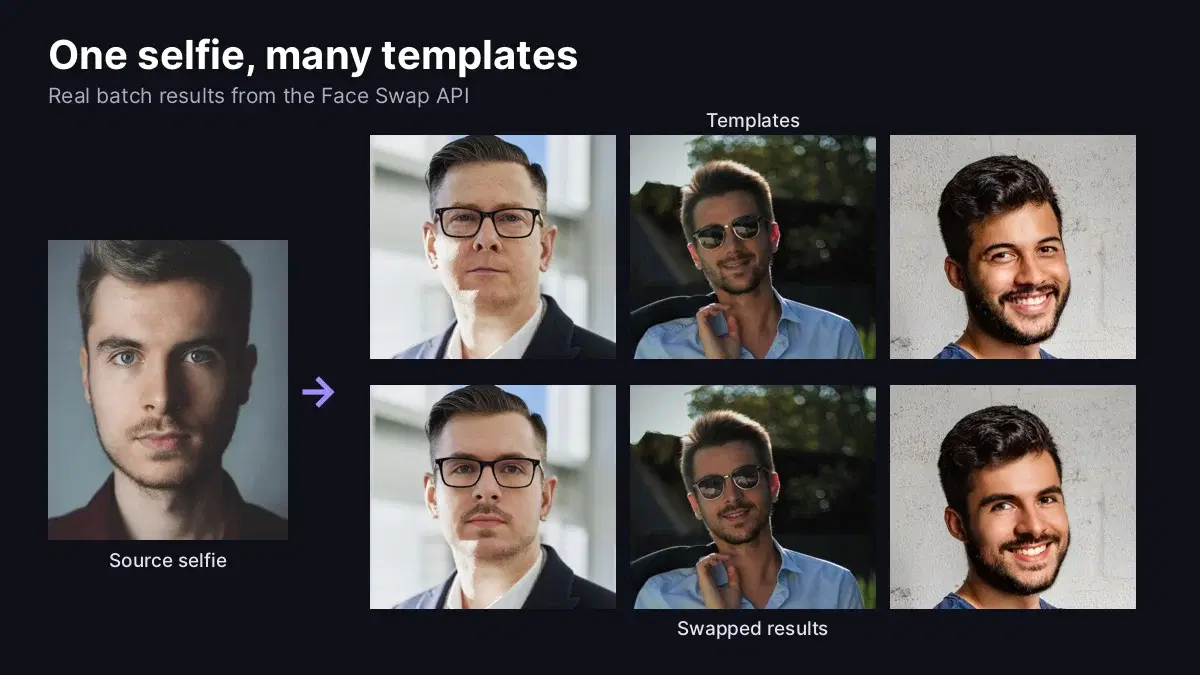
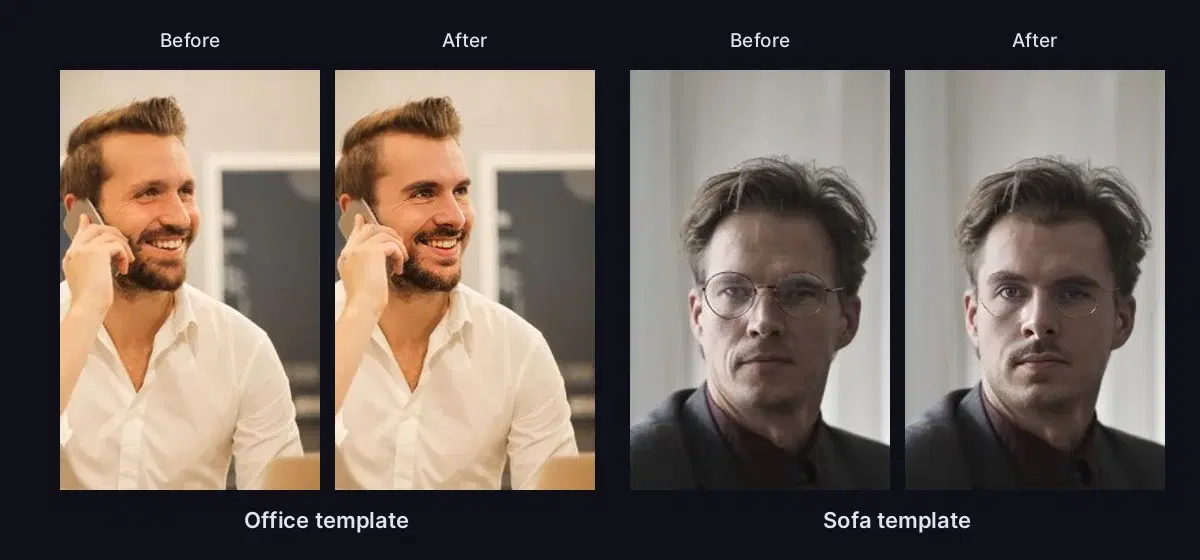
We ran the script with one selfie and six templates: five portraits in different scenes and one photo of hands with no face in it, to test the skip. Here is the output:
casual.jpg: saved output/casual.jpg
no_face.jpg: skipped: no face
office.jpg: saved output/office.jpg
outdoor.jpg: saved output/outdoor.jpg
sofa.jpg: saved output/sofa.jpg
suit.jpg: saved output/suit.jpg
Each result keeps the template's pose, clothes, glasses and lighting, and takes the face from the selfie:
Using Image URLs Instead of Files
If your images are already hosted, send source_url and target_url as form fields instead of uploading files:
import requests

response = requests.post(
    "https://deepfake-face-swap-ai.p.rapidapi.com/swap-face",
    headers={
        "x-rapidapi-host": "deepfake-face-swap-ai.p.rapidapi.com",
        "x-rapidapi-key": "YOUR_API_KEY",
    },
    data={
        "source_url": "https://images.pexels.com/photos/614810/pexels-photo-614810.jpeg?w=800",
        "target_url": "https://images.pexels.com/photos/2182970/pexels-photo-2182970.jpeg?w=800",
    },
    timeout=120,
)
print(response.json())
The API returns the result URL and its dimensions:
{'image_url': 'https://images.ai-engine.net/face-swap-ai/6ae31bb6-6517-4f79-a481-47982e2afdd5.jpg', 'width': 800, 'height': 1200, 'size_bytes': 131991}Production Tips
- Copy results to your own storage. Save each file as the script does, so your app serves images from storage you control.
- Handle HTTP 422. If a source image has no usable face, tell the user to upload a new selfie. A template with no face returns
No face detected in target image. - Choose templates with clear faces. Front-facing and three-quarter portraits give a natural result, and work well for a template pack.
Use It with Consent
Only swap the face of someone who has agreed to it, which is the natural flow when users upload their own selfie. Use templates you have the rights to, and tell people when an image has been generated. Do not use face swap to impersonate anyone or to create misleading images of real people.
Where to Go Next
For the other endpoints, including swapping one face in a group photo, read the Face Swap API guide. To apply the same call to moving images, follow the video face swap tutorial. Test photos come from Pexels.
Frequently Asked Questions
- How do I face swap in Python?
- Send a POST request to a face swap API with a source image and a target image using the requests library. The Face Swap API returns JSON with an image_url pointing to the result, so you do not need a GPU or any model files on your machine.
- How do I swap one face onto many images?
- Loop over your template images and send the same source image with each one. A ThreadPoolExecutor runs several requests at once, and checking each template with the detect-faces endpoint first lets you skip images that have no face.
- What happens if a template has no face?
- The swap-face endpoint returns HTTP 422 with the message No face detected in target image. Checking templates with detect-faces first lets your batch skip those files and carry on.