This tutorial uses the Face Analyzer API. See the docs, live demo, and pricing.
You want to detect emotions from facial expressions in your application. Customer feedback kiosks, driver monitoring, telehealth platforms, HR mood tracking - the use cases are growing. Two approaches: install DeepFace, the most popular open-source face analysis library (22,000+ GitHub stars), or call a cloud face analysis API that returns emotions along with age, gender, and landmarks in a single request. This guide tests both on the same images and compares what they get right, what they get wrong, and what it takes to run each in production. The cloud option is the Face Analyzer API.
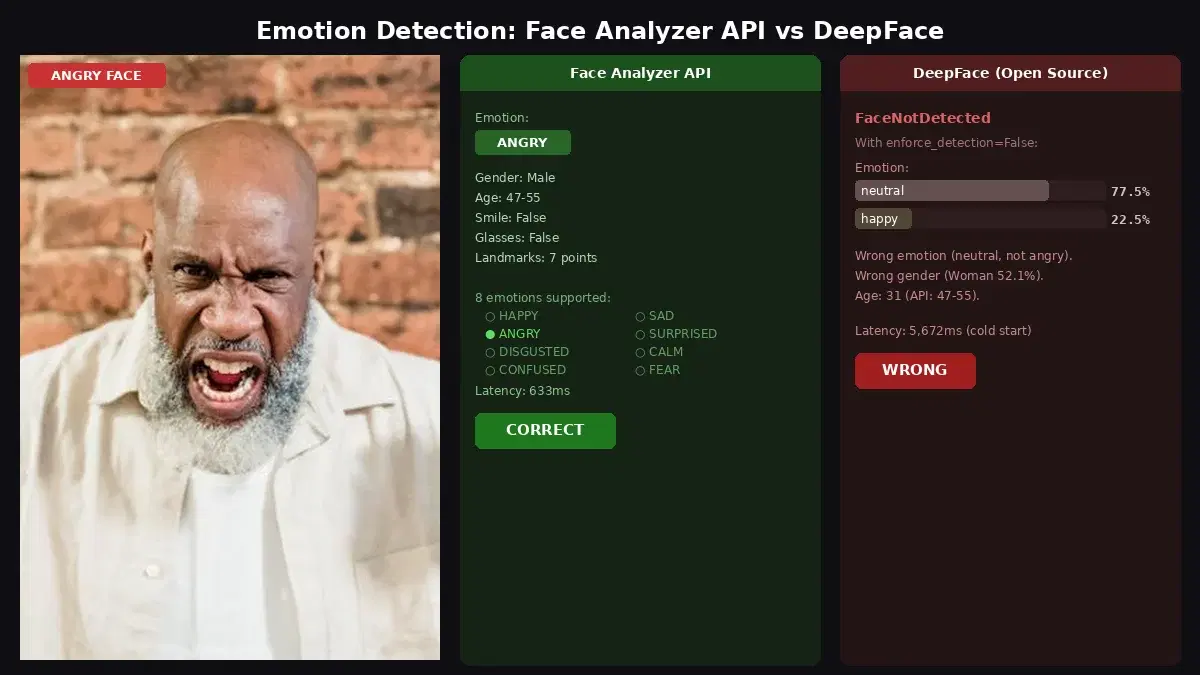
Quick Comparison
| Criteria | Face Analyzer API | DeepFace (Open Source) |
|---|---|---|
| Emotions | 8 (happy, sad, angry, surprised, disgusted, calm, confused, fear) | 7 (angry, disgust, fear, happy, sad, surprise, neutral) |
| Output format | Dominant emotion(s) per face, can return multiple | All 7 emotions with percentage scores |
| Extra features | Age, gender, smile, glasses, sunglasses, landmarks, face comparison, repositories | Age, gender, race |
| Setup | API key (2 minutes) | pip install deepface + TensorFlow + tf-keras (~500MB) |
| Latency (CPU) | ~600-700ms (includes network) | 500-5,000ms (depends on model loading) |
| Face detection | Detected all 3 test images | Crashed on 2 of 3 test images |
| License | Commercial (pay per call) | MIT |
Test environment: Intel Core i7-7700HQ @ 2.80GHz, 4 cores, no GPU. All DeepFace tests ran on CPU with TensorFlow 2.21.
What DeepFace Does
DeepFace is a Python library that wraps multiple face analysis models. It detects faces, estimates age, gender, race, and classifies facial expressions into 7 emotions with percentage scores. It uses TensorFlow under the hood and downloads model weights (~500MB) on first run.
from deepface import DeepFace

result = DeepFace.analyze(
    "photo.jpg",
    actions=["emotion", "age", "gender"],
    silent=True,
)

r = result[0]
print(f"Emotion: {r['dominant_emotion']}")
for emo, score in sorted(r["emotion"].items(), key=lambda x: -x[1]):
    print(f"  {emo}: {score:.1f}%")
print(f"Age: {r['age']}")
print(f"Gender: {r['dominant_gender']}")
The first call is slow (5-10 seconds) because it downloads model weights from GitHub. Subsequent calls take 500-800ms on CPU. DeepFace doesn't support non-ASCII file paths (crashes on accented characters like "Téléchargements"), which is a known limitation.
What the Face Analyzer API Does
The Face Analyzer API detects faces and returns 8 emotions, age range, gender, smile, eyeglasses, sunglasses, and 7 facial landmarks in a single call. It also supports face comparison and facial repositories for re-identification.
import requests

url = "https://faceanalyzer-ai.p.rapidapi.com/faceanalysis"
headers = {
    "x-rapidapi-host": "faceanalyzer-ai.p.rapidapi.com",
    "x-rapidapi-key": "YOUR_API_KEY",
}

with open("photo.jpg", "rb") as f:
    response = requests.post(url, headers=headers, files={"image": f})

data = response.json()
for face in data["body"]["faces"]:
    ff = face["facialFeatures"]
    print(f"Emotions: {ff['Emotions']}")
    print(f"Gender: {ff['Gender']}")
    print(f"Age: {ff['AgeRange']['Low']}-{ff['AgeRange']['High']}")
    print(f"Smile: {ff['Smile']}")
    print(f"Glasses: {ff['Eyeglasses']}")
Testing Both on the Same Images
We tested both tools on three Pexels images with distinct facial expressions. All tests ran on the same machine (Intel i7-7700HQ, no GPU).
Test 1: Surprised expression
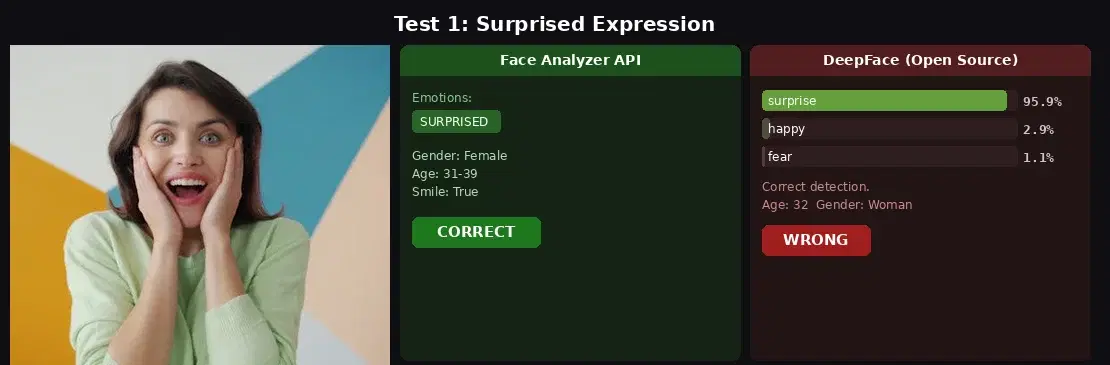
- API: SURPRISED. Gender: Female, Age: 31-39, Smile: True. Latency: ~600ms.
- DeepFace: surprise 95.9%, happy 2.9%, fear 1.1%. Gender: Woman, Age: 32. Latency: ~500ms (warm).
- Verdict: Both correct. DeepFace gives score distribution, API gives extra attributes (smile, glasses).
Test 2: Fear expression
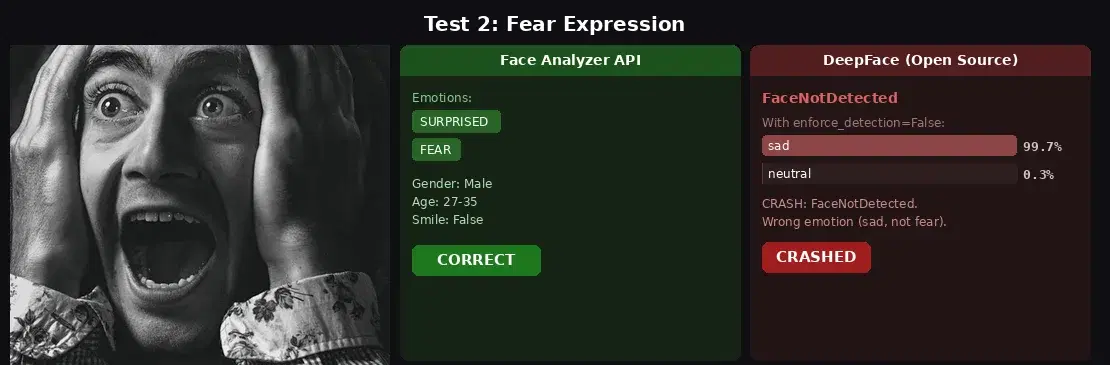
- API: SURPRISED + FEAR (two emotions detected). Gender: Male, Age: 27-35. Latency: 665ms.
- DeepFace:
FaceNotDetectedcrash. Withenforce_detection=False: sad 99.7%. Wrong emotion entirely. - Verdict: API wins. It detected the face and returned two relevant emotions. DeepFace crashed, then misclassified fear as sadness.
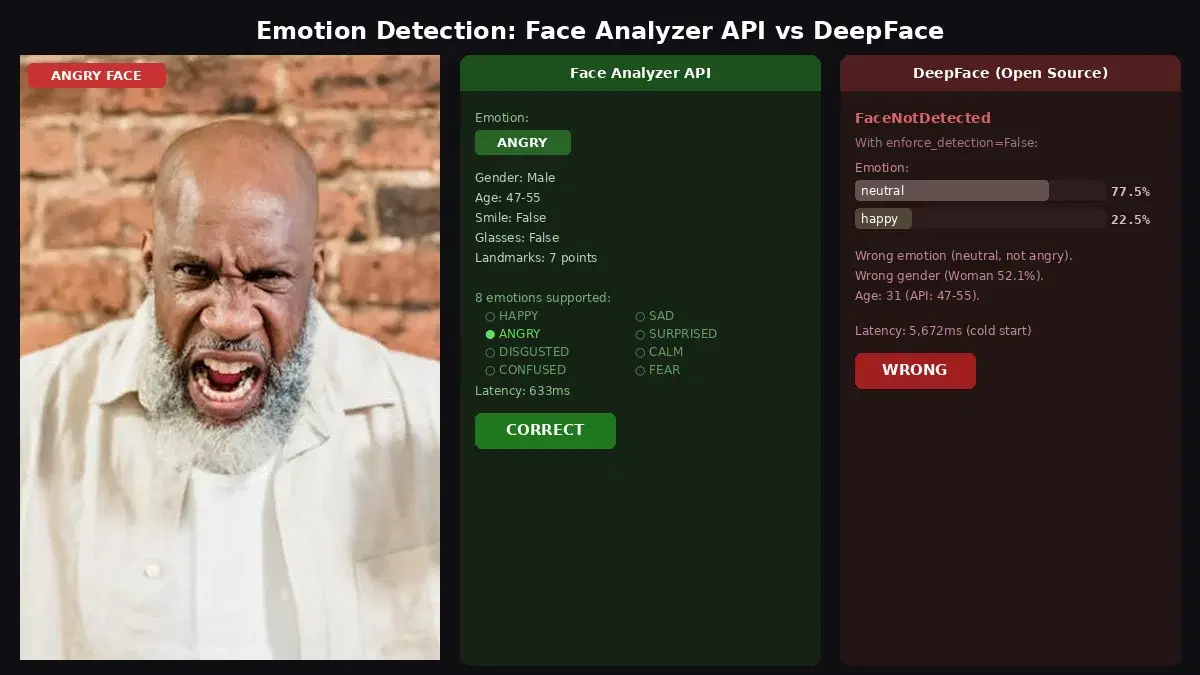
Test 3: Angry expression
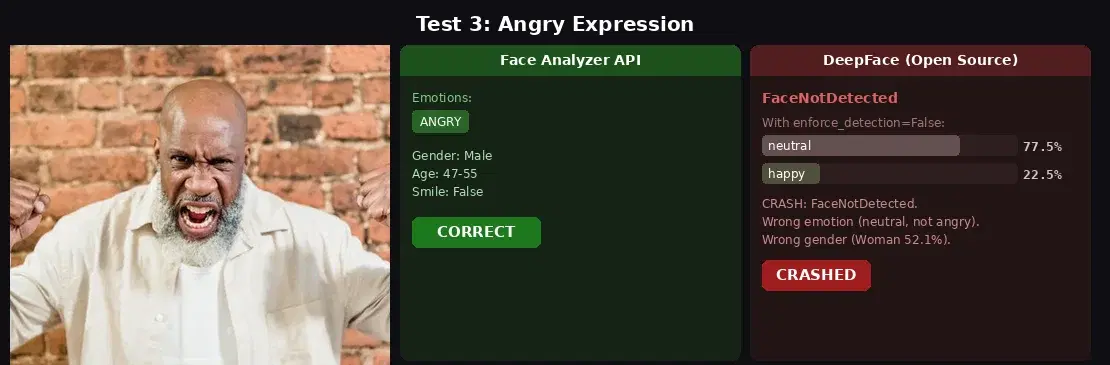
- API: ANGRY. Gender: Male, Age: 47-55. Latency: 633ms.
- DeepFace:
FaceNotDetectedcrash. With fallback: neutral 77.5%, happy 22.5%. Wrong emotion, wrong gender (Woman 52.1%). Latency: 5,672ms (cold start). - Verdict: API wins. DeepFace got the emotion, gender, and age all wrong on this image.
The Installation Problem
DeepFace's biggest friction point isn't accuracy, it's setup. Here's what we encountered installing it for this test:
pip install deepfaceinstalls TensorFlow (~500MB of dependencies).- First run crashes with
ValueError: You have tensorflow 2.21.0 and this requires tf-keras package. Fix:pip install tf-keras. - First analysis call downloads 3 model files from GitHub (emotion model 6MB, age model 539MB, gender model 537MB). Total: over 1GB of model weights.
- File paths with non-ASCII characters (e.g., French "Téléchargements") throw
ValueError: Input image must not have non-english characters. - Without a GPU, TensorFlow prints warnings about missing CUDA drivers on every single run.
The API requires pip install requests and an API key. That's it.
When to Choose DeepFace
- You need emotion score distributions. DeepFace returns percentage scores for all 7 emotions, not just the dominant one. Useful for research where you need to track subtle emotion shifts.
- Offline processing. No network dependency. All models run locally.
- You need race estimation. DeepFace detects race (asian, white, middle eastern, indian, latino, black). The API doesn't.
- Research and experimentation. DeepFace wraps multiple face recognition backends (VGG-Face, FaceNet, ArcFace) and lets you swap between them.
When to Choose the API
- Reliable face detection. The API detected all 3 test images. DeepFace crashed on 2 of 3. If your application can't afford failed detections, the API is safer.
- Multi-feature analysis. One API call returns emotion + age + gender + smile + glasses + sunglasses + landmarks. DeepFace requires separate analysis passes and doesn't detect smile, glasses, or landmarks.
- Face comparison and repositories. The API supports face comparison, facial repositories, and celebrity recognition. DeepFace has face verification but not cloud-managed repositories.
- No dependency headaches. No TensorFlow, no tf-keras, no 1GB model downloads, no CUDA warnings.
- Consistent latency. The API processes every image in 600-700ms regardless of the input. DeepFace ranges from 500ms (warm, simple face) to 5,000ms+ (cold start, complex image).
Code: Test Both on Your Images
Face Analyzer API (cURL)
curl -X POST \
  'https://faceanalyzer-ai.p.rapidapi.com/faceanalysis' \
  -H 'x-rapidapi-host: faceanalyzer-ai.p.rapidapi.com' \
  -H 'x-rapidapi-key: YOUR_API_KEY' \
  -F 'image=@photo.jpg'
Face Analyzer API (Python)
import requests

url = "https://faceanalyzer-ai.p.rapidapi.com/faceanalysis"
headers = {
    "x-rapidapi-host": "faceanalyzer-ai.p.rapidapi.com",
    "x-rapidapi-key": "YOUR_API_KEY",
}

with open("photo.jpg", "rb") as f:
    response = requests.post(url, headers=headers, files={"image": f})

for face in response.json()["body"]["faces"]:
    ff = face["facialFeatures"]
    print(f"Emotions: {ff['Emotions']}")
    print(f"Gender: {ff['Gender']}, Age: {ff['AgeRange']['Low']}-{ff['AgeRange']['High']}")
Face Analyzer API (JavaScript)
const fs = require("fs");
const FormData = require("form-data");

const form = new FormData();
form.append("image", fs.createReadStream("photo.jpg"));

const response = await fetch(
  "https://faceanalyzer-ai.p.rapidapi.com/faceanalysis",
  {
    method: "POST",
    headers: {
      "x-rapidapi-host": "faceanalyzer-ai.p.rapidapi.com",
      "x-rapidapi-key": "YOUR_API_KEY",
      ...form.getHeaders(),
    },
    body: form,
  }
);

const data = await response.json();
data.body.faces.forEach((face) => {
  console.log("Emotions:", face.facialFeatures.Emotions);
  console.log("Gender:", face.facialFeatures.Gender);
  console.log("Age:", face.facialFeatures.AgeRange);
});
DeepFace (Python)
from deepface import DeepFace

# Note: first run downloads ~1GB of model weights
# File paths must be ASCII only (no accented characters)
result = DeepFace.analyze(
    "photo.jpg",
    actions=["emotion", "age", "gender"],
    enforce_detection=False,  # prevents crash on hard-to-detect faces
    silent=True,
)

r = result[0]
print(f"Emotion: {r['dominant_emotion']}")
for emo, score in r["emotion"].items():
    print(f"  {emo}: {score:.1f}%")
print(f"Age: {r['age']}, Gender: {r['dominant_gender']}")
Sources
- DeepFace GitHub Repository - 22K+ stars, MIT license, TensorFlow-based
- Facial Expression Recognition with Keras (Serengil, 2018) - FER2013 benchmark: human accuracy ~65%, top models ~75%
- DeepFace on PyPI - current version, dependencies, changelog
DeepFace is a capable open-source library for facial emotion detection research. If you need emotion score distributions, race estimation, or offline processing, it's a strong choice. But for production applications where reliable emotion detection and multi-feature analysis matter, the Face Analyzer API is more dependable: it detected all test faces, classified emotions correctly, and returned age, gender, smile, and glasses in a single call with consistent sub-second latency. For more face-related projects, check out the age verification tutorial and the face matching deep dive.
Frequently Asked Questions
- How accurate is DeepFace for emotion detection?
- DeepFace uses models trained on the FER2013 dataset, where human accuracy is about 65% and top models reach 75%. In our tests, DeepFace correctly identified surprise but misclassified fear as sad and anger as neutral. It also failed to detect faces in 2 out of 3 test images, requiring a fallback flag.
- What emotions can a face analysis API detect?
- The Face Analyzer API detects 8 emotions: happy, sad, angry, surprised, disgusted, calm, confused, and fear. It can return multiple emotions per face when the expression is ambiguous (e.g., surprised + fear). DeepFace detects 7 emotions: angry, disgust, fear, happy, sad, surprise, and neutral.
- Does DeepFace require a GPU for emotion detection?
- No, but it is slow without one. DeepFace runs on CPU using TensorFlow, with processing times of 500ms-5,000ms per image depending on model loading. It also requires TensorFlow, tf-keras, and potentially dlib, which adds 500MB+ of dependencies. A cloud API processes the same image in under 700ms with zero local dependencies.