This tutorial uses the Face Analyzer API. See the docs, live demo, and pricing.
Age-restricted products and services need a way to verify that a customer is old enough before completing a purchase. Alcohol delivery, online gambling, vaping shops, and even some social platforms require an age verification system by law. Most solutions rely on ID document uploads, which creates friction and drops conversion rates. A faster alternative: estimate the customer's age from a selfie using a face age detection API. In this tutorial, you'll build a complete age verification endpoint in Python using the Face Analyzer API.
What Is Face-Based Age Verification?
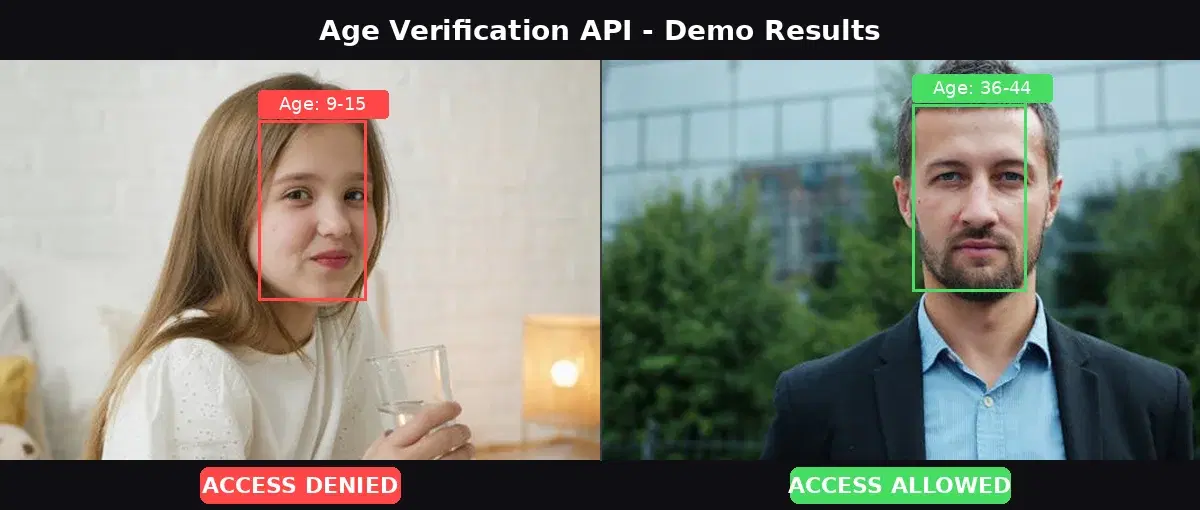
Face-based age verification uses facial analysis to estimate a person's age from a photo. Instead of scanning an ID document, the user takes a selfie. The API detects the face, analyzes facial features, and returns an estimated age range (for example, 25-35). Your application then checks whether the lower bound of that range meets the legal threshold (18, 21, or whatever your jurisdiction requires).
This approach is faster than document verification (under 1 second vs 10-30 seconds), works on any device with a camera, and doesn't require the user to have their ID on hand. Unlike biometric authentication methods that store templates, online age verification through facial estimation can be stateless: process the image, get the result, discard the photo. It's not a replacement for full KYC in regulated industries like fintech, but it's the right fit for age gates where a reasonable estimate is legally sufficient.
Age Gate vs Age Verification: Key Differences
| Method | How It Works | Strength | Weakness |
|---|---|---|---|
| Date-of-birth prompt | User types their birthday | Zero friction | Anyone can lie |
| ID document scan | User uploads a photo of their ID | Legally strong | Slow, high drop-off, privacy concerns |
| Face-based estimation | User takes a selfie, API estimates age | Fast, no documents needed | Estimate (not exact), edge cases near threshold |
| Third-party database | Verify against credit bureau or telco records | High accuracy | Expensive, region-limited, slow integration |
For most ecommerce and content platforms, face-based estimation hits the right balance: it's fast enough to keep users in the flow, accurate enough to filter out obvious minors, and cheap enough to run on every transaction.
Why Age Verification APIs Matter for Compliance
Regulations are tightening globally. The UK's Online Safety Act requires age verification for platforms hosting adult content. In the US, states like Louisiana, Virginia, and Utah have passed laws requiring age checks for certain online services. The EU's Digital Services Act pushes platforms to protect minors. Non-compliance can mean fines, lawsuits, or being blocked in entire markets.
An age verification API lets you add compliance in a single endpoint call. No ML infrastructure to manage, no model training, no GPU costs. You send an image, get back an age range, and make a decision.
How the Face Analyzer API Estimates Age
The Face Analyzer API exposes a /faceanalysis endpoint that detects faces and returns attributes for each one: gender, smile, eyeglasses, emotion, and an AgeRange object with Low and High bounds. The age estimate is based on facial features, not metadata.
Here's what the API returns for a single face:
{
  "statusCode": 200,
  "body": {
    "faces": [
      {
        "boundingBox": { "topLeft": { "x": 0.43, "y": 0.15 }, "bottomRight": { "x": 0.61, "y": 0.6 } },
        "facialFeatures": {
          "Gender": "Female",
          "Smile": true,
          "Eyeglasses": false,
          "Sunglasses": false,
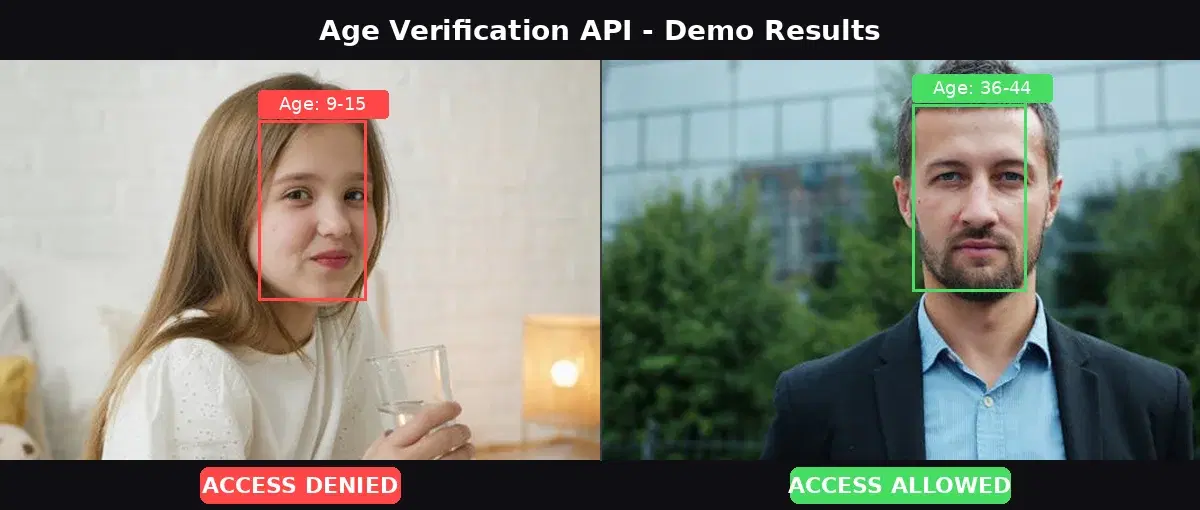
          "AgeRange": { "Low": 9, "High": 15 },
          "Emotions": ["HAPPY"]
        }
      }
    ]
  }
}
The AgeRange.Low value is what matters for verification. If it's below your threshold, the user doesn't pass. Using the lower bound is the conservative approach: it minimizes the chance of allowing a minor through.
Building an Age Verification Endpoint in Python
Let's build a Python function that takes an image, calls the API, and returns an allow/deny decision. Then we'll wrap it in a Flask endpoint.
Core verification function
import requests

API_URL = "https://faceanalyzer-ai.p.rapidapi.com/faceanalysis"
HEADERS = {
    "x-rapidapi-host": "faceanalyzer-ai.p.rapidapi.com",
    "x-rapidapi-key": "YOUR_API_KEY",
}

def verify_age(image_path: str, min_age: int = 18) -> dict:
    """Check if the person in the image meets the minimum age."""
    with open(image_path, "rb") as f:
        resp = requests.post(API_URL, headers=HEADERS, files={"image": f})

    data = resp.json()
    faces = data["body"]["faces"]

    if not faces:
        return {"allowed": False, "reason": "no face detected"}

    # Use the first (largest) face
    age_range = faces[0]["facialFeatures"]["AgeRange"]
    estimated_low = age_range["Low"]
    estimated_high = age_range["High"]

    allowed = estimated_low >= min_age
    return {
        "allowed": allowed,
        "age_range": f"{estimated_low}-{estimated_high}",
        "threshold": min_age,
        "reason": "meets age requirement" if allowed else "below age threshold",
    }

# Test it
result = verify_age("selfie.jpg", min_age=21)
print(result)
# {"allowed": False, "age_range": "9-15", "threshold": 21, "reason": "below age threshold"}
Flask endpoint
from flask import Flask, request, jsonify

app = Flask(__name__)

@app.route("/verify-age", methods=["POST"])
def verify_age_endpoint():
    if "image" not in request.files:
        return jsonify({"error": "no image provided"}), 400

    image = request.files["image"]
    min_age = int(request.form.get("min_age", 18))

    # Call the Face Analyzer API
    resp = requests.post(
        API_URL,
        headers=HEADERS,
        files={"image": ("selfie.jpg", image.read(), image.content_type)},
    )
    data = resp.json()
    faces = data["body"]["faces"]

    if not faces:
        return jsonify({"allowed": False, "reason": "no face detected"}), 200

    age_range = faces[0]["facialFeatures"]["AgeRange"]
    allowed = age_range["Low"] >= min_age

    return jsonify({
        "allowed": allowed,
        "age_range": {"low": age_range["Low"], "high": age_range["High"]},
        "threshold": min_age,
    })

if __name__ == "__main__":
    app.run(port=5000)
Calling the API Directly
If you want to test the age estimation without building a full app, here are standalone examples in cURL, Python, and JavaScript.
cURL
curl -X POST \
  'https://faceanalyzer-ai.p.rapidapi.com/faceanalysis' \
  -H 'x-rapidapi-host: faceanalyzer-ai.p.rapidapi.com' \
  -H 'x-rapidapi-key: YOUR_API_KEY' \
  -F 'image=@selfie.jpg'
Python
import requests

url = "https://faceanalyzer-ai.p.rapidapi.com/faceanalysis"
headers = {
    "x-rapidapi-host": "faceanalyzer-ai.p.rapidapi.com",
    "x-rapidapi-key": "YOUR_API_KEY",
}

with open("selfie.jpg", "rb") as f:
    response = requests.post(url, headers=headers, files={"image": f})

data = response.json()
for face in data["body"]["faces"]:
    age = face["facialFeatures"]["AgeRange"]
    print(f"Estimated age: {age['Low']}-{age['High']}")
JavaScript (Node.js)
const fs = require("fs");
const FormData = require("form-data");

const form = new FormData();
form.append("image", fs.createReadStream("selfie.jpg"));

const response = await fetch(
  "https://faceanalyzer-ai.p.rapidapi.com/faceanalysis",
  {
    method: "POST",
    headers: {
      "x-rapidapi-host": "faceanalyzer-ai.p.rapidapi.com",
      "x-rapidapi-key": "YOUR_API_KEY",
      ...form.getHeaders(),
    },
    body: form,
  }
);

const data = await response.json();
data.body.faces.forEach((face) => {
  const age = face.facialFeatures.AgeRange;
  console.log(`Estimated age: ${age.Low}-${age.High}`);
});
Handling Edge Cases
Age estimation from a photo is not perfect. Here are the cases you need to handle in production.
- No face detected - The user submitted a blurry photo, a photo of their hand, or an image with no visible face. Return a clear error and ask them to retake.
- Multiple faces - Group photos or someone in the background. Use the face with the largest bounding box (closest to camera) and ignore the rest.
- Borderline age - The API returns a range like 16-22 and your threshold is 18. The conservative approach: use
AgeRange.Lowand deny. If you want to reduce false rejections, you could use the midpoint(Low + High) / 2and offer a fallback (ID upload) for borderline cases. - Sunglasses or heavy filters - Accessories that obscure the face reduce estimation accuracy. Check the
Sunglassesfield in the response and ask the user to remove them if detected. - Spoofing with a printed photo - Someone could hold up a photo of an adult to bypass the check. For high-risk use cases, add liveness detection (blink check, head turn) before sending the image to the age estimation endpoint.
Compliance for Alcohol, Tobacco, and Vaping
Different industries have different thresholds and strictness levels. Here's a practical breakdown:
| Industry | Typical Threshold | Recommended Approach |
|---|---|---|
| Alcohol delivery | 21 (US) / 18 (EU, UK) | Face estimation + ID fallback for borderline |
| Vaping / tobacco | 21 (US) / 18 (EU) | Face estimation at checkout |
| Online gambling | 18-21 depending on jurisdiction | Face estimation + full KYC for account creation |
| Adult content platforms | 18 | Face estimation (UK Online Safety Act compliant) |
| Social media (minor protection) | 13-16 | Face estimation for parental consent flow |
For high-risk verticals (gambling, fintech), combine face-based age estimation with document verification for a layered approach. For lower-risk verticals (content gating, ecommerce), face estimation alone is typically sufficient.
Face-Based vs Document-Based Verification
| Criteria | Face-Based (API) | Document-Based |
|---|---|---|
| Speed | Under 1 second | 10-30 seconds |
| User friction | Low (selfie only) | High (find ID, photograph it) |
| Accuracy | Age range estimate | Exact date of birth |
| Privacy impact | Lower (no PII stored) | Higher (ID photo contains sensitive data) |
| Cost per check | $0.002-0.01 | $0.50-2.00 (enterprise KYC) |
| Best for | Age gates, content platforms, ecommerce | Fintech, gambling, high-risk verticals |
Real-World Use Cases
Alcohol and tobacco delivery
A delivery app adds a selfie step at checkout for age-restricted items. The API estimates the customer's age in under a second. Orders from customers estimated under 21 are flagged for ID check at the door. This reduces delivery refusals and keeps the app compliant with state regulations.
Online gambling sign-up
A betting platform uses face-based age estimation as the first step of registration. Users who pass immediately proceed to account setup. Users near the threshold get routed to a full identity verification flow with document upload. This two-tier approach keeps onboarding fast for most users while maintaining compliance.
Social media minor protection
A platform wants to enforce parental consent for users under 16 (GDPR requirement). New sign-ups take a selfie. If the API estimates the user is under 16, the platform triggers a parental consent flow before activating the account.
Vending machines and kiosks
A smart vending machine selling vape products captures a photo from its built-in camera. The age estimation API runs on the backend and unlocks the machine only if the customer is estimated to be over 21. No cashier needed.
Tips and Best Practices
- Always use
AgeRange.Lowfor the threshold check. This is the conservative approach. If the API returns 16-22, treating it as 16 protects you legally. - Offer a fallback for borderline cases. When the estimated age range spans the threshold (e.g., 16-22 with a 18+ requirement), let the user upload an ID document instead of flat-out rejecting them.
- Don't store the selfie. For privacy and GDPR compliance, process the image, get the result, and discard the photo. You only need to log the decision (allowed/denied, timestamp, age range) for audit purposes.
- Check for sunglasses. The API returns a
Sunglassesboolean. If true, ask the user to retake the photo without them for a better estimate. - Set the threshold higher than the legal minimum. If your legal requirement is 18, set your threshold to 21. This gives you a safety margin on borderline estimates and reduces compliance risk.
Face-based age verification gives you a fast, low-friction way to gate access to age-restricted products and content. The Face Analyzer API handles the heavy lifting: face detection, age estimation, and attribute analysis in a single call. Combine it with your business logic and a fallback for edge cases, and you have a production-ready age gate that keeps you compliant without killing your conversion rate.
Frequently Asked Questions
- How accurate is AI age estimation from a selfie?
- Modern face analysis APIs estimate age within a range of 5-10 years. For age verification, the lower bound of the range is used to make the decision. This conservative approach means a 22-year-old might get an estimated range of 18-28, which still passes a 18+ threshold. Accuracy improves with good lighting, a front-facing angle, and no sunglasses.
- Is facial age estimation GDPR compliant?
- It can be. The key is to process the selfie, extract the age estimate, and discard the image immediately without storing it. You only need to log the verification result (allowed/denied, timestamp, age range) for audit purposes. Biometric data processing requires explicit user consent under GDPR Article 9.
- Can age verification APIs detect minors without an ID?
- Yes. Face-based age estimation works from a selfie alone, no ID document required. The API analyzes facial features to estimate an age range. If the lower bound falls below your threshold (e.g., 18 or 21), access is denied. For borderline cases, you can add an ID document fallback as a second verification step.