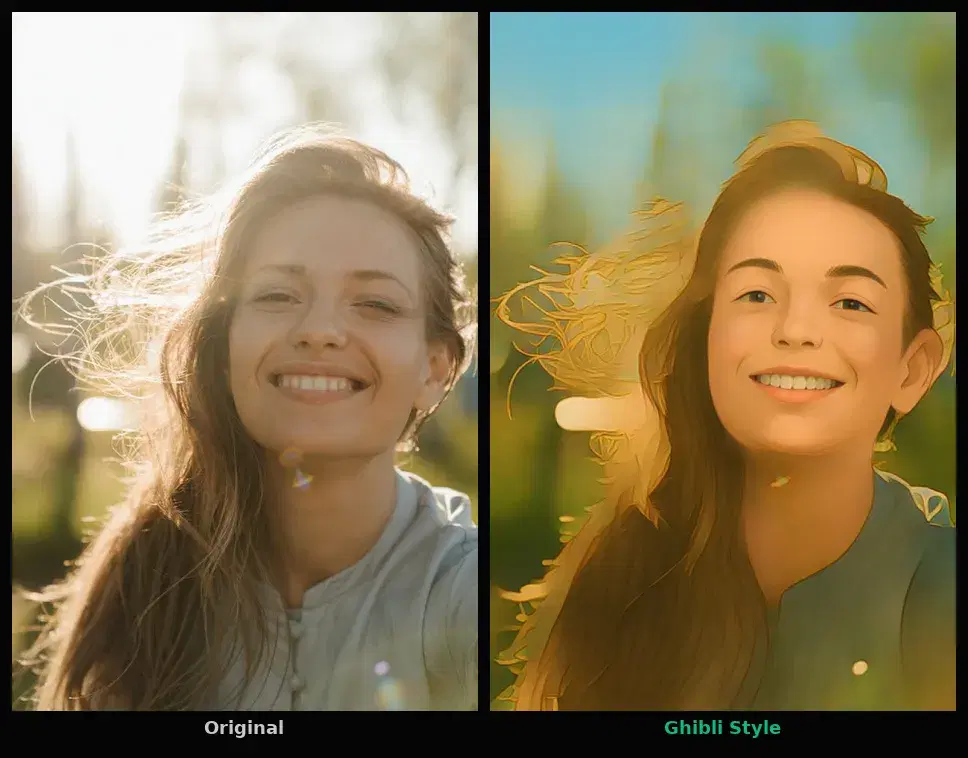
This tutorial uses the Photo to Anime API. See the docs, live demo, and pricing.
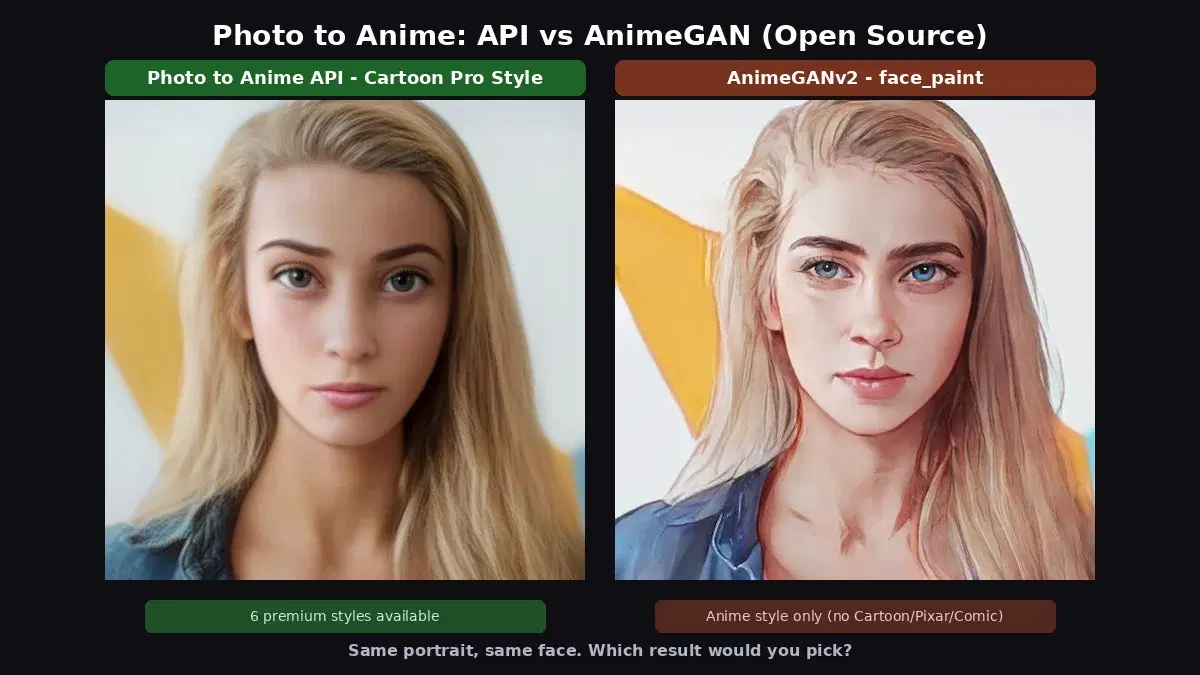
You want to add an anime or cartoon filter to your application. The open-source route is tempting: AnimeGAN has been the go-to model since 2020, with v2 (2021) and v3 (2022) available as pretrained weights on GitHub. It is free, runs locally, and generates decent anime-style portraits. But once you look at what it actually outputs and what it takes to run in production, the picture changes. This guide compares AnimeGAN v2 and v3 against the Photo to Anime API using the same portrait, with real results, benchmarks, and code examples.
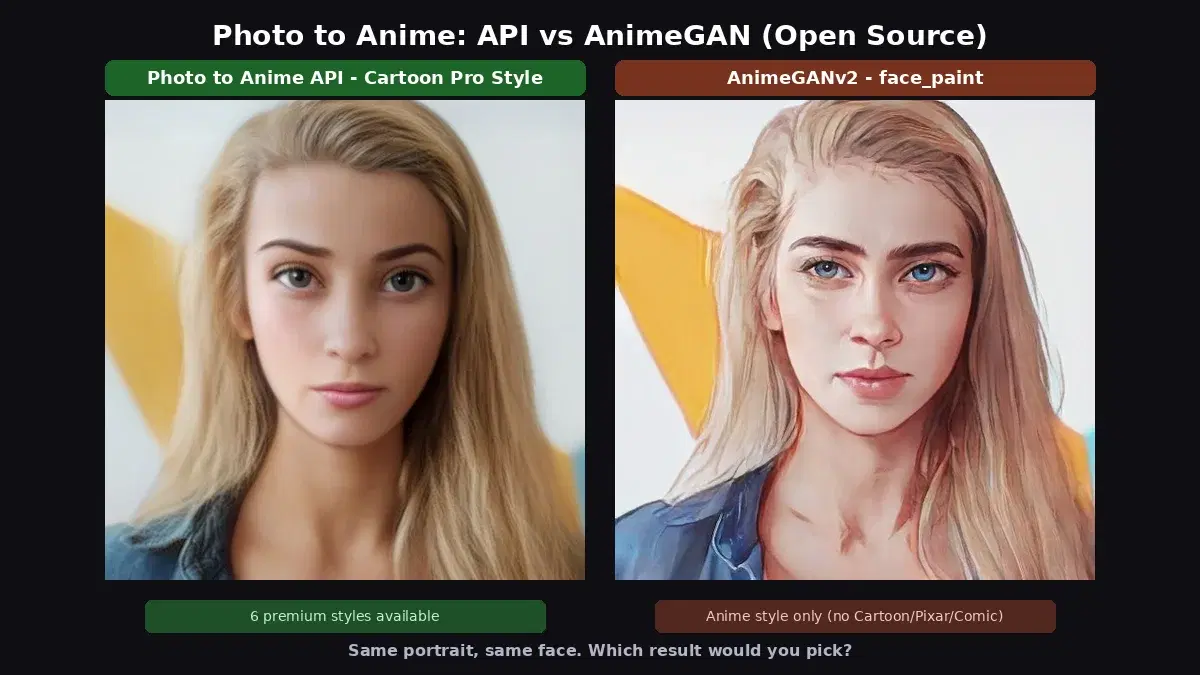
Quick Comparison
| Criteria | Photo to Anime API | AnimeGAN v2 / v3 |
|---|---|---|
| Styles available | 14 (6 premium: Arcane, Pixar, Comic, Caricature, Illustration, Cartoon Pro; 7 classic; Ghibli) | 5 total across v2 and v3 (face_paint, celeba_distill, paprika, Hayao, Shinkai) |
| Style variety | Cartoon, 3D animation, comic, sketch, illustration, caricature, anime, Ghibli | Japanese anime only (no Pixar, no comic, no caricature) |
| Setup | API key (2 minutes) | pip install torch (~2GB) + torch.hub download + onnxruntime for v3 |
| Processing time | ~1-2s (includes network) | 2-3s per image on CPU (plus first-run model download of 8-16MB per style) |
| Style control | Adjustable intensity (0.0-1.0), sub-style variations (style_id 0-316) | None (fixed per model) |
| Output resolution | Up to 1600x1344 (input-dependent) | 512x512 (v2 face_paint), variable for v3 |
| License | Commercial (pay per call) | Open source |
| Dependencies | requests (one library) | PyTorch, torchvision, onnxruntime, Pillow, numpy |
Test environment: Intel Core i7-7700HQ @ 2.80GHz, 4 cores, no GPU. Both AnimeGANv2 (via torch.hub) and AnimeGANv3 (via ONNX Runtime) ran on CPU.
What AnimeGAN Does
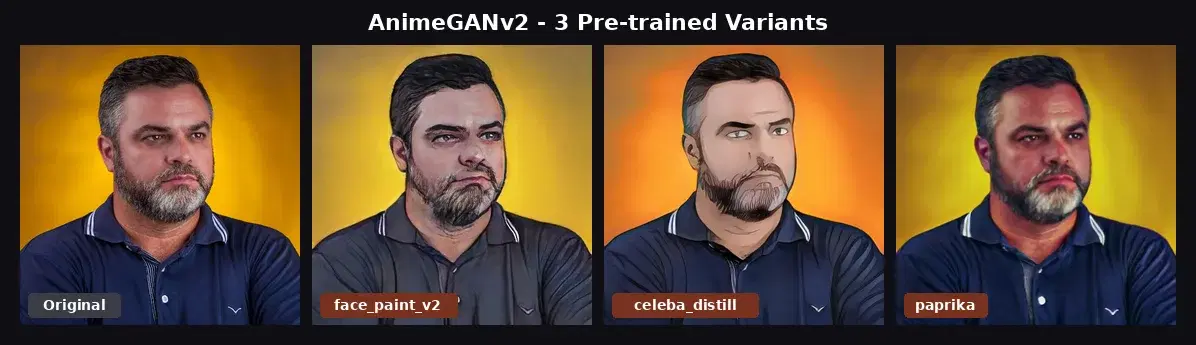
AnimeGAN is a GAN trained to transform photos into anime-style images. The original paper was released in 2020, followed by v2 in 2021 and v3 in 2022. Each version ships with a handful of pretrained weights, each producing a specific anime aesthetic.
AnimeGANv2 variants
- face_paint_512_v2: portrait-focused, clean lines, anime face style
- celeba_distill: distilled from CelebA dataset, softer colors
- paprika: trained on Paprika aesthetic, more naturalistic
All three variants produce similar results on the same input: a stylized version of the original photo with anime-like shading and color simplification. They are trained for the same target domain.
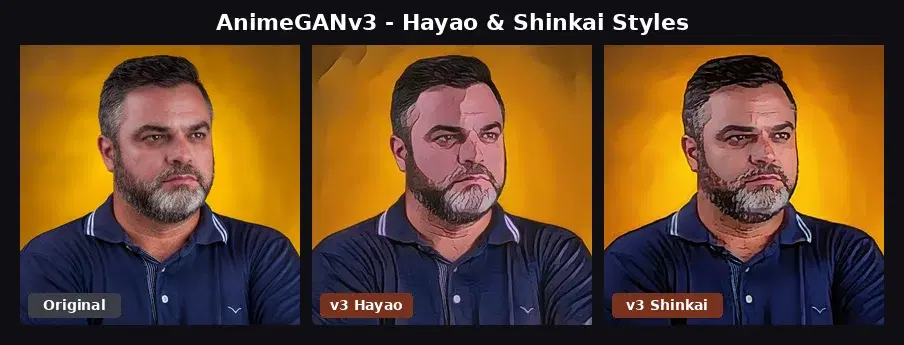
AnimeGANv3 variants
- AnimeGANv3_Hayao_36: Studio Ghibli (Hayao Miyazaki) style
- AnimeGANv3_Shinkai_37: Makoto Shinkai style
v3 ships as ONNX models, which are easier to load without full PyTorch but still require onnxruntime. The outputs target director-specific aesthetics but remain within the anime domain.
What the Photo to Anime API Does
The Photo to Anime API provides three endpoints with 14 total styles: /cartoonize (7 classic styles including anime, 3D, sketch), /cartoonize-pro (6 premium styles: Cartoon Pro, Caricature, Arcane, Comic, Pixar, Illustration), and /ghibli (Studio Ghibli style with face enhancement).
The premium styles are what matter for comparison. They produce distinct artistic aesthetics that AnimeGAN cannot reach. Here is the same portrait processed through 5 different premium styles:
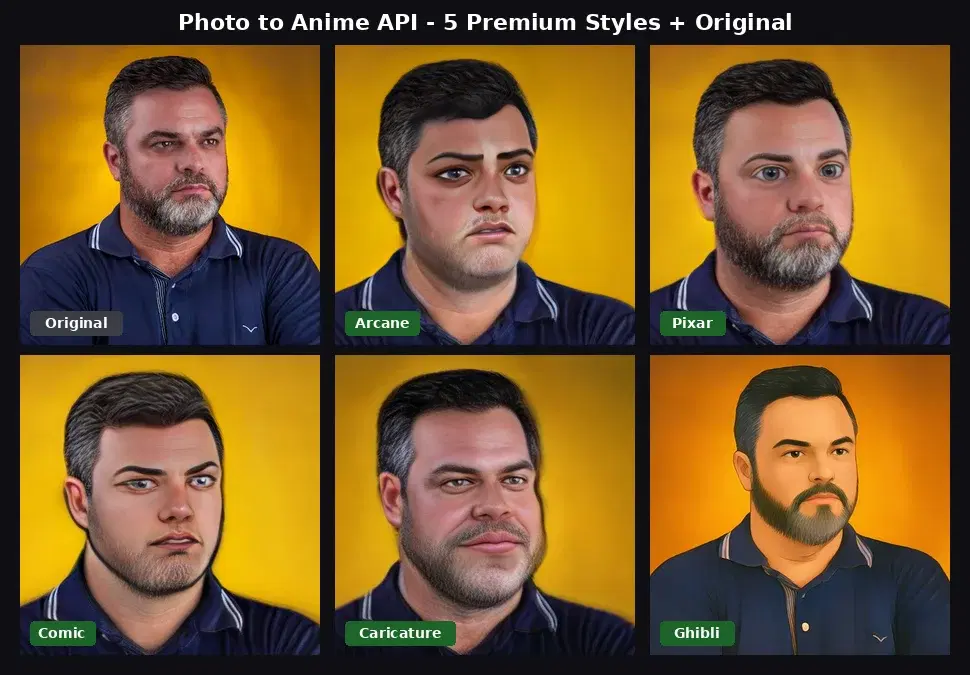
Each style produces a visibly different result. Arcane has dark fantasy lighting with painterly brush strokes. Pixar has 3D animation smoothness. Comic has bold contours and saturated colors. Caricature preserves the likeness with slight exaggeration. Ghibli has the soft anime feel. None of these can be produced by AnimeGAN.
The Style Coverage Gap
This is the fundamental difference. AnimeGAN was trained on anime datasets for a single target aesthetic per model. The API supports a broader set of style domains that require different training data.
| Style | Photo to Anime API | AnimeGAN v2/v3 |
|---|---|---|
| Japanese anime | Yes (cartoonize + ghibli) | Yes (all variants) |
| Studio Ghibli | Yes (dedicated endpoint) | Yes (v3 Hayao) |
| Arcane / dark fantasy | Yes | No |
| Pixar / 3D animation | Yes | No |
| Comic book | Yes | No |
| Caricature | Yes | No |
| Sketch / line drawing | Yes (cartoonize style=sketch) | No |
| Style intensity control | Yes (0.0-1.0) | No |
Running AnimeGAN Locally
Here is how to install and run AnimeGANv2 and v3 on your machine. You will need Python 3.8+ and about 2.5GB of free disk space for dependencies.
AnimeGANv2 with PyTorch
import torch
from PIL import Image

# Load model (downloads ~8MB on first run)
model = torch.hub.load(
    "bryandlee/animegan2-pytorch:main",
    "generator",
    pretrained="face_paint_512_v2",
    trust_repo=True,
)
face2paint = torch.hub.load(
    "bryandlee/animegan2-pytorch:main",
    "face2paint",
    size=512,
    trust_repo=True,
)

img = Image.open("portrait.jpg").convert("RGB")
with torch.no_grad():
    output = face2paint(model, img)

output.save("result.jpg", quality=90)
First run takes about 60 seconds: PyTorch imports, repo clone from GitHub, model weight download, and initial inference. Subsequent runs take 2-3 seconds per image on CPU. Output is fixed at 512x512.
AnimeGANv3 with ONNX Runtime
import numpy as np
import onnxruntime as ort
from PIL import Image

# Download model from GitHub releases first:
# https://github.com/TachibanaYoshino/AnimeGANv3/releases
session = ort.InferenceSession("AnimeGANv3_Hayao_36.onnx")

img = Image.open("portrait.jpg").convert("RGB")

# Preprocess: resize to multiple of 8, normalize to [-1, 1]
w, h = img.size
scale = 512 / max(w, h)
new_w = int((w * scale) // 8) * 8
new_h = int((h * scale) // 8) * 8
img_resized = img.resize((new_w, new_h), Image.LANCZOS)
arr = np.array(img_resized).astype(np.float32) / 127.5 - 1.0
arr = arr[np.newaxis, :, :, :]

# Run inference
output = session.run(None, {session.get_inputs()[0].name: arr})

# Postprocess back to image
result_arr = (output[0][0] + 1.0) * 127.5
result_arr = np.clip(result_arr, 0, 255).astype(np.uint8)
Image.fromarray(result_arr).save("result.jpg", quality=90)
v3 is slightly faster than v2 on CPU (~700ms per image in our tests) because ONNX Runtime is more optimized than PyTorch for inference. The tradeoff: you manage preprocessing, postprocessing, and model weights manually.
Calling the Photo to Anime API
cURL
# Premium style (Arcane)
curl -X POST 'https://phototoanime1.p.rapidapi.com/cartoonize-pro' \
  -H 'x-rapidapi-host: phototoanime1.p.rapidapi.com' \
  -H 'x-rapidapi-key: YOUR_API_KEY' \
  -F 'image=@portrait.jpg' \
  -F 'style=arcane'

# Ghibli style
curl -X POST 'https://phototoanime1.p.rapidapi.com/ghibli' \
  -H 'x-rapidapi-host: phototoanime1.p.rapidapi.com' \
  -H 'x-rapidapi-key: YOUR_API_KEY' \
  -F 'image=@portrait.jpg'
Python
import requests

url = "https://phototoanime1.p.rapidapi.com/cartoonize-pro"
headers = {
    "x-rapidapi-host": "phototoanime1.p.rapidapi.com",
    "x-rapidapi-key": "YOUR_API_KEY",
}

# Try different premium styles
for style in ["arcane", "pixar", "comic", "caricature"]:
    with open("portrait.jpg", "rb") as f:
        response = requests.post(
            url,
            headers=headers,
            files={"image": f},
            data={"style": style, "style_degree": "0.7"},
        )
    result = response.json()
    print(f"{style}: {result['image_url']}")
    # Download the result
    img_data = requests.get(result["image_url"]).content
    with open(f"output_{style}.jpg", "wb") as f:
        f.write(img_data)
JavaScript (Node.js)
const fs = require("fs");
const FormData = require("form-data");

async function cartoonize(imagePath, style) {
  const form = new FormData();
  form.append("image", fs.createReadStream(imagePath));
  form.append("style", style);

  const response = await fetch(
    "https://phototoanime1.p.rapidapi.com/cartoonize-pro",
    {
      method: "POST",
      headers: {
        "x-rapidapi-host": "phototoanime1.p.rapidapi.com",
        "x-rapidapi-key": "YOUR_API_KEY",
        ...form.getHeaders(),
      },
      body: form,
    }
  );

  const data = await response.json();
  console.log(`${style}: ${data.image_url}`);
  return data.image_url;
}

cartoonize("portrait.jpg", "arcane");
When to Choose AnimeGAN
- Japanese anime style is enough. If you only need anime or Ghibli-style portraits and nothing else, AnimeGANv2 or v3 handles that well.
- Offline processing. No network dependency. All models run locally on CPU or GPU. Good for air-gapped environments or privacy-sensitive workloads.
- Custom training. You can fine-tune AnimeGAN on your own dataset if you have ML expertise and GPU time. The API uses fixed pretrained models.
- Zero per-call cost. After infrastructure, there is no marginal cost per image. If you process millions of images with existing GPU hardware, self-hosting wins on cost.
When to Choose the API
- Multiple artistic styles. Arcane, Pixar, Comic, Caricature, Illustration, Ghibli. AnimeGAN cannot produce any of these. If your users want variety, the API is the only option without training custom models.
- Higher output resolution. The API returns up to 1600x1344 while AnimeGANv2 face_paint is fixed at 512x512.
- Style intensity control. The
style_degreeparameter lets you dial in subtle stylization (0.3) or strong effects (0.9). AnimeGAN has no such control. - No dependency management. No PyTorch (~2GB), no onnxruntime, no model weights to download, no preprocessing code to write. One HTTP call returns a URL to the result.
- Face-aware processing. The API detects faces and applies stylization with smooth blending into the background. AnimeGAN applies uniformly to the whole image.
Sources
- AnimeGANv2 PyTorch (bryandlee) - PyTorch port, 3 pretrained weights, torch.hub integration
- AnimeGANv3 official repository - Hayao and Shinkai ONNX models, v1.1.0 release
- AnimeGANv2 paper and original TensorFlow implementation - architecture details and training data
AnimeGAN is a solid open-source baseline for Japanese anime stylization. If you only need that single style and already run PyTorch in your stack, it works. For applications that need multiple photo to anime styles (Arcane, Pixar, Comic, Caricature) or adjustable intensity, the Photo to Anime API covers ground that AnimeGAN was never trained for. For more photo-to-anime projects, see the anime filter app tutorial and the Ghibli art 3-line tutorial.
Frequently Asked Questions
- What is the difference between AnimeGAN v2 and v3?
- AnimeGANv2 is a PyTorch model released in 2021 with 3 pre-trained variants (face_paint, celeba_distill, paprika). AnimeGANv3 is the 2022 successor, released as ONNX models with styles trained on specific anime directors (Hayao Miyazaki, Makoto Shinkai). Both produce a single anime-style filter with limited variation.
- Can AnimeGAN generate Pixar or Arcane styles?
- No. AnimeGAN v2 and v3 are trained specifically for Japanese anime styles (Hayao, Shinkai, face_paint). They cannot produce Pixar, Comic, Caricature, Arcane, or other cartoon styles. For those, you need a multi-style model or a cloud API that supports premium style transfer.
- Is AnimeGAN good enough for production?
- AnimeGANv2 gives a usable anime filter for simple portraits, but processing takes 2-3 seconds on CPU (about 60 seconds including PyTorch imports and model download on first run), requires PyTorch (~2GB install), and only supports one style per model. For apps that need multiple artistic styles or sub-second latency, a cloud API is faster to integrate and maintain.