This tutorial uses the Face Analyzer API. See the docs, live demo, and pricing.
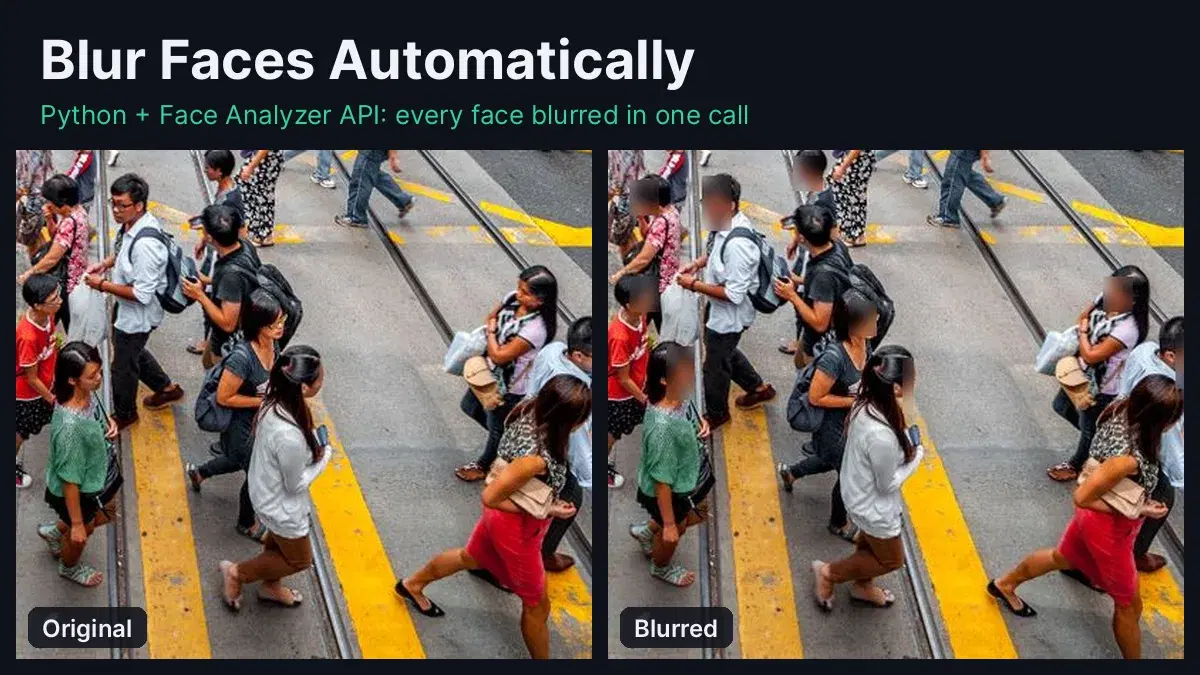
Street shots for a city guide, user uploads on a marketplace, a dataset for model training, a CCTV clip someone asked for under GDPR: every one of them is full of faces of people who never agreed to be published. Blurring them by hand does not scale past a few photos. This guide shows how to blur faces in photos automatically with Python: one API call finds every face, Pillow pixelates them, and the saved file drops the GPS metadata too.
Detection runs on the Face Analyzer API, the blur runs locally. Every number below comes from live calls on six crowded street photos and one party photo.
When You Need to Blur Faces
- Publishing photos of public places: travel blogs, real estate listings, street-level imagery and news sites show passers-by who did not consent.
- Answering access requests: the EDPB video guidelines say that when someone asks for a copy of footage they appear in, other people who can be identified in it should be anonymised, for example by blurring, before the copy goes out.
- Erasing personal data: the same guidelines state that blurring a picture with no retroactive ability to recover the data means the personal data are considered erased.
- Sharing datasets: training images and annotated photos can be shared with a vendor or a public repository once the faces are gone.
- User-generated content: apps that show reviews, listings or ride photos can blur bystanders before anything goes live.
Step 1: Detect Every Face with One API Call
/faceanalysis returns every face in the image with a bounding box expressed as fractions of the width and height, so the same box works at any resolution:
import os
import requests
from concurrent.futures import ThreadPoolExecutor
from PIL import Image, ImageFilter, ImageOps

BASE = "https://faceanalyzer-ai.p.rapidapi.com"
HEADERS = {
    "x-rapidapi-host": "faceanalyzer-ai.p.rapidapi.com",
    "x-rapidapi-key": "YOUR_API_KEY",
}

def detect_faces(path):
    """Return the bounding box of every face in the image (0 to 1 coordinates)."""
    with open(path, "rb") as f:
        r = requests.post(f"{BASE}/faceanalysis", headers=HEADERS, files={"image": f})
    return [face["boundingBox"] for face in r.json()["body"]["faces"]]

boxes = detect_faces("photos/covered_market.jpg")
print(len(boxes), "faces")
print(boxes[0])
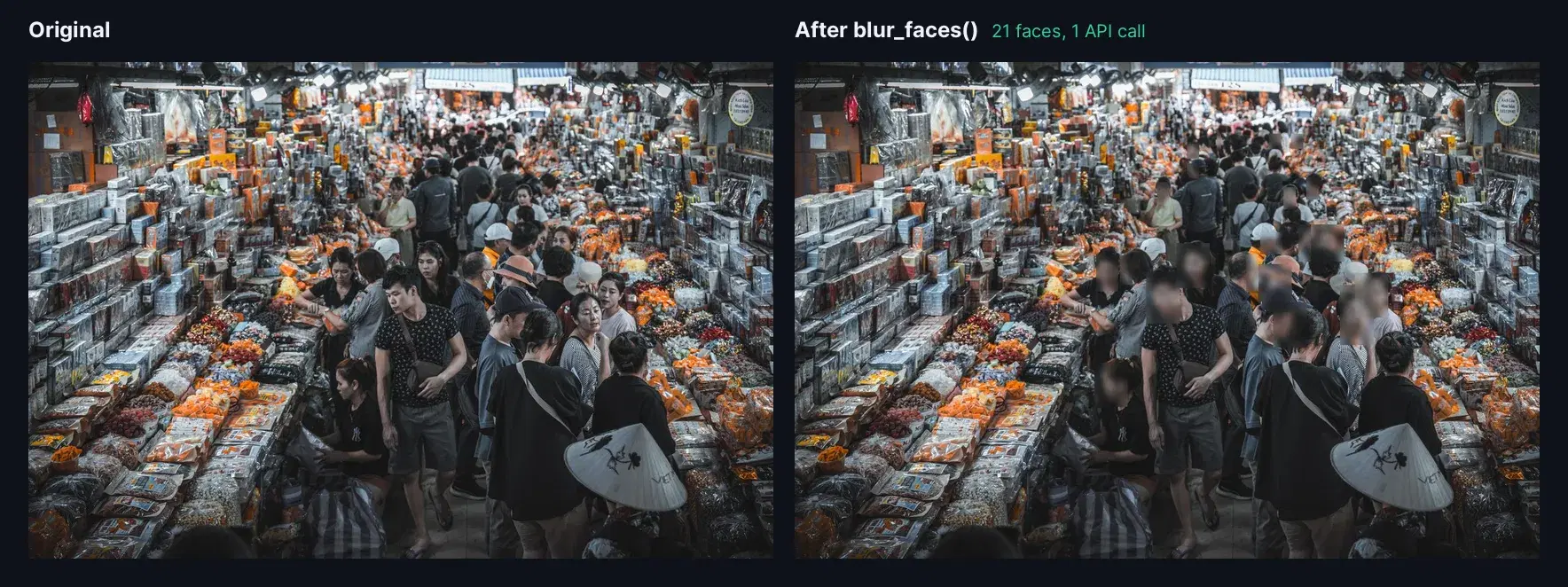
On a photo of a packed covered market:
21 faces
{'topLeft': {'x': 0.48, 'y': 0.44}, 'bottomRight': {'x': 0.51, 'y': 0.51}}
A photo without anyone in it returns {"faces": []}, so the rest of the script needs no special case: nothing to blur, the file is simply saved clean.
Step 2: Pixelate and Blur Each Face with Pillow
A light Gaussian blur can leave a face recognizable. Shrinking each face to an 8x8 grid first removes the detail for good, and a short blur on top smooths the blocks. Each box gets a 25% margin so hair, ears and chin are covered too:
def blur_boxes(path, boxes, out_path, pad=0.25):
    """Pixelate and blur each face box, then save without the original metadata."""
    im = ImageOps.exif_transpose(Image.open(path)).convert("RGB")
    w, h = im.size
    for b in boxes:
        x1, y1 = b["topLeft"]["x"] * w, b["topLeft"]["y"] * h
        x2, y2 = b["bottomRight"]["x"] * w, b["bottomRight"]["y"] * h
        px, py = max((x2 - x1) * pad, 4), max((y2 - y1) * pad, 4)
        box = (
            int(max(0, x1 - px)), int(max(0, y1 - py)),
            int(min(w, x2 + px)), int(min(h, y2 + py)),
        )
        face = im.crop(box)
        tiny = face.resize((8, 8))  # 8x8 blocks: the facial detail is gone
        im.paste(tiny.resize(face.size, Image.NEAREST).filter(ImageFilter.GaussianBlur(4)), box)
    im.save(out_path, quality=90)  # no exif= argument: GPS and camera data are dropped

blur_boxes("photos/covered_market.jpg", boxes, "covered_market_blurred.jpg")
Three details in that function matter for privacy work:
- Metadata is dropped. Pillow only writes EXIF when you pass it, so the output has no GPS position, camera serial or capture time. We checked: a test photo with GPS coordinates came out with an empty EXIF block.
- Phone photos stay upright. Phones often store the pixels sideways with an orientation tag. The API reads that tag and returns boxes for the upright image, and
exif_transposerotates the pixels the same way before the blur, so the boxes land on the faces. - Tiny faces are covered too. Boxes are rounded to two decimals, so a face in the far background can come back a few pixels wide. The 4-pixel minimum margin keeps it covered.
Step 3: Blur a Whole Folder in Parallel
Photos are independent, so a thread pool sends four at a time:
def anonymize(path, out_dir="blurred"):
    """Detect and blur every face in one photo."""
    boxes = detect_faces(path)
    blur_boxes(path, boxes, os.path.join(out_dir, os.path.basename(path)))
    return os.path.basename(path), len(boxes)

os.makedirs("blurred", exist_ok=True)
photos = sorted(os.path.join("photos", n) for n in os.listdir("photos"))
with ThreadPoolExecutor(max_workers=4) as pool:
    for name, count in pool.map(anonymize, photos):
        print(name, count, "faces blurred")
The live run on six crowded street photos:
city_market.jpg 17 faces blurred
covered_market.jpg 21 faces blurred
crowded_street.jpg 22 faces blurred
london_street.jpg 19 faces blurred
road_crossing.jpg 24 faces blurred
zurich_crossing.jpg 20 faces blurred
123 faces in about 3.5 seconds, including faces in profile, faces under a cap and faces a few pixels wide at the back of the crowd.
Why Not OpenCV Haar Cascades?
Most tutorials on blurring faces in Python start with OpenCV's Haar cascade, which runs offline and costs nothing. We ran the usual setup on the same seven photos:
import cv2

cascade = cv2.CascadeClassifier(cv2.data.haarcascades + "haarcascade_frontalface_default.xml")
gray = cv2.cvtColor(cv2.imread(path), cv2.COLOR_BGR2GRAY)
found = cascade.detectMultiScale(gray, scaleFactor=1.1, minNeighbors=5)| Photo | Haar cascade, OpenCV 4.13 (boxes) | Face Analyzer API (faces) |
|---|---|---|
| city_market.jpg | 0 | 17 |
| covered_market.jpg | 8 boxes, 3 not faces | 21 |
| crowded_street.jpg | 4 | 22 |
| london_street.jpg | 1 | 19 |
| road_crossing.jpg | 3 | 24 |
| zurich_crossing.jpg | 3 | 20 |
| party.jpg (5 people) | 7 boxes, 2 not faces | 5 |
The cascade only knows upright, frontal, fairly large faces. On the covered market it boxed a shop sign, a pair of shorts and a snack packet, and on the party photo a coat and a shoe, while most of the crowd went unboxed. For anonymization, a missed face is the failure that matters: it is published as is.
Blur Everyone Except One Person
Access requests are the case where you must keep one face and hide the rest: the person who asked gets a copy of the photo or footage in which everyone else is blurred. /compare-faces does it in one call. Send a reference photo of the requester as source_image and the scene as target_image: the response splits every face of the scene into matchedFaces and unmatchedFaces, each with a bounding box.
def blur_all_except(reference_path, photo_path, out_path):
    """Blur every face in the photo except the person in the reference photo."""
    with open(reference_path, "rb") as ref, open(photo_path, "rb") as photo:
        r = requests.post(
            f"{BASE}/compare-faces",
            headers=HEADERS,
            files={"source_image": ref, "target_image": photo},
        )
    body = r.json()["body"]
    others = [face["boundingBox"] for face in body["unmatchedFaces"]]
    blur_boxes(photo_path, others, out_path)
    return len(body["matchedFaces"]), len(others)

kept, blurred = blur_all_except("requester.jpg", "party.jpg", "party_for_requester.jpg")
print(kept, "kept,", blurred, "blurred")
# 1 kept, 4 blurred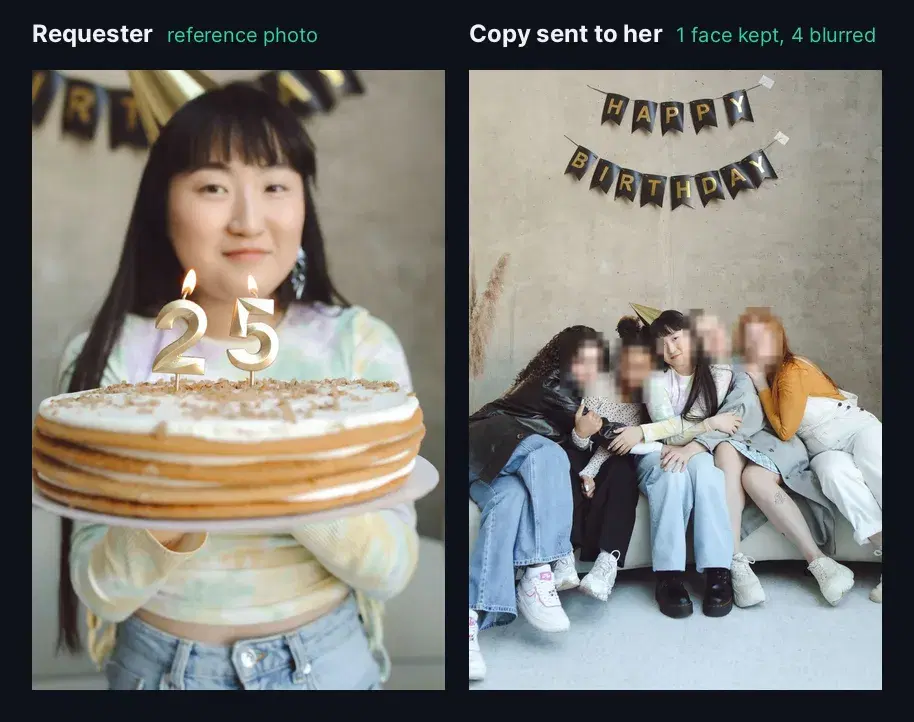
Swap the list to blur matchedFaces instead, and you get the reverse: hide one person who withdrew consent and leave the rest of the photo untouched. For many people at once (all the employees who opted out of the website photos, for example), loop over their reference photos or keep them in a face repository, as in the event photo search guide.
Production Tips
- Blur before storage, not at display time. A CSS blur or a client-side overlay leaves the original on your server and in the browser cache. Save the blurred file and delete the original when you no longer need it.
- Check the other clues. Name badges, license plates, house numbers and screens can identify someone as surely as a face. GDPR Recital 26 judges identifiability by all the means reasonably likely to be used.
- Keep the margin. The 25% padding covers hair and ears. Raise it for close-up portraits where the hairstyle alone is recognizable.
- Send images at their working size. A 1280 px photo was enough to find faces a few pixels wide in our tests and keeps uploads fast. Scale the boxes back to the full-resolution original before blurring, since the coordinates are fractions.
- Video works frame by frame. Extract frames, run the same
anonymizefunction and reassemble. Sampling every few frames and reusing the boxes in between keeps the call count down.
If you blur explicit content rather than faces, the NSFW blur tutorial uses the same Pillow approach with a moderation API. For one-to-one identity checks, see the face comparison tutorial.
Blur Faces in Your Own Photos
Automatic face blurring comes down to one detection call and a few lines of Pillow, and the same API covers the keep-one and hide-one cases for access requests. Grab a key from the Face Analyzer API page, point the script at a folder of your photos and check the blurred copies. A free tier is available to test it on real images.
Sources
- GDPR Recital 26 - anonymous information and the "means reasonably likely to be used" test for identifiability.
- EDPB Guidelines 3/2019 on processing of personal data through video devices - version 2.0, adopted 29 January 2020: blurring other people in copies given to a requester (paragraph 96) and blurring as erasure (paragraph 103).
- Test photos on Pexels by Th2city Santana, BabijaPhoto JB, Christopher Ugale, Ivan Aguilar, Mâide Arslan, Gije Cho and Polina Tankilevitch.
Frequently Asked Questions
- How do I blur faces in a photo automatically with Python?
- Send the photo to a face detection endpoint, which returns a bounding box for every face, then pixelate and blur each box with Pillow and save the result. With the Face Analyzer API it is one call per photo, and a 30-line script handles a whole folder in parallel.
- Is a blurred face still personal data under GDPR?
- Recital 26 of the GDPR says the rules do not apply to anonymous information, judged by all the means reasonably likely to be used to identify someone. The EDPB video guidelines add that blurring a picture with no way to recover it counts as erasure. Faces are rarely the only clue, so also remove name tags, plates and location metadata. This is not legal advice.
- Can I blur everyone except one person?
- Yes. Send a reference photo of that person and the scene to /compare-faces: the response splits the faces of the scene into matchedFaces and unmatchedFaces, each with a bounding box. Blur the unmatched list to keep only that person, or blur the matched list to hide only them.