This tutorial uses the OCR Wizard API. See the docs, live demo, and pricing.
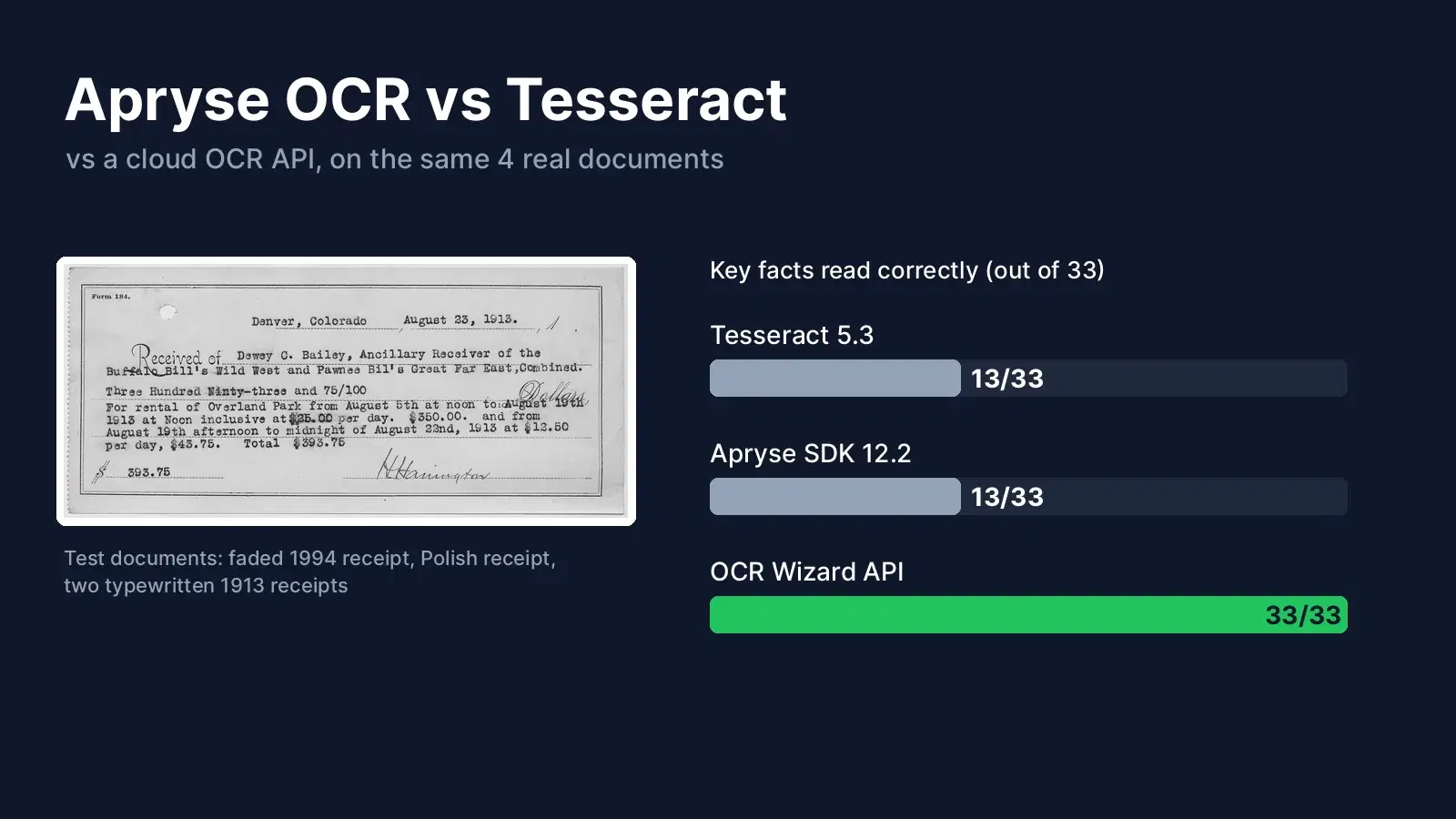
Apryse OCR vs Tesseract is a choice between a commercial on-premise SDK and the best-known open-source engine. There is a third option: a cloud OCR API that you call over HTTP. We installed all three in Python and ran them on the same four real documents, then counted how many key facts each one read correctly. Every number below comes from that test.
The Short Answer
- Tesseract: free, runs anywhere, good on clean prints. On worn receipts and old scans it needs preprocessing and tuning.
- Apryse OCR: an add-on to the Apryse Server SDK. It runs on your servers, turns scans into searchable PDFs, and fits teams that already use Apryse for PDF work. Pricing is by quote.
- Cloud OCR API: no install and no model files. In our test, the OCR Wizard API read every key fact on all four documents.
The Test Documents
We picked documents that look like real work, not clean screenshots. All are free to reuse (see Sources):
- A 1994 Tesco receipt on thermal paper, faded and creased.
- A 2020 Polish supermarket receipt, photographed with a phone.
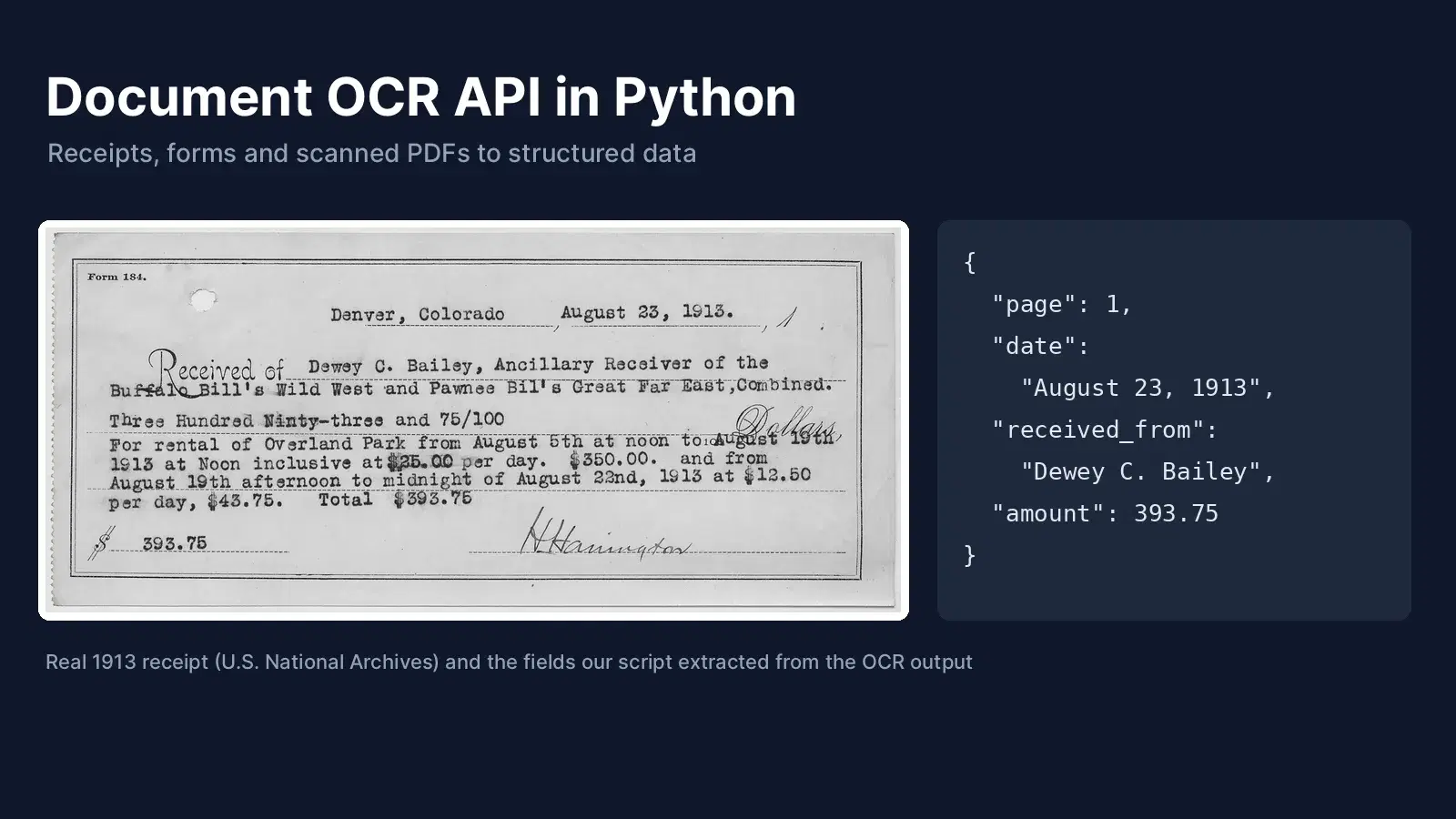
- Two typewritten receipts from 1913, scanned by the U.S. National Archives.
For each document we listed the facts a business would need: prices, totals, dates, names and amounts. That gave 33 facts in total. An engine scores a point when the fact appears exactly right in its output.
Results: Key Facts Read Correctly
| Document | Tesseract 5.3 | Apryse 12.2 (default) | Apryse 12.2 (accurate) | OCR Wizard API |
|---|---|---|---|---|
| Tesco receipt, 1994 (11 facts) | 1 | 0 | 0 | 11 |
| Polish receipt, 2020 (8 facts) | 6 | 5 | 4 | 8 |
| Rental receipt, 1913 (8 facts) | 2 | 1 | 5 | 8 |
| Watchman receipt, 1913 (6 facts) | 4 | 2 | 4 | 6 |
| Total (33 facts) | 13 | 8 | 13 | 33 |
Tesseract ran with page segmentation mode 6, which scored better than the default mode 3 (9 facts). Apryse ran with its two documented profiles: default (fast) and accurate (slower). The accurate profile helped a lot on the 1913 scans.
Here is the same part of the 1913 rental receipt, as read by each engine:
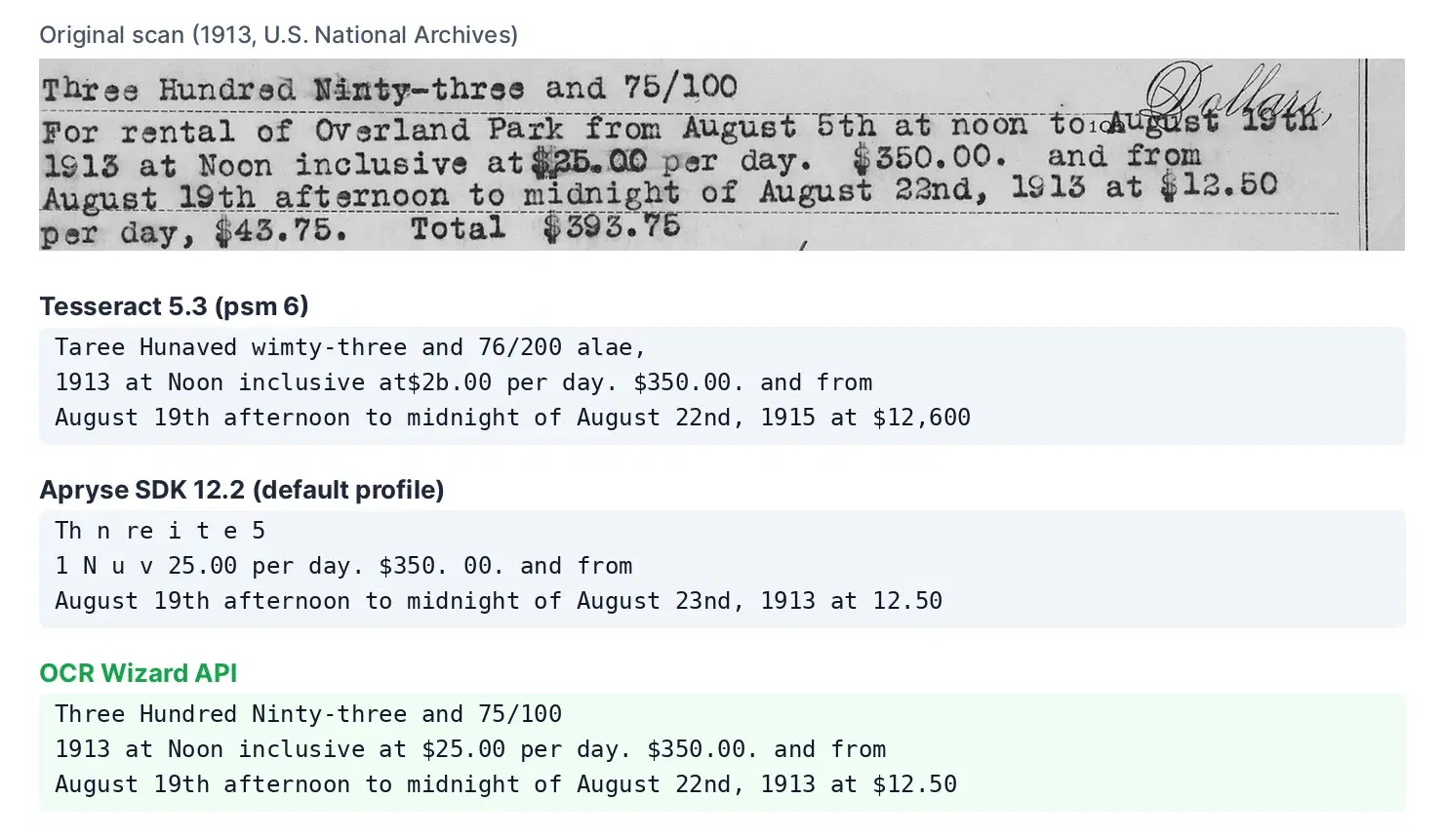
On this scan, Tesseract turned $25.00 into $2b.00 and $12.50 into $12,600. Apryse dropped letters from the written amount and returned $350. 00. with a space, which breaks a simple amount parser. The API returned the three lines as printed.
To be fair to both local engines: on a clean, sharp image of printed text that we generated, Apryse and Tesseract both read every word. Apryse also says its module is optimized for color or greyscale input at about 300 DPI. The gap appears on faded, low-contrast and old documents, which is exactly what receipt and archive projects deal with.
Speed
Time per page on the same documents (local engines on a laptop CPU, API including the network):
- Tesseract 5.3: 0.3 to 1.2 seconds.
- Apryse, default profile: 1.7 to 4.5 seconds.
- Apryse, accurate profile: 6 to 15 seconds.
- OCR Wizard API: 0.6 to 0.8 seconds.
The Code for Each Engine
Tesseract
Install the engine (apt install tesseract-ocr on Debian or Ubuntu), the language data you need, and pip install pytesseract:
import pytesseract

text = pytesseract.image_to_string("receipt.jpg", lang="eng", config="--psm 6")
print(text)
Apryse
Install the SDK and the OCR module from the Apryse package index, then set your trial or license key in APRYSE_KEY:
pip install --extra-index-url=https://pypi.apryse.com apryse-sdk apryse-ocrimport json
import os
import apryse_ocr
from apryse_sdk import PDFDoc, PDFNet, OCRModule, OCROptions
PDFNet.Initialize(os.environ["APRYSE_KEY"])
PDFNet.AddResourceSearchPath(os.path.join(os.path.dirname(apryse_ocr.__file__), "lib"))
doc = PDFDoc()
options = OCROptions()
options.AddLang("en")
OCRModule.ImageToPDF(doc, "receipt.jpg", options)
doc.Save("receipt_searchable.pdf", 0)
data = json.loads(OCRModule.GetOCRJsonFromPDF(doc, None))
for page in data["Page"]:
for para in page["Para"]:
for line in para["Line"]:
print(" ".join(word["text"] for word in line["Word"]))Two details cost us time. The SDK only finds the OCR module after AddResourceSearchPath points to the module's lib folder. And the module expects two-letter language codes such as en and pl: the three-letter code pol made the call fail.
OCR Wizard API
Only requests and a RapidAPI key in RAPIDAPI_KEY. The language is detected automatically:
import os

import requests

with open("receipt.jpg", "rb") as f:
    response = requests.post(
        "https://ocr-wizard.p.rapidapi.com/ocr",
        headers={
            "x-rapidapi-host": "ocr-wizard.p.rapidapi.com",
            "x-rapidapi-key": os.environ["RAPIDAPI_KEY"],
        },
        files={"image": f},
        timeout=60,
    )
response.raise_for_status()
result = response.json()["body"]
print(result["detectedLanguage"])
print(result["fullText"])
The response also lists every word with its bounding box. Our document OCR tutorial uses those boxes to pair receipt items with their prices.
Setup, Licensing and Deployment
| Tesseract | Apryse OCR | OCR Wizard API | |
|---|---|---|---|
| License | Apache 2.0, free | Commercial add-on to the Server SDK, quote-based | Pay per request, free tier on RapidAPI |
| Where it runs | Your machines | Your servers (Windows, Linux, macOS) | Cloud, over HTTPS |
| Install | System package plus language files | SDK plus OCR module, license key | None, an HTTP call |
| Output | Text, hOCR, TSV, searchable PDF | Searchable PDF, JSON or XML with positions | JSON: text, language, word boxes |
| Languages | 100+ language files to install | 80+ in the default module | Detected automatically |
| Handwriting and fields | Not built in | Separate add-ons (Handwriting ICR, Smart Data Extraction) | Handwriting supported; fields via your own parser |
Which One Should You Pick?
- Pick Tesseract for clean prints, offline tools and hobby projects, when you have time to tune preprocessing and page modes.
- Pick Apryse when documents must stay on your own servers and you already use the Apryse SDK to view, edit or convert PDFs. Test the accurate profile on your own scans, and ask their sales team for a quote early.
- Pick a cloud OCR API when your inputs are photos, receipts or old scans, when you want results in a few lines of code, and when you would rather pay per request than run OCR servers.
For more open-source options, including EasyOCR and PaddleOCR, see our comparison of OCR APIs and open-source engines. For PDFs, the PDF OCR in 5 lines guide shows the API's PDF endpoint.
How We Tested
- Tesseract 5.3.0 with the official English and Polish language data, through pytesseract.
- Apryse SDK 12.2 and the
apryse-ocr12.2.1 package from the Apryse package index, run with a free trial key, languagesenandpl, in both profiles. - OCR Wizard API, default settings, the same image files.
- A fact counts only when it appears exactly as printed, for example
$393.75.
Next Step
Run the three snippets on one of your own documents. To try the API, get a key on the OCR Wizard API page.
Sources
- Apryse OCR guide (modules, languages, IRIS)
- Apryse OCR for documents (licensing, input quality, add-ons)
- Tesseract on GitHub (Apache 2.0)
- Tesco grocery receipt, Finchley 1994 (Wikimedia Commons, public domain)
- Polish supermarket receipt by Hippietrail (Wikimedia Commons, CC BY-SA 4.0)
- Receipt for rental of Overland Park, 1913 (U.S. National Archives, public domain)
- Receipt for payment of watchman, 1913 (U.S. National Archives, public domain)
Frequently Asked Questions
- Is Apryse OCR better than Tesseract?
- On our four hard test documents, both read 13 of 33 key facts at their best setting. Apryse did better on the typewritten 1913 scans with its accurate profile, Tesseract did better on the Polish receipt. On a clean, sharp image, both read every word. The cloud OCR API read all 33 facts.
- Does Apryse OCR use Tesseract?
- Not anymore by default. Apryse documents that since version 12.0 its default OCR module is based on deep learning neural networks. The previous engine is still offered as the Alternative OCR module, and an IRIS OCR module is sold as a separate add-on.
- How much does Apryse OCR cost?
- Apryse does not publish a price list. The OCR module is an add-on with its own license on top of the Server SDK, and pricing is quoted by their sales team. A free trial key gives access to all features for testing.
- Is Tesseract free for commercial use?
- Yes. Tesseract is open source under the Apache 2.0 license, so you can use it in commercial products at no cost. You pay instead in setup, tuning and image preprocessing time.