This tutorial uses the OCR Wizard API. See the docs, live demo, and pricing.
A document OCR API turns a photo or a scan into text you can process. For receipts, forms and invoices, the text alone is not enough: you need to know which price belongs to which item and which date belongs to which field. This tutorial shows how to get that structure in Python with the OCR Wizard API. We tested every script below on three real documents: a 1994 Tesco receipt, a 2020 Polish supermarket receipt, and two typewritten receipts from 1913 scanned by the U.S. National Archives.
What the API Returns
You need Python with requests and a RapidAPI key saved in the RAPIDAPI_KEY environment variable. Send an image to the /ocr endpoint:
import os

import requests

response = requests.post(
    "https://ocr-wizard.p.rapidapi.com/ocr",
    headers={
        "x-rapidapi-host": "ocr-wizard.p.rapidapi.com",
        "x-rapidapi-key": os.environ["RAPIDAPI_KEY"],
    },
    files={"image": open("receipt.jpg", "rb")},
    timeout=60,
)
result = response.json()["body"]
print(result["detectedLanguage"])
print(result["fullText"][:120])
print(result["annotations"][0])
Real output on the Tesco receipt:
en
TESCO
EVERY LITTLE HELPS
6 JAM DOUGHNTS
REDUCED PRICE
6 JAM DOUGHNTS
REDUCED PRICE
0.55
MLD WHT CHDR
1.45
RICH TEA
0.39

{'text': 'TESCO', 'boundingPoly': [{'x': 159, 'y': 375}, {'x': 580, 'y': 375}, {'x': 580, 'y': 419}, {'x': 159, 'y': 419}]}
The response has three parts:
fullText: all the text, block by block.detectedLanguage: the language code, hereen.annotations: every word with itsboundingPoly, four corner points in pixels.
Look at fullText: the item MLD WHT CHDR and its price 1.45 are on separate lines, because the receipt prints them in two columns. To pair them, use the word boxes.
Rebuild the Rows from the Word Boxes
Words printed on the same line have close vertical centers. The script below sorts the words from top to bottom, groups the ones whose centers are less than 60% of a word height apart, then sorts each row from left to right. It also joins punctuation without a space when two words touch, so PHONE NO. stays PHONE NO. and not PHONE NO ..
Then parse_receipt reads the price at the end of each row, stops collecting items at the total line, and handles both decimal styles (1.45 and 1,99). Here is the complete script:
import os
import re
import sys

import requests

HEADERS = {
    "x-rapidapi-host": "ocr-wizard.p.rapidapi.com",
    "x-rapidapi-key": os.environ["RAPIDAPI_KEY"],
}


def ocr_image(path):
    with open(path, "rb") as f:
        response = requests.post(
            "https://ocr-wizard.p.rapidapi.com/ocr",
            headers=HEADERS,
            files={"image": f},
            timeout=60,
        )
    response.raise_for_status()
    return response.json()["body"]


def box(word):
    xs = [p["x"] for p in word["boundingPoly"]]
    ys = [p["y"] for p in word["boundingPoly"]]
    return min(xs), min(ys), max(xs), max(ys)


def group_rows(annotations):
    rows = []
    for word in sorted(annotations, key=lambda w: box(w)[1] + box(w)[3]):
        x0, y0, x1, y1 = box(word)
        middle = (y0 + y1) / 2
        if rows and abs(middle - rows[-1]["middle"]) < (y1 - y0) * 0.6:
            rows[-1]["words"].append(word)
        else:
            rows.append({"middle": middle, "words": [word]})
    lines = []
    for row in rows:
        words = sorted(row["words"], key=lambda w: box(w)[0])
        line = words[0]["text"]
        for previous, word in zip(words, words[1:]):
            gap = box(word)[0] - box(previous)[2]
            height = box(word)[3] - box(word)[1]
            line += (" " if gap > height * 0.25 else "") + word["text"]
        lines.append(line)
    return lines


PRICE = re.compile(r"(-?\d+[.,]\d{2})[A-Z]?$")
QUANTITY = re.compile(r"(\s[A-Z])?\s\d+\s?x\s?\d+[.,]\d{2}$")
END_OF_ITEMS = ("TOTAL", "SUMA", "SPRZEDAZ")
TOTAL_LINES = ("TOTAL", "SUMA PLN")


def parse_receipt(lines):
    items, total, in_items, previous = [], None, True, ""
    for line in lines:
        match = PRICE.search(line)
        label = line[: match.start()].strip() if match else line
        if label.upper().startswith(END_OF_ITEMS):
            in_items = False
        if match and label.upper().startswith(TOTAL_LINES):
            total = float(match.group(1).replace(",", "."))
        elif match and in_items:
            if label.upper() == "REDUCED PRICE":
                label = previous + " (reduced)"
            items.append((QUANTITY.sub("", label), float(match.group(1).replace(",", "."))))
        previous = line
    return items, total


if __name__ == "__main__":
    result = ocr_image(sys.argv[1])
    lines = group_rows(result["annotations"])
    items, total = parse_receipt(lines)
    print("Language:", result["detectedLanguage"])
    for label, amount in items:
        print(f"{amount:>7.2f}  {label}")
    line_sum = round(sum(amount for _, amount in items), 2)
    print(f"Total: {total}  Sum of lines: {line_sum}")
    if total is None or abs(line_sum - total) > 0.01:
        print("Check failed: send this receipt to manual review")
Run it with python receipt.py receipt.jpg. Output on the Polish receipt:
Language: pl
   1.99  ChlebPszen-Zyt550g
   3.29  Ser ź.Świat. 150g
   4.99  Polędw Łos 100g
  -2.00  Rabat
Total: 8.27  Sum of lines: 8.27
The three products, the discount (Rabat) and the total are all there, and the line sum matches the printed total. The rebuilt rows also keep the full Polish text, for example Sklep 5163 ul. Grabarska 2, 50-079 Wrocław for the store address.
Check the Total Before You Trust a Receipt
Output on the Tesco receipt:
Language: en
   0.55  6 JAM DOUGHNTS (reduced)
   1.45  MLD WHT CHDR
   0.39  RICH TEA
   0.44  C/CHP COOKIE
   0.50  4 TEACAKES (reduced)
   0.85  18 BROWN ROLLS (reduced)
   0.55  TUNA STEAKS
   0.64  L/GRAIN RICE
   0.79  ORANGE NET
Total: 6.71  Sum of lines: 6.16
Check failed: send this receipt to manual review
This receipt is printed on thermal paper from 1994, and the price of the first box of doughnuts has faded to a faint smudge. The line sum is 0.55 short of the printed total, so the check sends the receipt to a person instead of booking a wrong amount. Keep this check in any expense or accounting pipeline: it costs one line of code and catches damaged paper, folded corners and cut-off photos.
See What the API Read
To debug a document, draw the word boxes on the image. Add this to the same script (it reuses ocr_image and box, and needs Pillow):
from PIL import Image, ImageDraw


def draw_boxes(image_path, annotations, output_path):
    image = Image.open(image_path).convert("RGB")
    draw = ImageDraw.Draw(image)
    for word in annotations:
        draw.rectangle(box(word), outline=(22, 163, 74), width=3)
    image.save(output_path)


result = ocr_image("receipt.jpg")
draw_boxes("receipt.jpg", result["annotations"], "receipt_boxes.jpg")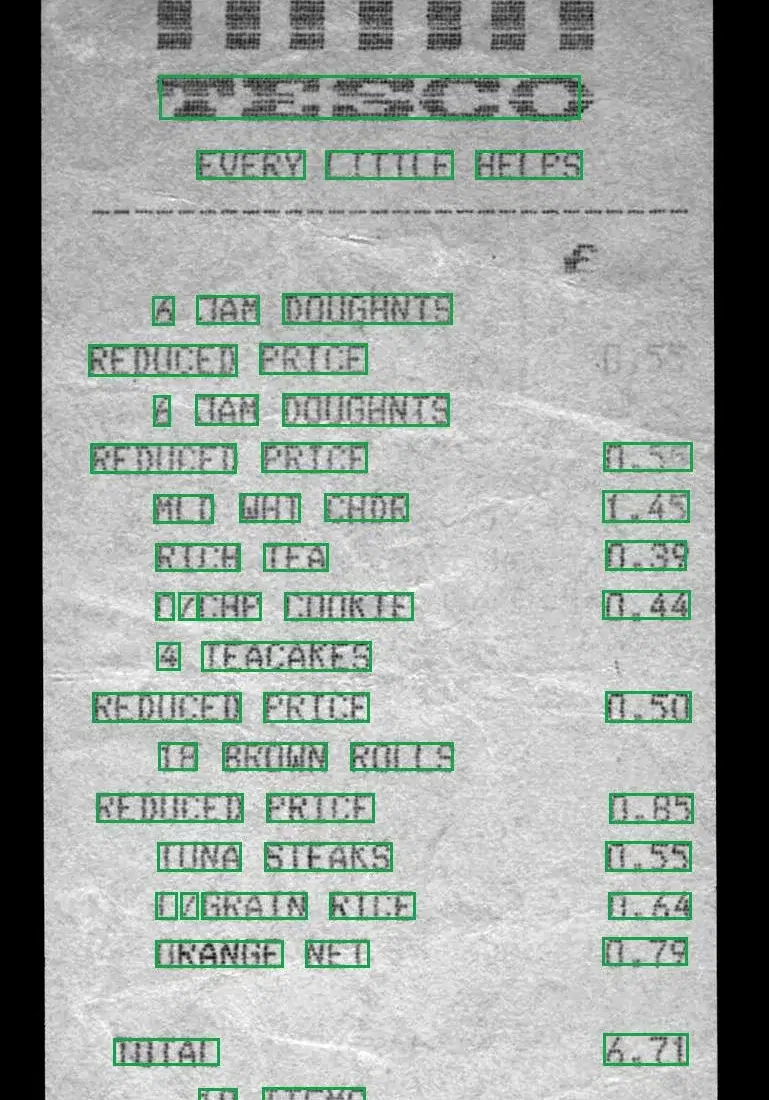
Each green box is one entry of annotations. The image makes it easy to see why a row was grouped the way it was, and to spot the faded price at the top right.
Scanned PDFs: Extract Fields Page by Page
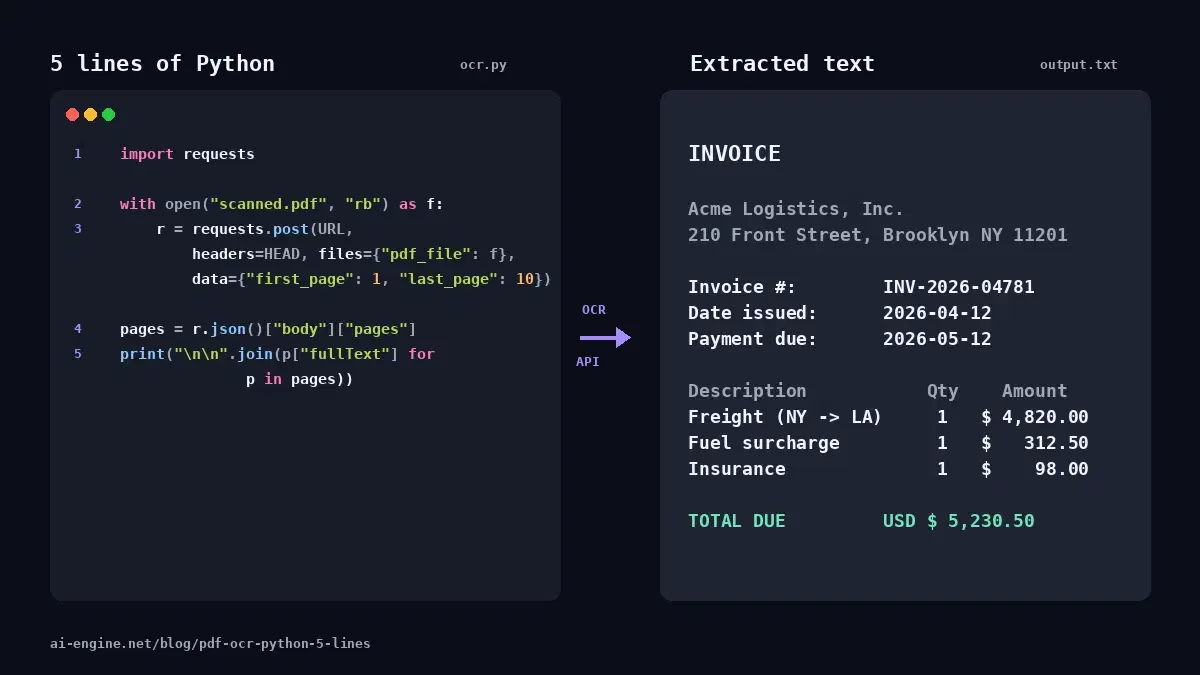
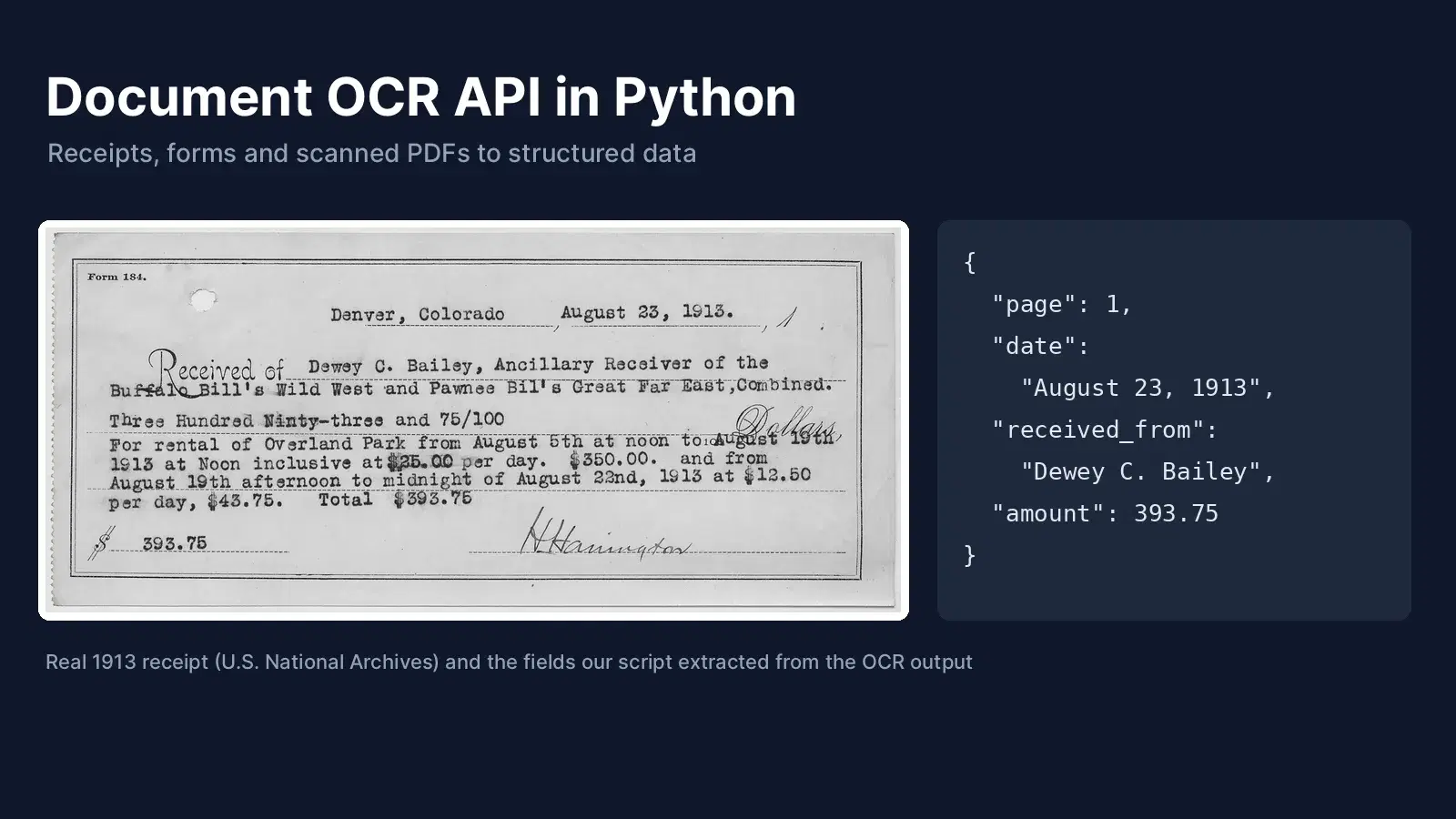
For PDFs, use the /ocr-pdf endpoint. It takes the file in pdf_file and an optional page range in first_page and last_page (both default to 1, so set last_page to read more than the first page). We built a two-page PDF from two 1913 receipts and extracted the date, the payer and the amount from each page:
import os
import re

import requests

HEADERS = {
    "x-rapidapi-host": "ocr-wizard.p.rapidapi.com",
    "x-rapidapi-key": os.environ["RAPIDAPI_KEY"],
}


def ocr_pdf(path, first_page=1, last_page=1):
    with open(path, "rb") as f:
        response = requests.post(
            "https://ocr-wizard.p.rapidapi.com/ocr-pdf",
            headers=HEADERS,
            files={"pdf_file": f},
            data={"first_page": first_page, "last_page": last_page},
            timeout=120,
        )
    response.raise_for_status()
    return response.json()["body"]["pages"]


DATE = re.compile(r"(?:January|February|March|April|May|June|July|August|"
                  r"September|October|November|December) \d{1,2}(?:st|nd|rd|th)?,? \d{4}")
AMOUNT = re.compile(r"\d+\.\d{2}")
PAYER = re.compile(r"of ([A-Z][\w.]* (?:[A-Z][\w.]* ?)+),")

pages = ocr_pdf("scans.pdf", first_page=1, last_page=2)
for number, page in enumerate(pages, start=1):
    text = page["fullText"]
    date = DATE.search(text)
    payer = PAYER.search(text)
    amounts = [float(a) for a in AMOUNT.findall(text)]
    print({
        "page": number,
        "date": date.group(0) if date else None,
        "received_from": payer.group(1) if payer else None,
        "amount": max(amounts) if amounts else None,
    })
Real output, in about 2 seconds for both pages:
{'page': 1, 'date': 'August 23, 1913', 'received_from': 'Dewey C. Bailey', 'amount': 393.75}
{'page': 2, 'date': 'August 7th 1913', 'received_from': 'Dewey C. Bailey', 'amount': 5.0}
The OCR read the typewritten text of both forms, including the line per day, $43.75. Total $393.75 on page 1. The regular expressions then pull the fields. For your own documents, write one pattern per field you need, test it on a few real pages, and keep the page number with every value so you can trace it back.
Regex or LLM for Field Extraction?
- Regular expressions: best when the layout repeats, such as receipts from the same stores or your own forms. They are free, fast and give the same result every time.
- An LLM after the OCR: best when every document looks different, such as supplier invoices or contracts. Send the rebuilt rows, not the raw
fullText, so the model sees each item next to its price. Our ID card to JSON tutorial shows this approach.
Production Tips
- Send the full resolution: our receipts were 769 to 1920 pixels wide. Small text needs pixels, so do not shrink photos before upload.
- Store the raw JSON: save the API response next to the document. When you improve your parser, you can rerun it on old documents without new requests.
- Control the page range: for long PDFs, send ranges with
first_pageandlast_pageand merge the results. The PDF OCR in 5 lines guide has a loop for documents longer than 10 pages. - Validate every number: compare sums with totals and dates with a plausible range, and route failures to a review queue.
If you are still choosing a tool, our comparison of OCR APIs and open-source engines covers Tesseract, EasyOCR and PaddleOCR.
Next Step
Get a key on the OCR Wizard API page, run receipt.py on one of your own receipts, and adjust the total keywords to the stores you see most often.
Sources
- Tesco grocery receipt, Finchley 1994 (Wikimedia Commons, public domain)
- Polish supermarket receipt by Hippietrail (Wikimedia Commons, CC BY-SA 4.0)
- Receipt for rental of Overland Park, 1913 (U.S. National Archives, public domain)
- Receipt for payment of watchman, 1913 (U.S. National Archives, public domain)
Frequently Asked Questions
- What is a document OCR API?
- A document OCR API is a web service that reads the text in a photo or a scanned PDF and returns it as data. The OCR Wizard API returns the full text, the detected language, and every word with its bounding box, so you can rebuild the layout and extract fields such as dates, names and totals.
- How do I extract line items from a receipt with OCR?
- Group the words into rows using their bounding boxes: words whose vertical centers are close belong to the same printed line. Then read the price at the end of each row with a regular expression. The full script in this article does it in about 80 lines of Python, with no extra dependency beyond requests.
- Can the API read multi-page scanned PDFs?
- Yes. Send the PDF to the /ocr-pdf endpoint with first_page and last_page. The response contains one entry per page, each with its own full text, language and word boxes. Our two-page test PDF of 1913 receipts came back in about 2 seconds.
- Does document OCR work for languages other than English?
- Yes. The API detects the language automatically. In our test it returned en for a British receipt and pl for a Polish receipt, with Polish characters such as Ł, ę and ź read correctly.