This tutorial uses the OCR Wizard API. See the docs, live demo, and pricing.
Tesseract has been the default open-source OCR engine for 15 years. It powered Google Books. It has 60K+ stars on GitHub. Every OCR tutorial starts with pip install pytesseract.
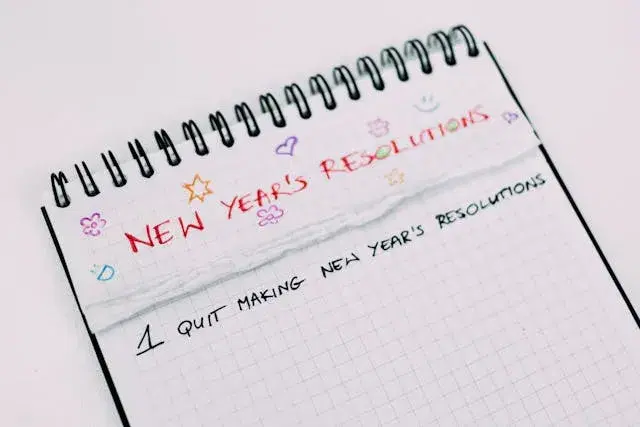
But in 2026, most developers who use Tesseract spend more time configuring it than actually extracting text. We ran it on a real image alongside an OCR API. Tesseract returned nothing. The API extracted every word.
The Test
One image. Two approaches. No tricks.
Tesseract (with preprocessing)
import pytesseract
from PIL import Image, ImageOps, ImageEnhance

img = Image.open("test.jpg")

# Standard preprocessing pipeline
gray = ImageOps.grayscale(img)
gray = ImageEnhance.Contrast(gray).enhance(2.0)
binary = gray.point(lambda p: 255 if p > 128 else 0)

text = pytesseract.image_to_string(binary)
print(text)Output:
(empty)Nothing. Zero text extracted. Even with grayscale conversion, contrast enhancement, and binarization. The stylized font and low contrast between text and background defeated Tesseract completely.
OCR API (no preprocessing)
import requests

response = requests.post(
    "https://ocr-wizard.p.rapidapi.com/ocr",
    headers={"x-rapidapi-key": "YOUR_API_KEY", "x-rapidapi-host": "ocr-wizard.p.rapidapi.com"},
    files={"image": open("test.jpg", "rb")},
)
print(response.json()["body"]["fullText"])Output:
NEW YEAR'S RESOLUTIONS
1 QUIT MAKING NEW YEAR'S RESOLUTIONSEvery word extracted. No preprocessing, no configuration, no language pack. Three lines of code.
Why Tesseract Fails
Tesseract is a CNN-based engine trained on clean, high-contrast, horizontal printed text. When the input deviates from that, accuracy collapses:
- Stylized or decorative fonts: Tesseract expects standard typefaces. Anything artistic breaks it.
- Low contrast: light text on textured backgrounds fails the binarization step.
- Handwriting: Tesseract has no handwriting model by default. You need to train your own.
- Skewed or rotated text: requires manual deskewing before Tesseract can process it.
- Multi-language documents: each language needs a separate pack download and explicit configuration.
The standard workaround is a preprocessing pipeline: grayscale, denoise, deskew, binarize, resize. That is 10-15 lines of code before you even call Tesseract. And it still fails on hard images.
What Changed
Cloud OCR APIs run transformer-based models on GPUs. Unlike Tesseract's CNN which looks at small local patches of the image, transformers use self-attention to see the entire image at once. They learn the relationship between characters, words, and layout simultaneously. Preprocessing (deskewing, denoising, contrast normalization) happens internally. You send the raw image, the model figures out the rest.
| Tesseract | OCR API | |
|---|---|---|
| Setup | Install binary + pytesseract + language packs | pip install requests |
| Preprocessing | Manual (10-15 lines) | None (handled by API) |
| Handwriting | Not supported (needs custom training) | Supported |
| Languages | 100+ (each needs separate download) | 50+ (auto-detected) |
| PDF support | Limited | Native (multi-page) |
| Bounding boxes | Word-level (extra config) | Word-level (included by default) |
| GPU needed | No (but slow on CPU) | No (runs on API's GPUs) |
| Cost | Free | Free tier (30/mo), then $12.99 for 5K |
When Tesseract Still Makes Sense
Tesseract is not dead for everyone. It is the right tool when:
- You need offline OCR with no internet connection
- You run on air-gapped or edge devices
- You need to train a custom model on a very specific font or document layout
- Your images are clean, high-contrast, printed text and you want zero cost at any volume
But keep in mind: even in these cases, you will need to build and maintain a preprocessing pipeline (rotation correction, deskewing, binarization, denoising) to get reliable results. That is code you write, test, and debug yourself.
Sources
- Tesseract OCR GitHub : open-source OCR engine, 60K+ stars, maintained by Google
- Tesseract: Improving Quality : official documentation on preprocessing requirements for better accuracy
Frequently Asked Questions
- Why does Tesseract fail on some images?
- Tesseract works best on clean, high-contrast, horizontal printed text. It struggles with handwriting, stylized fonts, low contrast, skewed text, and complex layouts. Without preprocessing (binarization, deskewing, denoising), accuracy drops significantly or returns empty results.
- What is the best alternative to Tesseract for OCR?
- Cloud OCR APIs like OCR Wizard handle preprocessing automatically on GPU infrastructure. They support 50+ languages, handwriting, PDFs, and complex layouts without any local setup. The free tier includes 30 requests per month for evaluation.
- When should I still use Tesseract?
- Tesseract is the right choice when you need offline OCR with no internet connection, when you run on air-gapped or edge devices, or when you need to train a custom model on a specific font or document type that no API supports.