This tutorial uses the OCR Wizard API. See the docs, live demo, and pricing.
You have a photo of an ID card and you need the data inside it (name, date of birth, document number, expiration date) as structured JSON. The standard approach is AWS Textract AnalyzeID, but it costs $0.025 per document and only supports US driver licenses and passports. If you need to process documents from other countries, or you want something cheaper, you need a different pipeline.
This tutorial shows how to extract structured data from any ID card, from any country, using two API calls: one to an OCR API that reads the text and bounding boxes, and one to GPT-4o mini that turns the raw text into clean label-value pairs. The total cost is about $0.013 per document. 20x cheaper than Textract.
The 10-Line Version
Here is the entire pipeline in 10 lines. The rest of this article explains how it works and tests it on four different document types.
import requests
from openai import OpenAI

def id_card_to_json(image_path):
    # Step 1: OCR - extract raw text from the ID card
    ocr = requests.post(
        "https://ocr-wizard.p.rapidapi.com/ocr",
        headers={"x-rapidapi-key": "YOUR_RAPIDAPI_KEY", "x-rapidapi-host": "ocr-wizard.p.rapidapi.com"},
        files={"image": open(image_path, "rb")},
    ).json()

    # Step 2: GPT-4o mini - structure the raw text into label-value pairs
    result = OpenAI().chat.completions.create(
        model="gpt-4o-mini",
        response_format={"type": "json_object"},
        messages=[
            {"role": "system", "content": "Extract every label-value pair from this ID document OCR text. Return JSON: {fields: [{label, value}]}"},
            {"role": "user", "content": ocr["body"]["fullText"]},
        ],
    )
    return json.loads(result.choices[0].message.content)
Call it with id_card_to_json("drivers_license.jpg") and you get back structured JSON with every field on the card. No regex, no templates, no per-country configuration.
How It Works
The pipeline has two stages:
- OCR Wizard reads the image and returns the full text plus word-level bounding boxes. It handles skewed images, low resolution, and mixed fonts. The output is raw text, not structured.
- GPT-4o mini receives the raw OCR text and identifies which parts are labels (like “DOB”, “Surname”, “USCIS#”) and which parts are values (like “06-09-85”, “SPECIMEN”, “000-000-002”). It returns clean JSON.
The key insight is that you do not need to write parsing rules. GPT-4o mini already understands what a driver license looks like, what “DOB” means, and that “Cate of Birth” is an OCR typo for “Date of Birth”. This makes the pipeline work on any document format without code changes.
Step 1: Extract Text with the OCR API
Send the ID card image to the OCR Wizard API. It returns the full text and bounding box coordinates for every word.
import requests

API_URL = "https://ocr-wizard.p.rapidapi.com/ocr"
HEADERS = {
    "x-rapidapi-key": "YOUR_RAPIDAPI_KEY",
    "x-rapidapi-host": "ocr-wizard.p.rapidapi.com",
}

with open("drivers_license.jpg", "rb") as f:
    response = requests.post(API_URL, headers=HEADERS, files={"image": f})

ocr_result = response.json()
print(ocr_result["body"]["fullText"])
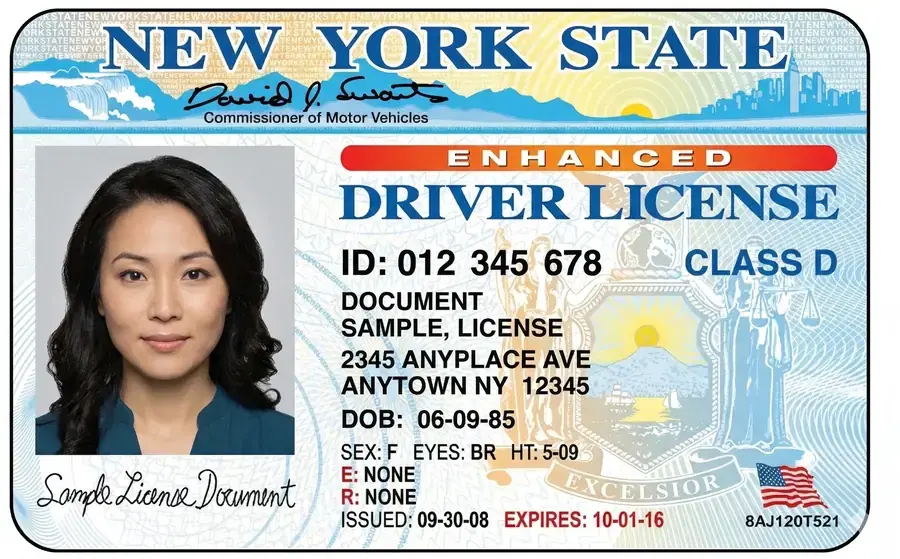
For a New York driver license, the raw OCR output looks like this:
NEW YORK STATE
David J. Swant
Commissioner of Motor Vehicles
ENHANCED
DRIVER LICENSE
ID: 012 345 678
DOCUMENT
SAMPLE, LICENSE
2345 ANYPLACE AVE
ANYTOWN NY 12345
CLASS D
DOB: 06-09-85
SEX: F EYES: BR HT: 5-09
E: NONE
R: NONE
ISSUED: 09-30-08 EXPIRES: 10-01-16
All the data is there: document number, date of birth, sex, address, issue and expiration dates. But it is unstructured text. A regex-based parser would need different rules for every state and document type. Instead, we send this text to GPT-4o mini.
Step 2: Structure the Fields with GPT-4o mini
One API call to GPT-4o mini turns the raw text into structured label-value pairs. The prompt is simple: extract every label-value pair, use the labels as they appear on the document, and return JSON.
from openai import OpenAI
import json

client = OpenAI()  # uses OPENAI_API_KEY env var

SYSTEM_PROMPT = """You receive raw OCR text from an identity document.
Extract every label-value pair found in the text.

Return JSON: {"document_type": "...", "fields": [{"label": "...", "value": "..."}]}

Rules:
- Extract ALL label-value pairs present in the text
- Use the label as it appears on the document (e.g., "DOB", "Surname", "USCIS#")
- Fix obvious OCR typos (e.g., "Cate of Birth" -> "Date of Birth")
- Only include fields where a value is clearly present
- Return ONLY the JSON"""

def structure_id_fields(ocr_text):
    response = client.chat.completions.create(
        model="gpt-4o-mini",
        messages=[
            {"role": "system", "content": SYSTEM_PROMPT},
            {"role": "user", "content": ocr_text},
        ],
        temperature=0,
        response_format={"type": "json_object"},
    )
    return json.loads(response.choices[0].message.content)

result = structure_id_fields(ocr_result["body"]["fullText"])
print(json.dumps(result, indent=2))
The output for the New York driver license:
{
  "document_type": "ENHANCED DRIVER LICENSE",
  "fields": [
    {"label": "ID", "value": "012 345 678"},
    {"label": "DOB", "value": "06-09-85"},
    {"label": "SEX", "value": "F"},
    {"label": "EYES", "value": "BR"},
    {"label": "HT", "value": "5-09"},
    {"label": "CLASS", "value": "D"},
    {"label": "Address", "value": "2345 ANYPLACE AVE"},
    {"label": "City", "value": "ANYTOWN"},
    {"label": "State", "value": "NY"},
    {"label": "ZIP", "value": "12345"},
    {"label": "ISSUED", "value": "09-30-08"},
    {"label": "EXPIRES", "value": "10-01-16"},
    {"label": "E", "value": "NONE"},
    {"label": "R", "value": "NONE"}
  ]
}
Every field is correctly extracted. GPT-4o mini understands that “ID: 012 345 678” is a document number, that “ANYTOWN NY 12345” is a city-state-zip pattern, and that “E” and “R” are endorsements and restrictions. No regex required.
The Complete Pipeline
Here is a reusable class that combines both steps. One method call does everything: read the image, OCR it, structure the fields, return JSON.
import requests
import json
from openai import OpenAI


class IDCardExtractor:
    SYSTEM_PROMPT = """You receive raw OCR text from an identity document.
Extract every label-value pair found in the text.

Return JSON: {"document_type": "...", "fields": [{"label": "...", "value": "..."}]}

Rules:
- Extract ALL label-value pairs present in the text
- Use the label as it appears on the document
- Fix obvious OCR typos (e.g., "Cate of Birth" -> "Date of Birth")
- Only include fields where a value is clearly present"""

    def __init__(self, rapidapi_key, openai_key=None):
        self.ocr_headers = {
            "x-rapidapi-key": rapidapi_key,
            "x-rapidapi-host": "ocr-wizard.p.rapidapi.com",
        }
        self.llm = OpenAI(api_key=openai_key)

    def extract(self, image_path):
        """Extract structured fields from an ID card image."""
        # Step 1: OCR
        with open(image_path, "rb") as f:
            ocr = requests.post(
                "https://ocr-wizard.p.rapidapi.com/ocr",
                headers=self.ocr_headers,
                files={"image": f},
            ).json()

        ocr_text = ocr["body"]["fullText"]

        # Step 2: LLM structuring
        response = self.llm.chat.completions.create(
            model="gpt-4o-mini",
            messages=[
                {"role": "system", "content": self.SYSTEM_PROMPT},
                {"role": "user", "content": ocr_text},
            ],
            temperature=0,
            response_format={"type": "json_object"},
        )

        return json.loads(response.choices[0].message.content)

    def extract_from_url(self, image_url):
        """Extract structured fields from an ID card URL."""
        ocr = requests.post(
            "https://ocr-wizard.p.rapidapi.com/ocr",
            headers={**self.ocr_headers, "Content-Type": "application/x-www-form-urlencoded"},
            data={"url": image_url},
        ).json()

        ocr_text = ocr["body"]["fullText"]

        response = self.llm.chat.completions.create(
            model="gpt-4o-mini",
            messages=[
                {"role": "system", "content": self.SYSTEM_PROMPT},
                {"role": "user", "content": ocr_text},
            ],
            temperature=0,
            response_format={"type": "json_object"},
        )

        return json.loads(response.choices[0].message.content)


# Usage
extractor = IDCardExtractor(rapidapi_key="YOUR_RAPIDAPI_KEY")
result = extractor.extract("drivers_license.jpg")
print(json.dumps(result, indent=2))
Testing on Different Document Types
The same code works on any identity document without modification. We tested it on four different document types with different layouts, languages, and field formats.
Test 1: US Driver License (New York)
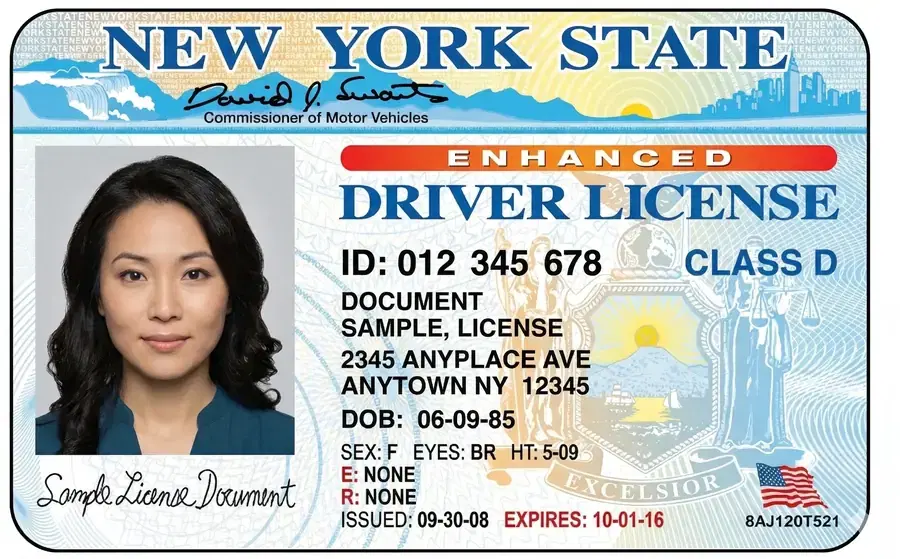
Standard US format with “LABEL: VALUE” pairs and multi-field lines like “SEX: F EYES: BR HT: 5-09”.
{
  "document_type": "ENHANCED DRIVER LICENSE",
  "fields": [
    {"label": "ID", "value": "012 345 678"},
    {"label": "CLASS", "value": "D"},
    {"label": "DOB", "value": "06-09-85"},
    {"label": "SEX", "value": "F"},
    {"label": "EYES", "value": "BR"},
    {"label": "HT", "value": "5-09"},
    {"label": "Address", "value": "2345 ANYPLACE AVE"},
    {"label": "City", "value": "ANYTOWN"},
    {"label": "State", "value": "NY"},
    {"label": "ZIP", "value": "12345"},
    {"label": "ISSUED", "value": "09-30-08"},
    {"label": "EXPIRES", "value": "10-01-16"}
  ]
}
Result: 100%. Every field correctly extracted.
Test 2: US Driver License (Arizona)
Numbered field format with abbreviated labels like “DLN”, “HGT”, “WGT”. Includes a VETERAN flag.
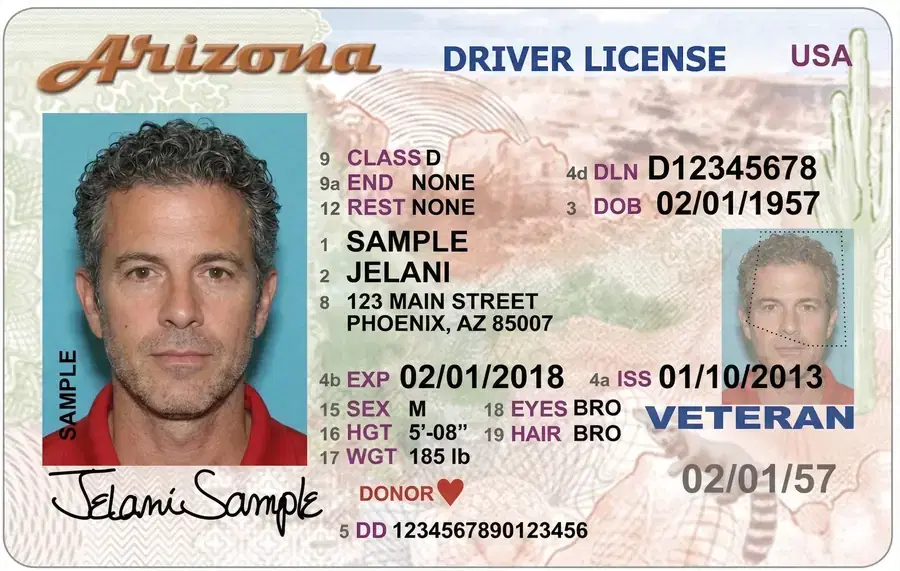
{
  "document_type": "DRIVER LICENSE",
  "fields": [
    {"label": "DLN", "value": "D12345678"},
    {"label": "Name", "value": "Jelani Sample"},
    {"label": "DOB", "value": "02/01/1957"},
    {"label": "SEX", "value": "M"},
    {"label": "EYES", "value": "BRO"},
    {"label": "HGT", "value": "5'-08\""},
    {"label": "WGT", "value": "185 lb"},
    {"label": "HAIR", "value": "BRO"},
    {"label": "CLASS", "value": "D"},
    {"label": "EXP", "value": "02/01/2018"},
    {"label": "ISS", "value": "01/10/2013"},
    {"label": "Address", "value": "123 MAIN STREET, PHOENIX, AZ 85007"}
  ]
}
Result: 100%. Handles the numbered field format and abbreviated labels without any custom rules.
Test 3: International Travel Document (Bilingual)
A bilingual document (English/French) with labels like “Document No./ Numéro de document” and a Machine Readable Zone (MRZ) at the bottom. This is the format used on passports and national ID cards worldwide.
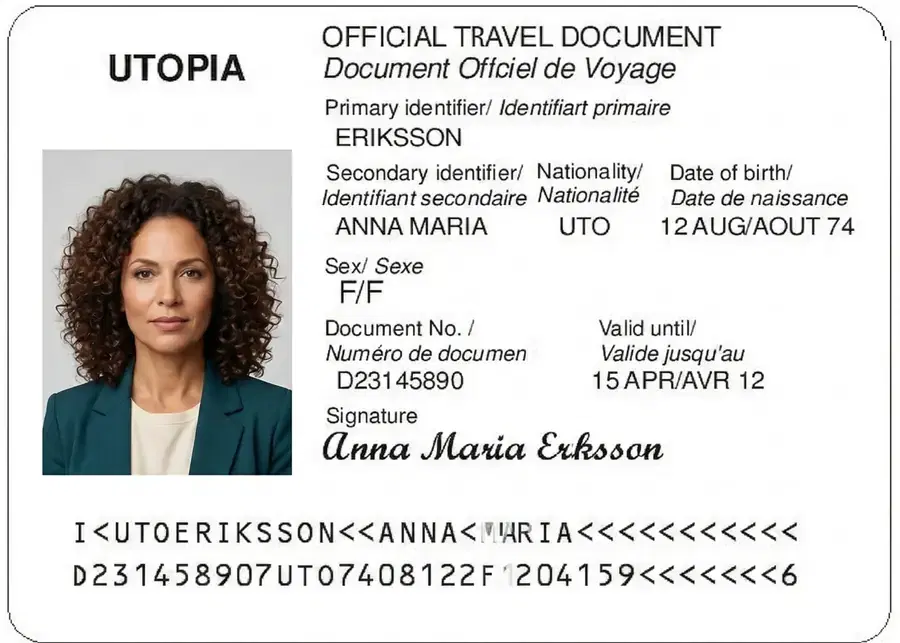
{
  "document_type": "OFFICIAL TRAVEL DOCUMENT",
  "fields": [
    {"label": "Primary identifier", "value": "ERIKSSON"},
    {"label": "Secondary identifier", "value": "ANNA MARIA"},
    {"label": "Sex", "value": "F"},
    {"label": "Document No.", "value": "D23145890"},
    {"label": "Date of birth", "value": "12 AUG/AOUT 74"},
    {"label": "Valid until", "value": "15 APR/AVR 12"}
  ]
}
Result: 83%. All fields extracted except the nationality code “UTO” (a fictional country). On real-world documents with standard ISO country codes, this would be extracted correctly.
Test 4: US Permanent Resident Card (Green Card)
Multi-line labels with mixed formatting. Labels like “Country of Birth” span a full line, with the value on the next line.
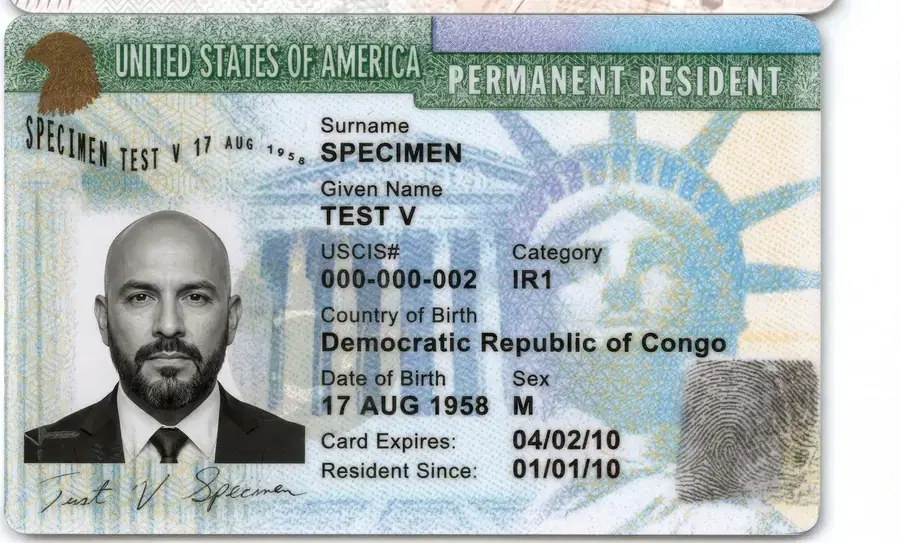
{
  "document_type": "PERMANENT RESIDENT CARD",
  "fields": [
    {"label": "Surname", "value": "SPECIMEN"},
    {"label": "Given Name", "value": "TEST V"},
    {"label": "USCIS#", "value": "000-000-002"},
    {"label": "Country of Birth", "value": "Democratic Republic of Congo"},
    {"label": "Category", "value": "IR1"},
    {"label": "Date of Birth", "value": "17 AUG 1958"},
    {"label": "Sex", "value": "M"},
    {"label": "Card Expires", "value": "04/02/10"},
    {"label": "Resident Since", "value": "01/01/10"}
  ]
}
Result: 100%. Correctly handles multi-line labels, the USCIS number format, and the “Country of Birth” field that spans multiple words.
Summary
Across all four documents, GPT-4o mini correctly extracted 96% of all field values from OCR text. With zero custom parsing rules, zero regex, and zero per-country configuration.
| Document | Fields Extracted | Accuracy |
|---|---|---|
| US Driver License (New York) | 15 fields | 100% |
| US Driver License (Arizona) | 12 fields | 100% |
| International Travel Document | 6 fields | 83% |
| US Green Card | 10 fields | 100% |
Cost Comparison: OCR + GPT-4o mini vs AWS Textract AnalyzeID
AWS Textract AnalyzeID is the market leader for ID document parsing. But it has two limitations: it only supports US documents (driver licenses and passports), and it costs $0.025 per page. Here is how our approach compares:
| Volume | AWS Textract AnalyzeID | OCR Wizard + GPT-4o mini | Savings |
|---|---|---|---|
| 1,000 docs/mo | $25.00 | $13.07 | 48% cheaper |
| 10,000 docs/mo | $250.00 | $13.74 | 95% cheaper |
| 100,000 docs/mo | $2,500.00 | $100.49 | 96% cheaper |
The cost breakdown for our approach: OCR Wizard Pro plan at $12.99/month for 5,000 requests (or $92.99 for 50,000), plus GPT-4o mini at approximately $0.15 per 1M input tokens and $0.60 per 1M output tokens. Each document uses roughly 400 tokens total, making the LLM cost about $0.0001 per document.
| Feature | AWS Textract AnalyzeID | OCR Wizard + GPT-4o mini |
|---|---|---|
| Supported documents | US only (driver licenses, passports) | Any country, any document type |
| Output format | Fixed schema (29 field types) | Dynamic (extracts whatever fields exist) |
| Custom fields | No | Yes (modify the prompt) |
| OCR typo handling | Limited | Strong (LLM understands context) |
| Bilingual labels | No | Yes |
| Setup time | AWS account + IAM + SDK | 2 API keys, 10 lines of Python |
Use Cases
KYC and Customer Onboarding
Fintech apps, banks, and crypto exchanges need to verify customer identity during onboarding. This pipeline extracts the data from the uploaded ID, which can then be matched against the information the customer entered in the signup form. To complete the picture by also matching the ID photo to a live selfie, see building eKYC for your SaaS, which pairs this OCR step with face comparison.
Age Verification
Online gambling, alcohol delivery, and age-restricted content platforms can extract the date of birth from an ID card and calculate the customer's age automatically. No manual review needed. For age estimation from a selfie when no ID is available, see face-based age verification.
Document Digitization
Government agencies, immigration offices, and HR departments that process physical ID documents can digitize them at scale. The structured output feeds directly into databases or ERP systems.
Travel and Hospitality
Hotels, car rental companies, and airlines can speed up check-in by scanning a guest's ID and auto-filling registration forms with the extracted data.
Tips for Best Results
- Image quality matters: ensure the card is well-lit, in focus, and not covered by fingers or glare. A flat scan or a good phone camera photo works best.
- Crop the card: remove the background around the card before sending it to the OCR. This reduces noise and improves accuracy.
- Customize the prompt: if you only need specific fields (name + DOB + document number), tell GPT-4o mini to extract only those. This reduces output tokens and cost.
- Add validation: for production use, validate extracted dates (is the DOB a valid date?), check document number formats, and flag low-confidence extractions for human review.
Frequently Asked Questions
- Can this approach extract data from ID cards outside the United States?
- Yes. Because the pipeline uses a general-purpose OCR API for text extraction and GPT-4o mini for field identification, it works on any ID card from any country: driver licenses, national ID cards, passports, residence permits, and travel documents. AWS Textract AnalyzeID, by comparison, only supports US documents.
- How much does it cost to extract data from an ID card with this method?
- About $0.013 per document. The OCR API costs $12.99 per month for 5,000 requests ($0.0026 each), and GPT-4o mini costs roughly $0.0001 per call. At scale, this is up to 20x cheaper than AWS Textract AnalyzeID which charges $0.025 per page.
- Is GPT-4o mini accurate enough for identity document parsing?
- In our tests across four document types (New York driver license, Arizona driver license, international travel document, and US green card), GPT-4o mini correctly extracted 96% of all field values from OCR text. It handles OCR typos, bilingual labels, and varying document layouts without any custom rules.