This tutorial uses the OCR Wizard API. See the docs, live demo, and pricing.
Optical Character Recognition (OCR) is one of those features that seems simple until you actually build it. You need to extract text from receipts, invoices, documents, handwritten notes, or photos of signs — and you need it to work reliably across languages, orientations, and image quality levels. Most developers start with open-source OCR engines like Tesseract, EasyOCR, or PaddleOCR. They are free, well-documented, and easy to set up. But once you move beyond clean, high-resolution scans of English text, their limitations become painfully obvious. In this guide, we compare the most popular open-source OCR options against the OCR Wizard API with real benchmarks to help you decide when open-source is enough and when a managed API is worth the investment.
The Open-Source OCR Landscape
Tesseract
Tesseract is the most widely used open-source OCR engine. Originally developed by HP in the 1980s and later maintained by Google, it supports over 100 languages and runs locally on any machine. Tesseract 5.x includes an LSTM neural network mode that improved accuracy over the legacy engine.
- Pros: Free, supports 100+ languages, large community, runs offline
- Cons: Poor on handwritten text, sensitive to image quality (rotation, shadows, blur), requires manual preprocessing (binarization, deskewing), no language auto-detection
EasyOCR
EasyOCR is a Python library that uses deep learning models for text detection and recognition. It supports 80+ languages and handles some scene text (text in natural photos) better than Tesseract.
- Pros: Better on scene text than Tesseract, simple Python API, GPU acceleration
- Cons: Slower than Tesseract (especially on CPU), large model downloads (1–2 GB), still struggles with handwriting, requires PyTorch dependency
PaddleOCR
PaddleOCR from Baidu is the newest major open-source OCR toolkit. It offers state-of-the-art accuracy on many benchmarks and supports multilingual text detection and recognition.
- Pros: Best accuracy among open-source options, good multilingual support, active development
- Cons: Heavy dependency (PaddlePaddle framework), complex setup, large models, limited community outside China
Where Open-Source OCR Fails
Open-source OCR works well on clean, well-lit scans of printed text in supported languages. But real-world images are rarely that clean. Here are the scenarios where open-source engines consistently underperform.
Handwritten Text
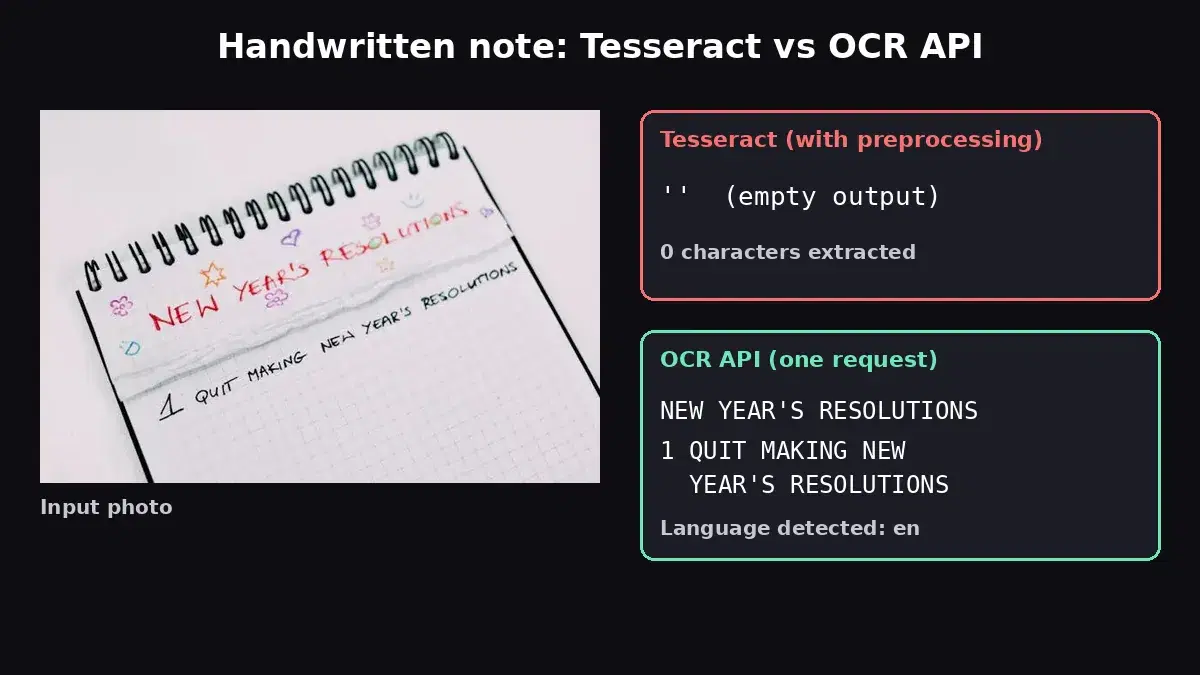
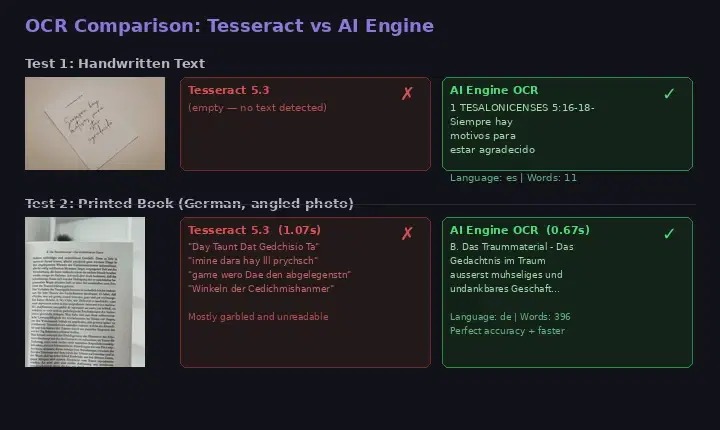
This is the biggest gap. Tesseract was designed for printed text and has near-zero accuracy on handwriting. EasyOCR and PaddleOCR handle some printed-style handwriting but fail on cursive or informal writing. We tested Tesseract 5.3 against the OCR Wizard API on a handwritten note:
# Tesseract on handwritten cursive text
$ tesseract handwritten_note.jpg stdout
# (empty output — zero text detected)

# AI Engine OCR on the same image
$ curl -X POST 'https://ocr-wizard.p.rapidapi.com/ocr' \
  -H 'x-rapidapi-host: ocr-wizard.p.rapidapi.com' \
  -H 'x-rapidapi-key: YOUR_API_KEY' \
  -F 'image=@handwritten_note.jpg'

# Result: "1 TESALONICENSES 5:16-18 Siempre hay motivos para estar agradecido"
# Language detected: Spanish | Words: 11
Tesseract returned absolutely nothing. The API extracted every word correctly and automatically detected the language as Spanish. This is not a cherry-picked example — handwritten text is a known weakness of all open-source OCR engines.
Angled and Poorly Lit Photos
When text is photographed at an angle (as opposed to flatbed-scanned), open-source OCR accuracy drops dramatically. Shadows, perspective distortion, and uneven lighting create conditions that Tesseract's preprocessing pipeline cannot reliably handle. We tested both engines on a photo of a German book page taken at an angle:
# Tesseract on angled book photo (German text) — 1.07 seconds
$ tesseract book_page.png stdout
"Day Taunt Dat Gedchisio Ta"
"imine dara hay lll prychsch game wero Dae"
"den abgelegenstn Winkeln der Cedichmishanmer"
# → Mostly garbled, unreadable output

# AI Engine OCR on the same image — 0.67 seconds
# → "B. Das Traummaterial - Das Gedächtnis im Traum
#    äußerst mühseliges und undankbares Geschäft..."
# Language: German | Words: 396 | Perfect accuracy
On this test, the API was not only dramatically more accurate (perfect German text with proper umlauts and special characters) but also 37% faster than Tesseract (0.67s vs 1.07s). Tesseract produced garbled output that would be useless in any production application.
Multilingual Documents
Documents that contain multiple languages are a nightmare for Tesseract. You must specify the language upfront (-l eng+fra), and mixing more than 2–3 languages degrades accuracy significantly. The German book page we tested actually contained a passage in French ("toute impression même la plus insignifiante, laisse une trace inaltérable"). The API extracted both languages perfectly. Tesseract mangled both.
No Language Auto-Detection
Tesseract requires you to specify the language before processing. If you are building an application that accepts documents in any language (an invoice processing system, a translation tool, a document archive), you need to detect the language first — which is itself a non-trivial problem. The OCR Wizard API detects the language automatically and returns it in the response, eliminating this entire step.
When Open-Source OCR Is Enough
To be fair, open-source OCR is perfectly adequate for specific scenarios:
- Clean scans of printed English text — If your input is always high-resolution, flat, well-lit scans (like PDFs converted to images), Tesseract performs well and costs nothing.
- Offline or air-gapped environments — If your application cannot make external API calls (military, healthcare, certain financial systems), local OCR is your only option.
- Extremely high volume with simple text — If you process millions of nearly identical images (like reading serial numbers from a production line), a tuned Tesseract setup can be cost-effective.
For everything else — handwriting, photos, multilingual documents, receipts, IDs, angled captures — an API delivers dramatically better results with zero maintenance.
The API Approach: OCR Wizard
The OCR Wizard API is a managed OCR service that handles text extraction from images through a simple REST endpoint. Here is what it offers over open-source alternatives:
- Handwriting support — Reads cursive and informal handwritten text that Tesseract cannot detect at all
- Automatic language detection — Identifies the document language without any configuration
- Angle and lighting tolerance — Handles photos taken at angles, in low light, with shadows and perspective distortion
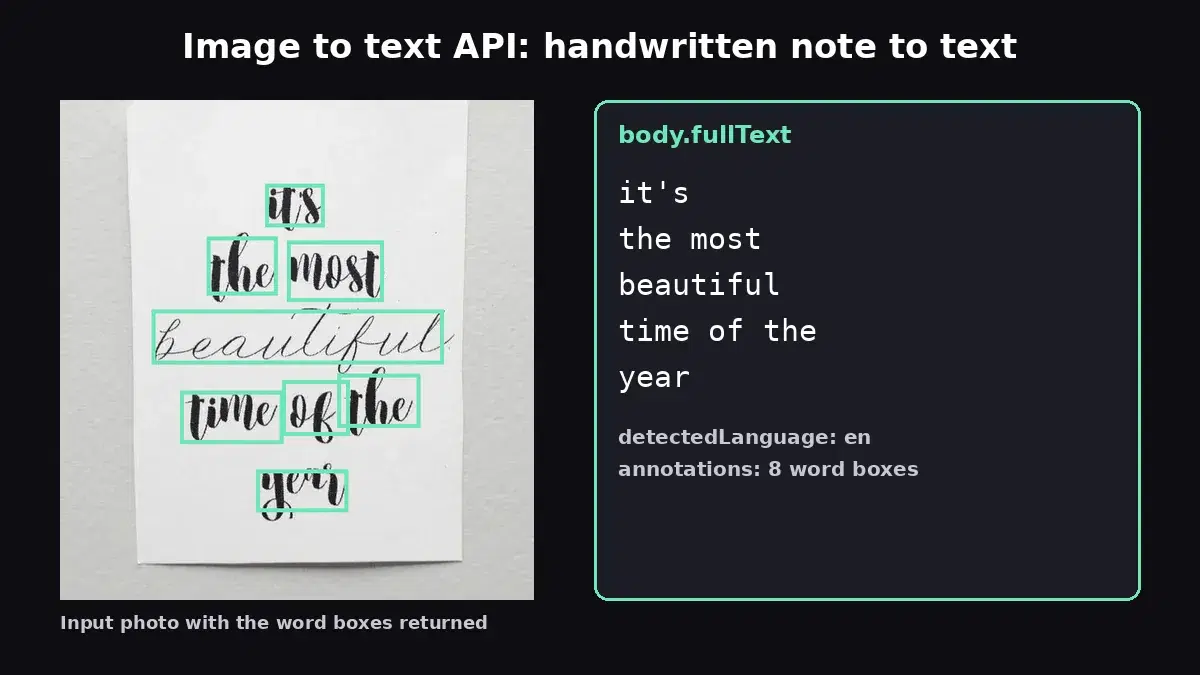
- Word-level bounding boxes — Returns the position of every detected word for overlay, highlighting, or structured extraction
- Zero infrastructure — No models to download, no dependencies to manage, no GPU to provision
Pricing
- Free: 100 requests/month
- Pro: $9.99/month for 10,000 requests (~$0.001/image)
- Ultra: $49.99/month for 100,000 requests (~$0.0005/image)
- Mega: $99.99/month for 500,000 requests (~$0.0002/image)
At $0.001 per image on the Pro plan, the cost is negligible compared to the engineering time you would spend preprocessing images, tuning Tesseract parameters, handling edge cases, and maintaining GPU infrastructure for EasyOCR or PaddleOCR.
Code Examples
cURL
# Extract text from an image file
curl -X POST 'https://ocr-wizard.p.rapidapi.com/ocr' \
  -H 'x-rapidapi-host: ocr-wizard.p.rapidapi.com' \
  -H 'x-rapidapi-key: YOUR_API_KEY' \
  -F 'image=@document.jpg'

# Or send an image URL
curl -X POST 'https://ocr-wizard.p.rapidapi.com/ocr' \
  -H 'x-rapidapi-host: ocr-wizard.p.rapidapi.com' \
  -H 'x-rapidapi-key: YOUR_API_KEY' \
  -H 'Content-Type: application/x-www-form-urlencoded' \
  -d 'url=https://example.com/receipt.jpg'
Python
import requests

API_URL = "https://ocr-wizard.p.rapidapi.com/ocr"
HEADERS = {
    "x-rapidapi-host": "ocr-wizard.p.rapidapi.com",
    "x-rapidapi-key": "YOUR_API_KEY",
}

# Extract text from a local file
with open("document.jpg", "rb") as f:
    response = requests.post(
        API_URL,
        headers=HEADERS,
        files={"image": ("doc.jpg", f, "image/jpeg")},
    )

result = response.json()
print(f"Language: {result['body']['detectedLanguage']}")
print(f"Full text: {result['body']['fullText']}")

# Each word with its bounding box
for word in result["body"]["annotations"]:
    print(f"  '{word['text']}' at {word['boundingPoly']}")
JavaScript
const API_URL = "https://ocr-wizard.p.rapidapi.com/ocr";
const HEADERS = {
  "x-rapidapi-host": "ocr-wizard.p.rapidapi.com",
  "x-rapidapi-key": "YOUR_API_KEY",
};

// From a file input
const formData = new FormData();
formData.append("image", fileInput.files[0]);

const response = await fetch(API_URL, {
  method: "POST",
  headers: HEADERS,
  body: formData,
});

const result = await response.json();
console.log("Language:", result.body.detectedLanguage);
console.log("Text:", result.body.fullText);
console.log("Words found:", result.body.annotations.length);
Real-World Use Cases
Receipt and Invoice Processing
Expense management apps and accounting tools need to extract amounts, dates, vendor names, and line items from photos of receipts. Receipts are often crumpled, faded, or photographed at angles. Tesseract struggles with thermal receipt paper and small fonts. The API handles these reliably and returns word positions that let you build structured extraction on top.
Document Digitization
Converting paper archives to searchable digital text is a common enterprise need. Documents may be in any language, include handwritten annotations, or be photographed rather than scanned. The API's automatic language detection and handwriting support make it suitable for diverse document collections without per-language configuration.
ID and Card Reading
Reading text from ID cards, business cards, or driver's licenses requires handling varied layouts, fonts, and background patterns. Open-source OCR often misreads characters when text overlaps with security patterns or holograms. A cloud OCR API trained on diverse document types handles these edge cases better.
Accessibility
Applications that read text aloud for visually impaired users need reliable OCR on real-world images: menus, street signs, product labels, handwritten notes. The accuracy gap between Tesseract and a managed API directly impacts the user experience for accessibility features.
Open-Source vs API: Decision Framework
Use this simple framework to decide which approach fits your project:
| Scenario | Open-Source (Tesseract) | API (OCR Wizard) |
|---|---|---|
| Clean printed scans | Good | Excellent |
| Handwritten text | Fails | Good |
| Angled photos | Poor | Excellent |
| Multilingual docs | Manual config | Auto-detect |
| Receipts / IDs | Inconsistent | Reliable |
| Setup time | Hours (deps, models, tuning) | Minutes (one HTTP call) |
| Maintenance | You manage everything | Zero |
| Cost (10K images/mo) | Free (+ your server costs) | $9.99/month |
| Offline support | Yes | No |
If your images are clean scans and you need offline capability, Tesseract is a solid choice. For everything else — especially if your users upload photos from their phones, your documents span multiple languages, or you need to read handwriting — the API saves you weeks of engineering time and delivers consistently better results at a cost that is hard to argue with.
Getting Started
The fastest way to evaluate is to test both approaches on your actual images. Install Tesseract locally and compare its output against the API on the same inputs:
import subprocess
import requests

def compare_ocr(image_path: str, api_key: str):
    """Compare Tesseract and OCR Wizard API on the same image."""

    # Tesseract
    tess = subprocess.run(
        ["tesseract", image_path, "stdout"],
        capture_output=True, text=True,
    )
    tess_text = tess.stdout.strip()

    # OCR Wizard API
    with open(image_path, "rb") as f:
        resp = requests.post(
            "https://ocr-wizard.p.rapidapi.com/ocr",
            headers={
                "x-rapidapi-host": "ocr-wizard.p.rapidapi.com",
                "x-rapidapi-key": api_key,
            },
            files={"image": f},
        )
    api_result = resp.json()
    api_text = api_result["body"]["fullText"]
    language = api_result["body"]["detectedLanguage"]

    print(f"--- Tesseract ---")
    print(tess_text or "(no text detected)")
    print(f"\n--- OCR Wizard API ---")
    print(f"Language: {language}")
    print(api_text)

compare_ocr("your_test_image.jpg", "YOUR_API_KEY")
Run this on 10–20 representative images from your use case. The difference in output quality will tell you everything you need to know. For a detailed integration guide, see our OCR API tutorial.
Open-source OCR engines have their place, but their limitations are real and well-documented. If your application processes anything beyond clean printed scans, the OCR Wizard API delivers dramatically better accuracy, automatic language detection, and handwriting support — all for less than $10/month. Start with the free tier (100 requests), test it on your images, and see the difference for yourself.
Frequently Asked Questions
- Is Tesseract OCR good enough for production?
- Tesseract works well on clean, printed text but struggles with handwritten text, noisy scans, and complex layouts. A managed OCR API typically delivers higher accuracy on real-world documents without tuning.
- What is the best OCR API for developers?
- The best OCR API depends on your use case. For general-purpose text extraction with handwriting support and word-level bounding boxes, the OCR Wizard API offers high accuracy starting at a free tier of 30 requests per month.
- How accurate is open-source OCR vs a cloud API?
- On clean printed text, open-source engines like Tesseract reach 90-95% accuracy. On handwritten or noisy documents, managed APIs significantly outperform them, often achieving 95%+ accuracy without manual configuration.