This tutorial uses the id-document-ocr API. See the docs, live demo, and pricing.
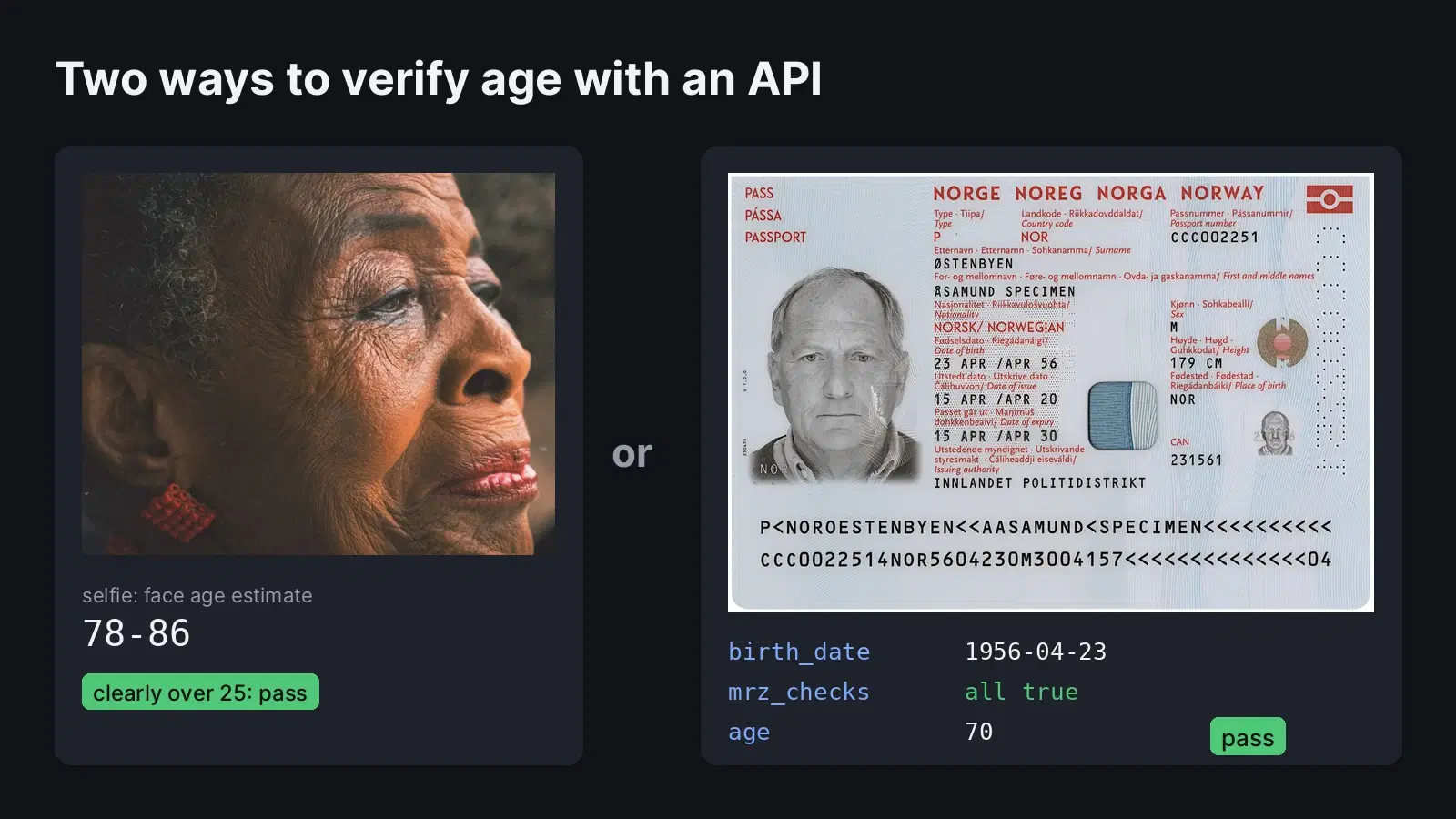
Age checks sit in front of alcohol delivery, vape shops, betting, dating and adult content, and they all face the same trade-off. A face estimate is fast and needs nothing from the user, but it gives a range, not a proof. An ID document gives an exact birth date, but asking every visitor for one loses customers. This tutorial builds an age verification flow in Python that uses both: a selfie first, an ID document only when the face is too close to call.
It uses two APIs: the Face Analyzer API to estimate age from a selfie, and the ID Document OCR API to read and verify the birth date on a passport or ID card. Every result below comes from a live call, on free stock portraits and official specimen documents.
Face Estimate or ID Document: What Each One Proves
| Face estimate | ID document | |
|---|---|---|
| What you get | An age range, for example 23 to 29 | An exact birth date, checked against the MRZ |
| What the user does | Takes a selfie | Photographs a passport or ID card |
| Best for | Clear cases, far from the limit | Cases close to the limit, and regulated checks |
| What it does not prove | An exact age | That the document belongs to the person |
The two cover each other. The face settles the clear cases without friction, the document settles the close ones, and the face also tells you when a document does not fit the person sending it. For a wider look at providers and certified services, see our age verification API comparison.
The Script
One file, three steps: estimate_age reads the face, age_from_id reads and verifies the birth date, and verify_age decides. Set your key in the RAPIDAPI_KEY environment variable and install requests.
import os
from datetime import date

import requests

KEY = os.environ["RAPIDAPI_KEY"]
FACE_HOST = "faceanalyzer-ai.p.rapidapi.com"
ID_HOST = "id-document-ocr-verification.p.rapidapi.com"


def headers(host):
    return {"x-rapidapi-key": KEY, "x-rapidapi-host": host}


def estimate_age(selfie):
    """Age range of the single face in a selfie, or None."""
    with open(selfie, "rb") as f:
        r = requests.post(f"https://{FACE_HOST}/faceanalysis",
                          headers=headers(FACE_HOST), files={"image": f}, timeout=30)
    r.raise_for_status()
    faces = r.json()["body"]["faces"]
    if len(faces) != 1:
        return None
    return faces[0]["facialFeatures"]["AgeRange"]


def age_on(birth, today):
    """Exact age in years, birthday not reached yet counts one year less."""
    before_birthday = (today.month, today.day) < (birth.month, birth.day)
    return today.year - birth.year - before_birthday


def age_from_id(*paths, today=None, accept_expired=True):
    """Return (age, reason). age is None when the birth date can't be trusted."""
    files = [("images", open(p, "rb")) for p in paths]
    r = requests.post(f"https://{ID_HOST}/parse-id",
                      headers=headers(ID_HOST), files=files, timeout=60)
    r.raise_for_status()
    result = r.json()["result"]
    verdict = result["verdict"]

    if verdict["status"] != "ok":
        failed = [k for k, ok in verdict["mrz_checks"].items() if not ok]
        return None, f"document {verdict['status']}: " + ", ".join(
            failed + verdict["mismatched_fields"] + verdict["missing_critical_fields"])
    if verdict["is_expired"] and not accept_expired:
        return None, "document expired"
    birth = result["fields"].get("birth_date", {})
    if birth.get("status") in (None, "missing"):
        return None, "no birth date on the document"

    age = age_on(date.fromisoformat(birth["value"]), today or date.today())
    return age, f"born {birth['value']} ({birth['status']})"


def verify_age(selfie, id_paths=(), min_age=18, buffer=7):
    """Face estimate first, ID document only when the face is too close to call."""
    face = estimate_age(selfie) if selfie else None
    if face and face["Low"] >= min_age + buffer:
        return "pass", f"face {face['Low']}-{face['High']}"
    if not id_paths:
        return "ask_for_id", f"face {face['Low']}-{face['High']}" if face else "no single face"

    age, reason = age_from_id(*id_paths)
    if age is None:
        return "manual_review", reason
    if face and not face["Low"] - 10 <= age <= face["High"] + 10:
        return "manual_review", f"ID age {age} does not fit face {face['Low']}-{face['High']}"
    return ("pass" if age >= min_age else "deny"), f"ID age {age}, {reason}"


if __name__ == "__main__":
    import sys
    selfie, *ids = sys.argv[1:]
    decision, reason = verify_age(selfie, ids)
    print(f"{decision:14} {reason}")
The rule here is 18 or over, with a 7-year buffer on the face: a selfie passes alone only when the lowest age of its range is 25 or more. Change min_age to 21 for alcohol in the United States, and widen the buffer if your regulator asks for it.
Step 1: Estimate Age from a Selfie
/faceanalysis returns an AgeRange with Low and High for every face. The script accepts exactly one face: a selfie with two people in it is not a selfie, so it falls through to the ID step. Our face-based age verification guide covers this step in depth, with a Flask endpoint and edge cases.
Step 2: Read and Verify the Birth Date
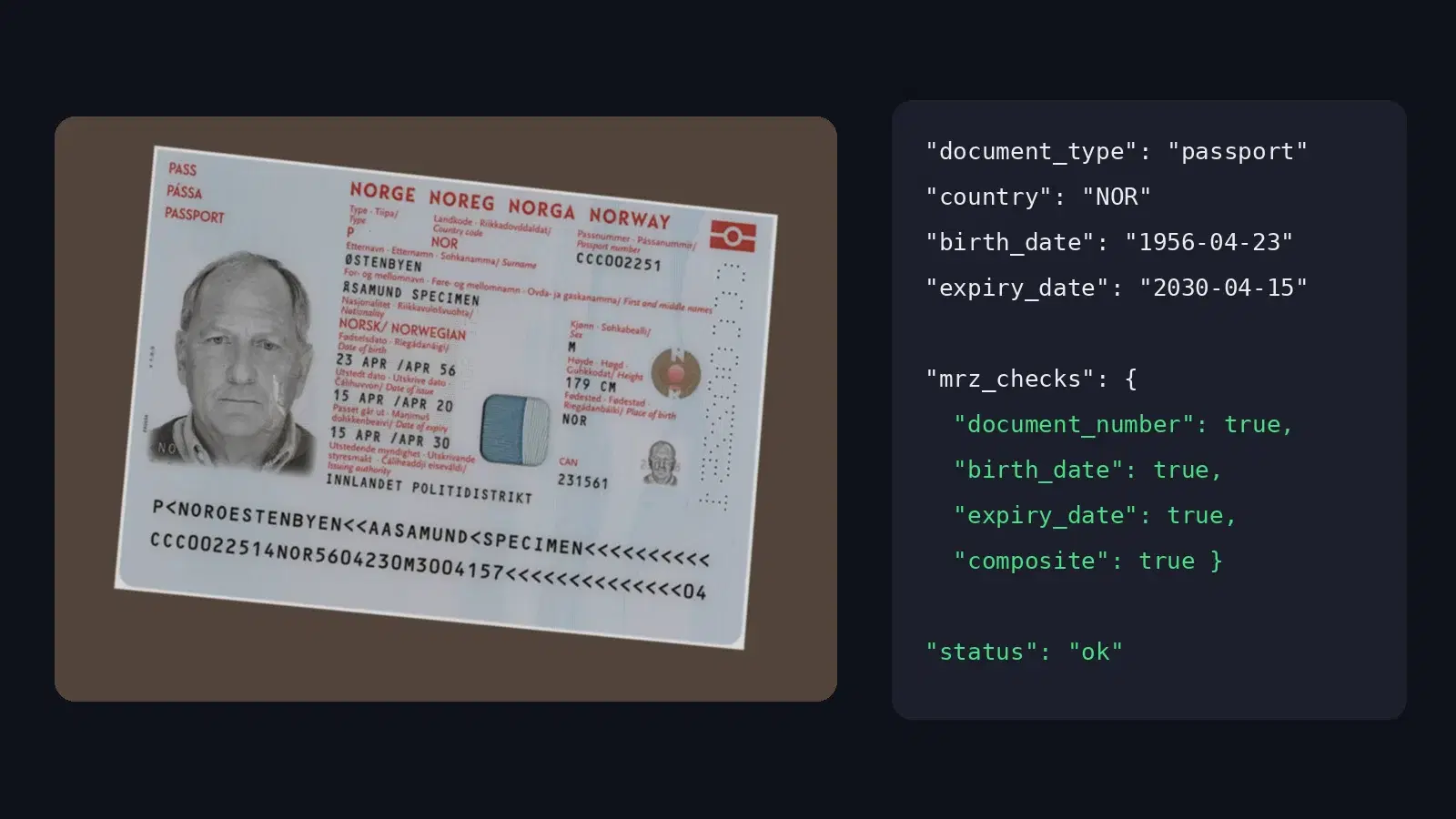
/parse-id reads the document and returns each field with a status, plus a verdict. The script uses the birth date only when the verdict is ok, which means every check digit in the MRZ passed and the printed text did not contradict it. Anything else goes to a person, with the reason. On three specimen documents:
norwegian_passport.jpg  (70, 'born 1956-04-23 (mrz_only)')
croatian_id.jpg         (49, 'born 1977-01-01 (mrz_only)')
dutch_passport.jpg      (61, 'born 1965-03-10 (mrz_only)')
The Dutch and Croatian specimens are expired. accept_expired=True keeps them: an expired document still proves a birth date, and many age checks accept it. Set it to False where the law asks for a valid document.
Then the exact age. A person is 18 on their 18th birthday, not on January 1 of that year, and the tuple comparison in age_on gets every case right, including a birthday on February 29:
>>> age_on(date(2008, 11, 28), date(2026, 11, 27))  # birthday tomorrow
17
>>> age_on(date(2008, 11, 27), date(2026, 11, 27))  # birthday today
18
>>> age_on(date(2008, 2, 29), date(2026, 2, 28))    # leap day, not yet
17
>>> age_on(date(2008, 2, 29), date(2026, 3, 1))
18
Step 3: Decide, on Real Photos
We ran verify_age on four stock portraits and on specimen documents:
$ python age_check.py selfie_1.jpg
pass           face 78-86
$ python age_check.py selfie_2.jpg
ask_for_id     face 23-29
$ python age_check.py selfie_4.jpg
ask_for_id     face 19-25
$ python age_check.py selfie_3.jpg croatian_id.jpg
manual_review  ID age 49 does not fit face 13-21
$ python age_check.py selfie_4.jpg passport_edited.jpg
manual_review  document review: composite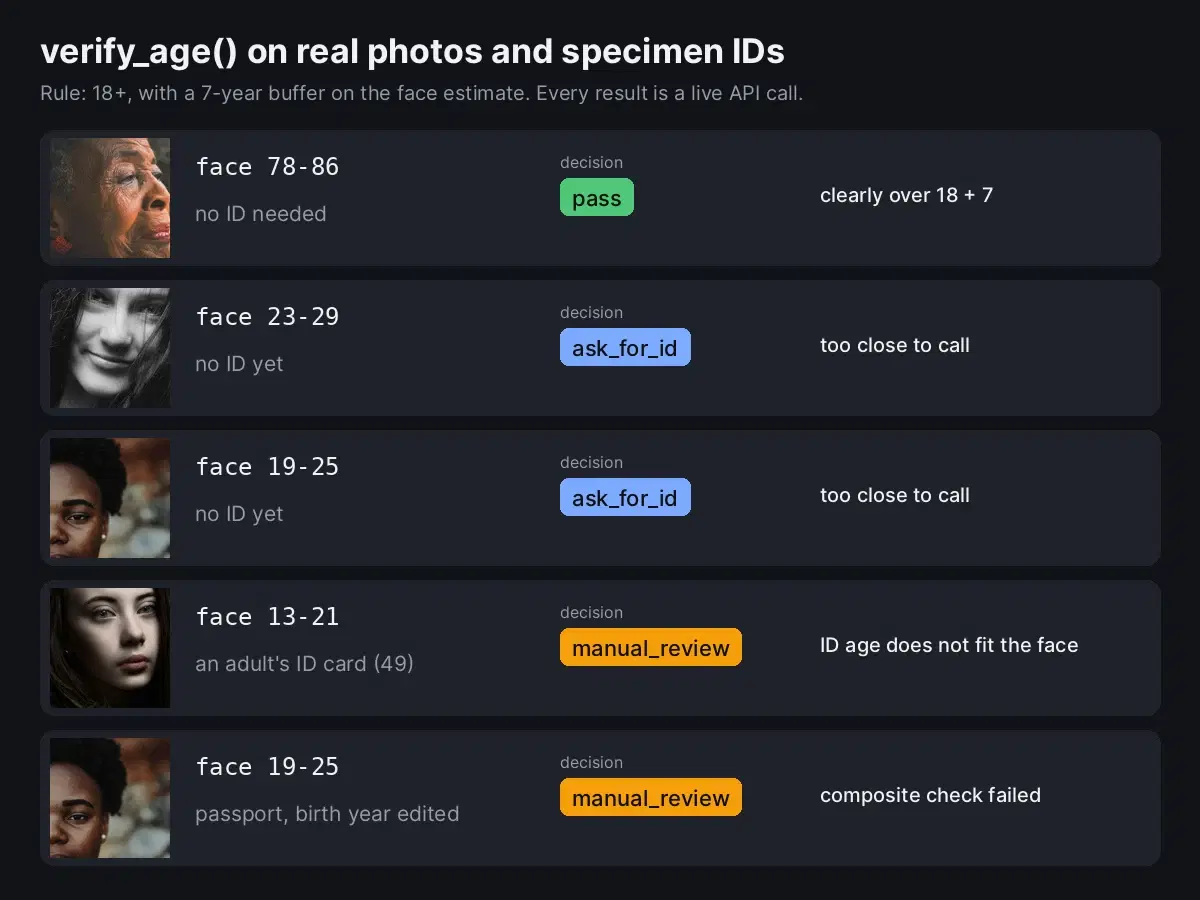
The first selfie passes in one call, under a second. The next two are adults by their looks, but the low end of their range is under 25, so the app asks for a document instead of guessing. The last two show the two attacks an ID step has to survive.
A Borrowed ID: the Age Does Not Fit the Face
An ID check alone has a gap: it proves the age of the document, not of the person. A teenager can photograph a parent's ID card. To test it, we sent a selfie estimated 13 to 21 with the Croatian specimen card, whose holder is 49. The document is authentic, so age_from_id returns 49 without complaint.
The two lines after it catch the case: an ID age more than 10 years outside the face range sends the request to review. It costs nothing, since the face estimate is already there. It does not replace a real face comparison between the selfie and the ID photo, which our eKYC tutorial builds, but it stops the lazy version of the attack.
An Edited Birth Date: the Check Digits Disagree
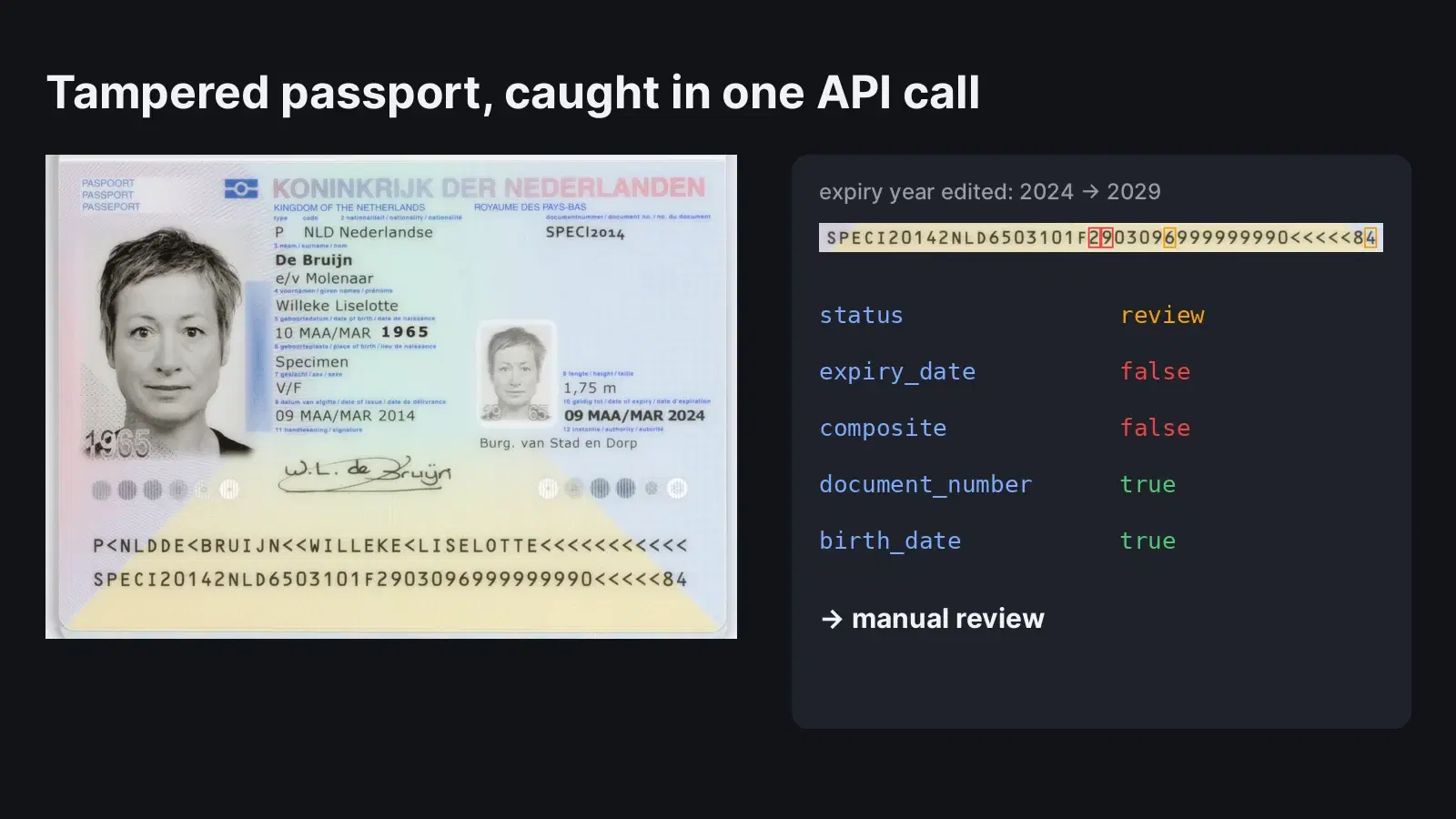
The other attack edits the document. We changed the birth year on a copy of the Dutch specimen passport from 1965 to 1999 in the MRZ:
- Year changed only: status
review, with thebirth_dateandcompositechecks false. - Year changed and its check digit recalculated: status
review, with thecompositecheck false. The composite digit covers the document number, the birth date and the expiry date together.
In both cases age_from_id returns no age and the reason, and the flow sends the case to a person. Our fake ID detection tutorial goes through more edits, and the passport MRZ tutorial shows how the check digits work.
Production Tips
- Keep the rule in one place.
min_age, the buffer, the 10-year tolerance andaccept_expireddepend on your country and your product. Load them from config, not from the code. - Do not tell the user why a check failed. Show "we need to review your document", and keep the reason for your reviewers. A precise error message turns your app into a free testing tool for edited documents.
- Store the decision, not the documents. Once you have the result, keep the decision, the date and the reason, and delete the selfie and the ID images. The ID Document OCR API does not store the images you send.
- Ask for a better photo before a person looks. When the document comes back with missing fields, a second photo of the whole page, flat and without glare, often fixes it. The ID API accepts several photos of the same side in one call and votes field by field.
- Add a face comparison for regulated checks. Where the law requires proof that the document belongs to the user, compare the selfie with the ID photo before you pass anyone on the ID path.
Next Step
Get a key on the Face Analyzer API page and the ID Document OCR API page, save age_check.py, and run it on a selfie. Then add a specimen passport and set min_age to your own limit.
Sources
Frequently Asked Questions
- Is face age estimation enough for age verification?
- For a clear case, yes: a face estimated well above your limit can pass without any document. Close to the limit it is not, because an estimate is a range. The usual approach, used by retailers with rules like Challenge 25, is to accept the face only above the limit plus a buffer and ask for an ID document below it. In our tests, a face estimated 78 to 86 passed directly and faces estimated 19 to 25 and 23 to 29 were sent to the ID step.
- How do I calculate an exact age from a date of birth in Python?
- Subtract the birth year from the current year, then subtract one more if the birthday has not happened yet this year: today.year - birth.year - ((today.month, today.day) < (birth.month, birth.day)). The tuple comparison handles every case, including people born on February 29, who turn 18 on March 1 in years without a leap day.
- Can I trust the birth date read from an ID document?
- Only when the document checks out. The birth date in a passport or ID card MRZ has its own check digit, and a composite digit covers the whole line. The ID Document OCR API runs these checks and returns status ok only when they pass. When we edited the birth year on a specimen passport, the API returned review, even after we recalculated the birth date check digit, because the composite check failed.
- How do I stop a minor from using a parent's ID?
- Compare the ID with the person. A cheap first signal is the face estimate: if the selfie looks 13 to 21 and the ID says 49, the two do not fit and the case goes to review. The full answer is a face comparison between the selfie and the ID photo, which proves the document belongs to the person holding it.