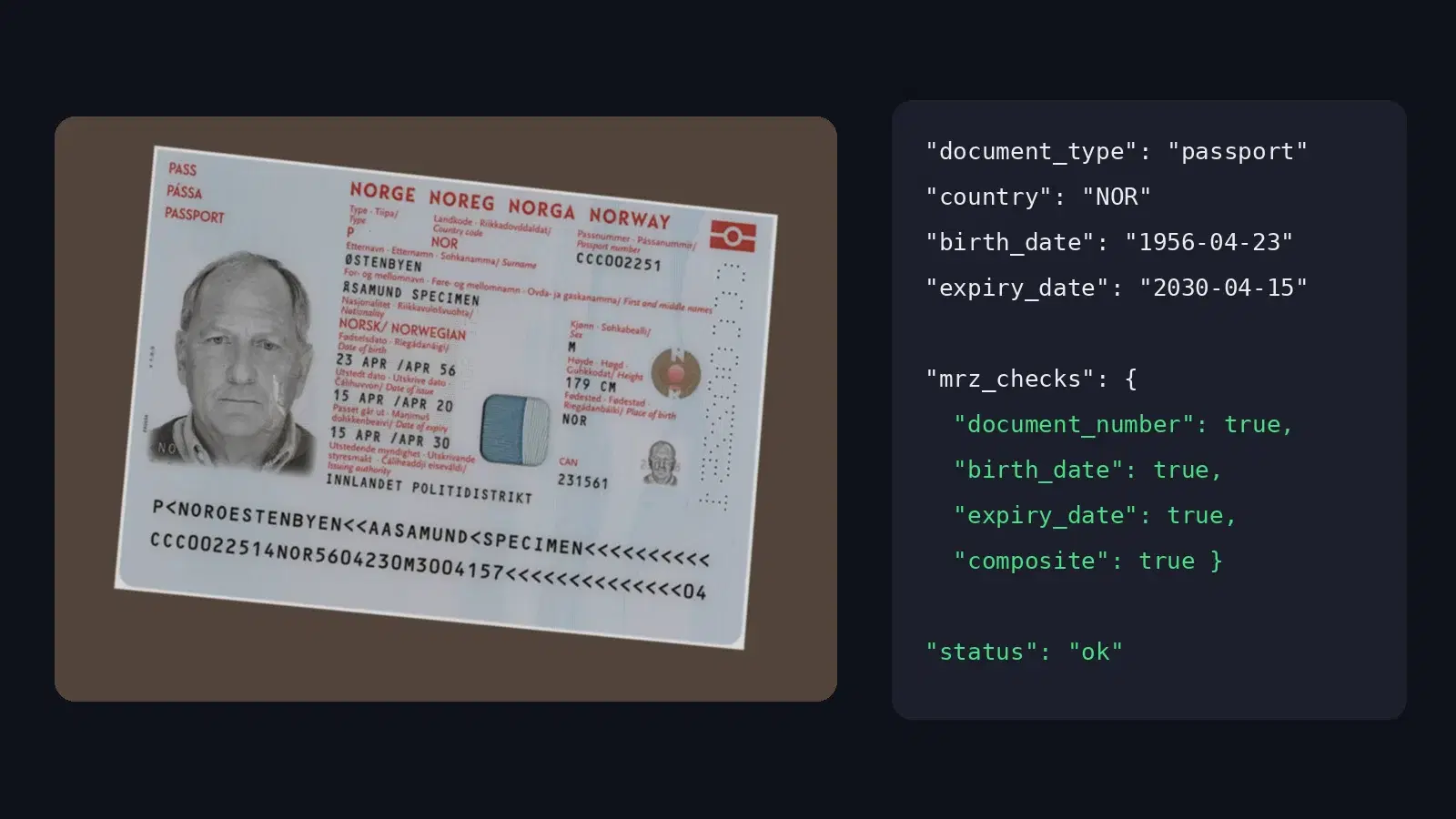
This tutorial uses the id-document-ocr API. See the docs, live demo, and pricing.
Every app that checks identity documents meets the same fraud sooner or later: an expired passport with a new expiry year, an ID card with a different birth date, a photo edited before upload. This tutorial shows how to detect a fake or tampered ID document in Python with the ID Document OCR API: one call returns every field, every check the document can prove on its own, and a verdict your code can act on.
We tested everything on official specimen documents published by governments: a Dutch passport and a Croatian ID card. Specimens carry fictional data and are free to reuse. We edited copies of them the way a quick forgery is made, by replacing digits in the image, then sent each version to the API.
How Tampering Shows Up in an ID Document
A passport or ID card can prove three things about its own data, without any database:
- Check digits. The machine readable zone (MRZ) has one digit after the document number, the birth date and the expiry date. Change a date and its digit no longer matches. Our passport MRZ tutorial shows the algorithm in 10 lines.
- The composite digit. One last digit covers the document number, birth date, expiry date and their check digits together. Fixing one field's digit is not enough.
- Printed text against the MRZ. The name, dates and sex are printed in the visual zone and encoded in the MRZ. Edit one and the two disagree.
The API runs these checks and reports each one in the verdict object:
| Field | What it tells you |
|---|---|
status | ok (safe to automate), review (a person must look) or rejected |
mrz_checks | true or false for each MRZ check digit, including the composite |
mismatched_fields | Fields where the printed text and the MRZ disagree |
national_checks | Validators for national ID numbers that have their own checksum |
missing_critical_fields | Fields the document should have but that could not be trusted |
consistency_issues | Dates or values that cannot all be true together |
is_expired | A separate flag: an authentic expired document is still ok |
Each field also has a status: mrz_confirmed when the printed text and the MRZ agree, mrz_only when only the MRZ was read, mismatch when they disagree, with the printed value in visual_value.
The Script: Turn the Verdict into a Decision
You need Python 3, requests and a RapidAPI key in the RAPIDAPI_KEY environment variable. Save this as check_id.py. It sends each photo to /parse-id, collects every tampering signal in plain words, and returns a decision:
import os
import sys

import requests

API_URL = "https://id-document-ocr-verification.p.rapidapi.com/parse-id"
HEADERS = {
    "x-rapidapi-key": os.environ["RAPIDAPI_KEY"],
    "x-rapidapi-host": "id-document-ocr-verification.p.rapidapi.com",
}


def parse_id(*paths):
    """Send 1 to 6 photos of the same document, get fields and a verdict."""
    files = [("images", open(p, "rb")) for p in paths]
    r = requests.post(API_URL, headers=HEADERS, files=files, timeout=60)
    r.raise_for_status()
    return r.json()["result"]


def tamper_signals(result):
    """List every reason the document cannot be trusted as is."""
    verdict, fields = result["verdict"], result["fields"]
    signals = []
    if not verdict["mrz_present"]:
        signals.append("no MRZ that passes its checks")
    for name, ok in verdict["mrz_checks"].items():
        if not ok:
            signals.append(f"check digit failed: {name}")
    for name, ok in verdict.get("national_checks", {}).items():
        if not ok:
            signals.append(f"national number invalid: {name}")
    for name in verdict["mismatched_fields"]:
        f = fields[name]
        signals.append(f"{name}: MRZ {f['value']}, printed {f['visual_value']}")
    for name in verdict["missing_critical_fields"]:
        signals.append(f"missing: {name}")
    signals += [str(issue) for issue in verdict["consistency_issues"]]
    return signals


def decide(result):
    verdict = result["verdict"]
    if verdict["status"] == "ok":
        return "reject: expired" if verdict["is_expired"] else "accept"
    return "manual review: " + "; ".join(tamper_signals(result))


if __name__ == "__main__":
    for path in sys.argv[1:]:
        result = parse_id(path)
        expiry = result["fields"].get("expiry_date", {}).get("value")
        print(f"{os.path.basename(path)}  expiry={expiry}")
        print(f"  -> {decide(result)}")
Here is the output on the two original specimens and six edited copies:
$ python check_id.py ids/*.jpg
nl_original.jpg  expiry=2024-03-09
  -> reject: expired
nl_expiry_2029.jpg  expiry=2029-03-09
  -> manual review: check digit failed: expiry_date; check digit failed: composite
nl_expiry_2031_digit_fixed.jpg  expiry=2031-03-09
  -> manual review: check digit failed: composite
nl_two_fields.jpg  expiry=2029-03-09
  -> manual review: check digit failed: document_number; check digit failed: expiry_date; check digit failed: composite
nl_heavy_edit.jpg  expiry=None
  -> manual review: no MRZ that passes its checks; missing: birth_date; missing: document_number; missing: expiry_date
hr_original.jpg  expiry=2002-12-12
  -> reject: expired
hr_printed_expiry_2027.jpg  expiry=2002-12-12
  -> manual review: expiry_date: MRZ 2002-12-12, printed 2027-12-12
hr_mrz_expiry_2028.jpg  expiry=2028-12-12
  -> manual review: expiry_date: MRZ 2028-12-12, printed 2002-12-12
Both originals are authentic and expired, so they pass every check and are refused only for the date. None of the six edited copies is accepted. The sections below show what each edit was and which check caught it.
Edit 1: Change a Date in the MRZ
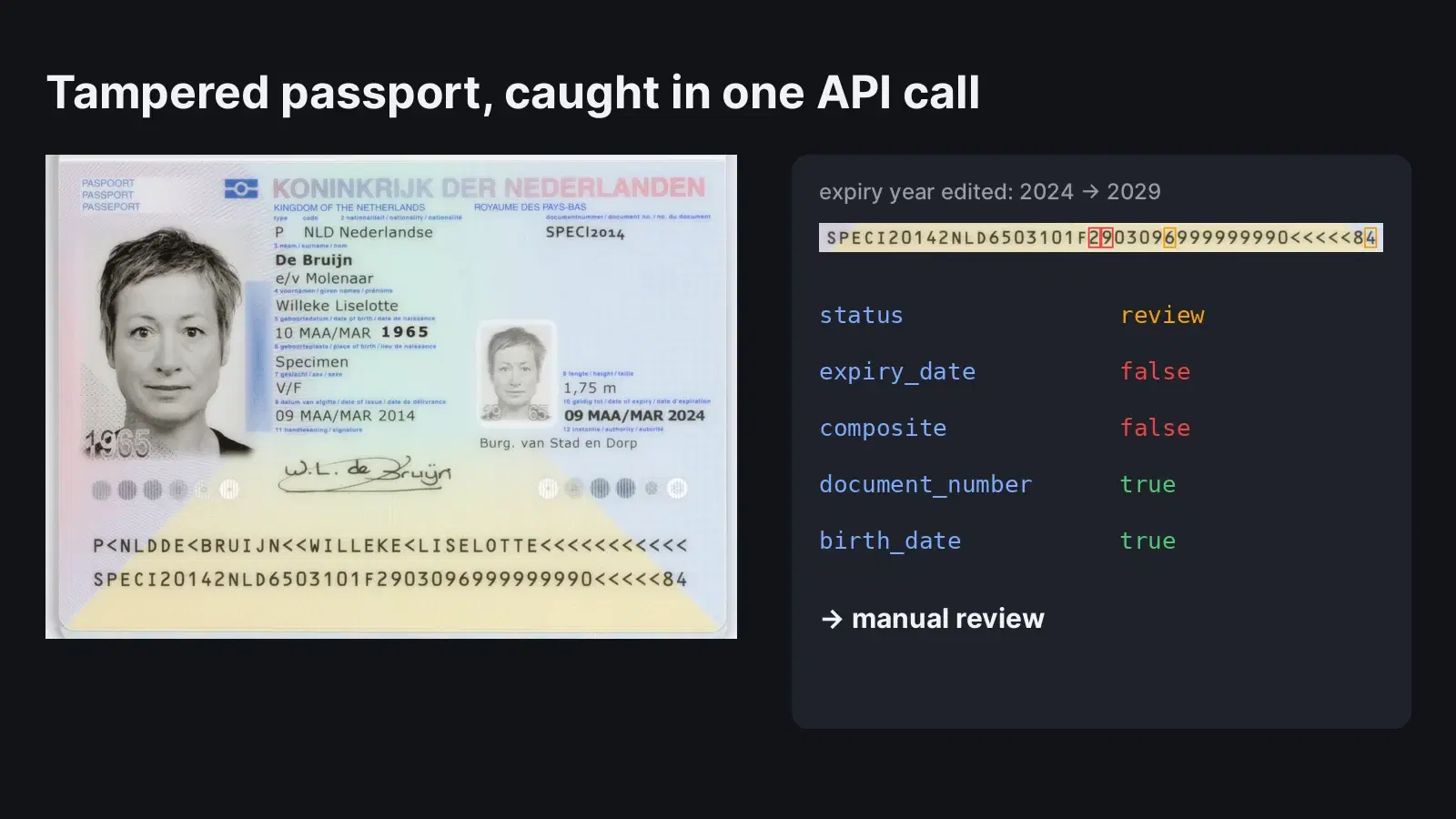
The most common edit turns an expired document into a valid one. On the Dutch passport, which expired in March 2024, we changed the expiry year in the MRZ from 24 to 29 and left everything else as it was.
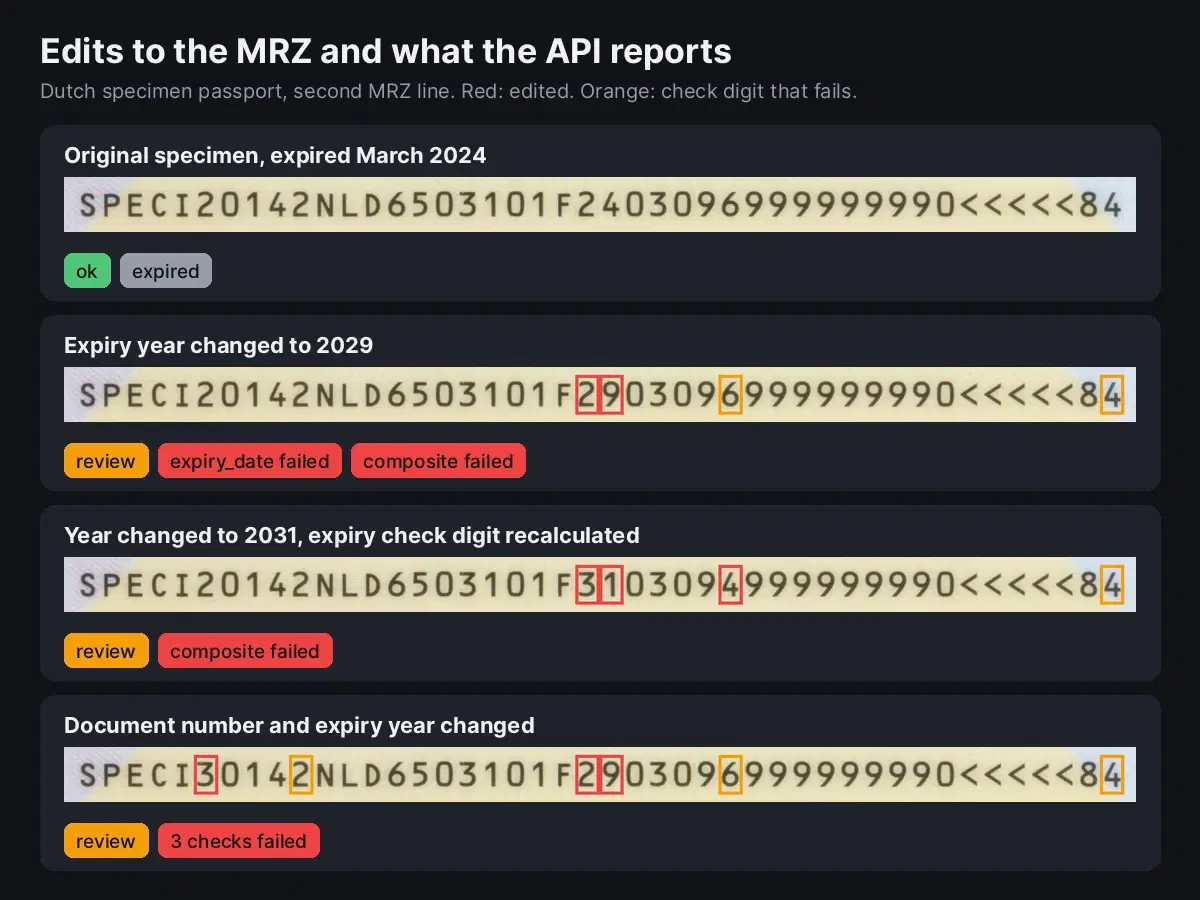
The expiry check digit still matches 2024, so expiry_date fails, and the composite digit fails with it. The API returns the new date, but marks it mrz_unchecked and sets the status to review. Changing two fields at once (the document number and the expiry year) makes three checks fail.
Edit 2: Recalculate the Check Digit
The check digit algorithm is public, so a forger can recompute it. We changed the year to 2031 and replaced the expiry check digit with the correct one for the new date. The expiry check now passes, but the composite digit at the end of the line was computed over the old date:
from mrz import check_digit  # from the passport MRZ tutorial

line2 = "SPECI20142NLD6503101F3103094999999990<<<<<84"
print(check_digit(line2[21:27]) == line2[27])  # expiry: True
composite = line2[0:10] + line2[13:20] + line2[21:43]
print(check_digit(composite) == line2[43]) # composite: FalseTrue
FalseThe API reports the same thing: composite false, status review. To get past the MRZ alone, a forger has to recompute two digits correctly, which brings us to the third layer.
Edit 3: Every Digit Right, but the Printed Date Disagrees
On the Croatian ID card, the API reads the printed expiry date as well as the MRZ. We made two forgeries. In the first, we changed only the printed date to 2027. In the second, we changed the MRZ to 2028 and recalculated every check digit, including the composite, so every MRZ check passes.
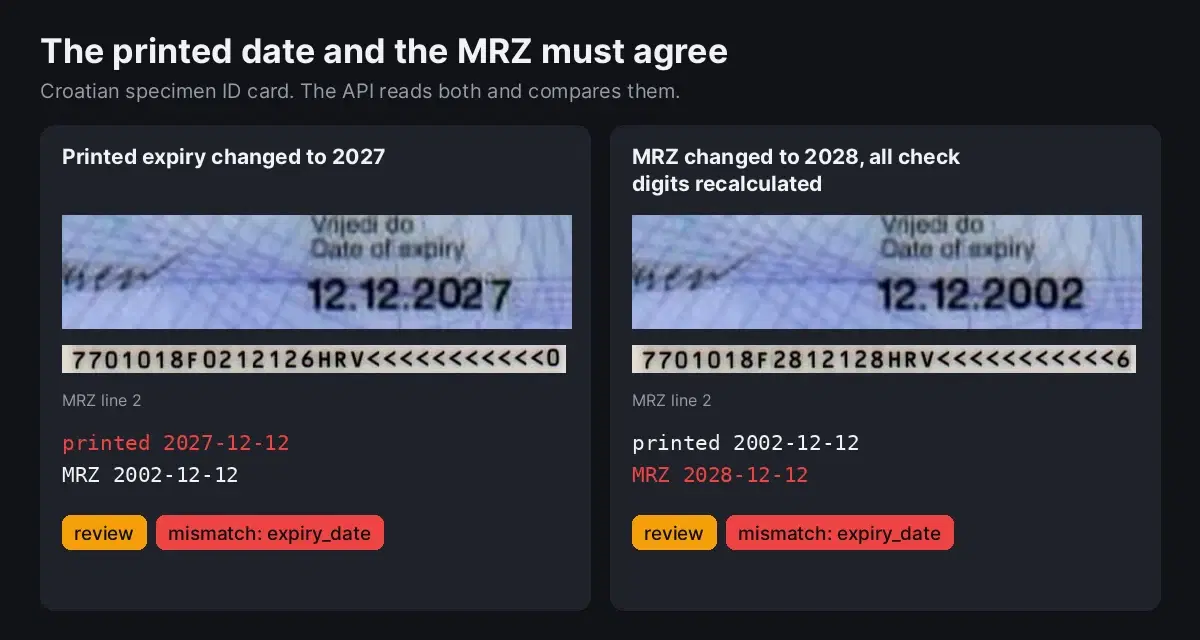
Both come back as review with expiry_date in mismatched_fields. The field shows both values, so a reviewer sees the conflict at once:
"expiry_date": {
  "value": "2028-12-12",
  "status": "mismatch",
  "visual_value": "2002-12-12"
}
On the untouched card, the same field is mrz_confirmed: the printed date and the MRZ agree. This is why the photo matters. Ask for the whole document, both sides of an ID card, sharp and flat, so the API can read the printed zone and compare it.
Edit 4: Too Many Changes
When we changed the document number, the birth year and the expiry year together without touching any digit, the MRZ failed so many checks that the API stopped trusting it: mrz_present is false, the birth date, document number and expiry date are listed in missing_critical_fields, and the status is review. The edited values are never returned as if they were valid.
What to Do with Each Result
| Result | Action |
|---|---|
ok, not expired | Accept automatically and store the fields |
ok, expired | Refuse and ask for a valid document |
review with a failed check digit or a mismatch | Send to a person with the signals from tamper_signals |
review with missing fields only | Ask for a new photo of the whole document first, then a person |
rejected | Refuse |
Production Tips
- Do not tell the user which check failed. Show a neutral message such as "we could not verify this document". Detailed errors let a fraudster use your app to test forgeries until one passes.
- Limit retries. Several review results for the same account in a short time are a signal in themselves. Count them and stop automatic retries after two or three.
- Send several photos of the same document. The endpoint accepts up to 6 images in one call, such as the front, the back and a second shot of the data page, and combines them into one result.
- Match the face too. A document can be authentic and belong to someone else. Compare a selfie with the document photo, as in the selfie to ID verification tutorial.
- Keep the signals with the decision. Store the verdict and the signal list for every check. When a reviewer overrides a decision, you know exactly what they saw.
Next Step
Get a key on the ID Document OCR API page, save check_id.py and run it on a specimen document. Then edit one digit of its MRZ and watch the verdict change.
Sources
Frequently Asked Questions
- How can I tell if an ID document has been tampered with?
- Check what the document says about itself. The MRZ has check digits on the document number, birth date and expiry date, plus a composite digit over the whole line, and the printed text must match the MRZ. The ID Document OCR API runs all of these checks and returns a verdict. In our tests on edited specimens, every edit came back as review with the exact reason: a failed check digit or a printed date that disagreed with the MRZ.
- Can a forger just recalculate the MRZ check digits?
- Recalculating one digit is not enough, because the composite digit covers the document number, birth date, expiry date and their digits together. When we changed the expiry year and fixed only the expiry check digit, the composite check failed. When we recalculated every digit on an ID card, the API still flagged it because the printed expiry date no longer matched the MRZ.
- What should my app do when an ID comes back as review?
- Send it to a person, or ask the user for a new photo of the whole document. Do not accept it automatically and do not tell the user which check failed, so nobody can use your app to test forgeries. Accept automatically only when the status is ok and the document is not expired.
- Is an expired ID a fake ID?
- No. An authentic but expired document passes every check and comes back with status ok and is_expired true. Expired documents are the most common starting point for tampering, though: changing the expiry year is the edit we tested most, and the API flagged every version of it.