This tutorial uses the id-document-ocr API. See the docs, live demo, and pricing.
The two lines of letters, digits and chevrons at the bottom of a passport are the machine readable zone, or MRZ. They hold the holder's name, document number, nationality, birth date and expiry date, plus check digits that prove each field was read correctly. This tutorial shows how to read a passport MRZ in Python: the check digit algorithm in 10 lines, reading the MRZ from a photo, then one call to the ID Document OCR API that returns verified fields and a verdict.
Every script was run on official specimen documents published by governments: Dutch and Norwegian passports, Croatian and Luxembourg ID cards. Specimens carry fictional data and are public domain or CC0 on Wikimedia Commons, so no real person's document was used.
What Is in a Passport MRZ
Passports use the TD3 format defined by ICAO Doc 9303: two lines of exactly 44 characters, in a font designed for OCR. Empty positions are filled with <, which also separates the last name from the first names. Here is the MRZ of the Dutch specimen passport, field by field:
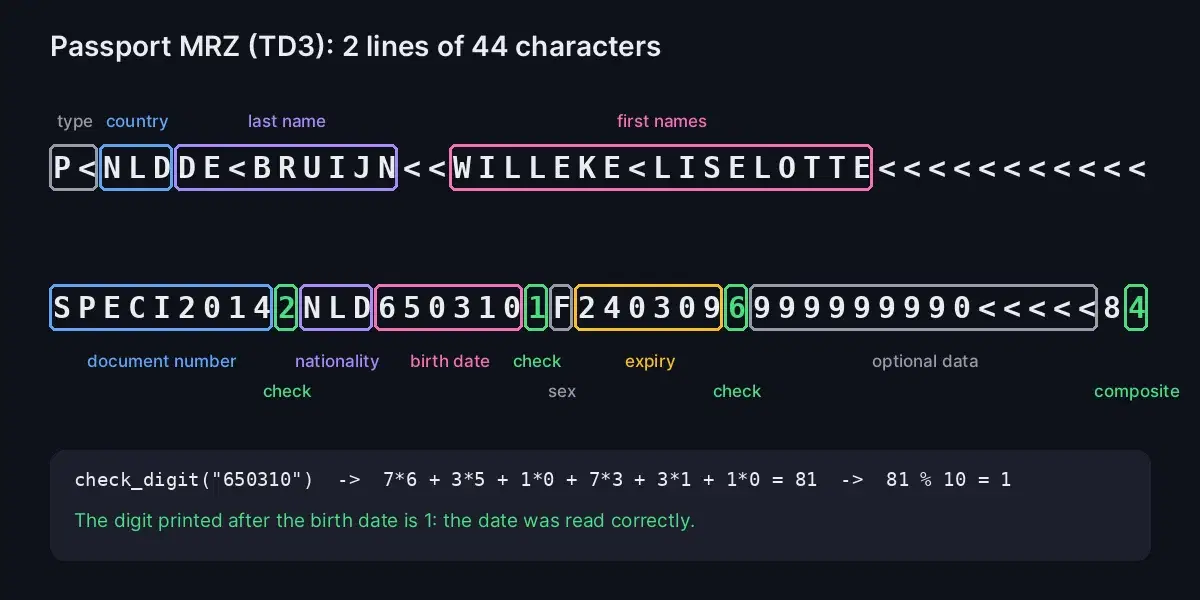
Dates are written YYMMDD, so 650310 is March 10, 1965. Four digits protect the data: one after the document number, one after the birth date, one after the expiry date, and a composite digit at the very end that covers the whole second line.
The Check Digit Algorithm in 10 Lines of Python
Each character gets a value (digits keep theirs, A to Z are 10 to 35, the filler is 0), the values are multiplied by the weights 7, 3, 1 repeated, and the check digit is the sum modulo 10. Save this as mrz.py:
WEIGHTS = (7, 3, 1)


def char_value(c):
    if c.isdigit():
        return int(c)
    if c.isalpha():
        return ord(c.upper()) - 55  # A=10 ... Z=35
    return 0  # the filler '<'


def check_digit(data):
    """ICAO 9303 check digit: weights 7, 3, 1 repeated, sum modulo 10."""
    return str(sum(char_value(c) * WEIGHTS[i % 3] for i, c in enumerate(data)) % 10)


def parse_td3(line1, line2):
    """Parse the two 44-character lines of a passport MRZ and verify every check digit."""
    surname, _, given = line1[5:].partition("<<")
    fields = {
        "country": line1[2:5].replace("<", ""),
        "last_name": surname.replace("<", " ").strip(),
        "first_name": given.replace("<", " ").strip(),
        "document_number": line2[0:9].replace("<", ""),
        "nationality": line2[10:13].replace("<", ""),
        "birth_date": line2[13:19],
        "sex": line2[20],
        "expiry_date": line2[21:27],
    }
    checks = {
        "document_number": check_digit(line2[0:9]) == line2[9],
        "birth_date": check_digit(line2[13:19]) == line2[19],
        "expiry_date": check_digit(line2[21:27]) == line2[27],
        "composite": check_digit(line2[0:10] + line2[13:20] + line2[21:43]) == line2[43],
    }
    return fields, checks


if __name__ == "__main__":
    line1 = "P<NLDDE<BRUIJN<<WILLEKE<LISELOTTE<<<<<<<<<<<"
    line2 = "SPECI20142NLD6503101F2403096999999990<<<<<84"
    fields, checks = parse_td3(line1, line2)
    print(fields)
    print(checks)

    # One digit changed: birth year 1965 -> 1968
    tampered = line2[:14] + "8" + line2[15:]
print(parse_td3(line1, tampered)[1]){'country': 'NLD', 'last_name': 'DE BRUIJN', 'first_name': 'WILLEKE LISELOTTE', 'document_number': 'SPECI2014', 'nationality': 'NLD', 'birth_date': '650310', 'sex': 'F', 'expiry_date': '240309'}
{'document_number': True, 'birth_date': True, 'expiry_date': True, 'composite': True}
{'document_number': True, 'birth_date': False, 'expiry_date': True, 'composite': False}On the real MRZ, every check passes. Change one digit of the birth year and two checks fail: the birth date digit and the composite digit. This is what makes the MRZ reliable. An OCR engine that confuses 5 and 6, or O and 0, cannot produce a wrong value that still passes the checks, except by rare chance.
Read the MRZ from a Photo
To get the two lines from an image, any OCR that returns line breaks works. With the OCR Wizard API, keep the lines that are 44 characters long and contain a filler, after removing spaces (OCR sometimes splits a line in two words). Save this next to mrz.py as ocr_mrz.py:
import os
import sys

import requests

from mrz import parse_td3

HOST = "ocr-wizard.p.rapidapi.com"
HEADERS = {"x-rapidapi-host": HOST, "x-rapidapi-key": os.environ["RAPIDAPI_KEY"]}


def read_mrz_lines(path):
    """OCR the photo and keep the two passport MRZ lines (44 characters, with fillers)."""
    with open(path, "rb") as f:
        r = requests.post(f"https://{HOST}/ocr", headers=HEADERS, files={"image": f}, timeout=60)
    r.raise_for_status()
    lines = [l.replace(" ", "") for l in r.json()["body"]["fullText"].split("\n")]
    mrz = [l for l in lines if len(l) == 44 and "<" in l]
    if len(mrz) != 2:
        raise ValueError(f"MRZ not found in {path}")
    return mrz


for path in sys.argv[1:]:
    line1, line2 = read_mrz_lines(path)
    fields, checks = parse_td3(line1, line2)
    print(path, "all checks pass" if all(checks.values()) else checks)
print(" ", fields)export RAPIDAPI_KEY=your_key
python ocr_mrz.py nl_passport.jpg no_passport.jpgnl_passport.jpg all checks pass
{'country': 'NLD', 'last_name': 'DE BRUIJN', 'first_name': 'WILLEKE LISELOTTE', 'document_number': 'SPECI2014', 'nationality': 'NLD', 'birth_date': '650310', 'sex': 'F', 'expiry_date': '240309'}
no_passport.jpg all checks pass
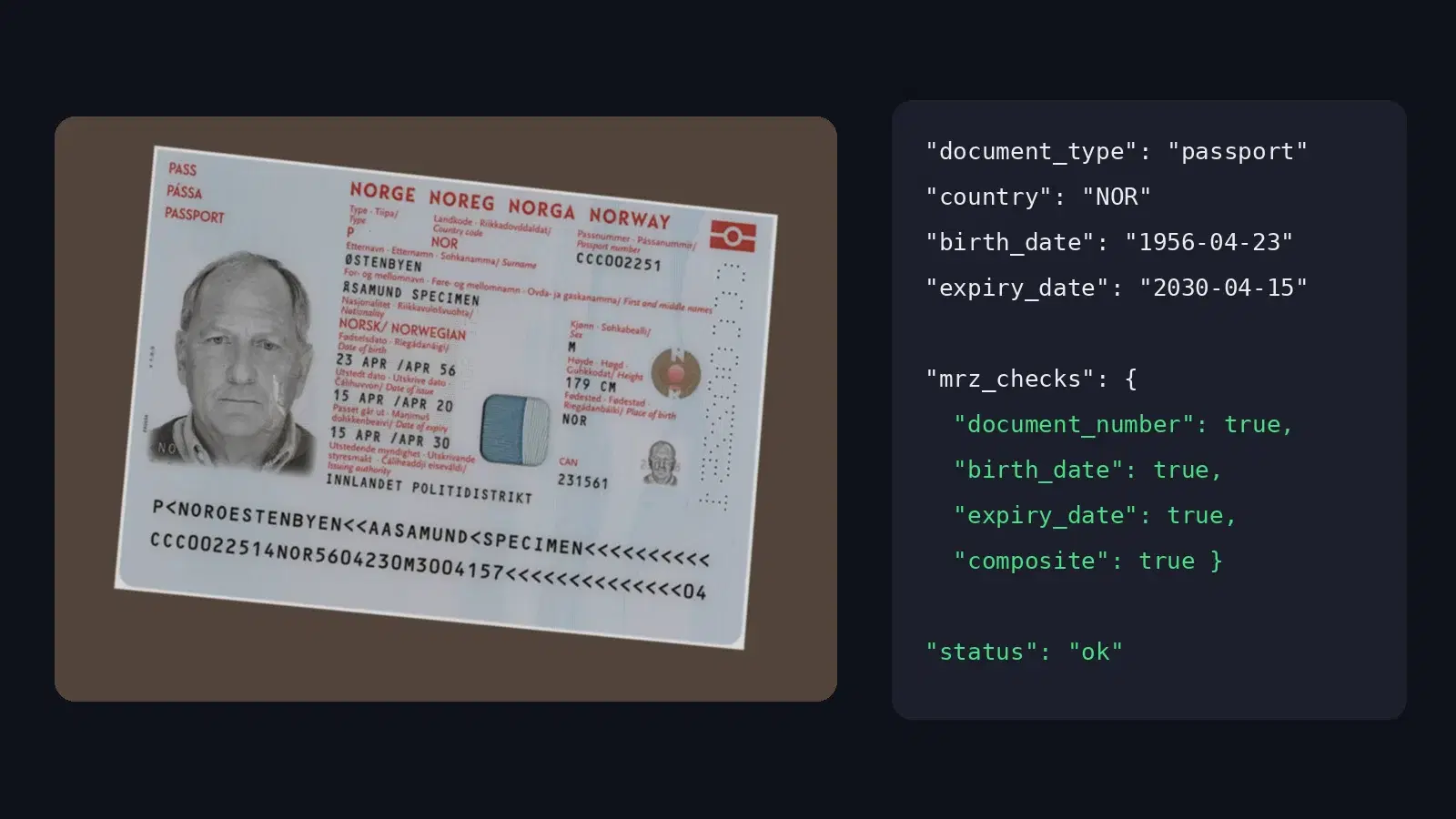
{'country': 'NOR', 'last_name': 'OESTENBYEN', 'first_name': 'AASAMUND SPECIMEN', 'document_number': 'CCC002251', 'nationality': 'NOR', 'birth_date': '560423', 'sex': 'M', 'expiry_date': '300415'}Both passports pass all four checks. Notice OESTENBYEN: the printed name is Østenbyen, and the MRZ only allows A to Z, so ICAO transliterates Ø to OE. Your database should store both forms if you match names against other sources.
This works for a clean passport scan. A production KYC flow quickly needs much more:
- ID cards (TD1, three lines of 30), visas and residence permits (TD2, two lines of 36).
- The printed zone: names, dates and numbers on the front, compared with the MRZ to catch a document where one of them was edited.
- National numbers with their own checksums, such as the Romanian CNP or the Spanish DNI, and driving licenses that have no MRZ at all.
- Several phone photos of the same document, front and back, sent in any order.
- Expiry rules, and a clear decision: automate, or send to a person.
Verify Any ID Document with One API Call
The ID Document OCR API does all of the above in one request to /parse-id. You send 1 to 6 images or a PDF, it returns every field in ISO format with a trust level, the result of each check, and a verdict: ok, review or rejected. This script runs it on five documents, including three simulated phone shots of the Norwegian passport (tilted, blurred, with glare) and the Dutch passport with its birth year edited. Save it as verify_id.py:
import os
import time

import requests

HOST = "id-document-ocr-verification.p.rapidapi.com"
HEADERS = {"x-rapidapi-host": HOST, "x-rapidapi-key": os.environ["RAPIDAPI_KEY"]}


def verify_id(*paths):
    """Send one document (1 to 6 photos, any order) and return the parsed result."""
    files = [("images", open(p, "rb")) for p in paths]
    try:
        r = requests.post(f"https://{HOST}/parse-id", headers=HEADERS, files=files, timeout=60)
    finally:
        for _, f in files:
            f.close()
    r.raise_for_status()
    return r.json()["result"]


def decide(result):
    """Automate only what the checksums back, send the rest to a person."""
    verdict = result["verdict"]
    if verdict["status"] == "ok" and not verdict["is_expired"]:
        return "accept"
    if verdict["status"] == "ok":
        return "ask for a valid document (expired)"
    failed = [name for name, passed in verdict["mrz_checks"].items() if not passed]
    reasons = failed + verdict["mismatched_fields"] + verdict["missing_critical_fields"]
    return f"{verdict['status']}: {', '.join(reasons)}"


DOCUMENTS = {
    "Dutch passport": ["nl_passport.jpg"],
    "Norwegian passport, 3 phone shots": ["phone/no_shot1.jpg", "phone/no_shot2.jpg", "phone/no_shot3.jpg"],
    "Croatian ID card": ["hr_id.jpg"],
    "Luxembourg ID card, back": ["lu_id_back.jpg"],
    "Dutch passport, birth year edited": ["nl_passport_tampered.jpg"],
}

for name, paths in DOCUMENTS.items():
    start = time.time()
    result = verify_id(*paths)
    f = result["fields"]
    print(f"{name} ({time.time() - start:.1f} s)")
    print(f"  {result['document_type']} {result['country']} | {f['last_name']['value']}, "
          f"{f['first_name']['value']} | born {f['birth_date']['value']} | "
          f"expires {f['expiry_date']['value']}")
print(f" -> {decide(result)}")Dutch passport (1.7 s)
passport NLD | DE BRUIJN, WILLEKE LISELOTTE | born 1965-03-10 | expires 2024-03-09
-> ask for a valid document (expired)
Norwegian passport, 3 phone shots (1.5 s)
passport NOR | OESTENBYEN, AASAMUND SPECIMEN | born 1956-04-23 | expires 2030-04-15
-> accept
Croatian ID card (1.1 s)
id_card HRV | SPECIMEN, SPECIMEN | born 1977-01-01 | expires 2002-12-12
-> ask for a valid document (expired)
Luxembourg ID card, back (0.7 s)
id_card LUX | SPECIMEN, JEANNE | born 1983-08-19 | expires 2031-07-15
-> accept
Dutch passport, birth year edited (2.3 s)
passport NLD | DE BRUIJN, WILLEKE LISELOTTE | born 1968-03-10 | expires 2024-03-09
-> review: birth_date, composite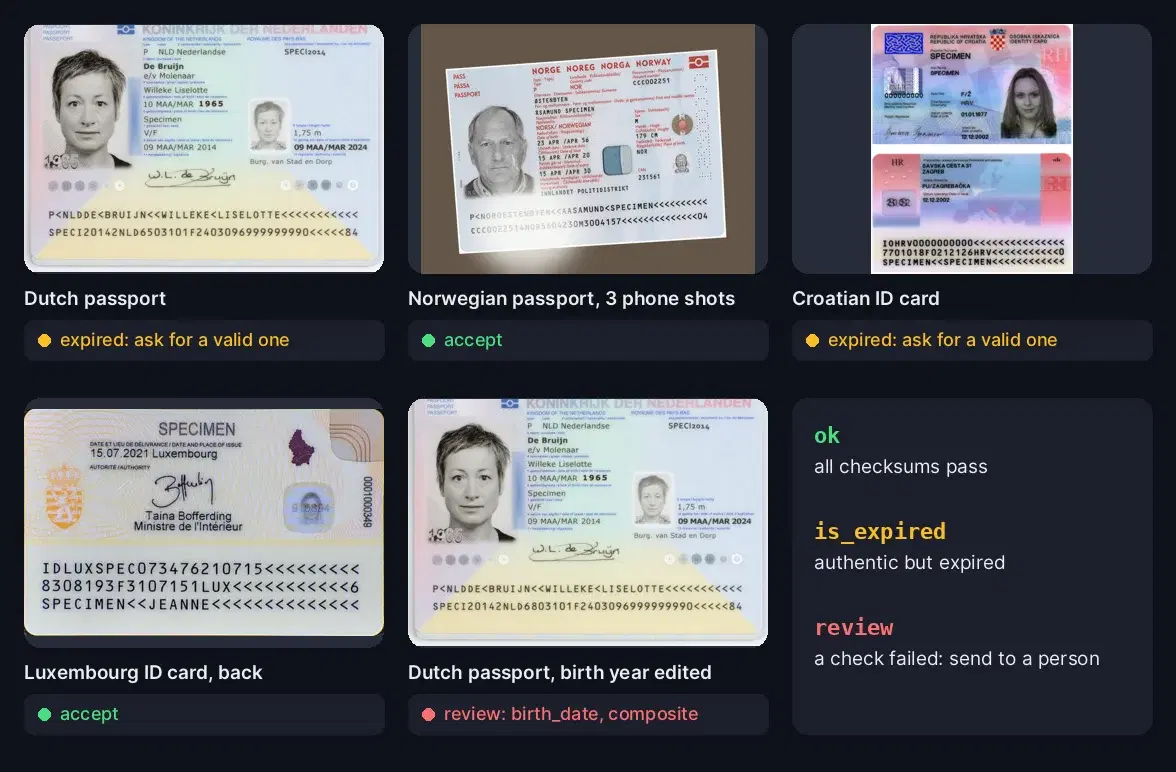
Each call took between 0.7 and 2.3 seconds. What happened on each document:
- Expired but authentic. The Dutch passport (2024) and Croatian ID card (2002) specimens pass every check, so the verdict is
ok, withis_expired: trueas a separate flag. The script asks for a valid document instead of rejecting the user. - Three phone shots, one answer. The three Norwegian photos are sent together in one request. The API groups them, votes field by field and returns a single result in 1.5 seconds.
- ID card back only. The Luxembourg card is read from its three line TD1 MRZ, without the front.
- Edited birth year. Same result as our own
mrz.py: the birth date and composite checks fail, so the verdict isreview.
Read the Verdict and Field Status
On the edited passport, the API does not hide the problem behind a confidence score. The fields that the failed checks cover are marked mrz_unchecked, and the verdict says which checks failed:
{
  "birth_date": {
    "value": "1968-03-10",
    "status": "mrz_unchecked"
  },
  "last_name": {
    "value": "DE BRUIJN",
    "status": "mrz_unchecked"
  },
  "verdict": {
    "status": "review",
    "is_expired": true,
    "mrz_checks": {
      "document_number": true,
      "birth_date": false,
      "expiry_date": true,
      "composite": false
    }
  }
}
The rules are simple to wire into an onboarding flow:
ok: every critical field was extracted and every check passed. Safe to automate.review: a check failed, a field is missing, or the MRZ and the printed zone disagree. Send it to a person with the reasons.rejected: the MRZ fails several integrity checks. Ask for another document.- Each field also has a
status:mrz_confirmedwhen the MRZ and the printed zone agree,mrz_onlywhen the value comes from a verified MRZ.
Send the front and back of an ID card in the same request to get the cross-check between the two sides. The verdict then also catches a front that does not match the MRZ on the back.
Production Tips
- Ask for 2 or 3 photos of each side. Phone photos have glare and blur in different places. Sending them together lets the vote pick the best reading of each field.
- Treat expiry as a business rule. An expired passport is still authentic. Some flows accept it for age checks, a bank onboarding does not. The separate
is_expiredflag lets you decide. - Do not store the images. Once the fields are extracted and verified, keep the values you need and delete the photos. The API itself keeps nothing.
- Match the face too. Check digits prove the data is consistent, not that the person in front of the camera owns the document. Compare a selfie with the document photo, as in our selfie to ID verification tutorial.
- Keep the review queue small. Automate the
okverdicts and send onlyreviewcases to your compliance team, with the failed checks shown.
Next Step
Get a free key on the ID Document OCR API page, save verify_id.py and run it on a specimen or on your own passport. For KYC platforms and check-in apps with high volumes, custom plans are available.
Sources
Frequently Asked Questions
- How is an MRZ check digit calculated?
- Each character gets a value: digits keep their value, A to Z are 10 to 35, and the filler < is 0. Multiply the values by the weights 7, 3, 1 repeated, add them up and keep the remainder of the division by 10. The result must equal the check digit printed after the field. The algorithm is defined in ICAO Doc 9303.
- What fields does a passport MRZ contain?
- A passport MRZ (TD3 format) has two lines of 44 characters: document type, issuing country, last and first names on line 1; document number, nationality, birth date, sex, expiry date and optional data on line 2. The document number, birth date and expiry date each have a check digit, and a final composite digit covers the whole second line.
- Can the MRZ check digits detect a fake passport?
- They detect a changed or misread digit. In our test, changing the birth year from 1965 to 1968 in the MRZ made the birth date and composite checks fail, and the API returned review instead of ok. Check digits do not prove a document is genuine on their own, so combine them with a face match and human review of flagged documents.
- Does this work for ID cards as well as passports?
- Yes. ID cards use the TD1 format: three lines of 30 characters on the back. The ID Document OCR API parses passports, ID cards, driving licenses and residence permits, and verified the Croatian and Luxembourg ID card specimens in this tutorial.