This tutorial uses the Object Detection API. See the docs, live demo, and pricing.
You need object detection in your application. You have two main paths: run YOLO (You Only Look Once) on your own infrastructure, or call a cloud object detection API over HTTP. YOLO is free and powerful, but it requires a GPU, Python dependencies, and ongoing maintenance. A cloud API is simple and scalable, but it costs money and adds network latency. This guide compares both approaches across five axes — setup, cost, latency, accuracy, and scalability — so you can make the right choice for your project.
Quick Comparison
| Criteria | YOLO (Self-Hosted) | AI Engine Cloud API |
|---|---|---|
| Setup time | ~30 min (Python, PyTorch, GPU drivers) | ~2 min (get API key) |
| Infrastructure | GPU required (local or cloud) | None — fully managed |
| Cost (1K images) | "Free" + GPU hosting ($50–200/mo) | $12.99/mo (Pro plan) |
| Latency | ~20–50ms (local GPU) | ~200–500ms (network round-trip) |
| Scalability | Limited by your GPU | Auto-scale, up to 50K req/mo |
| Maintenance | Model updates, dependency management | Zero maintenance |
| Custom training | Full fine-tuning support | Pre-trained models only |
| Offline support | Yes | No |
What Is YOLO?
YOLO (You Only Look Once) is a family of open-source object detection models that process an entire image in a single forward pass through a neural network. Unlike two-stage detectors that first propose regions and then classify them, YOLO predicts bounding boxes and class probabilities simultaneously, making it fast enough for real-time applications.
YOLOv8 from Ultralytics is the most popular version today. It is open-source, built on PyTorch, and supports detection, segmentation, and pose estimation. A minimal inference script looks like this:
from ultralytics import YOLO

# Load a pretrained model (downloads ~6MB on first run)
model = YOLO("yolov8n.pt")

# Run inference on an image
results = model("street.jpg")

# Print detected objects
for result in results:
    for box in result.boxes:
        label = result.names[int(box.cls)]
        confidence = float(box.conf)
        x1, y1, x2, y2 = box.xyxy[0].tolist()
        print(f"{label} ({confidence:.0%}) at [{x1:.0f}, {y1:.0f}, {x2:.0f}, {y2:.0f}]")
Simple enough. But getting to this point requires installing Python, PyTorch (with CUDA if you want GPU acceleration), the Ultralytics package, and downloading model weights. On a machine without a GPU, that same inference can take 2–5 seconds per image instead of 20–50 milliseconds.
What Is a Cloud Object Detection API?
A cloud object detection API is an HTTP endpoint that accepts an image (file upload or URL) and returns structured JSON with detected objects, their labels, confidence scores, and bounding box coordinates. No local setup beyond an API key. The Object Detection API works like this:
import requests

response = requests.post(
    "https://objects-detection.p.rapidapi.com/objects-detection",
    headers={
        "x-rapidapi-host": "objects-detection.p.rapidapi.com",
        "x-rapidapi-key": "YOUR_API_KEY",
        "Content-Type": "application/x-www-form-urlencoded",
    },
    data={"url": "https://example.com/street.jpg"},
)

result = response.json()
for label in result["body"]["labels"]:
    name = label["Name"]
    for instance in label["Instances"]:
        conf = instance["Confidence"]
        bb = instance["BoundingBox"]
        print(f"{name} ({conf:.0f}%) at [{bb['topLeft']['x']:.2f}, {bb['topLeft']['y']:.2f}]")
That is the entire integration. No PyTorch, no GPU drivers, no model downloads. The API returns a list of detected labels, each with a confidence score and one or more instances with normalized bounding box coordinates.
Setup Comparison: 30 Minutes vs 2 Minutes
The difference in setup complexity is where most developers feel the gap. Here is what each path actually requires.
YOLO Setup
# 1. Create a virtual environment
python -m venv yolo-env
source yolo-env/bin/activate

# 2. Install PyTorch with CUDA support (~2.5 GB download)
pip install torch torchvision --index-url https://download.pytorch.org/whl/cu121

# 3. Install Ultralytics
pip install ultralytics

# 4. Download a model and run inference
python -c "
from ultralytics import YOLO
model = YOLO('yolov8n.pt')  # downloads weights on first run
results = model('https://example.com/street.jpg')
print(results[0].boxes)
"

# Total: ~30 minutes (longer without GPU or on slow networks)
# Dependencies: Python 3.8+, PyTorch, CUDA toolkit (for GPU), ~3 GB disk
Cloud API Setup
# 1. Get your API key from RapidAPI (free tier: 30 requests/month)
# 2. Make a single HTTP request

curl -X POST 'https://objects-detection.p.rapidapi.com/objects-detection' \
  -H 'x-rapidapi-host: objects-detection.p.rapidapi.com' \
  -H 'x-rapidapi-key: YOUR_API_KEY' \
  -H 'Content-Type: application/x-www-form-urlencoded' \
  -d 'url=https://example.com/street.jpg'

# Total: ~2 minutes
# Dependencies: any HTTP client (curl, requests, fetch)
The YOLO path requires you to manage a Python environment, handle PyTorch/CUDA version compatibility, and write inference logic. The API path requires an HTTP client and a key. For teams without ML infrastructure experience, this difference alone can justify the API approach.
Cost at Scale
YOLO is "free" in the sense that the model weights are open-source. But running inference at scale requires GPU compute, and that is not free.
YOLO Infrastructure Costs
- Local GPU: A decent NVIDIA GPU (RTX 3060 or better) costs $300–500 upfront, plus electricity and maintenance
- Cloud GPU: AWS g4dn.xlarge (T4 GPU) costs ~$0.50/hour or ~$365/month for always-on. Google Cloud and Azure have similar pricing
- Hidden costs: Monitoring, logging, auto-scaling logic, model version management, dependency updates, security patches
API Pricing
| Plan | Price | Requests/month | Cost per image |
|---|---|---|---|
| Basic | Free | 30 | $0 |
| Pro | $12.99/mo | 5,000 | ~$0.0026 |
| Ultra | $22.99/mo | 10,000 | ~$0.0023 |
| Mega | $92.99/mo | 50,000 | ~$0.0019 |
Break-Even Analysis
At the Mega tier ($92.99/mo for 50K images), you are paying under $0.002 per image. A cloud GPU instance capable of running YOLO at production scale costs $365+/month. The API is cheaper until you consistently exceed ~50,000–100,000 images per month and already have GPU infrastructure in place. For the vast majority of applications, the API is the more cost-effective choice.
Accuracy and Detection Quality
Both approaches use similar model architectures under the hood. YOLO and cloud APIs both leverage deep convolutional neural networks trained on large object detection datasets like COCO (80 categories) or Open Images (600+ categories).
- YOLO advantage: You can fine-tune the model on your own data. If you need to detect custom object classes (specific products, defects, or domain-specific items), YOLO with custom training is the clear winner.
- API advantage: Cloud APIs can use larger, more expensive models server-side without impacting your infrastructure. The API detects a wider range of categories out of the box and handles edge cases (lighting, angles, occlusion) that smaller YOLO variants may miss.
For standard categories (people, cars, animals, furniture, electronics), detection quality is comparable. The difference matters most when you need custom classes or when you need the absolute best accuracy on difficult images.
When to Choose YOLO
YOLO is the right choice when any of these conditions apply:
- Real-time latency (<50ms): Video processing, robotics, or augmented reality applications where network round-trip time is unacceptable
- Custom model training: You need to detect objects that standard models do not recognize (manufacturing defects, specific product SKUs, medical imaging)
- Offline or air-gapped environments: Edge devices, military systems, or facilities without reliable internet access
- Very high volume with existing GPU infrastructure: If you already have GPU servers and process 100,000+ images per month, the marginal cost of running YOLO is near zero
When to Choose a Cloud API
A cloud API is the better choice when any of these conditions apply:
- Rapid prototyping: You want to test object detection in your app today, not after a week of infrastructure setup
- No GPU or ML expertise: Your team does not have experience managing PyTorch, CUDA drivers, or model deployment pipelines
- Moderate volume (<50K images/month): At this scale, the API is cheaper than provisioning and maintaining GPU infrastructure
- Zero maintenance: You do not want to deal with model updates, dependency conflicts, or GPU driver compatibility issues
- Multi-platform deployment: Your app runs on mobile, serverless functions, or lightweight containers where installing PyTorch is impractical
Demo: See the API in Action
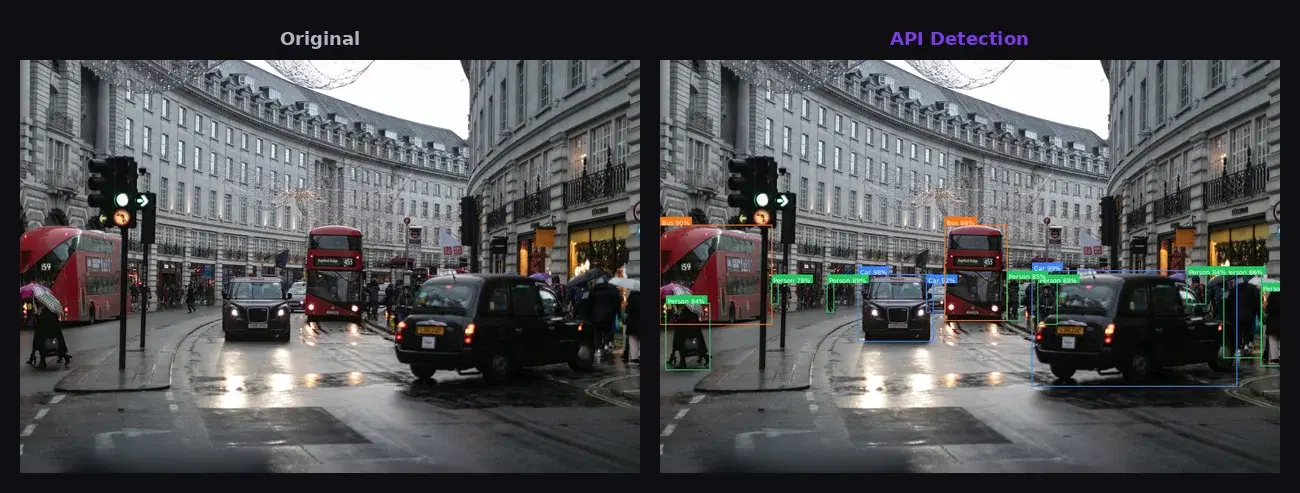
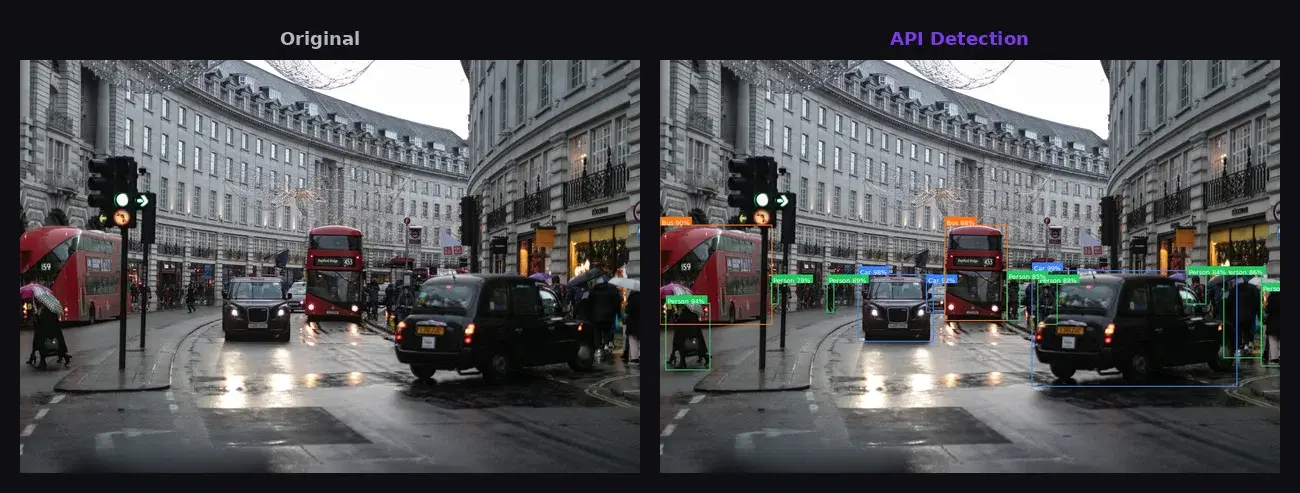
The image below shows a busy London street processed by the Object Detection API. The API detected cars, buses, and pedestrians with bounding boxes and confidence scores — all from a single HTTP request.
Getting Started: Full Python Example
Here is a complete Python script that calls the API, parses the response, and draws bounding boxes using Pillow. You can use this as a starting point for any object detection integration.
import requests
from PIL import Image, ImageDraw, ImageFont
from io import BytesIO

API_URL = "https://objects-detection.p.rapidapi.com/objects-detection"
HEADERS = {
    "x-rapidapi-host": "objects-detection.p.rapidapi.com",
    "x-rapidapi-key": "YOUR_API_KEY",
    "Content-Type": "application/x-www-form-urlencoded",
}

# Send an image URL to the API
image_url = "https://example.com/street.jpg"
response = requests.post(API_URL, headers=HEADERS, data={"url": image_url})
result = response.json()

# Download the original image for annotation
img_data = requests.get(image_url).content
img = Image.open(BytesIO(img_data))
draw = ImageDraw.Draw(img)
w, h = img.size

# Draw bounding boxes for each detected object
for label in result["body"]["labels"]:
    name = label["Name"]
    for instance in label["Instances"]:
        conf = instance["Confidence"]
        if conf < 70:  # skip low-confidence detections
            continue

        bb = instance["BoundingBox"]
        x1 = int(bb["topLeft"]["x"] * w)
        y1 = int(bb["topLeft"]["y"] * h)
        x2 = int(bb["bottomRight"]["x"] * w)
        y2 = int(bb["bottomRight"]["y"] * h)

        draw.rectangle([x1, y1, x2, y2], outline="lime", width=2)
        draw.text((x1, y1 - 15), f"{name} {conf:.0f}%", fill="lime")

img.save("detected.jpg")
print(f"Detected {len(result['body']['labels'])} object categories")
print(f"Keywords: {', '.join(result['body']['keywords'][:10])}")
The response includes two useful sections: labels with per-instance bounding boxes and confidence scores, and keywords with high-level scene descriptors like "City", "Street", "Transportation". You can use the keywords for auto-tagging and the bounding boxes for visual annotation or downstream processing.
cURL
curl -X POST 'https://objects-detection.p.rapidapi.com/objects-detection' \
  -H 'x-rapidapi-host: objects-detection.p.rapidapi.com' \
  -H 'x-rapidapi-key: YOUR_API_KEY' \
  -H 'Content-Type: application/x-www-form-urlencoded' \
  -d 'url=https://example.com/street.jpg'
JavaScript (Node.js / Browser)
const response = await fetch(
  "https://objects-detection.p.rapidapi.com/objects-detection",
  {
    method: "POST",
    headers: {
      "x-rapidapi-host": "objects-detection.p.rapidapi.com",
      "x-rapidapi-key": "YOUR_API_KEY",
      "Content-Type": "application/x-www-form-urlencoded",
    },
    body: new URLSearchParams({ url: "https://example.com/street.jpg" }),
  }
);

const result = await response.json();

result.body.labels.forEach((label) => {
  label.Instances.forEach((instance) => {
    const { topLeft, bottomRight } = instance.BoundingBox;
    console.log(
      `${label.Name} (${instance.Confidence.toFixed(1)}%) at [${topLeft.x}, ${topLeft.y}] → [${bottomRight.x}, ${bottomRight.y}]`
    );
  });
});
Both YOLO and cloud APIs are valid tools for object detection. The right choice depends on your latency requirements, budget, team expertise, and operational complexity tolerance. For most applications — especially when you want to ship fast, keep costs predictable, and avoid infrastructure headaches — a cloud API is the pragmatic choice. For real-time video, custom models, or offline deployments, YOLO remains unmatched.
Ready to try the API? Start with the free tier (30 requests/month) on the Object Detection API page, or read the step-by-step object detection tutorial for a deeper integration guide.
Frequently Asked Questions
- What is the difference between YOLO and a cloud object detection API?
- YOLO is a self-hosted open-source model that runs on your own GPU for low-latency inference. A cloud API handles model hosting, scaling, and maintenance for you — you send an image via HTTP and get results back as JSON.
- When should I choose YOLO over a cloud API?
- Choose YOLO when you need sub-50ms latency for real-time video, want to fine-tune a custom model on your own dataset, work in offline environments, or process over 100K images per month with existing GPU infrastructure.
- How much does a cloud object detection API cost?
- Cloud API pricing starts free (30 requests/month) and scales to $12.99/month for 5,000 requests or $92.99/month for 50,000 requests, with no GPU or infrastructure costs on your end.