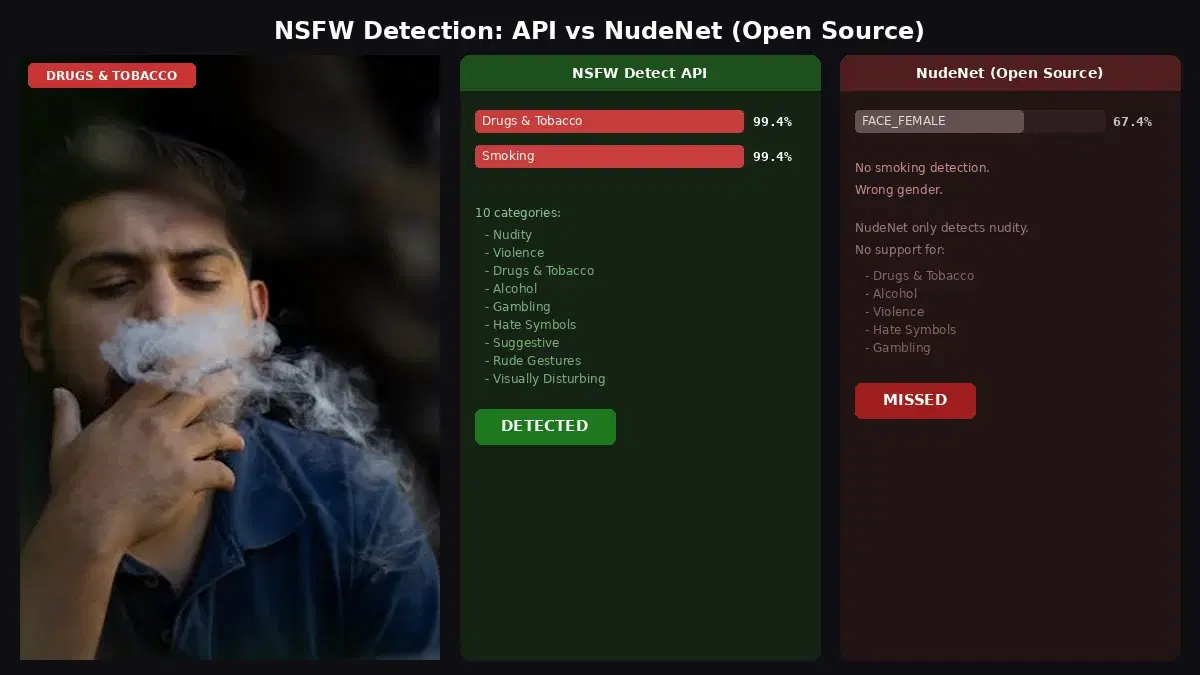
This tutorial uses the NSFW Detect API. See the docs, live demo, and pricing.
Every platform that accepts user-uploaded images faces the same challenge: how do you keep harmful or explicit content from reaching your users? Manually reviewing every upload is expensive, slow, and mentally taxing for moderators. An NSFW detection API solves this by automatically classifying images in milliseconds, letting you enforce your content policies at scale without burning out your team.
Why NSFW Detection Matters for Your Platform
User-generated content is the lifeblood of social platforms, marketplaces, forums, and dating apps. But a single piece of explicit content slipping through can trigger app store removals, legal liability, advertiser pullbacks, and a mass exodus of users who no longer feel safe. The numbers speak for themselves: platforms that rely solely on manual moderation typically catch fewer than 30% of violations before they are reported by other users.
An automated NSFW detection pipeline flips that equation. By scanning every image at upload time, you can quarantine or reject explicit content before it ever reaches a feed. This protects your users, your brand, and your moderators all at once. And because the NSFW Detect API returns confidence scores rather than a simple yes/no flag, you get granular control over how strictly you enforce your rules.
Getting Started with the NSFW Detection API
The fastest way to try the API is with a simple cURL request. You send an image URL and get back a JSON response containing classification labels and their confidence scores. Let's walk through examples in three popular languages.
cURL
curl -X POST \
  'https://nsfw-detect3.p.rapidapi.com/nsfw-detect' \
  -H 'x-rapidapi-host: nsfw-detect3.p.rapidapi.com' \
  -H 'x-rapidapi-key: YOUR_API_KEY' \
  -H 'Content-Type: application/x-www-form-urlencoded' \
  -d 'url=https://example.com/uploaded-photo.jpg'
Python
import requests

url = "https://nsfw-detect3.p.rapidapi.com/nsfw-detect"
headers = {
    "x-rapidapi-host": "nsfw-detect3.p.rapidapi.com",
    "x-rapidapi-key": "YOUR_API_KEY",
    "Content-Type": "application/x-www-form-urlencoded",
}

response = requests.post(url, headers=headers, data={"url": "https://example.com/uploaded-photo.jpg"})
data = response.json()

# Check moderation labels and take action
labels = data["body"]["ModerationLabels"]
if not labels:
    print("Approved: no inappropriate content detected")
else:
    # Find the highest-confidence label
    top = max(labels, key=lambda l: l["Confidence"])
    if top["Confidence"] > 85:
        print(f"Blocked: {top['Name']} ({top['Confidence']:.0f}%)")
    elif top["Confidence"] > 50:
        print(f"Flagged for review: {top['Name']} ({top['Confidence']:.0f}%)")
    else:
        print("Approved: low-confidence detections only")
JavaScript (Node.js)
const response = await fetch(
  "https://nsfw-detect3.p.rapidapi.com/nsfw-detect",
  {
    method: "POST",
    headers: {
      "x-rapidapi-host": "nsfw-detect3.p.rapidapi.com",
      "x-rapidapi-key": "YOUR_API_KEY",
      "Content-Type": "application/x-www-form-urlencoded",
    },
    body: new URLSearchParams({
      url: "https://example.com/uploaded-photo.jpg",
    }),
  }
);

const data = await response.json();
const labels = data.body.ModerationLabels;

// Three-tier moderation logic
if (labels.length === 0) {
  console.log("Safe to publish");
} else {
  const top = labels.reduce((a, b) => (a.Confidence > b.Confidence ? a : b));
  if (top.Confidence > 85) {
    console.log(`Auto-reject: ${top.Name} (${top.Confidence.toFixed(1)}%)`);
  } else if (top.Confidence > 50) {
    console.log(`Flag for human review: ${top.Name} (${top.Confidence.toFixed(1)}%)`);
  } else {
    console.log("Safe to publish");
  }
}
Notice the three-tier pattern in both the Python and JavaScript examples. Instead of a binary block-or-allow decision, you check the highest-confidence moderation label: above 85% triggers automatic rejection, between 50–85% gets queued for human review, and below 50% (or an empty label array) means automatic approval. This approach dramatically reduces false positives while still catching the content that matters most.
Real-World Use Cases
The NSFW Detect API fits into a wide range of platforms and workflows. Here are four scenarios where automated content moderation delivers immediate value.
1. Social Media and Community Platforms
Any app with a photo feed, profile pictures, or community posts needs moderation. Plug the API into your upload pipeline so that every image is classified before it reaches the content-delivery layer. Pair it with face detection to build a comprehensive safety stack that also catches identity-related policy violations like impersonation or deepfakes.
2. E-Commerce and Marketplace Listings
Product listing images need to meet marketplace standards. An NSFW detection step during the listing creation flow prevents sellers from uploading inappropriate thumbnails, which protects your brand and keeps your platform compliant with payment processor policies. When combined with object detection, you can also verify that the listed product actually appears in the image.
3. Dating and Social Discovery Apps
Dating apps face disproportionately high rates of explicit content in profile photos and direct messages. Running every uploaded image through the NSFW detection pipeline lets you enforce decency standards in real time. You can customize thresholds per feature: stricter for public profiles, slightly more relaxed for age-verified private messaging.
4. Education and Collaboration Tools
Schools and enterprise collaboration suites need to keep shared content safe for all audiences. The API can scan attachments in chat messages, shared whiteboards, and document uploads. Because classification happens in under a second, users experience no perceptible delay.
Tips and Best Practices
Getting the API call working is the easy part. Building a moderation system that scales reliably takes a few more considerations.
Tune Your Thresholds Per Context
A medical imaging platform and a children's social network have very different definitions of acceptable content. Start with a conservative threshold (block everything above 0.5), monitor false-positive rates for a week, and then adjust upward until you hit the right balance for your audience.
Build a Review Queue
Never silently delete content that falls in the gray zone. Instead, move it into a review queue where a human moderator can make the final call. This gives you an audit trail and helps you refine your thresholds over time. Track the ratio of overturned decisions to gauge whether your automated system is too aggressive or too lenient.
Process Asynchronously for Large Volumes
If your platform handles thousands of uploads per minute, run NSFW checks asynchronously using a message queue like RabbitMQ or AWS SQS. Upload the image first, display a "processing" placeholder, and swap in the real image once the classification comes back clean. This keeps your upload endpoint fast while still enforcing moderation.
Combine Multiple Signals
NSFW detection is one layer in a defense-in-depth strategy. Combine it with text sentiment analysis on captions, user reputation scores, and rate limiting to catch bad actors who test your system with borderline content before uploading something clearly violating. The most resilient moderation pipelines use at least three independent signals before making a blocking decision.
Log Everything
Store the raw API response alongside the image metadata. If a user appeals a content decision, you need to show exactly why the system flagged their upload. This transparency builds trust and helps your legal team respond to disputes confidently.
Automated NSFW detection is no longer optional for platforms that accept user images. With a few lines of code, you can protect your community, reduce moderator burnout, and scale your content policies alongside your user base. Head over to the NSFW Detect API page to grab your API key and start building.
Frequently Asked Questions
- What is an NSFW detection API?
- An NSFW detection API is a cloud service that analyzes images and classifies them across categories like explicit, suggestive, violent, or safe. You send an image via HTTP and receive confidence scores for each category, enabling automated content moderation at scale.
- How accurate is AI-based content moderation?
- Modern NSFW detection APIs achieve over 95% accuracy on standard benchmarks. They classify images across multiple categories — not just binary safe/unsafe — which reduces false positives. Edge cases like artistic nudity or medical imagery may require human review as a second layer.
- Can I use an NSFW API for real-time content moderation?
- Yes. Cloud NSFW APIs typically respond in under 500 milliseconds per image, making them fast enough for real-time moderation on social media platforms, chat apps, and user-generated content sites. You can block or flag uploads before they become visible to other users.