This tutorial uses the Photo to Anime API. See the docs, live demo, and pricing.
Studio Ghibli's art style has taken over social media. The hand-drawn look, the soft colors, the dreamy landscapes. Everyone wants their photos to look like a frame from Spirited Away or My Neighbor Totoro.
Most tutorials tell you to install PyTorch, download a 2GB model, and fight with CUDA drivers. That's not necessary. With a Ghibli style API, you can do it in 3 lines of Python, for free, with no GPU.
The Result
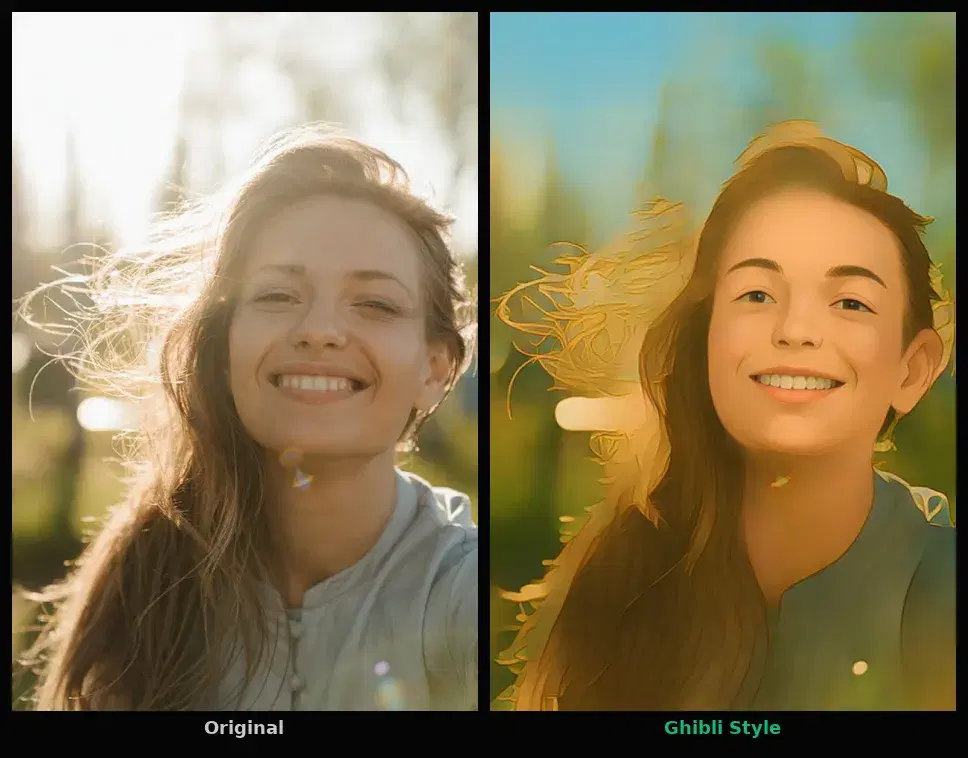
Here is what the API produces from a regular portrait photo:
The face, hair, and background are all transformed into the Ghibli aesthetic. The API handles face detection and style blending automatically.
The Code (3 Lines)
import requests

response = requests.post(
    "https://phototoanime1.p.rapidapi.com/ghibli",
    headers={"x-rapidapi-key": "YOUR_API_KEY", "x-rapidapi-host": "phototoanime1.p.rapidapi.com"},
    files={"image": open("my_photo.jpg", "rb")},
)
print(response.json()["image_url"])
That's it. The response:
{
  "image_url": "https://images.ai-engine.net/photo-to-anime-ai/abc123.jpg",
  "width": 640,
  "height": 960,
  "size_bytes": 126722
}
Open the image_url and you have your Ghibli art. No PyTorch, no CUDA, no model file.
What You Need
- Python with the
requestslibrary (pip install requests) - A free API key from RapidAPI
- A photo (JPEG, PNG, or WebP, up to 10MB)
The free tier gives you 50 transformations per month. No credit card required.
Step by Step
Step 1: Get Your API Key
Go to the Photo to Anime API on RapidAPI and subscribe to the free Basic plan. Copy your API key from the dashboard.
Step 2: Send Your Photo
import requests

API_URL = "https://phototoanime1.p.rapidapi.com/ghibli"
HEADERS = {
    "x-rapidapi-key": "YOUR_API_KEY",
    "x-rapidapi-host": "phototoanime1.p.rapidapi.com",
}

with open("my_photo.jpg", "rb") as f:
    response = requests.post(API_URL, headers=HEADERS, files={"image": f})

result = response.json()
print(f"Ghibli art: {result['image_url']}")
print(f"Size: {result['width']}x{result['height']}")
Step 3: Download the Result
# Download the Ghibli version
image_data = requests.get(result["image_url"]).content
with open("ghibli_output.jpg", "wb") as f:
    f.write(image_data)
print("Saved ghibli_output.jpg")
You Can Also Use a URL
If your photo is already online, you don't need to upload a file. Pass the URL directly:
response = requests.post(
    API_URL,
    headers={**HEADERS, "Content-Type": "application/x-www-form-urlencoded"},
    data={"url": "https://example.com/my_photo.jpg"},
)
print(response.json()["image_url"])
cURL Version
If you prefer the command line:
curl -X POST "https://phototoanime1.p.rapidapi.com/ghibli" \
  -H "x-rapidapi-key: YOUR_API_KEY" \
  -H "x-rapidapi-host: phototoanime1.p.rapidapi.com" \
  -F "image=@my_photo.jpg"
API vs Local Model: Why This Is Better
The viral approach to Ghibli art involves installing PyTorch, downloading a pre-trained model, and running inference locally. Here is why the API approach wins for most people:
| Local Model | Ghibli API | |
|---|---|---|
| Setup | Install PyTorch + download model (2GB+) | pip install requests (50KB) |
| GPU | Required for decent speed | Not needed |
| Code | 20-30 lines + config | 3 lines |
| Cost | Free (but need GPU hardware) | Free (50/month, then $12.99 for 10K) |
| Quality | Depends on model you find | Face-aware processing with background blending |
| Works on | Your machine only | Any language, any platform |
7 Other Styles
The same API also offers 7 cartoon styles via the /cartoonize endpoint: anime, 3d, handdrawn, sketch, artstyle, design, and illustration. Just change the endpoint and add a style parameter:
# Anime style (or 3d, handdrawn, sketch, artstyle, design, illustration)
response = requests.post(
    "https://phototoanime1.p.rapidapi.com/cartoonize",
    headers=HEADERS,
    files={"image": open("photo.jpg", "rb")},
    data={"style": "anime"},
)
print(response.json()["image_url"])
Tips for Best Results
- Use clear, well-lit portraits. The face detection works best when the face is visible and not too small in the frame.
- Front-facing photos work best. Side profiles and extreme angles may produce less consistent results.
- High resolution helps. The API handles up to 10MB images. Larger inputs generally produce better detail in the output.
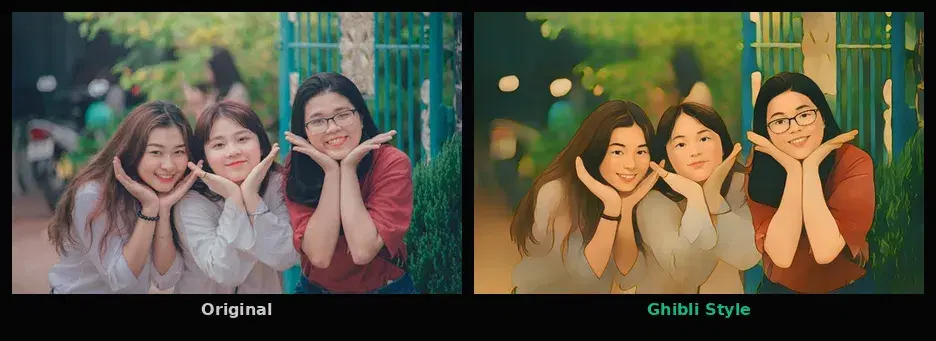
- Try different photos. Portraits, landscapes, and group photos all produce different Ghibli effects. Experiment.
Build Something With It
Some ideas:
- Social media filter app: users upload a selfie, get a Ghibli avatar, share it
- Couple portraits: wedding photos, anniversary gifts in Ghibli style
- Pet portraits: turn pet photos into Ghibli characters
- Profile picture generator: integrate into a web app for one-click Ghibli avatars
The API is a REST endpoint, so it works with any language or framework. Python, JavaScript, Go, Ruby, or just cURL from the terminal.
Frequently Asked Questions
- Can I turn photos into Ghibli art for free?
- Yes. The Photo to Anime API includes a free tier with 50 requests per month. That means you can transform 50 photos into Ghibli style every month at no cost. No credit card required.
- Do I need a GPU or PyTorch to generate Ghibli art from photos?
- No. The Ghibli transformation runs on cloud GPUs via an API. You send your photo with a simple HTTP request and get back the result. Your code only needs the requests library (pip install requests). No GPU, no PyTorch, no model downloads.
- How long does it take to convert a photo to Ghibli style?
- About 2 to 4 seconds per image. The API processes the photo on dedicated GPU infrastructure and returns a CDN link to the result. Processing time depends on image resolution.