This tutorial uses the Image Colorization API. See the docs, live demo, and pricing.
Old family photos fade, scratch, and lose detail over time. Black and white images from the early 20th century capture moments that color photography could not. Restoring these photos used to require hours of manual Photoshop work or expensive professional services. With AI photo restoration APIs, you can automate the entire process: colorize grayscale images and enhance damaged faces in a few API calls.
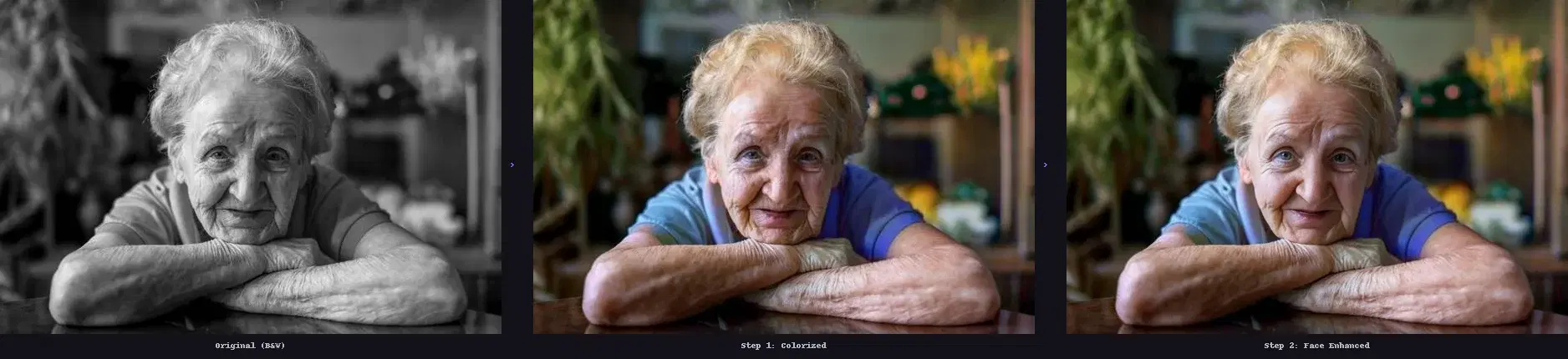
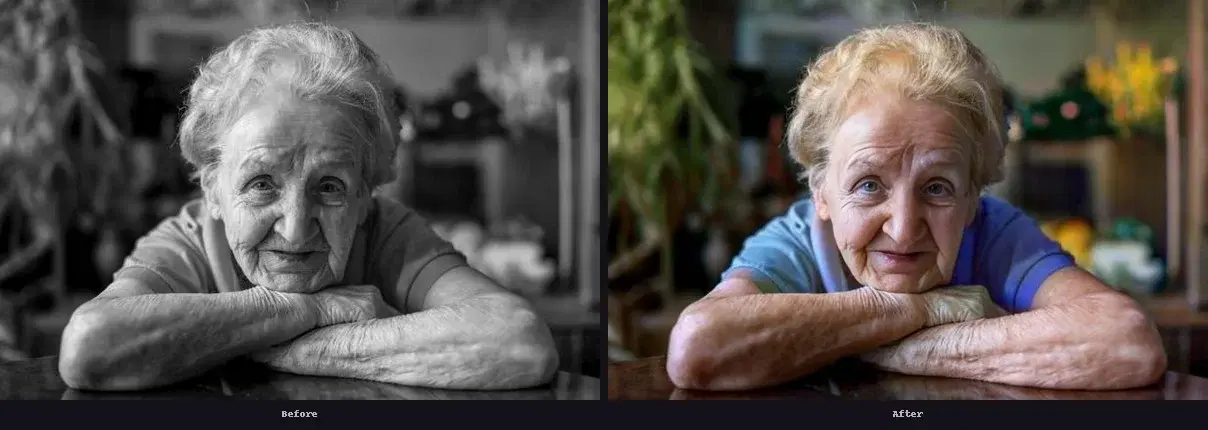
This tutorial shows how to build a two-step restoration pipeline in Python. First, the Image Colorization API adds realistic colors to a black and white photo. Then, the Face Restoration API sharpens and enhances facial details that may have degraded over decades. The result is a photo that looks like it was taken yesterday.
Why Old Photos Need Two AI Models
Colorization and face restoration solve different problems. Colorization models like DeOldify and DDColor are trained to predict what colors belong in a grayscale image. They understand that sky is blue, grass is green, and skin tones vary by context. But they do not improve image quality. A blurry face stays blurry after colorization.
Face restoration models like GFPGAN and CodeFormer work the opposite way. They are trained to reconstruct facial features from low-quality inputs: fixing noise, removing blur, filling in missing details, and upscaling resolution. But they do not add color.
By chaining both APIs, you get the best of both worlds. The colorization step transforms a black and white photo into a color image, and the face restoration step sharpens the facial details that decades of aging have degraded.
How AI Photo Colorization Works
Modern colorization models use deep neural networks trained on millions of color photographs. The model learns associations between visual patterns and colors: it recognizes that outdoor backgrounds tend to be green or blue, that skin has warm tones, and that clothing varies by era and context. When you feed it a grayscale image, it predicts the most likely color for each pixel based on surrounding context.
The Image Colorization API wraps this technology behind a single REST endpoint. You send a black and white image, and the API returns a full-color version in seconds. No GPU setup, no model downloads, no Python library dependencies beyond requests.
How AI Face Restoration Works
Face restoration models are trained specifically on facial images. They learn the structure of human faces: where eyes, nose, mouth, and jawline should be relative to each other. When they receive a degraded face as input, they reconstruct missing details using this learned understanding of facial geometry. The output is a cleaner, sharper version of the face with 2x upscaling.
The Face Restoration API supports two modes: single (enhances only the most prominent face) and all (enhances every detected face in the image). For old family portraits with multiple people, the all mode processes everyone in a single call.
Step-by-Step: Restore an Old Photo with Python
Here is the complete pipeline. You need Python 3.7+ and the requests library.
pip install requestsStep 1: Colorize the Black and White Photo
import requests
from pathlib import Path

COLORIZE_URL = "https://photocolorizer-ai.p.rapidapi.com/colorize-photo"
HEADERS = {
    "x-rapidapi-key": "YOUR_API_KEY",
}


def colorize(image_path: str) -> str:
    """Send a B&W image to the Colorization API, return the colorized image URL."""
    with open(image_path, "rb") as f:
        response = requests.post(
            COLORIZE_URL,
            headers={**HEADERS, "x-rapidapi-host": "photocolorizer-ai.p.rapidapi.com"},
            files={"image": f},
        )
    result = response.json()
    return result["image_url"]


colorized_url = colorize("old_photo.jpg")
print(f"Colorized: {colorized_url}")
The API returns a JSON response with image_url (CDN link to the colorized image), width, height, and size_bytes.
Step 2: Enhance the Face
RESTORE_URL = "https://face-restoration.p.rapidapi.com/enhance-face"


def restore_face(image_url: str) -> str:
    """Send a colorized image URL to the Face Restoration API."""
    response = requests.post(
        RESTORE_URL,
        headers={
            **HEADERS,
            "x-rapidapi-host": "face-restoration.p.rapidapi.com",
            "Content-Type": "application/x-www-form-urlencoded",
        },
        data={"image_url": image_url, "mode": "all"},
    )
    result = response.json()
    return result["image_url"]


restored_url = restore_face(colorized_url)
print(f"Restored: {restored_url}")
Notice that the second API call uses the image_url output from the first step. You do not need to download and re-upload the intermediate image. The Face Restoration API fetches it directly from the CDN.
Step 3: Download the Final Result
def download(url: str, output_path: str):
    """Download the final restored image."""
    img_data = requests.get(url).content
    Path(output_path).write_bytes(img_data)
    print(f"Saved: {output_path} ({len(img_data) // 1024}KB)")


download(restored_url, "restored_photo.jpg")
The Complete Pipeline Script
Here is everything combined into a single reusable function:
import requests
from pathlib import Path

API_KEY = "YOUR_API_KEY"

COLORIZE_URL = "https://photocolorizer-ai.p.rapidapi.com/colorize-photo"
RESTORE_URL = "https://face-restoration.p.rapidapi.com/enhance-face"


def restore_old_photo(image_path: str, output_path: str = "restored.jpg") -> dict:
    """Full pipeline: colorize a B&W photo, then enhance faces."""

    # Step 1: Colorize
    with open(image_path, "rb") as f:
        color_resp = requests.post(
            COLORIZE_URL,
            headers={
                "x-rapidapi-key": API_KEY,
                "x-rapidapi-host": "photocolorizer-ai.p.rapidapi.com",
            },
            files={"image": f},
        )
    colorized_url = color_resp.json()["image_url"]

    # Step 2: Enhance faces (pass the colorized URL directly)
    face_resp = requests.post(
        RESTORE_URL,
        headers={
            "x-rapidapi-key": API_KEY,
            "x-rapidapi-host": "face-restoration.p.rapidapi.com",
            "Content-Type": "application/x-www-form-urlencoded",
        },
        data={"image_url": colorized_url, "mode": "all"},
    )
    restored = face_resp.json()

    # Step 3: Download the final image
    img_data = requests.get(restored["image_url"]).content
    Path(output_path).write_bytes(img_data)

    return {
        "colorized_url": colorized_url,
        "restored_url": restored["image_url"],
        "width": restored["width"],
        "height": restored["height"],
        "faces_detected": restored["faces_detected"],
        "output_path": output_path,
    }


result = restore_old_photo("grandma_1950.jpg", "grandma_restored.jpg")
print(f"Restored {result['faces_detected']} face(s)")
print(f"Output: {result['output_path']} ({result['width']}x{result['height']})")
Before and After
Using cURL
You can run the same pipeline from the command line:
Colorize
curl -X POST "https://photocolorizer-ai.p.rapidapi.com/colorize-photo" \
  -H "x-rapidapi-key: YOUR_API_KEY" \
  -H "x-rapidapi-host: photocolorizer-ai.p.rapidapi.com" \
  -F "image=@old_photo.jpg"
Enhance Face (using the colorized URL from the previous response)
curl -X POST "https://face-restoration.p.rapidapi.com/enhance-face" \
  -H "x-rapidapi-key: YOUR_API_KEY" \
  -H "x-rapidapi-host: face-restoration.p.rapidapi.com" \
  -H "Content-Type: application/x-www-form-urlencoded" \
  -d "image_url=https://images.ai-engine.net/photo-colorizer-api/your-colorized-image.jpg" \
  -d "mode=all"
Batch Processing Old Photos
If you have a folder of old photos to restore (a family archive, a museum collection, a genealogy project), you can process them in parallel:
from concurrent.futures import ThreadPoolExecutor, as_completed
import os

def process_folder(input_dir: str, output_dir: str, max_workers: int = 4):
    os.makedirs(output_dir, exist_ok=True)
    photos = [f for f in os.listdir(input_dir) if f.lower().endswith((".jpg", ".jpeg", ".png"))]

    with ThreadPoolExecutor(max_workers=max_workers) as pool:
        futures = {
            pool.submit(
                restore_old_photo,
                os.path.join(input_dir, photo),
                os.path.join(output_dir, f"restored_{photo}"),
            ): photo
            for photo in photos
        }

        for future in as_completed(futures):
            photo = futures[future]
            try:
                result = future.result()
                print(f"Done: {photo} ({result['faces_detected']} faces)")
            except Exception as e:
                print(f"Failed: {photo} ({e})")


process_folder("old_photos/", "restored_photos/")
With 4 parallel workers, you can process roughly 60 to 80 photos per hour. The bottleneck is the API response time (2 to 4 seconds per image, per step).
Managed API vs Self-Hosting GFPGAN and DeOldify
The alternative to using these APIs is running open-source models yourself. Here is how the two approaches compare:
| Criteria | AI Engine APIs | Self-hosted (DeOldify + GFPGAN) |
|---|---|---|
| Setup time | 5 minutes (get API key) | 2+ hours (install PyTorch, download model weights, configure CUDA) |
| GPU required | No | Yes (NVIDIA GPU with 4GB+ VRAM) |
| Dependencies | requests (one library) | PyTorch, torchvision, basicsr, facexlib, realesrgan, gfpgan |
| Pipeline chaining | Pass URL between APIs (no download needed) | Manage intermediate files manually |
| Scaling | Handled by the API (concurrent requests) | You manage GPU servers and queuing |
| Model updates | Automatic (API provider updates models) | Manual (download new weights, test, redeploy) |
For most developers building genealogy apps, photo restoration services, or archive digitization tools, the API approach saves weeks of infrastructure work. Self-hosting makes sense when you need offline processing, want to fine-tune the models on specific photo types, or process millions of images where per-call API costs add up.
Real-World Use Cases
Genealogy and Family History Apps
Services like MyHeritage proved there is massive demand for AI photo restoration in the genealogy space. Users upload old family photos and want to see them in color with clear facial details. The two-step pipeline delivers exactly this. Ancestry apps can offer restoration as a premium feature or as part of onboarding to increase engagement.
Museum and Archive Digitization
Museums and historical archives have thousands of black and white photos in their collections. Colorizing and enhancing these images makes them more accessible and engaging for visitors, both online and in physical exhibitions. The batch processing script above can handle large collections with minimal manual intervention.
Photo Restoration as a Service
Entrepreneurs can build a photo restoration SaaS by wrapping these APIs behind a web interface. Users upload an old photo, the backend runs the pipeline, and the restored version is delivered in under 10 seconds. The API handles the heavy lifting while you focus on the user experience and marketing.
Tips for Best Results
- Always colorize before face restoration. The face restoration model produces better results on color images because it was trained primarily on color data. Colorizing a B&W photo first gives the face model more signal to work with.
- Use
mode=allfor group photos. Old family portraits often have multiple people. Theallmode enhances every detected face instead of just the largest one. - Scan at the highest resolution available. The more detail in the input, the better the output. If you are scanning physical prints, use 300 DPI or higher.
- The pipeline works on sepia photos too, not just pure black and white. The colorization model handles sepia tones and converts them to full color.
- Save both intermediate and final results. Sometimes the colorized version (before face restoration) is preferable depending on the use case.
Going Further
This two-API pipeline covers colorization and face enhancement. For more advanced restoration, you can extend the pipeline with additional steps. Use the Background Removal API to isolate subjects before processing, or combine the results with the Photo to Anime API to create artistic interpretations of old family photos.