This tutorial uses the Logo Detection API. See the docs, live demo, and pricing.
Brand logos are everywhere - on billboards, product packaging, social media posts, sports broadcasts, and storefronts. Being able to automatically detect and identify these logos in images opens the door to powerful applications in brand monitoring, intellectual property protection, and marketing analytics. A logo detection API handles the heavy lifting of computer vision model training and inference, letting you identify brand logos in any image with a single HTTP request. In this tutorial, you will learn how to integrate the Logo Detection API into your projects using cURL, Python, and JavaScript.
Why Logo Detection Matters
Logos are one of the most recognizable visual assets a company owns. Detecting them programmatically enables a range of business-critical capabilities that would be impractical to handle manually at scale.
Brand Monitoring
Companies invest heavily in their brand identity, yet they often have limited visibility into how their logos appear across the internet. A logo detection system can scan social media posts, news articles, and user-generated content to track where and how a brand is being represented. This includes unauthorized usage, logo modifications, and organic mentions that text-based monitoring tools would miss entirely because the brand name is never typed out - it only appears visually.
Counterfeit Detection
Counterfeit goods are a multi-billion-dollar problem. E-commerce platforms and brand protection teams use logo detection to scan product listings for suspicious logo usage. By comparing detected logos against known authentic versions, teams can flag potential counterfeits before they reach consumers. This is especially valuable on marketplaces where thousands of new listings appear every day and manual review is impossible.
Sponsorship Tracking
In sports, entertainment, and events, sponsors pay premium prices for logo placement on jerseys, banners, and equipment. Logo detection allows sponsors and broadcasters to quantify exactly how much screen time each logo receives during a broadcast or event. This data drives sponsorship valuations, renewal negotiations, and ROI calculations that were previously based on rough estimates.
Getting Started with the Logo Detection API
The Logo Detection API accepts either an image URL (sent as form-encoded data) or a direct image file upload (sent as multipart form data). It returns a JSON response containing every detected logo, along with a description of the brand, a confidence score, and a bounding polygon that marks the exact location of the logo within the image. Below are working examples in three languages.
cURL
Send an image URL using form-encoded data:
curl --request POST \
  --url https://logos-detection.p.rapidapi.com/detect-logo \
  --header 'Content-Type: application/x-www-form-urlencoded' \
  --header 'x-rapidapi-host: logos-detection.p.rapidapi.com' \
  --header 'x-rapidapi-key: YOUR_API_KEY' \
  --data-urlencode 'url=https://example.com/photo.jpg'
Or upload a local file directly:
curl --request POST \
  --url https://logos-detection.p.rapidapi.com/detect-logo \
  --header 'Content-Type: multipart/form-data' \
  --header 'x-rapidapi-host: logos-detection.p.rapidapi.com' \
  --header 'x-rapidapi-key: YOUR_API_KEY' \
  --form 'image=@/path/to/local-photo.jpg'
Python
Here is a Python script that demonstrates both the URL-based and file-based approaches, then iterates through the detected logos to print brand names, confidence scores, and bounding polygon coordinates:
import requests

api_url = "https://logos-detection.p.rapidapi.com/detect-logo"
headers = {
    "x-rapidapi-host": "logos-detection.p.rapidapi.com",
    "x-rapidapi-key": "YOUR_API_KEY",
}

# Option 1: Send an image URL
response = requests.post(
    api_url,
    headers={**headers, "Content-Type": "application/x-www-form-urlencoded"},
    data={"url": "https://example.com/photo.jpg"},
)

# Option 2: Upload a local file
# with open("local-photo.jpg", "rb") as f:
#     response = requests.post(
#         api_url,
#         headers=headers,
#         files={"image": ("photo.jpg", f, "image/jpeg")},
#     )

data = response.json()

# Iterate through detected logos
for logo in data["body"]["logos"]:
    name = logo["description"]
    score = logo["score"]
    coords = ", ".join(f"({v['x']}, {v['y']})" for v in logo["boundingPoly"])
    print(f"{name} (confidence: {score:.0%}) at [{coords}]")
JavaScript (fetch)
This example uploads a local file using the Fetch API with FormData, which works in both the browser and Node.js 18+:
// Upload a file using FormData
const formData = new FormData();
formData.append("image", fileInput.files[0]);

const response = await fetch(
  "https://logos-detection.p.rapidapi.com/detect-logo",
  {
    method: "POST",
    headers: {
      "x-rapidapi-host": "logos-detection.p.rapidapi.com",
      "x-rapidapi-key": "YOUR_API_KEY",
    },
    body: formData,
  }
);

const data = await response.json();

// Process each detected logo
data.body.logos.forEach((logo) => {
  const { description, score, boundingPoly } = logo;
  const coords = boundingPoly
    .map((v) => `(${v.x}, ${v.y})`)
    .join(", ");
  console.log(`${description} (confidence: ${(score * 100).toFixed(1)}%) at [${coords}]`);
});
Understanding the Response
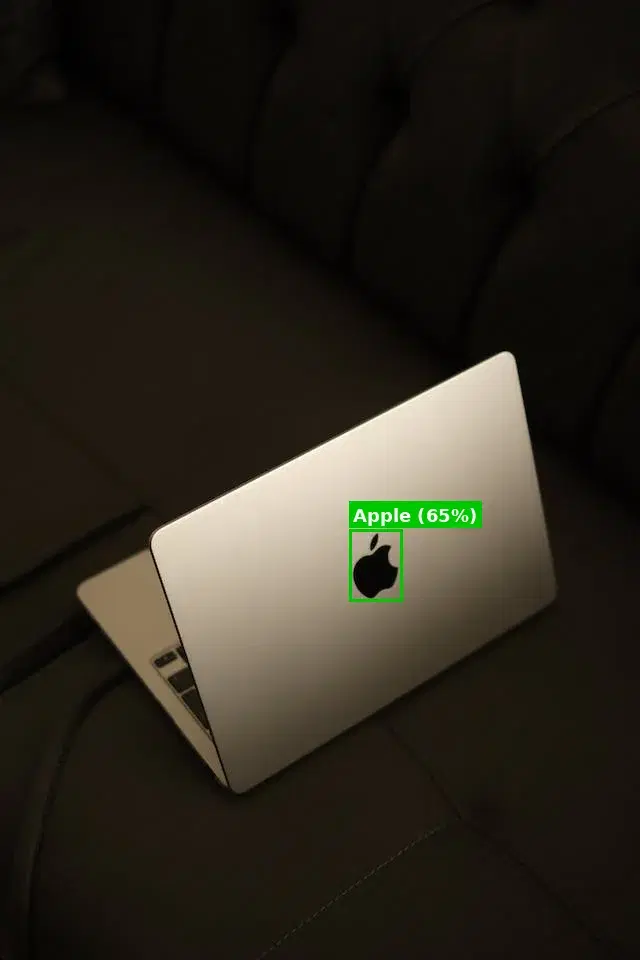
The API returns a JSON object with a statusCode and a body containing a logos array. Here is a typical response:
{
  "statusCode": 200,
  "body": {
    "logos": [
      {
        "description": "Apple",
        "score": 0.65,
        "boundingPoly": [
          { "x": 349, "y": 529 },
          { "x": 402, "y": 529 },
          { "x": 402, "y": 601 },
          { "x": 349, "y": 601 }
        ]
      }
    ]
  }
}
Let's break down each field:
- description: The name of the detected brand or logo. This is the human-readable label that the model has matched, such as "Google", "Nike", or "Apple".
- score: A floating-point confidence value between 0 and 1. A score of 0.95 means the model is 95% confident in its identification. For production use, filtering results to a minimum threshold of 0.7 or higher is recommended to avoid false positives.
- boundingPoly: An array of vertex objects that defines the polygon outlining the logo in the image. Each vertex has an
xandycoordinate in pixels, measured from the top-left corner of the image. The four vertices typically form a rectangle, but the polygon format allows for more complex shapes when a logo is viewed at an angle or is partially occluded.
When an image contains multiple logos, the logos array will include a separate object for each detection. If no logos are found, the array will be empty. Your application should always handle the empty-array case gracefully.
Draw the Detected Logos
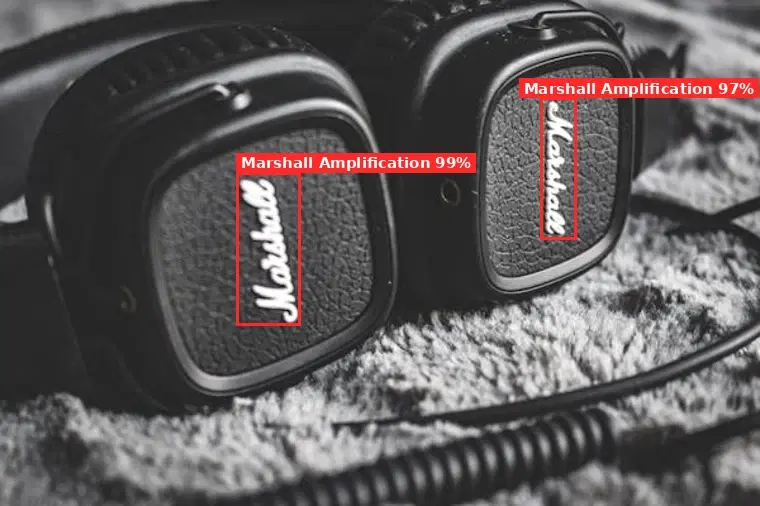
The boundingPoly vertices are pixel coordinates, so you can outline each detected logo directly with Pillow, no coordinate math required:
from PIL import Image, ImageDraw

im = Image.open("photo.jpg").convert("RGB")
draw = ImageDraw.Draw(im)

for logo in data["body"]["logos"]:
    if logo["score"] < 0.7:               # keep confident detections (0 to 1)
        continue
    points = [(v["x"], v["y"]) for v in logo["boundingPoly"]]
    draw.polygon(points, outline="red", width=4)
    draw.text(points[0], f"{logo['description']} {logo['score']:.0%}", fill="red")

im.save("annotated.jpg")

# Real output on a photo of Marshall headphones:
# Marshall Amplification (99%), Marshall Amplification (97%)
Keep the outlines on an overlay layer rather than burning them into the source file, so the original stays available for reprocessing.
Real-World Use Cases
Logo detection is a versatile capability that powers applications across industries. Here are four scenarios where developers and businesses are putting it to work.
Brand Monitoring on Social Media
Social media platforms generate billions of images daily. Text-based social listening tools catch mentions where someone types a brand name, but they completely miss visual-only mentions - someone wearing a branded t-shirt, a photo of a storefront, or a product unboxing video thumbnail. By running logo detection on images from social feeds, marketing teams can track brand visibility in user-generated content, measure organic reach, and detect unauthorized logo usage. This visual intelligence layer complements traditional sentiment analysis to give a complete picture of brand perception. If you also need to identify what other objects appear alongside logos in those images, the object detection API can help with that.
Counterfeit Detection on E-Commerce Platforms
Online marketplaces face constant pressure to remove counterfeit listings. Logo detection automates the first line of defense by scanning every product image for brand logos and flagging listings that use trademarked logos without authorization. The bounding polygon data lets you compare the detected logo's size, position, and aspect ratio against known authentic placements, catching subtle differences that human reviewers might miss when processing thousands of listings per day.
Sponsorship ROI in Sports and Events
Sponsors need to know exactly how much exposure their brand receives during a live broadcast or event. Logo detection can process frames from video footage to calculate total screen time, logo size relative to the frame, and placement quality (center screen versus periphery). These metrics feed directly into sponsorship valuation models and help both sponsors and rights holders negotiate data-driven deals. Combined with image labeling, you can also categorize the context in which the logo appears - whether it is on a jersey, a banner, or a piece of equipment.
Competitive Intelligence
Understanding where competitor logos show up provides strategic insights. Retail chains can analyze shelf photos across store locations to measure competitor product placement and share of shelf. Marketing teams can track competitor logo frequency in event photography, press coverage, and influencer content. This data helps companies benchmark their visual presence against competitors and identify gaps in their brand visibility strategy. Over time, trend analysis reveals whether a competitor is increasing or decreasing their visual footprint in specific channels.
Tips and Best Practices
Use High-Quality Images
Give the model logos at least 50 pixels wide. Blurry, compressed, or tiny logos are the main cause of misses. When pulling from social media, grab the highest-resolution version rather than a thumbnail. Resizing down to around 1600 pixels on the longest side is fine; aggressive downscaling that makes small logos unreadable is not.
Filter by Confidence Score
Match your threshold to the cost of a false positive. For a brand-monitoring dashboard, 0.6 is fine, since a wrong hit is a minor annoyance. For automated counterfeit takedowns, use 0.85 and route borderline cases to a human reviewer, because a false positive could pull a legitimate listing.
Handle Multiple Logos Per Image
Always loop over the full logos array, never just the first result. One frame of a sports broadcast can show a dozen sponsor logos at once. Track each one independently, and use its bounding polygon to tie the detection to a specific region of the image for downstream analysis or visualization.
Use Bounding Polygons for Visual Overlays
Draw the polygon vertices as overlays, not baked into the image. Render colored outlines with HTML Canvas, SVG, or a server-side library like Pillow (Python) or Sharp (Node.js). This is ideal for QA dashboards where reviewers verify the right logo was found in the right place, and keeping annotations separate preserves the source file for reprocessing.
Batch Processing and Rate Limiting
Cap concurrency at three to five requests and back off on 429s. For large volumes, such as a full product catalog or a day of social images, use a job queue or worker pool with exponential backoff on rate-limit responses. Cache results by image hash to skip duplicates, and log both successes and failures so you can watch throughput and error rates over time.
Logo detection transforms unstructured visual data into actionable brand intelligence. Whether you are monitoring your brand across social media, fighting counterfeits on e-commerce platforms, or quantifying sponsorship exposure in sports broadcasts, the Logo Detection API gives you the tools to do it at scale with a single REST endpoint. Grab your API key, try the examples above, and start turning images into insights.
Frequently Asked Questions
- What is a logo detection API?
- A logo detection API scans images and identifies brand logos present in them. It returns the logo name, bounding box coordinates, and confidence score. Use cases include brand monitoring in social media, counterfeit detection in e-commerce, and sponsorship tracking in sports broadcasts.
- How many brand logos can the API detect?
- The API recognizes thousands of brand logos across industries - from major tech companies and automotive brands to food, fashion, and sports logos. Detection works best on clearly visible logos that are not heavily distorted or occluded.
- Can I use logo detection for brand monitoring?
- Yes. Logo detection is a core tool for brand monitoring. Scan social media images, news articles, or broadcast footage to track where and how often your brand logo appears. This provides visual brand analytics that text-based monitoring cannot capture.