This tutorial uses the Photo to Anime API. See the docs, live demo, and pricing.
Anime and cartoon-style artwork has exploded in popularity across social media, gaming, and digital marketing. Creating it manually requires hours of skilled illustration work, but the Photo to Anime API can transform any photograph into a polished cartoon rendering in seconds — with 7 unique styles to choose from.
7 Unique Cartoon Styles
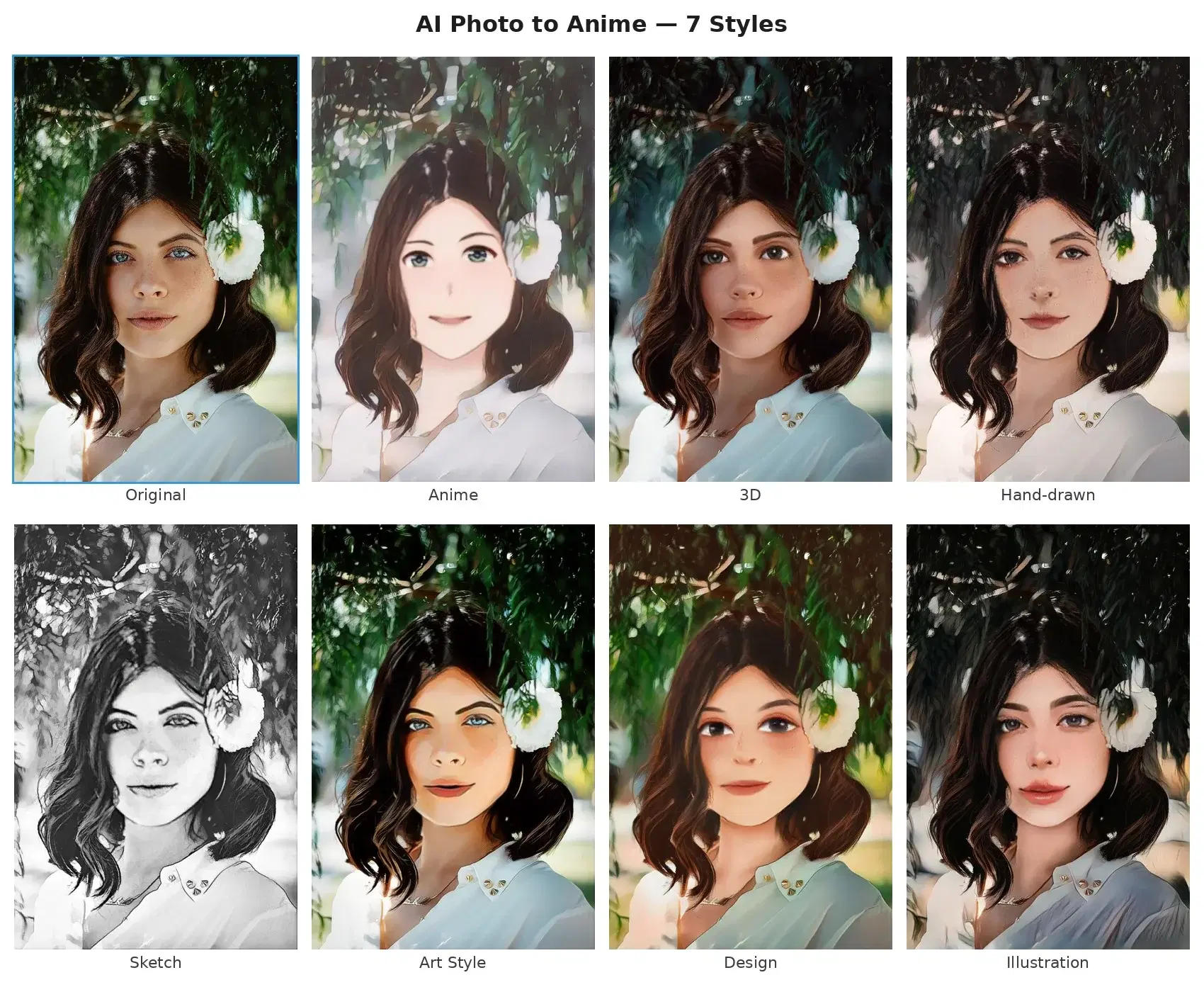
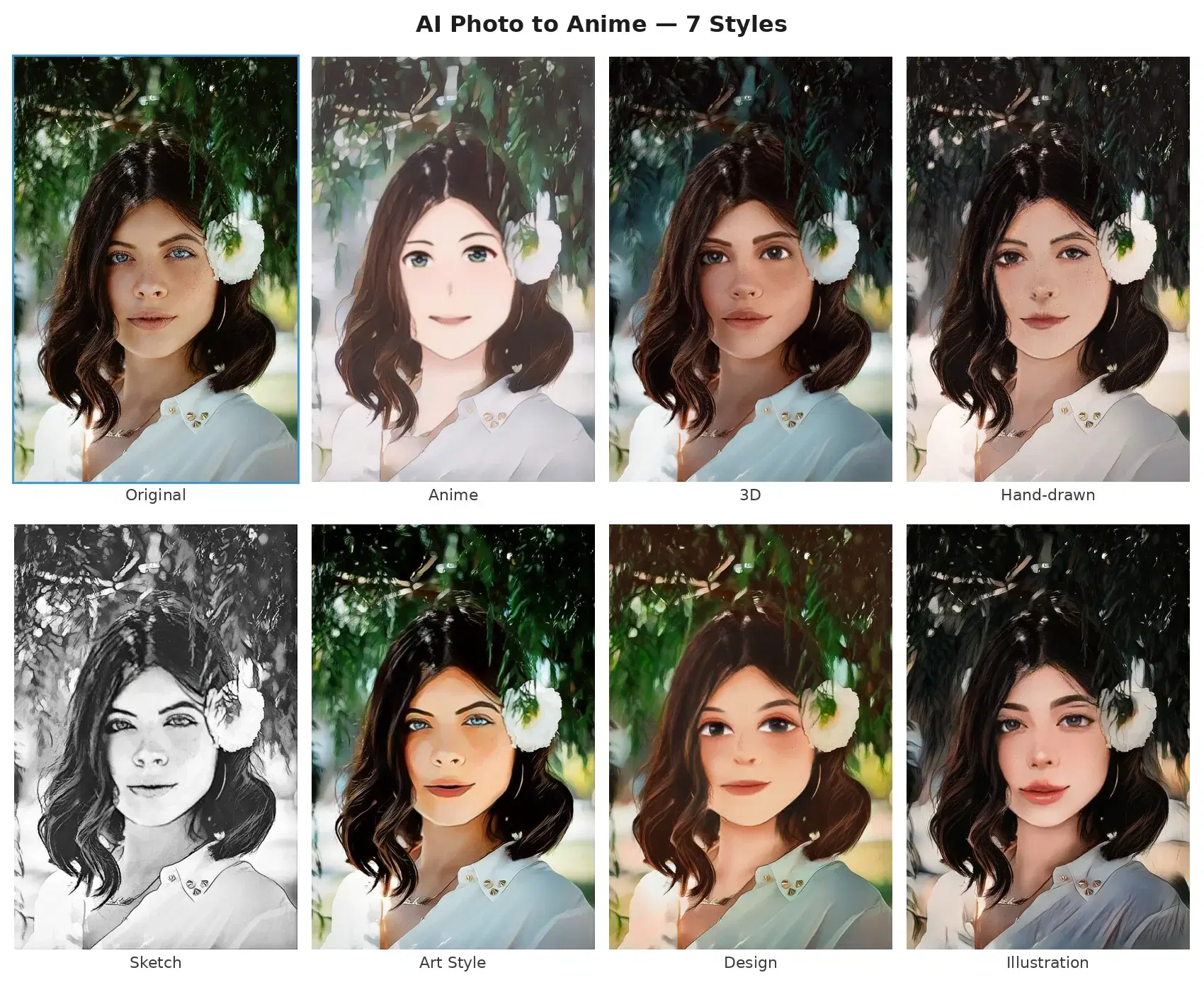
The API offers seven distinct artistic styles, each producing a different visual effect:
- Anime — Japanese anime style with clean lines and vibrant colors
- 3D — Smooth, Pixar-like 3D cartoon rendering
- Hand-drawn — Organic, hand-drawn illustration feel
- Sketch — Pencil sketch style with monochrome, detailed lines
- Art Style — Artistic painting with bold strokes and rich colors
- Design — Flat, modern graphic design aesthetic
- Illustration — Detailed, colorful digital illustration
Studio Ghibli Style (Dedicated Endpoint)
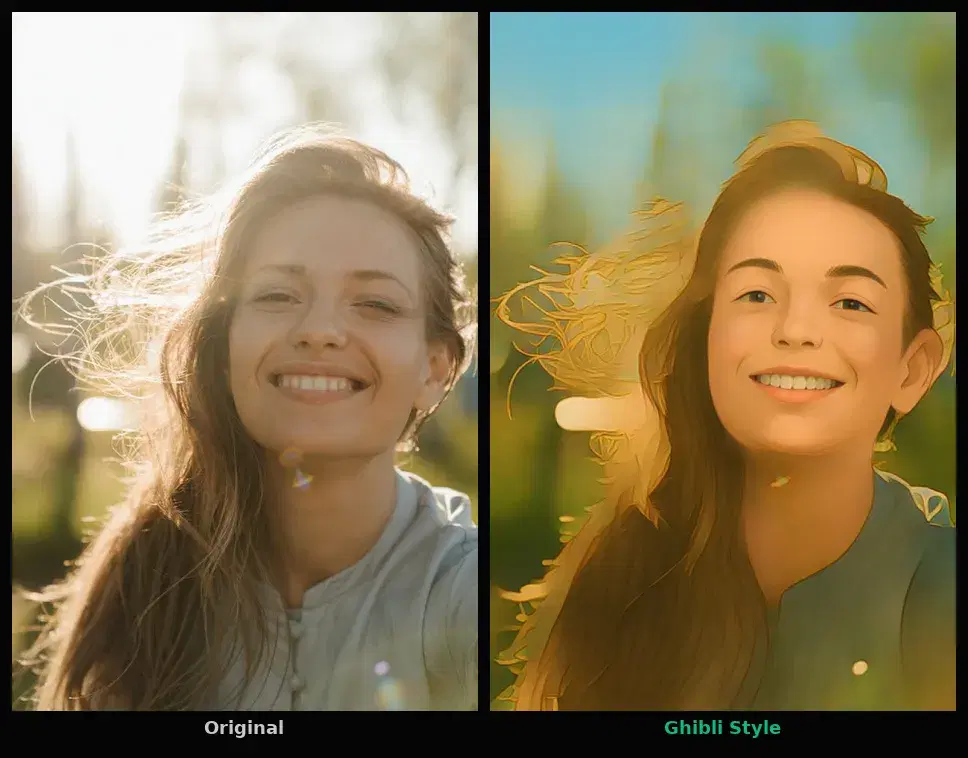
Beyond the 7 classic styles, the Photo to Anime API also ships a dedicated /ghibli endpoint that converts portraits and scenes into Studio Ghibli inspired artwork. The endpoint runs a separate model trained specifically on the soft watercolor textures, painterly backgrounds, and warm color palette that define the Ghibli look. It also includes a face enhancement pass, so portraits keep their identity while gaining the hand painted feel.
Use the Ghibli endpoint when you want a more cinematic, illustrative result than the classic Anime style can produce. Typical use cases include profile pictures for fan communities, illustrated book covers, animated greeting cards, and personalized merchandise targeting fans of Studio Ghibli films.
import requests

GHIBLI_URL = "https://phototoanime1.p.rapidapi.com/ghibli"
HEADERS = {
    "x-rapidapi-host": "phototoanime1.p.rapidapi.com",
    "x-rapidapi-key": "YOUR_API_KEY",
}

with open("portrait.jpg", "rb") as f:
    response = requests.post(GHIBLI_URL, headers=HEADERS, files={"image": f})

result = response.json()
print(result["image_url"])  # URL to the Ghibli-styled image
Why Use a Photo to Anime API?
Building your own style transfer model means dealing with deep neural networks, training datasets, GPU clusters, and months of fine-tuning. The Photo to Anime API wraps all of that complexity into a single endpoint. You send a photo and a style choice, and get back a cartoon-styled version with face-aware processing that blends the stylized head seamlessly into the background.
Getting Started
The API accepts image files or public URLs and returns a JSON response with a URL to the processed JPEG image. Here are working examples in three languages.
cURL
# File upload with style
curl -X POST "https://phototoanime1.p.rapidapi.com/cartoonize" \
  -H "x-rapidapi-key: YOUR_API_KEY" \
  -H "x-rapidapi-host: phototoanime1.p.rapidapi.com" \
  -F "image=@photo.jpg" \
  -F "style=anime"

# JSON with image URL
curl -X POST "https://phototoanime1.p.rapidapi.com/cartoonize" \
  -H "x-rapidapi-key: YOUR_API_KEY" \
  -H "x-rapidapi-host: phototoanime1.p.rapidapi.com" \
  -H "Content-Type: application/json" \
  -d '{"image_url": "https://example.com/photo.jpg", "style": "3d"}'
Python
import requests

API_URL = "https://phototoanime1.p.rapidapi.com/cartoonize"
HEADERS = {
    "x-rapidapi-host": "phototoanime1.p.rapidapi.com",
    "x-rapidapi-key": "YOUR_API_KEY",
}

# Option 1: Upload a file
with open("photo.jpg", "rb") as f:
    response = requests.post(
        API_URL,
        headers=HEADERS,
        files={"image": f},
        data={"style": "anime"},
    )

# Option 2: Pass an image URL
response = requests.post(
    API_URL,
    headers={**HEADERS, "Content-Type": "application/json"},
    json={"image_url": "https://example.com/photo.jpg", "style": "3d"},
)

result = response.json()
print(result["image_url"])  # URL to the cartoon-styled JPEG
JavaScript (Node.js)
const form = new FormData();
form.append("image", fileInput.files[0]);
form.append("style", "anime");

const response = await fetch(
  "https://phototoanime1.p.rapidapi.com/cartoonize",
  {
    method: "POST",
    headers: {
      "x-rapidapi-host": "phototoanime1.p.rapidapi.com",
      "x-rapidapi-key": "YOUR_API_KEY",
    },
    body: form,
  }
);

const result = await response.json();
console.log(result.image_url);  // URL to the cartoon-styled JPEG
The response includes an image_url pointing to the processed JPEG, along with width, height, and size_bytes. The URL is publicly accessible and expires after 24 hours.
Real-World Use Cases
The Photo to Anime API opens up creative possibilities across multiple industries. Here are four scenarios where developers and creators are putting it to work.
1. Social Media Profile Generators
Build a feature that lets users upload a selfie and instantly receive a cartoon-style avatar in any of the 7 styles. This is one of the most viral mechanics in consumer apps: users love sharing before-and-after comparisons, and each share drives organic traffic back to your platform.
2. Marketing and Advertising Campaigns
Brands targeting younger demographics can transform product photography and campaign visuals into cartoon styles to stand out in crowded feeds. A fashion brand could render its seasonal lookbook in anime style, while a tech company might use the 3D style for a playful campaign.
3. Game and App Asset Creation
Indie game developers and app designers can use the API to rapidly prototype character designs. Upload reference photos, try all 7 styles, and use the output as a starting point for further illustration. Pair this with AI image generation to create entirely new characters.
4. Personalized Merchandise
Print-on-demand platforms can offer cartoon-style portraits on mugs, phone cases, posters, and t-shirts. Let customers choose from 7 styles, preview the result on the product, and place an order in minutes. For even more visual variety, combine with colorized vintage effects as alternative rendering options.
Tips and Best Practices
Use High-Quality Input Photos
The transformation works best with well-lit, high-resolution portraits where the face is clearly visible. Blurry or heavily compressed photos will produce lower quality results. If your application accepts user uploads, consider running a quick resolution check before sending the image to the API.
Experiment with Styles
Different styles work better for different use cases. The Anime and 3D styles are great for avatars, Sketch works well for artistic prints, and Design produces clean results for marketing materials. Let your users choose — or offer a "try all styles" feature.
Show a Loading State
Processing takes 2-3 seconds. Always show a loading indicator or progress animation while the transformation is in progress. A well-designed loading screen with a message like "Creating your cartoon portrait..." keeps users engaged.
Cache Transformed Results
If a user might view their transformed image multiple times, store the result URL or download the image to your own storage. Result URLs expire after 24 hours, so caching ensures the image remains available.
Respect Copyright and Privacy
Make sure your terms of service clearly state how uploaded photos will be used and stored. If your platform allows users to transform photos of other people, consider requiring consent or limiting the feature to self-portraits.
Offer Download and Share Options
The whole point of a cartoon portrait is to show it off. Make it dead simple for users to download the high-resolution result and share it directly to social media. Each share is free marketing for your platform.
With 7 unique styles and face-aware processing, the Photo to Anime API lets you ship a cartoon style transfer feature in an afternoon. Grab your API key and start transforming.
Frequently Asked Questions
- How does AI turn photos into anime?
- The API uses a neural style transfer model trained on anime and cartoon artwork. It analyzes the input photo's structure (faces, edges, colors) and redraws it in the target style while preserving the subject's identity and pose. The result is a stylized version that looks hand-drawn.
- What anime and cartoon styles are available?
- The Photo to Anime API supports 7 classic styles via the /cartoonize endpoint (Anime, 3D, Hand-drawn, Sketch, Art Style, Design, Illustration) plus a dedicated Studio Ghibli style via the /ghibli endpoint with face enhancement. Each produces a distinct visual result, from clean anime lines to 3D rendered characters to pencil sketches to Ghibli-inspired watercolor scenes. You select the style via a parameter in the API call.
- Does the anime conversion work on any photo?
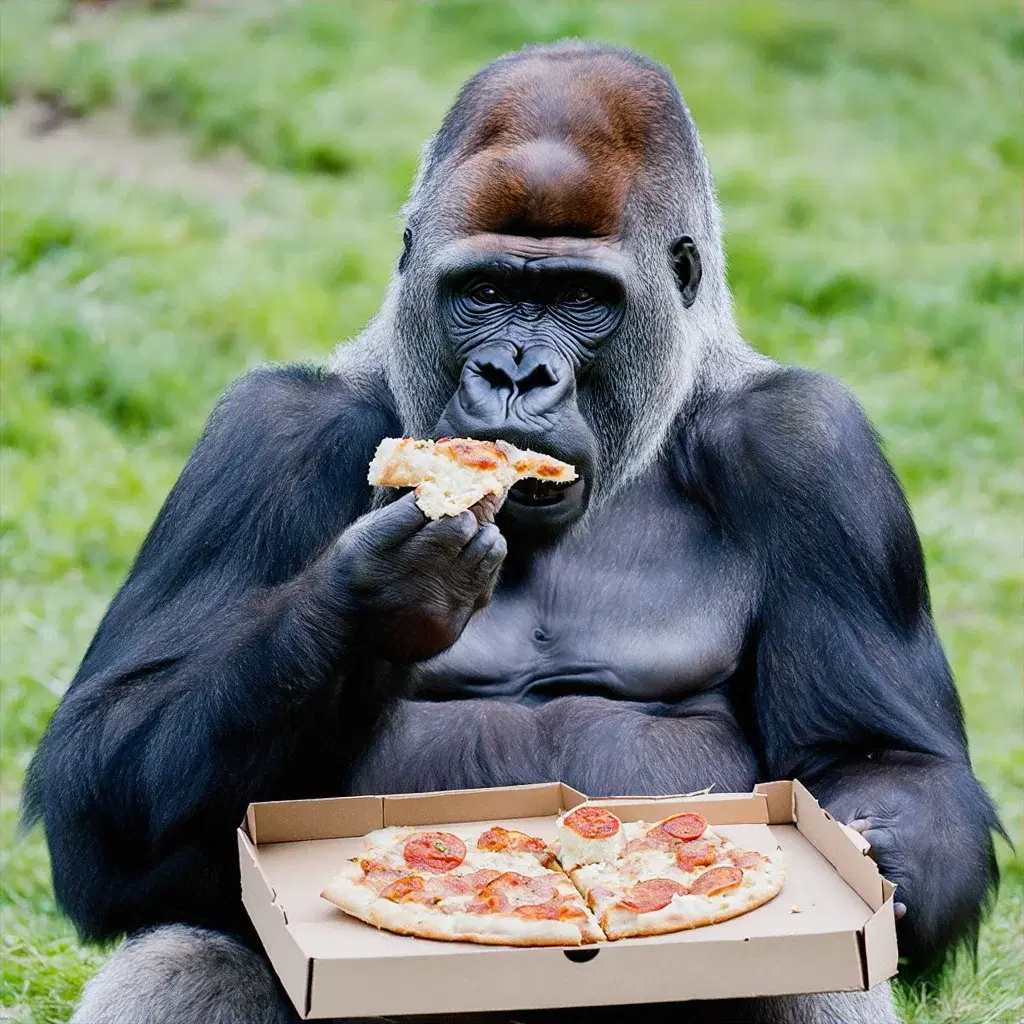
- Yes, the API works on portraits, group photos, pets, and even landscapes. Results are best with clear, well-lit photos where faces are visible. The AI preserves the original composition while applying the selected artistic style to the entire image.