This tutorial uses the Image Colorization API. See the docs, live demo, and pricing.
Black-and-white photographs carry history, emotion, and nostalgia, but they also leave a lot to the imagination. An image colorization API uses deep learning to predict and apply realistic colors to grayscale images, breathing new life into old family photos, historical archives, and vintage film stills. In this guide, you will learn how the technology works under the hood, how to integrate it into your projects, and how to get the best possible results.
How Image Colorization Works
At its core, image colorization is a prediction problem. The model takes a single-channel grayscale image as input and outputs two additional color channels (typically in the LAB color space, where L is luminance and A/B are color dimensions). The model has been trained on millions of color photographs: it learned to associate certain textures, shapes, and contexts with specific colors. Grass is green, sky is blue, and skin tones follow predictable distributions.
Modern colorization models use convolutional neural networks with encoder-decoder architectures, often augmented by attention mechanisms that help the model maintain color consistency across large regions of an image. The Image Colorization API abstracts all of this complexity behind a single endpoint. You do not need to understand LAB color spaces or neural network architectures to use it. You just send a photo and get a colorized version back.
Getting Started with the Image Colorization API
The API accepts a URL pointing to a grayscale (or color) image and returns a colorized version. Even if you send a photo that already has color, the model will re-interpret and apply its own color predictions, which can produce interesting artistic effects. Here are working examples in three languages.
cURL
curl -X POST \
  'https://photocolorizer-ai.p.rapidapi.com/colorize-photo' \
  -H 'Content-Type: application/x-www-form-urlencoded' \
  -H 'x-rapidapi-host: photocolorizer-ai.p.rapidapi.com' \
  -H 'x-rapidapi-key: YOUR_API_KEY' \
  -d 'url=https://example.com/vintage-bw-photo.jpg'
Python
import requests

url = "https://photocolorizer-ai.p.rapidapi.com/colorize-photo"
headers = {
    "x-rapidapi-host": "photocolorizer-ai.p.rapidapi.com",
    "x-rapidapi-key": "YOUR_API_KEY",
}
payload = {"url": "https://example.com/vintage-bw-photo.jpg"}

response = requests.post(
    url,
    headers={**headers, "Content-Type": "application/x-www-form-urlencoded"},
    data=payload,
)
data = response.json()

# Download the colorized image
image_url = data["image_url"]
img_data = requests.get(image_url).content
with open("colorized_output.jpg", "wb") as f:
    f.write(img_data)
print("Colorized image saved as colorized_output.jpg")
JavaScript (Node.js)
import fs from "fs";

const response = await fetch(
  "https://photocolorizer-ai.p.rapidapi.com/colorize-photo",
  {
    method: "POST",
    headers: {
      "Content-Type": "application/x-www-form-urlencoded",
      "x-rapidapi-host": "photocolorizer-ai.p.rapidapi.com",
      "x-rapidapi-key": "YOUR_API_KEY",
    },
    body: new URLSearchParams({
      url: "https://example.com/vintage-bw-photo.jpg",
    }),
  }
);

const data = await response.json();
const imageUrl = data.image_url;

const imgResponse = await fetch(imageUrl);
const buffer = Buffer.from(await imgResponse.arrayBuffer());
fs.writeFileSync("colorized_output.jpg", buffer);
console.log("Colorized image saved successfully");
Every response is JSON with the output image_url plus width, height, and size_bytes. You can also upload a local file instead of a URL by sending files={"image": f} as multipart, which is what you want when batching a folder of scanned photos.
Batch a Whole Collection
Archives and consumer apps rarely colorize one photo at a time. Upload local files and process them concurrently, saving each colorized result next to the original so a UI can toggle between the two:
import os
import requests
from concurrent.futures import ThreadPoolExecutor, as_completed

URL = "https://photocolorizer-ai.p.rapidapi.com/colorize-photo"
HEADERS = {
    "x-rapidapi-key": "YOUR_API_KEY",
    "x-rapidapi-host": "photocolorizer-ai.p.rapidapi.com",
}

def colorize(path):
    with open(path, "rb") as f:
        r = requests.post(URL, headers=HEADERS, files={"image": f}, timeout=60)
    out = r.json()["image_url"]
    saved = path.rsplit(".", 1)[0] + "_color.jpg"
    with open(saved, "wb") as f:
        f.write(requests.get(out).content)
    return saved

photos = [os.path.join("scans", f) for f in os.listdir("scans")
          if f.lower().endswith((".jpg", ".jpeg", ".png"))]

with ThreadPoolExecutor(max_workers=5) as pool:
    futures = {pool.submit(colorize, p): p for p in photos}
    for fut in as_completed(futures):
        print("colorized:", fut.result())
See the Results
Below is an example of the Image Colorization API in action. The original grayscale input has been transformed with realistic, context-aware colors.
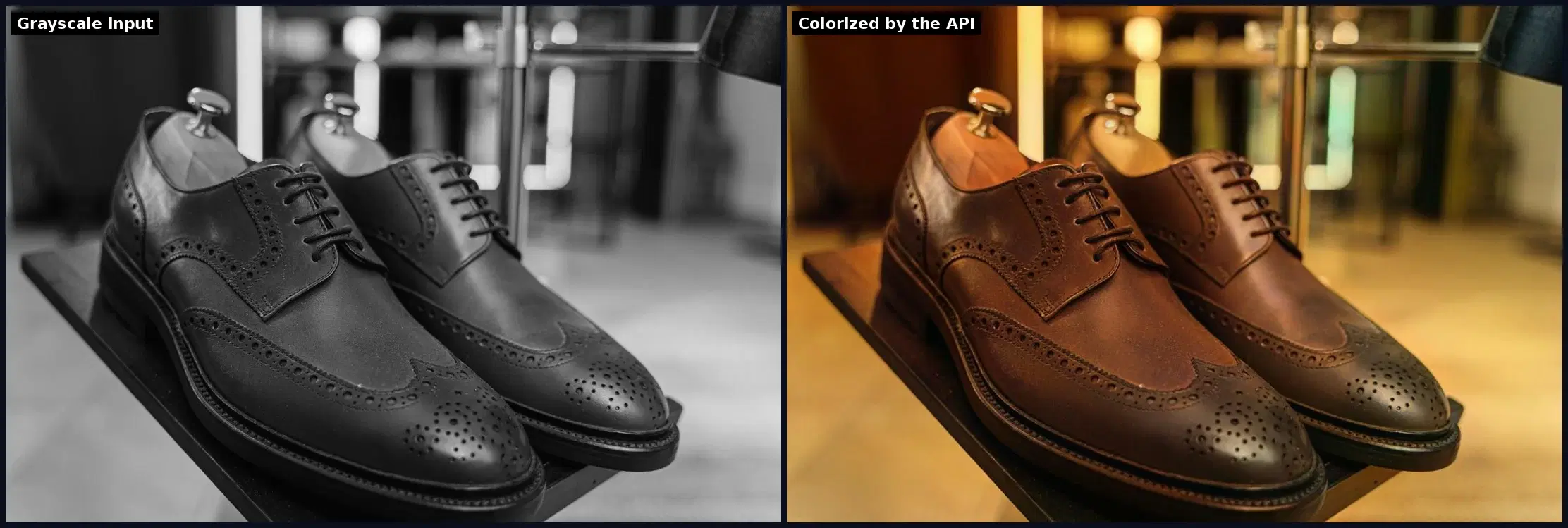
The model excels at common scenes: outdoor landscapes, portraits, urban settings, and nature photography. It handles gradients (like sunrise skies) and textures (like wooden surfaces) with surprising accuracy. Edge cases where the model has less training data, such as unusual lighting conditions or abstract compositions, may produce less predictable results, but the output is almost always a reasonable starting point for manual touch-ups.
Real-World Use Cases
Image colorization is not just a novelty feature. It solves real problems across several industries. Here are four scenarios where the Image Colorization API delivers immediate value.
1. Family Photo Restoration
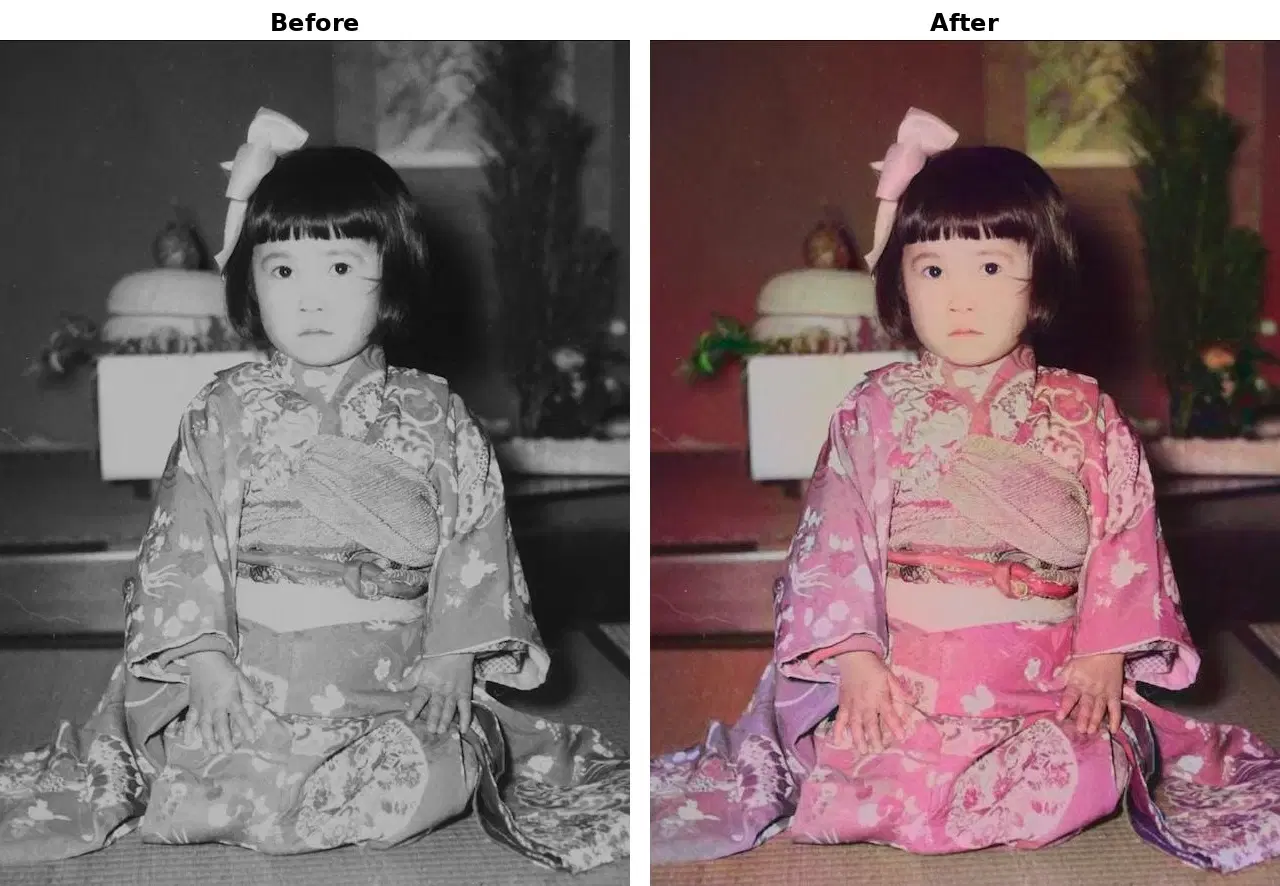
Consumer apps can offer a "restore old photos" feature that colorizes scanned family pictures from the pre-color-photography era. Users upload a faded black-and-white scan, and the app returns a vivid, colorized version. This is an emotionally powerful feature that drives word-of-mouth sharing, especially around holidays when families gather and dig through old photo albums. For a full restoration pipeline that chains colorization with face enhancement, see how to restore old photos with AI APIs.
2. Historical Archives and Museums
Museums and digital archives can make historical collections more engaging by presenting colorized versions alongside the originals. A World War II archive, for example, feels far more immediate and relatable in color. The API can process entire collections programmatically, saving curators weeks of manual work. Combine this with anime-style transformation to offer creative alternative views of historical imagery.
3. Real Estate and Architecture
Architects and real estate agents sometimes work with old building photographs that were shot in black and white. Colorizing these images helps clients visualize properties in a more realistic context. It is especially useful for before-and-after renovation showcases, where the "before" photo was taken decades ago.
4. Film and Media Production
Documentary filmmakers and content creators working with archival footage can colorize still frames to create more visually compelling content. While full video colorization requires frame-by-frame processing, the API is fast enough to handle individual frames extracted from archival clips. Pair this with background removal to isolate subjects from colorized frames for compositing into modern footage.
Tips and Best Practices
Start with High-Resolution Scans
Scan physical photos at 300 DPI or higher. The model predicts better with more detail to work with. A sharp, high-resolution input gives it more texture information to base color predictions on, for more natural and consistent output.
Clean Up the Input First
Run a restoration pass before colorizing. Scratches, stains, dust, and faded areas confuse the model, which can read a scratch as an object edge or a stain as a shadow. Remove dust, normalize contrast, and repair scratches first.
Manage User Expectations
Colorization is a prediction, not a memory. The model does not know your grandmother's dress was actually red; it makes an educated guess from patterns in its training data. Present the output as an "AI interpretation" rather than a "restoration" so users who remember the original colors are not disappointed.
Offer Manual Correction Tools
Let users tweak colors by region after the AI pass. For accuracy-critical work like archives, a simple UI for adjusting specific areas turns the API output, a strong starting point that saves hours, into a result that matches the user's intent.
Batch Processing for Large Collections
Use a job queue with concurrency limits for large batches. Process images in parallel but respect the API's rate limits. Store both the grayscale original and the colorized result so users can toggle between them, a satisfying UI pattern that reinforces the value of the transformation.
Consider Color Space and Format
Keep archival output in PNG or TIFF, not JPEG. JPEG is fine for web display, but PNG or TIFF preserves color fidelity for archives or further editing. If your pipeline has extra processing steps, stay in PNG until the final output to avoid cumulative compression artifacts.
Image colorization sits at the intersection of computer vision, historical preservation, and creative expression. The Image Colorization API makes this powerful capability accessible through a single HTTP call, whether you are building a consumer photo app, digitizing a museum collection, or adding a restoration feature to your existing platform. The results speak for themselves, and the integration takes minutes, not months.
Frequently Asked Questions
- How does AI image colorization work?
- The AI model takes a grayscale image and predicts two color channels (A and B in LAB color space) using a neural network trained on millions of color photos. It learns to associate textures and shapes with realistic colors.
- Can I colorize a photo that already has color?
- Yes. Sending a color photo to the API will re-interpret and apply new color predictions, which can produce interesting artistic effects or correct faded colors in old photographs.
- How accurate is AI photo colorization?
- AI colorization excels at common scenes like landscapes, portraits, and urban settings. It correctly predicts sky blues, foliage greens, and skin tones. Unusual lighting or abstract compositions may produce less predictable results.