This tutorial uses the Face Analyzer API. See the docs, live demo, and pricing.
Face detection powers everything from automatic photo tagging to security check-ins and real-time video filters. If you have ever wondered how to add that capability to your own app, you are in the right place. This tutorial shows you how to build a working face detection API integration using cURL, Python, and JavaScript — no machine-learning expertise required.
Why Use a Face Detection API?
Training a face detection model from scratch requires massive labeled datasets, GPU compute time, and ongoing maintenance as edge cases surface. A hosted face detection API eliminates all of that. You send an image, and you get back a list of detected faces with bounding boxes, landmarks, and optional attribute predictions like age and emotion — all in a single request.
- Zero training required — The model is pre-trained and continuously improved by the provider, so you always get state-of-the-art accuracy.
- Rich metadata — Beyond bounding boxes, the API can return facial landmarks (eyes, nose, mouth), estimated age, gender, and expression labels.
- Low latency — Cloud inference typically completes in under 500 milliseconds, making it viable for interactive applications.
- Multi-face support — Whether the photo contains one person or a crowd, the API detects and annotates every visible face.
Let's see how to integrate the Face Analyzer API into your project.
Getting Started with the Face Analyzer API
The Face Analyzer API accepts an image URL and returns structured JSON describing every detected face. Below are ready-to-use snippets in three languages.
cURL
Fire off a quick test from the command line:
curl --request POST \
  --url https://faceanalyzer-ai.p.rapidapi.com/faceanalysis \
  --header 'Content-Type: application/x-www-form-urlencoded' \
  --header 'x-rapidapi-host: faceanalyzer-ai.p.rapidapi.com' \
  --header 'x-rapidapi-key: YOUR_API_KEY' \
  --data-urlencode 'url=https://example.com/group-photo.jpg'
Python
Here is a short Python script that prints every detected face's bounding box and estimated age:
import requests

url = "https://faceanalyzer-ai.p.rapidapi.com/faceanalysis"
headers = {
    "Content-Type": "application/x-www-form-urlencoded",
    "x-rapidapi-host": "faceanalyzer-ai.p.rapidapi.com",
    "x-rapidapi-key": "YOUR_API_KEY",
}
payload = {"url": "https://example.com/group-photo.jpg"}

response = requests.post(url, data=payload, headers=headers)
data = response.json()

for face in data["body"]["faces"]:
    features = face["facialFeatures"]
    age = features["AgeRange"]
    print(f"{features['Gender']} age {age['Low']}-{age['High']} — {features['Emotions'][0]}")
JavaScript (fetch)
The same request in JavaScript, suitable for both the browser and Node.js:
const response = await fetch(
  "https://faceanalyzer-ai.p.rapidapi.com/faceanalysis",
  {
    method: "POST",
    headers: {
      "Content-Type": "application/x-www-form-urlencoded",
      "x-rapidapi-host": "faceanalyzer-ai.p.rapidapi.com",
      "x-rapidapi-key": "YOUR_API_KEY",
    },
    body: new URLSearchParams({
      url: "https://example.com/group-photo.jpg",
    }),
  }
);

const data = await response.json();
data.body.faces.forEach((face) => {
  const { Gender, AgeRange, Emotions } = face.facialFeatures;
  console.log(`${Gender} age ${AgeRange.Low}-${AgeRange.High} — ${Emotions[0]}`);
});
See the Results
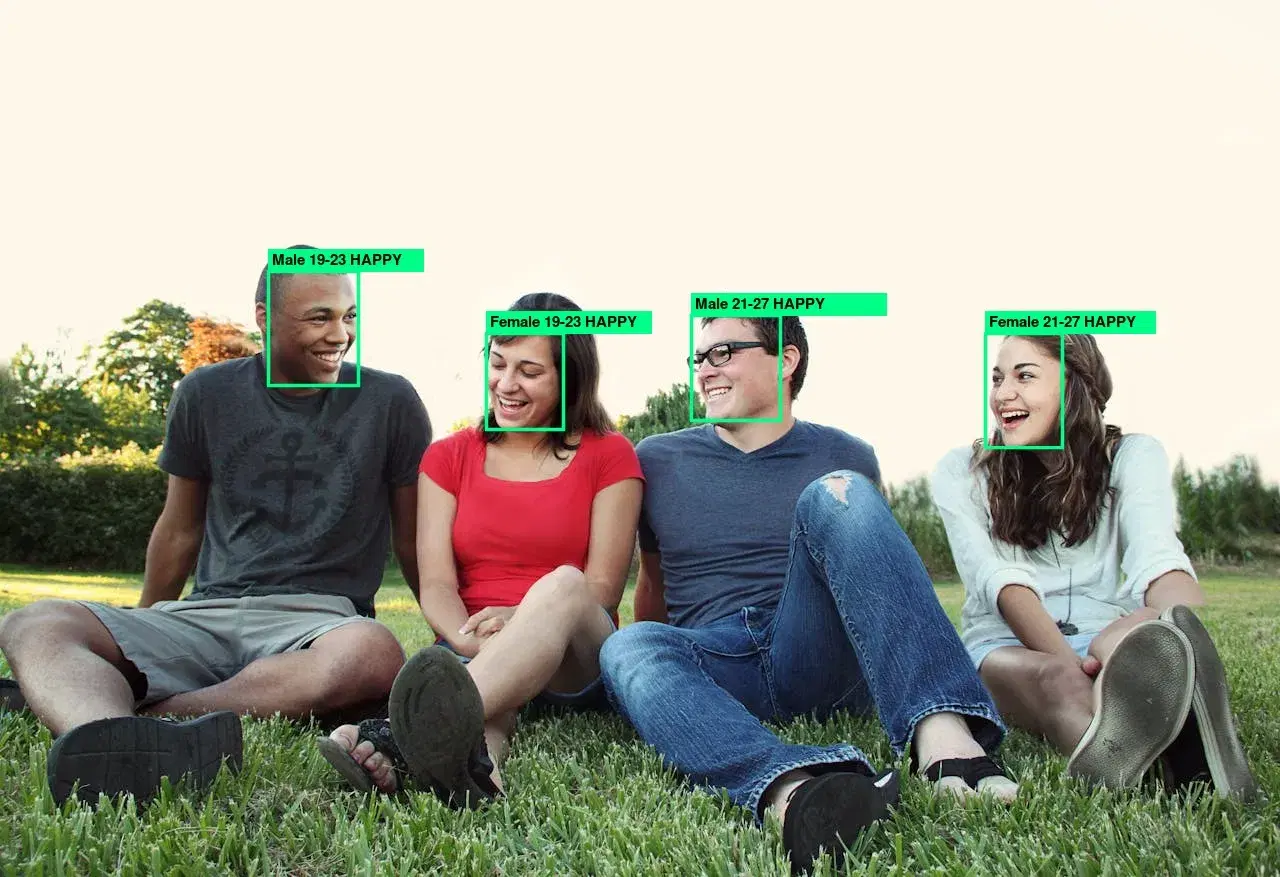
The image below shows the API processing a photograph and returning bounding boxes for each detected face. Notice how multiple faces in a single frame are all identified with individual coordinates and attributes.
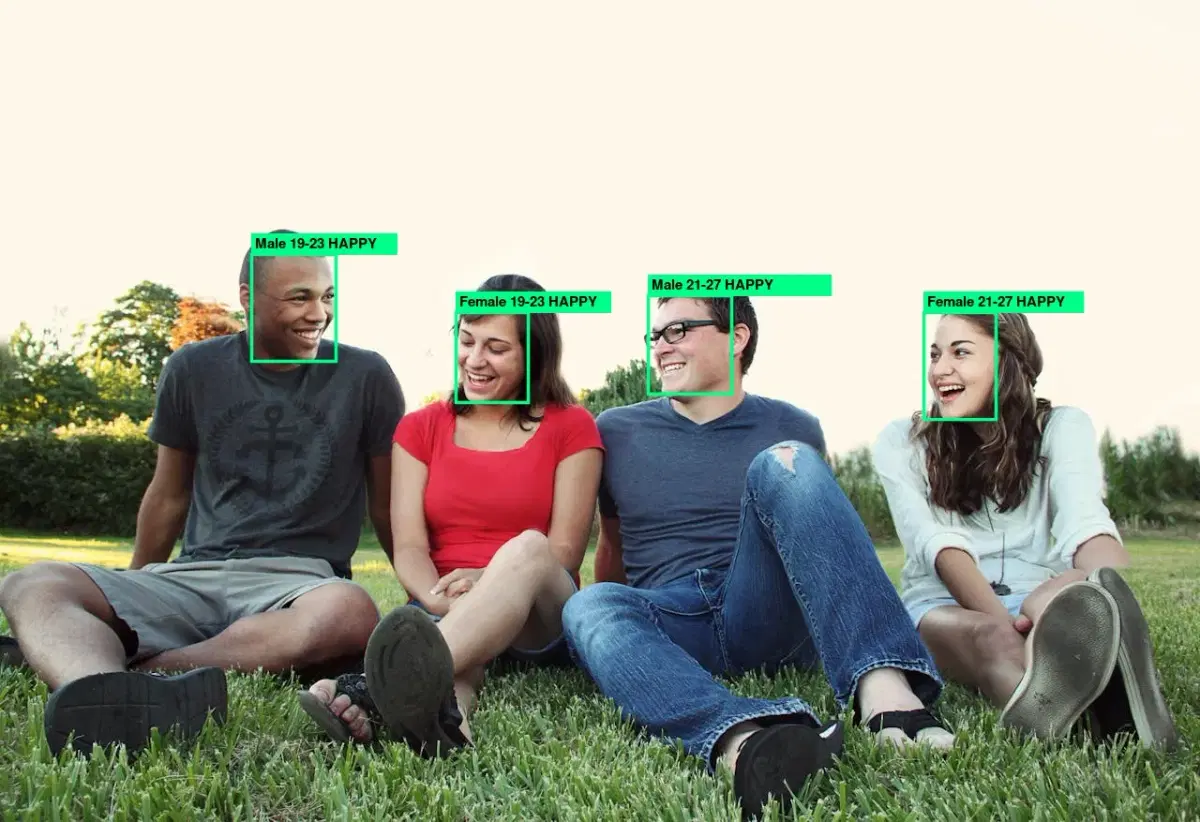
Each face object in the response includes a bounding box, landmark positions (eye centers, nose tip, mouth corners), and optional attributes such as estimated age, gender, and dominant emotion. That structured data is what makes it possible to build smart features on top of simple detection.
Real-World Use Cases
Face detection is a foundational building block for a wide range of applications:
- Photo management apps — Automatically tag and group photos by the people who appear in them, just like Google Photos or Apple Photos.
- Identity verification — Detect a face in a selfie during onboarding and compare it with an ID photo to confirm the user's identity.
- Content moderation — Flag images that contain faces in contexts where they should not appear, or combine detection with NSFW detection for comprehensive safety checks.
- Audience analytics — In retail or event settings, count and analyze faces in real time to understand crowd size, demographics, and engagement levels.
These scenarios all start with the same fundamental step — finding faces in an image — and the Face Analyzer API gives you that step out of the box.
Tips and Best Practices
To get the most reliable results from your face detection integration, keep these tips in mind:
- Use images with adequate resolution. Faces smaller than roughly 50 by 50 pixels in the source image are difficult for any model to detect. Aim for at least 100 pixels of face height when possible.
- Account for orientation. If your users upload photos from mobile devices, the EXIF orientation tag may cause the image to appear rotated. Normalize orientation before sending the image to the API.
- Filter by confidence. The response includes a confidence score for each detection. In production, discard results below a threshold (0.85 is a reasonable starting point) to avoid false positives.
- Draw bounding boxes on the client. Store the raw coordinates and render overlays in HTML Canvas or SVG rather than burning them into the image. This keeps the original untouched and lets you adjust styling later.
- Respect privacy. Face data is sensitive. Always inform users when their photos are being analyzed, store results securely, and comply with regulations like GDPR or CCPA.
Face detection is one of the most accessible computer-vision capabilities available today. With the Face Analyzer API, you can go from zero to a fully working prototype in an afternoon. Whether you are building a fun photo filter or a serious security system, the hardest part — finding the faces — is already solved. All you need to do is call the endpoint and build on top of the results.
Frequently Asked Questions
- What is a face detection API?
- A face detection API is a cloud service that locates human faces in images and returns their coordinates as bounding boxes. Advanced APIs also extract attributes like age, gender, emotion, and head pose for each detected face — no machine learning setup required on your end.
- What is the difference between face detection and facial recognition?
- Face detection finds where faces are in an image and returns their positions. Facial recognition goes further by identifying who the person is by comparing the detected face against a database of known faces. Detection is the first step; recognition adds identity matching.
- How many faces can a face detection API detect in one image?
- Most face detection APIs can detect dozens of faces in a single image. The API returns an array of face objects, each with bounding box coordinates and attributes. Performance depends on image resolution and face size — faces smaller than 20x20 pixels may be missed.